Ionic-framework: `<ion-buttons start>` not working inside `<ion-navbar>`
Ionic version: (check one with "x")
[ ] 1.x (For Ionic 1.x issues, please use https://github.com/ionic-team/ionic-v1)
[ ] 2.x
[x] 3.x
I'm submitting a ... (check one with "x")
[x] bug report
[ ] feature request
[ ] support request => Please do not submit support requests here, use one of these channels: https://forum.ionicframework.com/ or http://ionicworldwide.herokuapp.com/
Current behavior:
Trying to just copy and paste documentation example of how to add buttons to a navbar (From here: https://ionicframework.com/docs/components/#buttons-in-components).
The example contains two ion-buttons component, with start and end directives each.
The end directive runs fine. The start doesn't.
Expected behavior:
It should work just as documented, no questions here.
Steps to reproduce:
I've made a plunker to reproduce it: http://embed.plnkr.co/KQluWF/
Related code:
Other information:
Ionic info: (run ionic info from a terminal/cmd prompt and paste output below):
global packages:

    @ionic/cli-utils : 1.4.0
    Ionic CLI        : 3.4.0

local packages:

    @ionic/app-scripts              : 1.3.12
    @ionic/cli-plugin-ionic-angular : 1.3.1
    Ionic Framework                 : ionic-angular 3.5.0

System:

    Node       : v6.11.0
    OS         : Linux 4.4
    Xcode      : not installed
    ios-deploy : not installed
    ios-sim    : not installed
    npm        : 5.0.4
 iget-master
All 8 comments
Hello, thanks for using Ionic! First of all, sorry about that, but that code snippet is not accurate to that demo. Because of this I am going to move this to the site repo. I made a plunker here https://plnkr.co/edit/KVGciD9u1U3qTvEQ0LNX?p=preview that shows that this is actually working as expected once you add an ion-title (which should be in that snippet in the docs). Sorry about that! We will get it fixed up.
 jgw96
on 30 Jun 2017
jgw96
on 30 Jun 2017
This issue was moved to ionic-team/ionic-site#1174
jgw96
on 30 Jun 2017
@jgw96 Sorry, but your plunker have the same result of mine. I think that the issue should keep here and be reopened.
If I open the plunker in a separated window and enable simulation to mobile (iphone 6) it works.
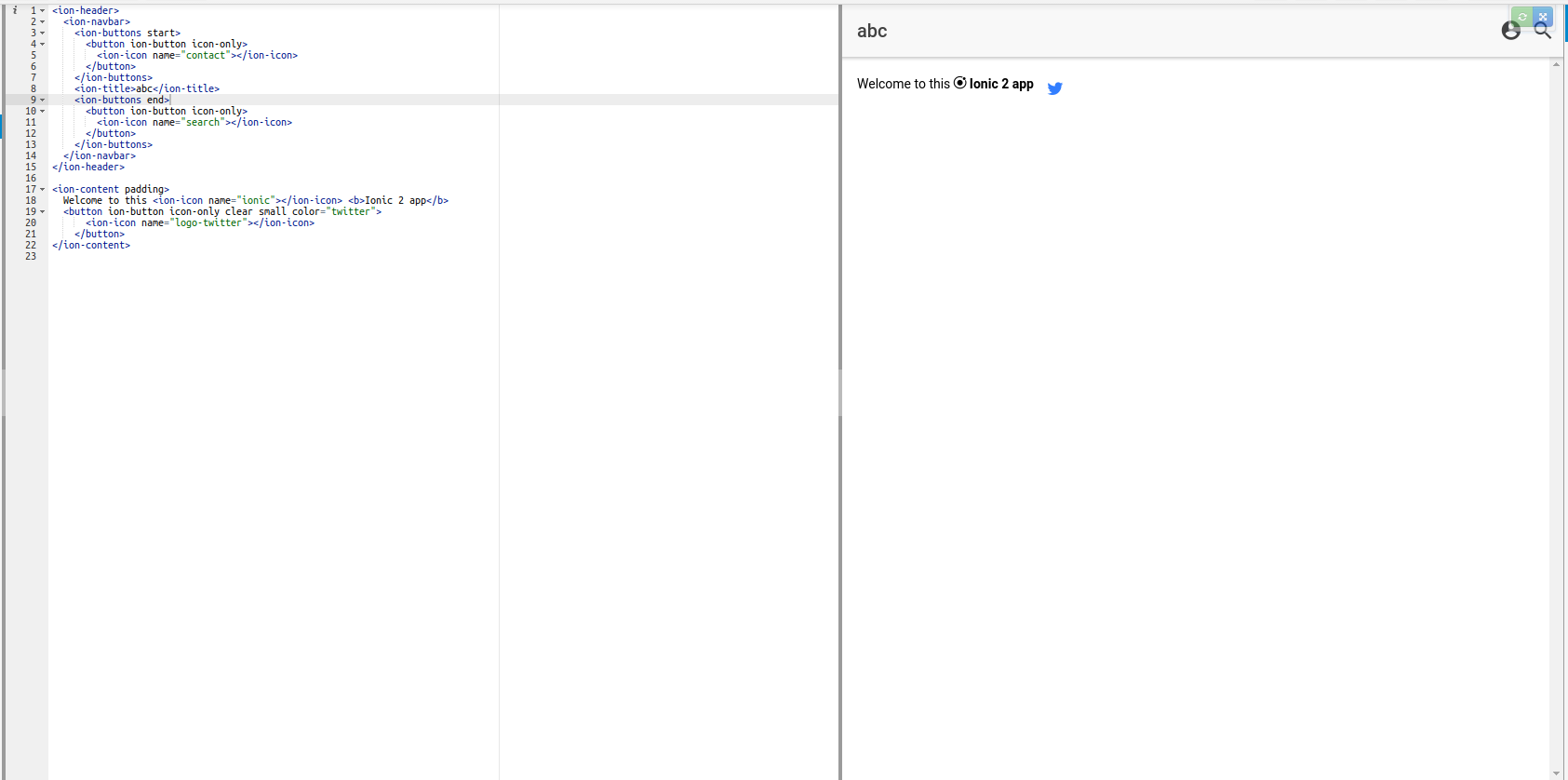
The problem isn't only with title itself. Viewing on desktop also breaks the behavior.
Look:

iget-master
on 30 Jun 2017
Investigating the issue, found that if I emulate IOS on firefox, the button goes to the left as expected, but if I emulate Android, it keeps on the right, and the title doesn't go to center.
the problem is that I'm trying to place a "back" button on the left (without pushing a page)
iget-master
on 30 Jun 2017
This is actually the desired behavior for both the buttons and titles. The Toolbar Docs have a more detailed explanation of where the buttons are placed in toolbar/navbars:
Property | Description
-- | --
start | Positions element to the left of the content in ios mode, and directly to the right in md and wp mode.
end | Positions element to the right of the content in ios mode, and to the far right in md and wp mode.
left | Positions element to the left of all other elements.
right | Positions element to the right of all other elements.
What this means is in ios mode using start will be placed to the left of any content (for example a title), and in md/wp mode it will be placed to the right of any content. If you want a button to always be on the left of any content, regardless of the mode, you should use the left attribute:
<ion-header>
  <ion-navbar>
    <ion-buttons left>
      <button ion-button icon-only>
        <ion-icon name="contact"></ion-icon>
      </button>
    </ion-buttons>
    <ion-buttons end>
      <button ion-button icon-only>
        <ion-icon name="search"></ion-icon>
      </button>
    </ion-buttons>
  </ion-navbar>
</ion-header>
Please let me know if you have questions, thanks!
 brandyscarney
on 11 Jul 2017
brandyscarney
on 11 Jul 2017
How to get back button?
 4LostGreyWolf
on 28 May 2018
4LostGreyWolf
on 28 May 2018
Thank you @brandyscarney This helped!
 satbir90
on 16 Jun 2018
satbir90
on 16 Jun 2018
Thanks for the issue! This issue is being locked to prevent comments that are not relevant to the original issue. If this is still an issue with the latest version of Ionic, please create a new issue and ensure the template is fully filled out.
![ionitron-bot[bot] picture](https://avatars1.githubusercontent.com/in/8640?v=4&s=40) ionitron-bot[bot]
on 1 Sep 2018
ionitron-bot[bot]
on 1 Sep 2018
Related issues
 SebastianGiro
·
3Comments
brandyscarney
·
3Comments
SebastianGiro
·
3Comments
brandyscarney
·
3Comments
 BilelKrichen
·
3Comments
BilelKrichen
·
3Comments
 manucorporat
·
3Comments
brandyscarney
·
3Comments
manucorporat
·
3Comments
brandyscarney
·
3Comments
Most helpful comment
This is actually the desired behavior for both the buttons and titles. The Toolbar Docs have a more detailed explanation of where the buttons are placed in toolbar/navbars:
Property | Description
-- | --
start | Positions element to the left of the content in
iosmode, and directly to the right inmdandwpmode.end | Positions element to the right of the content in
iosmode, and to the far right inmdandwpmode.left | Positions element to the left of all other elements.
right | Positions element to the right of all other elements.
What this means is in
iosmode usingstartwill be placed to the left of any content (for example a title), and inmd/wpmode it will be placed to the right of any content. If you want a button to always be on the left of any content, regardless of the mode, you should use theleftattribute:Please let me know if you have questions, thanks!