Ionic-framework: Datetime week days not displaying properly
Ionic version: (check one with "x")
[ ] 1.x
[x ] 2.x
I'm submitting a ... (check one with "x")
[x ] bug report
[ ] feature request
[ ] support request => Please do not submit support requests here, use one of these channels: https://forum.ionicframework.com/ or http://ionicworldwide.herokuapp.com/
Current behavior:
Checking the examples under http://ionicframework.com/docs/v2/api/components/datetime/DateTime/
The one with Chrome Wednesday Dec 31 is blank and in the same manner, when I try to display dates using the pickerformat='DDDD', only numerals show.
Expected behavior:
<ion-datetime displayFormat="DDDD" pickerFormat="DDDD" min="2016-08-22" max="2016-08-28" [(ngModel)]="weekdays"></ion-datetime> should show picker days in full name. Monday, Tuesday, Wednesday...Sunday
Steps to reproduce:
Check picker of Chrome Wednesday Dec 31 in
http://ionicframework.com/docs/v2/api/components/datetime/DateTime/
Thanks
 cozzbie
All 17 comments


 yoffe
on 30 Jan 2017
yoffe
on 30 Jan 2017
Yeah, I've just experienced this one too.
If you check into the source code of the component, you'll see it explicitly state it doesn't work.
// does not support selecting by day name
// automaticallly remove any day name formats
template = template.replace('DDDD', '{~}').replace('DDD', '{~}');
Suggest the docs are updated to remove the non-working case from the demo in the interim.
In the meantime, if anyone has any alternatives, please share. I'm trying to make a date time picker similar to the on in the iOS calendar application "DDD DD MMM YY, HH, mm". Struggling so far :)
 pinpointpanda
on 7 Feb 2017
pinpointpanda
on 7 Feb 2017
Is this still issue? I also want to use this DD DDD MMMM YYYY picker format.
 BDominik
on 7 Jun 2017
BDominik
on 7 Jun 2017
@BDominik yep, still an issue at the moment.
I ended up using a Cordova plugin for the native datepicker.
https://github.com/VitaliiBlagodir/cordova-plugin-datepicker
Works well for me (I'm only targeting iOS currently, so can't comment on the Android or Windows Phone functionality, but it supports all three platforms). Take a look if you haven't already.
pinpointpanda
on 8 Jun 2017
@pinpointpanda thanks for your answer, can you write here how can I change the format?
I need to set the date: moment().format("DD DDD MMMM YYYY") like this or how?
Thanks.
BDominik
on 9 Jun 2017
@BDominik this is what I did.
- Read and follow the instructions to install the Cordova Datepicker.
https://ionicframework.com/docs/native/date-picker/
- My code is shown below.
    this.datePicker.show({
      date: moment(this.event.startDate).toDate(),
      mode: 'datetime',
      minuteInterval: 5,
      is24Hour: true,
      locale: 'en_GB', //Setting the locale to en_GB enforces a 48 hour clock. en_US a 12 hour clock. For all other languages, use the device locale.
    }).then(
      date => this.event.startDate = moment(date).format("YYYY-MM-DDTHH:mm:ss"),
      err => console.log('Error occurred while getting date: ', err)
    );
Note:
You CAN'T force the native iOS datepicker to show the year. Try adding an event in the native iOS calendar app to see how it can be used.
If you need people to be selecting dates a long way in the future, use a calendar instead. It's poor UX to have people scrolling through hundreds of entries in a picker anyway. Again, follow the iOS Calendar design and use a calendar where people can select the date, then when you click 'Add' it adds an event on the day you selected.
On Android, the default picker should be a calendar and a clock anyway, so no worries on that front.
pinpointpanda
on 10 Jun 2017
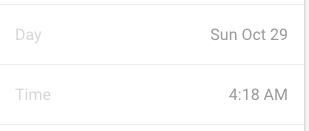
Works for me... ionic2
`
<ion-datetime disabled displayFormat="DDD MMM DD" pickerFormat="YYYY MM DD" name="appointdate" [(ngModel)] = "appointdata.book_date"></ion-datetime>
`
 davidudofa
on 31 Oct 2017
davidudofa
on 31 Oct 2017
I have the same issue with the ion-datetime. The problem is pickerFormat, not the displayFormat. Some news about this issue?
 s3c4
on 19 Jan 2018
s3c4
on 19 Jan 2018
I would make sense to allow selecting by dayname AND day with DDD in pickerFormat.
datetime could handle DDD just as a rendering option for DD. This is still the same with ionic v3.
DD => display only day number
DDD => display short day name + day number
DDDD => display long day name + day number
 ilkkanisula
on 13 Feb 2018
ilkkanisula
on 13 Feb 2018
Does anybody know when this will be fixed?
 cserron
on 19 Feb 2018
cserron
on 19 Feb 2018
Having the same problem. Tried every combination of DDD and DDDD in displayformat and pickerFormat. The day will never show up in the picker.
 olahalvorsen
on 5 Mar 2018
olahalvorsen
on 5 Mar 2018
Only works on displaFromat but not in pickerFormat
 sebrojas14
on 15 Mar 2018
sebrojas14
on 15 Mar 2018
I found this in the code:
// does not support selecting by day name
// automaticallly remove any day name formats
template = template.replace('DDDD', '{~}').replace('DDD', '{~}');
Why?
sebrojas14
on 15 Mar 2018
Are you planing to support weekdays like the native iOS picker does in Ionic 4 (or even 3.x)?
See #11999
 NiklasMerz
on 26 Nov 2018
NiklasMerz
on 26 Nov 2018
@adamdbradley Ionic 4 does the same thing. The label suggests that this is only an issue for Ionic 3.
NiklasMerz
on 26 Nov 2018
Thanks for the issue! We have moved the source code and issues for Ionic 3 into a separate repository. I am moving this issue to the repository for Ionic 3. Please track this issue over there.
Thank you for using Ionic!
![ionitron-bot[bot] picture](https://avatars1.githubusercontent.com/in/8640?v=4&s=40) ionitron-bot[bot]
on 7 Dec 2018
ionitron-bot[bot]
on 7 Dec 2018
Issue moved to: https://github.com/ionic-team/ionic-v3/issues/821
ionitron-bot[bot]
on 7 Dec 2018
Related issues
 GeorgeAnanthSoosai
·
3Comments
GeorgeAnanthSoosai
·
3Comments
 SebastianGiro
·
3Comments
SebastianGiro
·
3Comments
 fdnhkj
·
3Comments
fdnhkj
·
3Comments
 giammaleoni
·
3Comments
giammaleoni
·
3Comments
 gio82
·
3Comments
gio82
·
3Comments
Most helpful comment
These options perform that bug:

Sample:
http://plnkr.co/edit/CMlB2rztu1K1lRtBY31z