Ionic-framework: Ion-tabs work wrong in full screen mode
Ionic version: (check one with "x")
[ ] 1.x
[x] 2.x
I'm submitting a ... (check one with "x")
[x] bug report
[ ] feature request
[ ] support request => Please do not submit support requests here, use one of these channels: https://forum.ionicframework.com/ or http://ionicworldwide.herokuapp.com/
Current behavior:
I use video and ion-tabs in my app.When the video becomes full screen, the ion-tabs at the bottom also worked, although the icons disappear.
Expected behavior:
When switching element to full screen mode, ion-tabs will completely disappeared and not worked.
Steps to reproduce:
1.Change video to full screen mode.
2.Click the zone of ion-tabs.
Related code:
IonicModule.forRoot(MyApp, {
    tabsHideOnSubPages: true
})
Other information:
Ionic info: (run ionic info from a terminal/cmd prompt and paste output below):
Cordova CLI: 6.4.0
Ionic CLI Version: 2.2.1
Ionic App Lib Version: 2.2.0
ios-deploy version: Not installed
ios-sim version: Not installed
OS: Windows 7
Node Version: v6.9.4
Xcode version: Not installed
insert the output from ionic info here
 wlz19930129
All 15 comments
Do you have a plunker, screenshot?
What are you using? Windows app, browser (which browser)?
 mpaland
on 22 Jan 2017
mpaland
on 22 Jan 2017
Briefly ,I developed the system on WIN7, and packaged it to android app to run. Besides , I added a plugin which called cordova-plugin-crosswalk-webview while packaging.
When running “ionic serve” on chrome 54.0.2840.99 m (64-bit) and the video fills the screen, the icon-tabs will still in the bottom.

On the other hand, When ionic is running on a android phone platform and the video fills the screen, the icon-tabs disappeared and video control does not worked. Meanwhile ,the app will switch to ‘home tab’ page when I click the PLAY button.

wlz19930129
on 23 Jan 2017
 mhartington
on 24 Jan 2017
mhartington
on 24 Jan 2017
I see the same issue with 2.0.1.
 shawnlan
on 18 Feb 2017
shawnlan
on 18 Feb 2017
Current workaround for me is to set the following:
.ion-page,ion-tab{
contain:none !important
}
shawnlan
on 25 Feb 2017
Same bug exists for ionic 3+ on android. @shawnlan 👍
 Floyd1256
on 10 Jun 2017
Floyd1256
on 10 Jun 2017
Facing same issue with ionic 3.5.0. Lastest tab button is pressed and navigation is performed when video is in full screen when switching to minimize mode as both minimize button and last tab button seem to be overlapping each other. Still a bug? Any plan to fix or should i go with a workaround?
Thanks in advance
 ceeliro
on 10 Jul 2017
ceeliro
on 10 Jul 2017
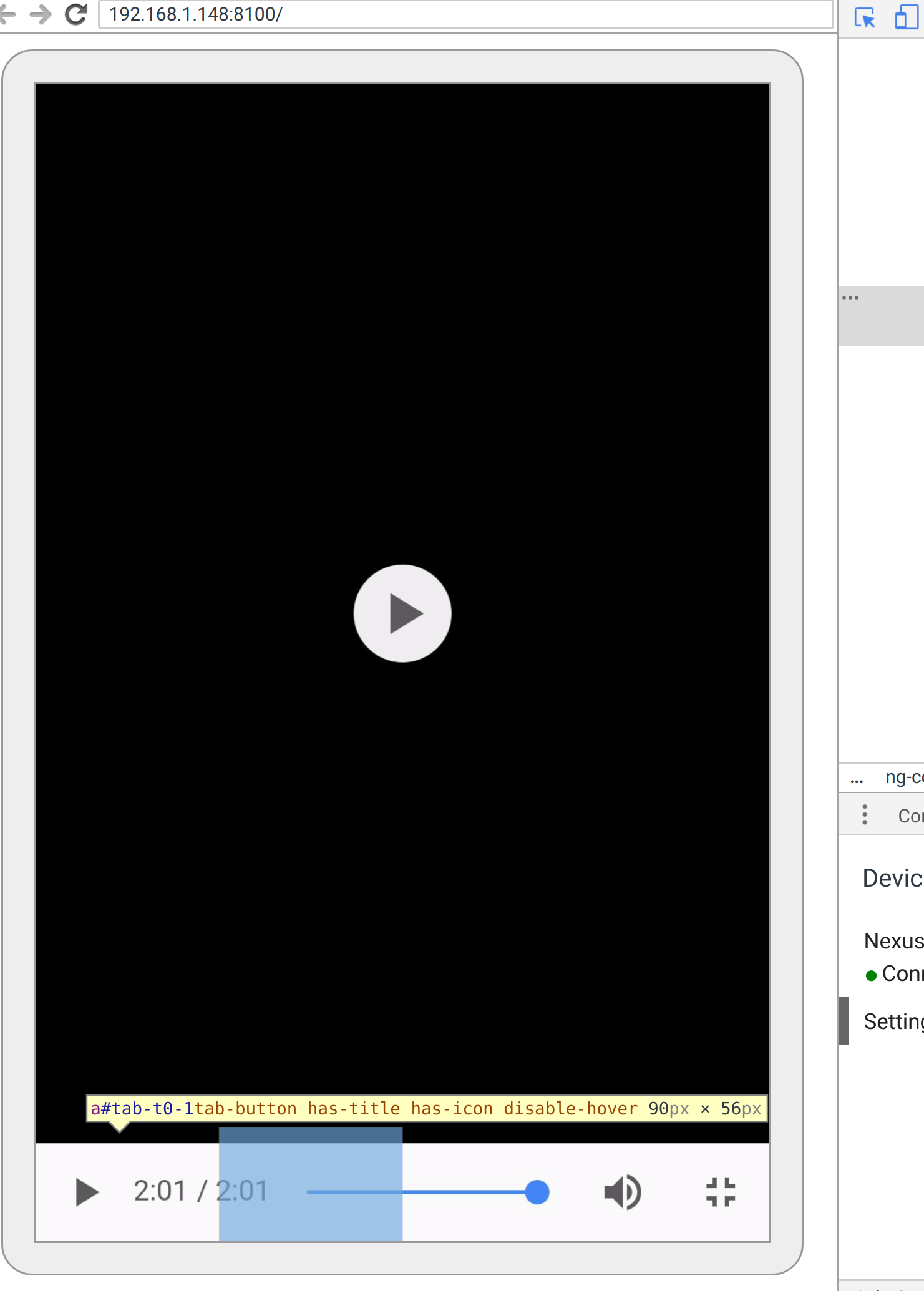
This is the screenshot from the Chrome Remote Debugging. The tab button isn't visible but for an unknown reason the button captures click events, so I cannot use Video Controls buttons.
 gregd
on 3 Oct 2017
gregd
on 3 Oct 2017
hi have you fixed the problems video controls bar in fullscreen mode on android
 RailgunWinjoy
on 4 Nov 2017
RailgunWinjoy
on 4 Nov 2017
Just wanted to bump the thread.
$ ionic info
cli packages: (C:\Users\\AppData\Roaming\npm\node_modules)

    @ionic/cli-utils  : 1.19.1
    ionic (Ionic CLI) : 3.19.1

global packages:

    cordova (Cordova CLI) : 8.0.0

local packages:

    @ionic/app-scripts : 3.1.8
    Cordova Platforms  : android 7.0.0 ios 4.3.1
    Ionic Framework    : ionic-angular 3.9.2

System:

    Node : v8.9.4
    npm  : 5.6.0
    OS   : Windows 10

Environment Variables:

    ANDROID_HOME : not set

Misc:

    backend : pro
I'm running angular 5. Here's a snippet of my package.json:
    "@angular/animations": "^5.2.1",
    "@angular/common": "^5.2.1",
    "@angular/compiler": "^5.2.1",
    "@angular/compiler-cli": "^5.2.1",
    "@angular/core": "^5.2.1",
    "@angular/forms": "^5.2.1",
    "@angular/http": "^5.2.1",
    "ionic-angular": "^3.9.2",
I'm using video.js in my Ionic app, which is simply a wrapper for the HTML5 video element. When in video fullscreen, tabs are still showing at the bottom.
 maxpaj
on 26 Feb 2018
maxpaj
on 26 Feb 2018
Any progress on this issue? I am seeing the same thing using Ionic 3.
- on android
- video in full screen on my media tab
user cannot get out of full screen mode because clicking the icon to do so in the video player doesn't work, ionic just navigates to the tab that is hidden behind it
 updraftiq
on 21 Apr 2018
updraftiq
on 21 Apr 2018
any Progress on this issue. Facing same issue when full screen mode is open control is not clickable.
 chhota89
on 16 May 2018
chhota89
on 16 May 2018
Still a problem with Ionic 3 on Android. In my case the tabs are still visible when in fullscreen. The fix by https://github.com/ionic-team/ionic/issues/10132#issuecomment-282454472 works but should be properly fixed.
 KiwiKilian
on 3 Sep 2018
KiwiKilian
on 3 Sep 2018
This issue has been automatically identified as an Ionic 3 issue. We recently moved Ionic 3 to its own repository. I am moving this issue to the repository for Ionic 3. Please track this issue over there.
If I've made a mistake, and if this issue is still relevant to Ionic 4, please let the Ionic Framework team know!
Thank you for using Ionic!
![ionitron-bot[bot] picture](https://avatars1.githubusercontent.com/in/8640?v=4&s=40) ionitron-bot[bot]
on 28 Nov 2018
ionitron-bot[bot]
on 28 Nov 2018
Issue moved to: https://github.com/ionic-team/ionic-v3/issues/166
ionitron-bot[bot]
on 28 Nov 2018
Related issues
 GeorgeAnanthSoosai
·
3Comments
GeorgeAnanthSoosai
·
3Comments
 Nick-The-Uncharted
·
3Comments
Nick-The-Uncharted
·
3Comments
 alan-agius4
·
3Comments
alan-agius4
·
3Comments
 brandyscarney
·
3Comments
brandyscarney
·
3Comments
 daveshirman
·
3Comments
daveshirman
·
3Comments
Most helpful comment
Current workaround for me is to set the following:
.ion-page,ion-tab{
contain:none !important
}