Ionic-cli: [CLI 3] Error trying to add android platform
Short description of the problem:
I'm trying to add the android platform to my project using ionic cordova platform add android
and I get the following error:
c:\xampp\htdocs\myproj>ionic cordova platform add android
> cordova platform add android --save
✖ Running command - failed!

[ERROR] Cordova encountered an error.
        You may get more insight by running the Cordova command above directly.

[ERROR] An error occurred while running cordova platform add android --save (exit code 1):

        Error: Current working directory is not a Cordova-based project.
I tried to run cordova platform add android --save as the error refers, and I get the following error:
c:\xampp\htdocs\myproj>cordova platform add android --save
Using cordova-fetch for cordova-android@~6.2.2
Error: Failed to fetch platform cordova-android@~6.2.2
Probably this is either a connection problem, or platform spec is incorrect.
Check your connection and platform name/version/URL.
Failed to get absolute path to installed module
What behavior are you expecting?
adding android platform in the CLI 3
Steps to reproduce:
- run
ionic cordova platform add android
Post the output of ionic info below please
global packages:

    @ionic/cli-utils : 1.2.0
    Cordova CLI      : 7.0.1
    Ionic CLI        : 3.2.0

local packages:

    @ionic/app-scripts              : 1.3.7
    @ionic/cli-plugin-cordova       : 1.2.1
    @ionic/cli-plugin-ionic-angular : 1.2.0
    Cordova Platforms               : none
    Ionic Framework                 : ionic-angular 3.3.0

System:

    Node       : v6.10.3
    OS         : Windows 10
    Xcode      : not installed
    ios-deploy : not installed
    ios-sim    : not installed
 theunreal
All 18 comments
Can you try cordova platform add [email protected] ?
 imhoffd
on 30 May 2017
imhoffd
on 30 May 2017
@dwieeb, I get the same error in this version and any other
theunreal
on 31 May 2017
I've never seen that error before. It says "Probably this is either a connection problem, or platform spec is incorrect."
We know the platform spec is correct, so what's your connection like?
imhoffd
on 1 Jun 2017
Try setting path = "C:\Windows\System32" in variable/system variable
 madsongr
on 6 Aug 2017
madsongr
on 6 Aug 2017
There seems to be an error with [email protected] and later. I had the same issue and using the below step was able to build my apk.
Do the following:
cordova platform remove android
Then add 6.1.2 specifically
cordova platform add [email protected]
Also found the following as an temporary workaround
cordova platform add android --nofetch
 Cdvalencia
on 9 Oct 2017
Cdvalencia
on 9 Oct 2017
thanks @Cdvalencia it works for me.
update: but it was failed ! :(
 nhoangdieu
on 16 Nov 2017
nhoangdieu
on 16 Nov 2017
Thank you madsongr, that solved my issue!!!
 darrencole
on 8 Apr 2018
darrencole
on 8 Apr 2018
I am having the same problem. Neither of solution have worked. What can I do?
 mhbt
on 15 May 2018
mhbt
on 15 May 2018
@darrencole What you did to solve this issue?
mhbt
on 15 May 2018
@mhbt I did this: Try setting path = "C:\Windows\System32" in variable/system variable
darrencole
on 15 May 2018
@darrencole how can write this in terminal ?
 Amoioo
on 7 Feb 2019
Amoioo
on 7 Feb 2019
@Amoioo what type of machine are you on?
darrencole
on 7 Feb 2019
@darrencole windows os and visual studio code platform
Amoioo
on 8 Feb 2019
When I write this command (Ionic cordova build - - release android) this Error appears it is shown in attached picture.
@darrencole @madsongr

Amoioo
on 8 Feb 2019
Ok. Try this. Go to Environment Variables on your PC and set the 'system variable' as we discussed above.
darrencole
on 8 Feb 2019
How please Explain ? @darrencole
Amoioo
on 8 Feb 2019
Sure buddy:
- Go to Control Panel > System > Advanced System Settings
- Click on the Advanced tab then press the "Environment Variables" button
- Go to the "System Variables" section and click on the "Path" variable.
- Click on edit.
- Append C:\Windows\System32 to the end of the Path value. Note, each new addition to Path must be separated from the last by a semi colon.
I hope this helps.
darrencole
on 8 Feb 2019
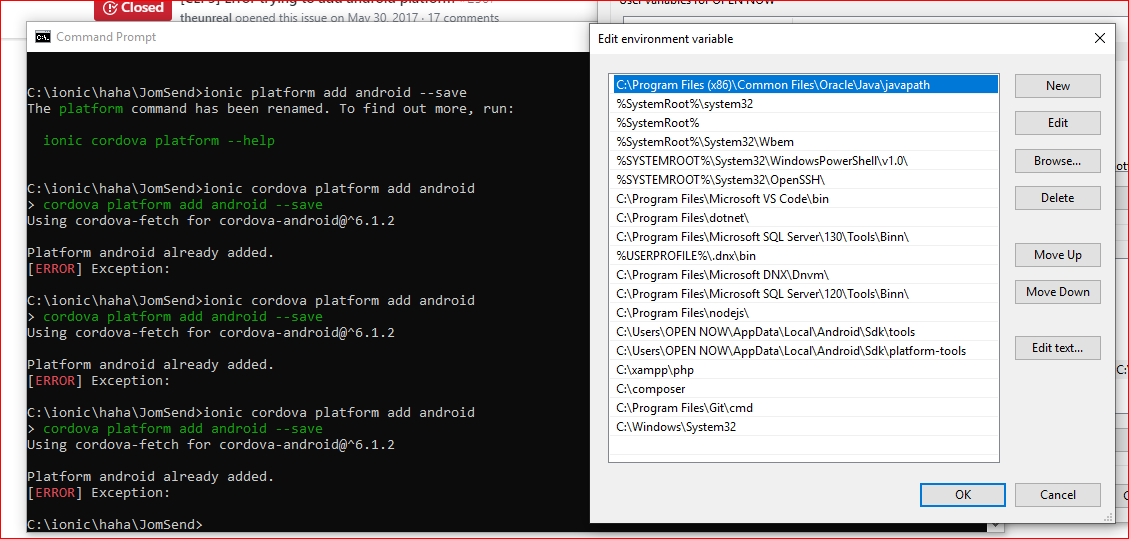
i can't do it
 Supadtra
on 14 Nov 2019
Supadtra
on 14 Nov 2019
Related issues
 chsakell
·
3Comments
chsakell
·
3Comments
 YaoaY
·
3Comments
YaoaY
·
3Comments
![ionitron-bot[bot] picture](https://avatars.githubusercontent.com/in/8640?v=4&s=40) ionitron-bot[bot]
·
3Comments
ionitron-bot[bot]
·
3Comments
 jgw96
·
3Comments
jgw96
·
3Comments
 patwaswapnil
·
3Comments
patwaswapnil
·
3Comments
Most helpful comment
Try setting path = "C:\Windows\System32" in variable/system variable