Ionic-cli: You have not accepted the license agreements of the following SDK components: [Google Repository].
I'm using cordova push plugin plugin for push notifications I've installed google repository and google play services packages from android SDK manager., but when ever I execute ionic build android to create build its gives me following error.
FAILURE: Build failed with an exception.
BUILD FAILED
Total time: 13.856 secs
What went wrong:
A problem occurred configuring root project 'android'.You have not accepted the license agreements of the following SDK components:
[Google Repository].
Before building your project, you need to accept the license agreements and complete the installation of the missing components using the Android Studio SDK Manager.
Alternatively, to learn how to transfer the license agreements from one workstation to another, go to http://d.android.com/r/studio-ui/export-licenses.htmlTry:
Run with --stacktrace option to get the stack trace. Run with --info or --debug option to get more log output.
Error: cmd: Command failed with exit code 1 Error output:
FAILURE: Build failed with an exception.
What went wrong:
A problem occurred configuring root project 'android'.You have not accepted the license agreements of the following SDK components:
[Google Repository].
Before building your project, you need to accept the license agreements and complete the installation of the missing components using the Android Studio SDK Manager.
Alternatively, to learn how to transfer the license agreements from one workstation to another, go to http://d.android.com/r/studio-ui/export-licenses.htmlTry:
Run with --stacktrace option to get the stack trace. Run with --info or --debug option to get more log output.
 muzammilahmed
All 28 comments
I also encountered this problem today.
Please help me If you solved this problem.
Thanks
 Fenmingyu
on 28 Nov 2016
Fenmingyu
on 28 Nov 2016
Did you find a solution to this problem? I am facing a similar issue.
 IgorGanapolsky
on 29 Nov 2016
IgorGanapolsky
on 29 Nov 2016
I found the fix it's because there are two missing packages called google repository and android repository. You can go to android sdk manager by android sdk command and navigate to extras folder there you can select both packages and install them. The issue will be resolved.
 smitthakkar96
on 29 Nov 2016
smitthakkar96
on 29 Nov 2016
@smitthakkar96 Those licenses should have already been downloaded to android-sdk-home/licenses directory.
IgorGanapolsky
on 29 Nov 2016
@IgorGanapolsky No those aren't, they are really large packages. Can you please put effort to check whether Google Repository Package is installed or not.
smitthakkar96
on 29 Nov 2016
I solved this problem just installed these components in "Android 7.0 (API 24)":
SDK platform
Google Apis
Sources for android SDK
 esase
on 30 Nov 2016
esase
on 30 Nov 2016
Thank you esase for posting this. I even installed the 7.1.1 (API 25) but no luck. I installed just the SDK platform, Google APIs, and Sources for Android SDK; the build was successful.
 ksummersill
on 9 Dec 2016
ksummersill
on 9 Dec 2016
Take note which API level and install that version
 killerbytes
on 15 Dec 2016
killerbytes
on 15 Dec 2016
@ksummersill You need to install the "Android 7.0 (API 24)" and not "Android 7.1.1 (API 25).
 Jojr
on 17 Dec 2016
Jojr
on 17 Dec 2016
Configure > SDK Manager > Launch Standalone SDK Manager
 BattleToads
on 11 Jan 2017
BattleToads
on 11 Jan 2017
You will run into an issue like this whenever your Android Studio's packages are outdated, as building will occur in the latest stable releases. To fix, do the following:
Android Studio > Preferences > Appearance & Behavior > System Settings > Android SDK
Tick the latest Android versions, click Apply.
It's at this point where Android will ask you to agree to its license(s) and the updated version(s) will be installed. Now you can Ionic / Cordova / PhoneGap build / run.
 gbrits
on 11 Feb 2017
gbrits
on 11 Feb 2017
I just checked for updates in Android studio settings, installed them, and the problems was solved.
 RafatAssaf
on 15 Oct 2017
RafatAssaf
on 15 Oct 2017
Update the your android gradle, its working fine
 raghulrajnkl
on 3 Nov 2017
raghulrajnkl
on 3 Nov 2017
@gbrits
I'm still getting the following error after installing the latest SDK's. Any advice? Thanks!
Checking the license for package Google Repository in /usr/local/Caskroom/android-sdk/3859397,26.0.1/licenses
Warning: License for package Google Repository not accepted.

FAILURE: Build failed with an exception.

* What went wrong:
A problem occurred configuring root project 'android'.
> You have not accepted the license agreements of the following SDK components:
  [Google Repository].
  Before building your project, you need to accept the license agreements and complete the installation of the missing components using the Android Studio SDK Manager.
  Alternatively, to learn how to transfer the license agreements from one workstation to another, go to http://d.android.com/r/studio-ui/export-licenses.html

* Try:
Run with --stacktrace option to get the stack trace. Run with --info or --debug option to get more log output.

BUILD FAILED


 SKempin
on 8 Nov 2017
SKempin
on 8 Nov 2017
@SKempin
Just run $ $ANDROID_HOME/tools/bin/sdkmanager "platforms;android-26" and accept it.
 amed
on 13 Nov 2017
amed
on 13 Nov 2017
I'm still getting the following error after installing the latest SDK's. Any advice? Thanks!
Checking the license for package Google Repository in /usr/local/Caskroom/android-sdk/3859397,26.0.1/licenses
Warning: License for package Google Repository not accepted.
FAILURE: Build failed with an exception.
What went wrong:
A problem occurred configuring root project 'android'.You have not accepted the license agreements of the following SDK components:
[Google Repository].
Before building your project, you need to accept the license agreements and complete the installation of the missing components using the Android Studio SDK Manager.
Alternatively, to learn how to transfer the license agreements from one workstation to another, go to http://d.android.com/r/studio-ui/export-licenses.htmlTry:
Run with --stacktrace option to get the stack trace. Run with --info or --debug option to get more log output.
BUILD FAILED
 DeepzSandra
on 15 Dec 2017
DeepzSandra
on 15 Dec 2017
The solution for Android Studio is here -> https://github.com/ionic-team/ionic-cli/issues/1726#issuecomment-279164447
The solution for Android SDK (stand-alone) is here -> https://github.com/ionic-team/ionic-cli/issues/1726#issuecomment-343827530
I'll expand on the latter a bit.
First, make sure you have the latest Android SDK installed.
Second, make sure ANDROID_HOME is set. (echo $ANDROID_HOME)
:memo: _If the ANDROID_HOME environment variable is not set, take a look at this guide: https://spring.io/guides/gs/android/#android-dev-env_
These commands may need slight tweaking for Windows:
cd $ANDROID_HOME
./tools/bin/sdkmanager --licenses
The sdk manager utility will walk you through licenses which need accepting.
 imhoffd
on 17 Dec 2017
imhoffd
on 17 Dec 2017
check Google APIs 23.0.1 up in Android studio
accept all license with sdkmanager --license
and the bug gone.
 chingwen823
on 30 Jan 2018
chingwen823
on 30 Jan 2018
You can simply solve that. Please open platforms/android in Android studio. Then it shows the same error in Build log as an error. There you can find the link to the missing agreement. You can simply click it to download and accept.
 renjithspace
on 30 May 2018
renjithspace
on 30 May 2018
If you are using the Android SDK Manager GUI and license is still rejected, try this which worked for me:
- Remove the platforms\android-26 folder.
- Run
sdkmanager "platforms;android-26"in the android-sdk\bin folder. - Press y to accept the license and wait until it's installed.
 andreszs
on 18 Jun 2018
andreszs
on 18 Jun 2018
Open the "sdkmanager.bat --update" via command line then select "Y" , enter and wait until finish.
as and example, I use the command line to enter the directory : "E:\android-sdk_r24.4.1-windows\android-sdk-windows\tools\bin"
then i type : sdkmanager.bat --update
I hope this helps.
 joese6
on 20 Jul 2018
joese6
on 20 Jul 2018
My $ANDROID_HOME was set to sdk-root-directory/tools/bin
I Updated the $ANDROID_HOME to its correct path sdk-root-directory
and added to PATH as $ANDROID_HOME/tools/bin
:)
 s2zaman
on 24 Jul 2018
s2zaman
on 24 Jul 2018

I added this : E:\android-sdk_r24.4.1-windows\android-sdk-windows\tools;E:\android-sdk_r24.4.1-windows\android-sdk-windows\platform-tools
then, in command line i type : sdkmanager.bat --update .
joese6
on 24 Jul 2018
If the problem persists you can try reinstalling the platform
ionic cordova platform rm android
ionic cordova platform add android
 hvsombrilla
on 3 Sep 2018
hvsombrilla
on 3 Sep 2018
actually you can just go to cmd
find where you have SDK installed and cd to tools/bin
execute in exmaple:
./sdkmanager "platforms;android-26"
and accept license with y
 lukdeboss
on 22 Dec 2018
lukdeboss
on 22 Dec 2018
You can face this problem if you have installed the SDK but have not accepted the license agreement.
To solve this problem you just need to accept the terms and conditions of the SDK component. To accept the terms and conditions you can use a command line tool sdkmanager.
You can solve the issue in 2 steps:
- Go to SDK -> tool -> bin using the following command
cd C:\Users\Admin\AppData\Local\Android\Sdk\tools\bin - Run the following command to ask for licenses acceptance
sdkmanager --licenses

If anybody still facing the issue then please follow the link for the solution
https://aboutreact.com/you-have-not-accepted-the-license-agreements-of-the-following-sdk-components/
 SnehalAgrawal
on 15 Feb 2019
SnehalAgrawal
on 15 Feb 2019
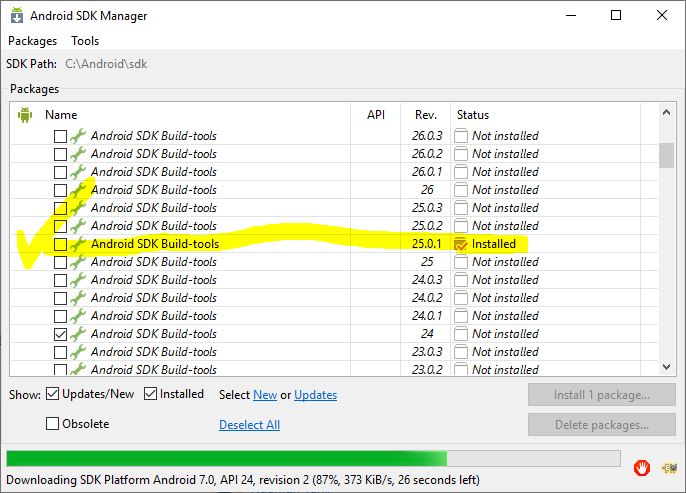
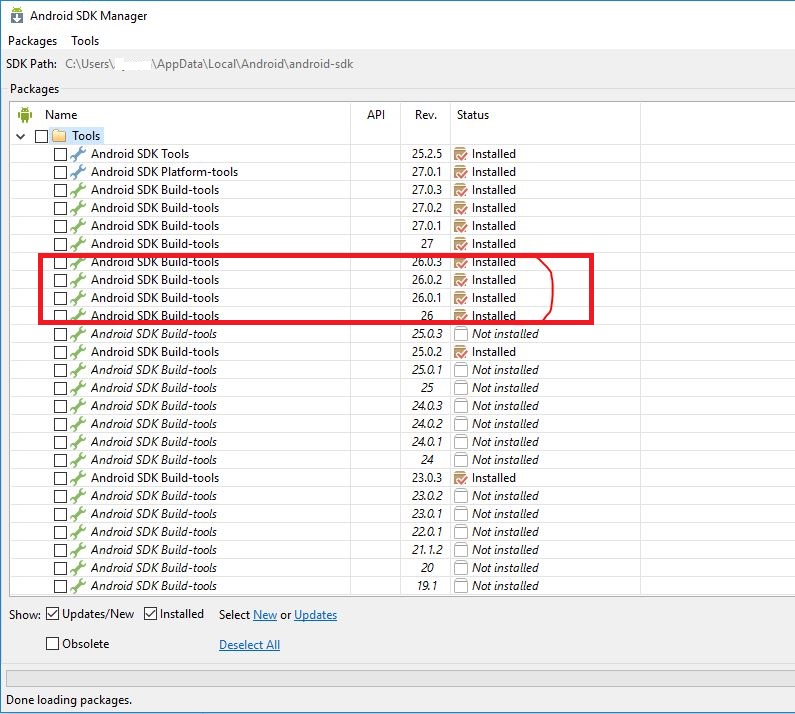
You just need to install your android SDK/build tools.
 ayoubkhan558
on 10 Jul 2019
ayoubkhan558
on 10 Jul 2019
For those coming to this issue now...
The solution is here 👉 https://github.com/ionic-team/ionic-cli/issues/1726#issuecomment-279164447
(make sure all required packages are installed first by following our Android Setup docs, making sure you also install an SDK Platform fully)
If you don't use Android Studio, here's what you have to do: https://github.com/ionic-team/ionic-cli/issues/1726#issuecomment-352219584
imhoffd
on 10 Jul 2019
Related issues
 jgw96
·
3Comments
jgw96
·
3Comments
 petermetz
·
3Comments
petermetz
·
3Comments
 secret4info
·
3Comments
secret4info
·
3Comments
 chsakell
·
3Comments
chsakell
·
3Comments
 ayush987goyal
·
3Comments
ayush987goyal
·
3Comments
Most helpful comment
You will run into an issue like this whenever your Android Studio's packages are outdated, as building will occur in the latest stable releases. To fix, do the following:
Android Studio > Preferences > Appearance & Behavior > System Settings > Android SDK
Tick the latest Android versions, click Apply.
It's at this point where Android will ask you to agree to its license(s) and the updated version(s) will be installed. Now you can Ionic / Cordova / PhoneGap build / run.