Ionic-app-scripts: application error net::ERR_CONNECTION_TIMED_OUT live reloading is not working after ionic cordova run android --livereload
https://forum.ionicframework.com/
http://ionicworldwide.herokuapp.com/
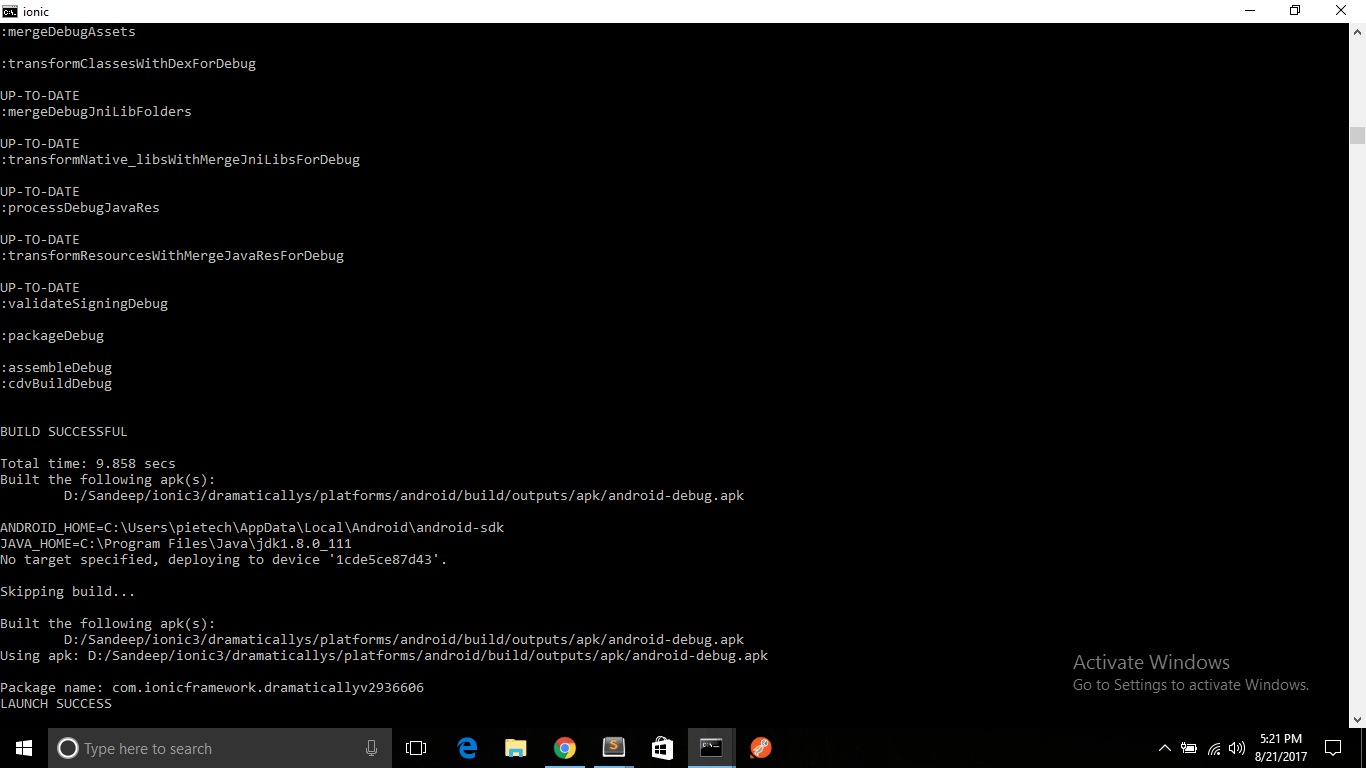
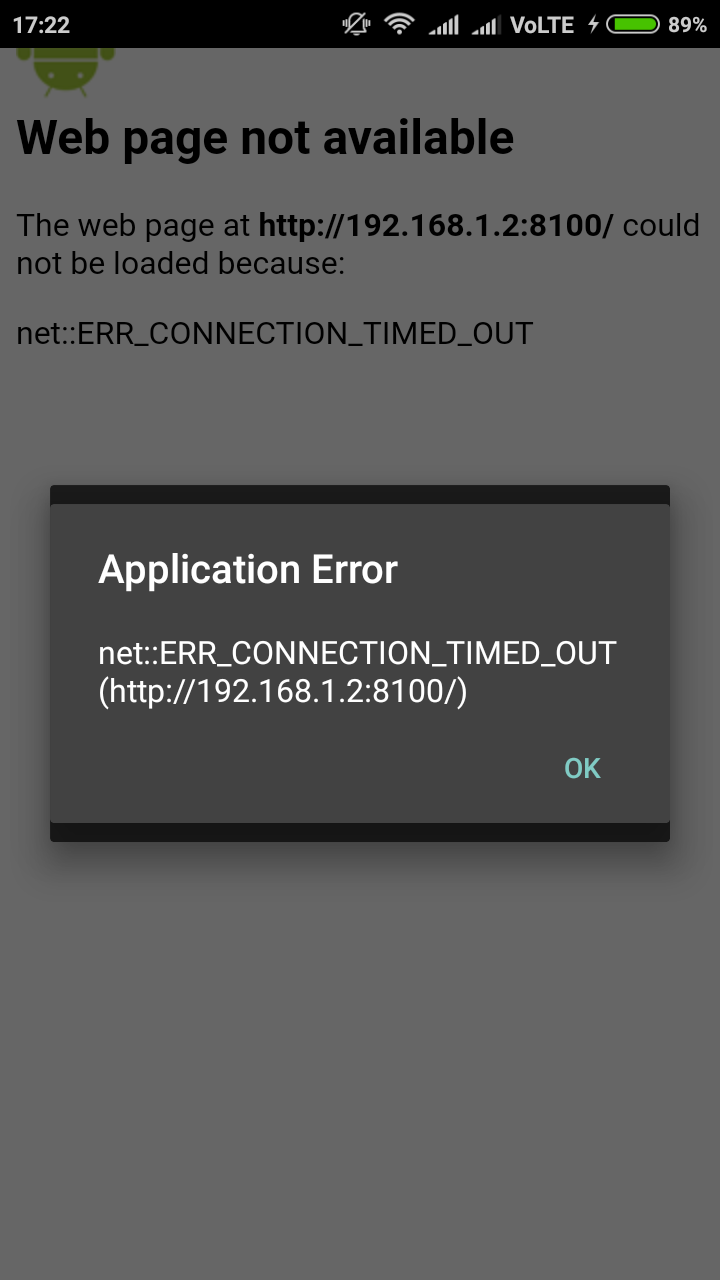
Short description of the problem: whenever I run ionic cordova run android --livereload , it shows launch success in cli but not getting load application in android mobile phone. everytime I am getting the same error-"application error net::ERR_CONNECTION_TIMED_OUT"
--here is my config.xml code
<content original-src="index.html" src="http://192.168.1.2:8100" />
<access origin="*" />
<allow-navigation href="*" />
my windows pc and mobile are connected with same wireless network ,
I have also installed cordova white-list plugin but unable to do live reload , what could be problem please respond if any one knows.
my configurations are following-
"@ionic/app-scripts": "2.0.2",
cli packages: (D:\Sandeep\ionic3\dramaticallys\node_modules)
@ionic/cli-utils  : 1.9.2
ionic (Ionic CLI) : 3.9.2
global packages:
Cordova CLI : 7.0.1
local packages:
@ionic/app-scripts : 2.0.2
Cordova Platforms  : android 6.2.3
Ionic Framework    : ionic-angular 3.5.2
System:
Android SDK Tools : 25.2.5
Node              : v6.10.1
npm               : 3.10.10
OS                : Windows 10
 San10694
All 38 comments
Same problem!
 LiveLikeCounter
on 5 Sep 2017
LiveLikeCounter
on 5 Sep 2017
Same problem! Have you found solution yet?
 itismelito
on 14 Sep 2017
itismelito
on 14 Sep 2017
Same Problem...
 SiLenTTz
on 26 Sep 2017
SiLenTTz
on 26 Sep 2017
Did you use this in config.xml?
<preference name="loadUrlTimeoutValue" value="600000" />
 airstep
on 8 Oct 2017
airstep
on 8 Oct 2017
@airstep Thanks but it still shows the same error as I described above. my phone and laptop both connected with same wi-fi network I think there is some problem with my network
San10694
on 9 Oct 2017
i also have the same problem
 shabirullah
on 3 Mar 2018
shabirullah
on 3 Mar 2018
Same problem here:
cli packages: (/usr/local/lib/node_modules)

    @ionic/cli-utils  : 1.19.1
    ionic (Ionic CLI) : 3.19.1

global packages:

    cordova (Cordova CLI) : 8.0.0

local packages:

    @ionic/app-scripts : 3.1.8
    Cordova Platforms  : android 7.0.0 ios 4.5.4
    Ionic Framework    : ionic-angular 3.9.2

System:

    Android SDK Tools : 26.1.1
    Node              : v8.9.0
    npm               : 5.6.0
    OS                : OS X El Capitan
    Xcode             : Xcode 8.2 Build version 8C38

Environment Variables:

    ANDROID_HOME : /Users/danielrodriguez/Library/Android/sdk/

Misc:

    backend : pro
 erperejildo
on 9 Mar 2018
erperejildo
on 9 Mar 2018
This is still problem.
 erichstark
on 20 Mar 2018
erichstark
on 20 Mar 2018
Suggested timeout value from config.xml is regenerated after ionic
ionic cordova run android --device --livereload
erichstark
on 20 Mar 2018
same problem
 imVinayPandya
on 24 Apr 2018
imVinayPandya
on 24 Apr 2018
I had same problem.
In my case I got it in firewall configuration...you have allow app "Node.js: Server-side JavaScript"
 mvvferrari
on 2 May 2018
mvvferrari
on 2 May 2018
Same problem here. Seems the app isn't listening at the good ip.
I want it to listen to 127.0.0.1:8100 and it's listening on 192.168.1.xx:8100... how to change it?
 IzioDev
on 8 May 2018
IzioDev
on 8 May 2018
I have same problem too :/
 huseynakifoglu
on 20 Jun 2018
huseynakifoglu
on 20 Jun 2018
ME TOOO
 foaudkajj
on 13 Jul 2018
foaudkajj
on 13 Jul 2018
I think this is already working, but you have to upgrade all of libraries. Check that with
npm outdated and than upgrade to latest version.
erichstark
on 13 Jul 2018
Still same problem. Kindly someone suggest solution. Please
 dummywebdemo
on 5 Aug 2018
dummywebdemo
on 5 Aug 2018
 curious-monggo
on 30 Aug 2018
curious-monggo
on 30 Aug 2018
Still same problem, Need some solution pleaseee
 khelsisura
on 5 Sep 2018
khelsisura
on 5 Sep 2018
@San10694 have you found any solution ?
khelsisura
on 5 Sep 2018
which version of android device do you have? Is all your dependencies in package.json up to date?
erichstark
on 5 Sep 2018
yes it's all up-to-date @erichstark , my android version is 8.1.0 (Oreo)
khelsisura
on 6 Sep 2018
if ever how do i know if my dependencies is updated or outdated ? btw thanks :)
khelsisura
on 6 Sep 2018
Run npm outdated Command in command line In your repository folder. If you see some packages then run npm update
erichstark
on 6 Sep 2018
done, i update all my dependencies and nothing happened
khelsisura
on 6 Sep 2018
Here is my conf and packages, please compare.
ionic info
Ionic:
ionic (Ionic CLI) : 4.1.2 (/Users/erich/.nvm/versions/node/v8.11.4/lib/node_modules/ionic)
Ionic Framework : ionic-angular 3.9.2
@ionic/app-scripts : 3.2.0
Cordova:
cordova (Cordova CLI) : 8.0.0
Cordova Platforms : android 7.1.1, browser 5.0.4
Cordova Plugins : cordova-plugin-ionic-keyboard 2.1.2, cordova-plugin-ionic-webview 2.1.1, (and 6 other plugins)
System:
Android SDK Tools : 26.1.1 (/Users/erich/Library/Android/sdk)
NodeJS : v8.11.4 (/Users/erich/.nvm/versions/node/v8.11.4/bin/node)
npm : 6.4.1
OS : macOS High Sierra
package.json
{
"name": "mobile",
"version": "1.2.0",
"author": "Ing. Erich Stark",
"homepage": "",
"private": true,
"scripts": {
"clean": "ionic-app-scripts clean",
"build": "ionic-app-scripts build",
"lint": "ionic-app-scripts lint",
"ionic:build": "ionic-app-scripts build",
"ionic:serve": "ionic-app-scripts serve"
},
"dependencies": {
"@angular/animations": "^6.1.6",
"@angular/cdk": "^6.4.7",
"@angular/common": "^6.1.6",
"@angular/compiler": "^6.1.6",
"@angular/compiler-cli": "^6.1.6",
"@angular/core": "^6.1.6",
"@angular/forms": "^6.1.6",
"@angular/http": "^6.1.6",
"@angular/platform-browser": "^6.1.6",
"@angular/platform-browser-dynamic": "^6.1.6",
"@ionic-native/core": "^4.12.2",
"@ionic-native/network": "^4.12.2",
"@ionic-native/qr-scanner": "^4.12.2",
"@ionic-native/splash-screen": "^4.12.2",
"@ionic-native/status-bar": "^4.12.2",
"@ionic/storage": "2.1.3",
"@swimlane/ngx-charts": "^9.0.0",
"@swimlane/ngx-datatable": "^13.1.0",
"cordova-android": "^7.1.1",
"cordova-browser": "^5.0.4",
"cordova-plugin-compat": "^1.2.0",
"cordova-plugin-device": "^2.0.2",
"cordova-plugin-ionic-keyboard": "^2.1.2",
"cordova-plugin-ionic-webview": "^2.1.1",
"cordova-plugin-network-information": "^2.0.1",
"cordova-plugin-qrscanner": "^2.6.0",
"cordova-plugin-splashscreen": "^5.0.2",
"cordova-plugin-statusbar": "^2.4.2",
"cordova-plugin-whitelist": "^1.3.3",
"d3": "^5.7.0",
"ionic-angular": "3.9.2",
"ionicons": "^4.4.3",
"moment": "^2.22.2",
"rxjs": "^6.3.2",
"rxjs-compat": "^6.3.2",
"sw-toolbox": "3.6.0",
"zone.js": "^0.8.26"
},
"devDependencies": {
"@ionic/app-scripts": "^3.2.0",
"typescript": "^2.9.2"
},
"description": "mobile",
"cordova": {
"plugins": {
"cordova-plugin-whitelist": {},
"cordova-plugin-splashscreen": {},
"cordova-plugin-ionic-keyboard": {},
"cordova-plugin-qrscanner": {},
"cordova-plugin-statusbar": {},
"cordova-plugin-network-information": {},
"cordova-plugin-ionic-webview": {},
"cordova-plugin-device": {}
},
"platforms": [
"browser",
"android"
]
}
}
erichstark
on 6 Sep 2018
Here is my conf and packages @erichstark
Ionic:
ionic (Ionic CLI) : 4.1.2 (C:\Users\harve\AppData\Roaming\npm\node_modules\ionic)
Ionic Framework : ionic-angular 3.9.2
@ionic/app-scripts : 3.2.0
Cordova:
cordova (Cordova CLI) : 8.0.0
Cordova Platforms : android 7.0.0, ios 4.5.5
Cordova Plugins : cordova-plugin-ionic-keyboard 2.1.2, cordova-plugin-ionic-webview 1.2.1, (and 13 other plugins)
System:
Android SDK Tools : 26.1.1 (C:\Users\harve\AppData\Local\Android\Sdk)
NodeJS : v8.11.3 (C:\Program Files\nodejs\node.exe)
npm : 5.6.0
OS
**package.json**
{
"name": "MY APP",
"version": "0.0.1",
"author": "Ken",
"homepage": "http://ionicframework.com/",
"private": true,
"scripts": {
"clean": "ionic-app-scripts clean",
"build": "ionic-app-scripts build",
"lint": "ionic-app-scripts lint",
"ionic:build": "ionic-app-scripts build",
"ionic:serve": "ionic-app-scripts serve"
},
"dependencies": {
"@angular/animations": "5.2.11",
"@angular/common": "5.2.11",
"@angular/compiler": "5.2.11",
"@angular/compiler-cli": "5.2.11",
"@angular/core": "5.2.11",
"@angular/forms": "5.2.11",
"@angular/http": "5.2.11",
"@angular/platform-browser": "5.2.11",
"@angular/platform-browser-dynamic": "5.2.11",
"@fortawesome/fontawesome-free": "^5.2.0",
"@ionic-native/base64": "^4.11.0",
"@ionic-native/camera": "^4.11.0",
"@ionic-native/core": "^4.10.1",
"@ionic-native/facebook": "^4.11.0",
"@ionic-native/in-app-browser": "^4.12.0",
"@ionic-native/linkedin": "^4.11.0",
"@ionic-native/media": "^4.11.0",
"@ionic-native/splash-screen": "^4.10.1",
"@ionic-native/status-bar": "^4.10.1",
"@ionic-native/streaming-media": "^4.11.0",
"@ionic-native/video-player": "^4.11.0",
"@ionic-native/wheel-selector": "^4.11.0",
"@ionic/storage": "^2.1.3",
"com-badrit-base64": "^0.2.0",
"cordova-android": "^7.1.1",
"cordova-ios": "4.5.5",
"cordova-plugin-camera": "^4.0.3",
"cordova-plugin-device": "^2.0.2",
"cordova-plugin-facebook4": "^2.2.0",
"cordova-plugin-file": "^6.0.1",
"cordova-plugin-filepath": "^1.4.2",
"cordova-plugin-inappbrowser": "^3.0.0",
"cordova-plugin-ionic-keyboard": "^2.1.2",
"cordova-plugin-ionic-webview": "^2.1.2",
"cordova-plugin-linkedin": "^1.2.1",
"cordova-plugin-media": "^5.0.2",
"cordova-plugin-splashscreen": "^5.0.2",
"cordova-plugin-statusbar": "^2.4.2",
"cordova-plugin-streaming-media": "^2.1.2",
"cordova-plugin-video-player": "git+https://github.com/moust/cordova-plugin-videoplayer.git",
"cordova-plugin-whitelist": "^1.3.3",
"cordova-sqlite-storage": "^2.3.3",
"cordova-wheel-selector-plugin": "^1.1.1",
"ionic-angular": "3.9.2",
"ionic-plugin-deeplinks": "^1.0.17",
"ionic2-rating": "^1.2.2",
"ionicons": "3.0.0",
"ngx-bootstrap": "^3.0.1",
"ngx-intl-tel-input": "^1.0.6",
"rxjs": "5.5.11",
"sw-toolbox": "3.6.0",
"sweetalert": "^2.1.0",
"zone.js": "0.8.26"
},
"devDependencies": {
"@ionic/app-scripts": "3.2.0",
"typescript": "~2.6.2"
},
"description": "An Ionic project",
"cordova": {
"plugins": {
"cordova-plugin-whitelist": {},
"cordova-plugin-device": {},
"cordova-plugin-splashscreen": {},
"cordova-plugin-ionic-keyboard": {},
"cordova-plugin-media": {},
"cordova-plugin-statusbar": {},
"cordova-wheel-selector-plugin": {},
"com.moust.cordova.videoplayer": {},
"cordova-plugin-streaming-media": {},
"cordova-sqlite-storage": {},
"cordova-plugin-camera": {},
"cordova-plugin-filepath": {},
"com-badrit-base64": {},
"cordova-plugin-inappbrowser": {},
"cordova-plugin-ionic-webview": {}
},
"platforms": [
"android",
"ios"
]
}
}
khelsisura
on 6 Sep 2018
At least you could try to upgrade all cordova plugins as mine :)
erichstark
on 6 Sep 2018
Hello, Solve the error by configuring the firewall for my network ..!

 Frenddy
on 2 Nov 2018
Frenddy
on 2 Nov 2018
doesnt work for me.. :(
 delciopolanco
on 4 Nov 2018
delciopolanco
on 4 Nov 2018
Hello,
I had the same error and it was because the device was on the 4G network. After I connected to my local network (same as the computer) it worked.
 javiac
on 7 Dec 2018
javiac
on 7 Dec 2018
@San10694 how did you fix this issue?
 singhmohancs
on 30 Mar 2019
singhmohancs
on 30 Mar 2019
I have the same problem, some solution?
 EndersonPro
on 16 Apr 2019
EndersonPro
on 16 Apr 2019
Tengo el mismo problema, ¿alguna solución?
Si tienen windows vayan al Firewall y permitan el salidas en redes publicas y privadas de Node.js
es sencillo.
De nada
 JavierAngelVega
on 6 Jun 2019
JavierAngelVega
on 6 Jun 2019
@JavierAngelVega Funcionó, tenia la configuración de internet en privada, la cambié y deshabilité el firewall y funcionó
 AlejandroRodriguezR
on 11 Jul 2019
AlejandroRodriguezR
on 11 Jul 2019
I had this problem with real time, and it went away with virtual devices
 ifredom
on 12 Jul 2019
ifredom
on 12 Jul 2019
meme probleme toujours pas des solutions
 kingpeter002
on 18 Jan 2020
kingpeter002
on 18 Jan 2020
Hello, Solve the error by configuring the firewall for my network ..!
Funciono para mi lo desactive en las redes publicas y listo.
 RafaelPuerta
on 9 Feb 2020
RafaelPuerta
on 9 Feb 2020
The device has to be in the same network with the pc.
Set the device connection with pc on file sharing.
And run more times. And uninstall the app every time when you run.
 muresanandreigardani
on 19 Feb 2020
muresanandreigardani
on 19 Feb 2020
Related issues
 loicfavory
·
4Comments
loicfavory
·
4Comments
 nalkon
·
4Comments
nalkon
·
4Comments
 itryan
·
3Comments
itryan
·
3Comments
 mburger81
·
4Comments
mburger81
·
4Comments
 christofferjjohansen
·
3Comments
christofferjjohansen
·
3Comments
Most helpful comment
Hello, Solve the error by configuring the firewall for my network ..!
