Ionic-app-scripts: Webpack is too slow
Note: for support questions, please use one of these channels:
https://forum.ionicframework.com/
http://ionicworldwide.herokuapp.com/
Short description of the problem:
I am using v1.3.7 of ionic-app-scripts and webpack is taking too long. Approximately 80 -100 seconds each time for dev build. Even livereload is taking the same time for webpack
What behavior are you expecting?
Faster webpack time
Steps to reproduce:
I am working on an enterprise project. So would not be able to share code repo here. I even tried the following configs
"ionic_build_to_es5": false,
    "ionic_source_map_type": "eval"
package.json
{
   "name":"MyApp",
   "private":true,
   "scripts":{
      "ionic:build":"ionic-app-scripts build",
      "ionic:serve":"ionic-app-scripts serve"
   },
   "dependencies":{
      "@angular/animations":"^4.0.0",
      "@angular/common":"^4.0.0",
      "@angular/compiler":"^4.0.0",
      "@angular/compiler-cli":"4.0.0",
      "@angular/core":"^4.0.0",
      "@angular/forms":"^4.0.0",
      "@angular/http":"^4.0.0",
      "@angular/platform-browser":"^4.0.0",
      "@angular/platform-browser-dynamic":"^4.0.0",
      "@angular/platform-server":"4.0.0",
      "@ionic-native/core":"3.6.1",
      "@ionic-native/google-analytics":"3.6.1",
      "@ionic-native/in-app-browser":"3.6.1",
      "@ionic-native/splash-screen":"3.6.1",
      "@ionic-native/status-bar":"3.6.1",
      "@ionic/cloud-angular":"^0.11.0",
      "@ionic/storage":"2.0.1",
      "@types/dragula":"2.1.29",
      "@types/js-base64":"2.1.4",
      "angular2-jwt":"0.1.28",
      "angular2-logger":"0.5.1",
      "angular2-text-mask":"8.0.1",
      "badwords":"^1.0.0",
      "class-transformer":"0.1.2",
      "core-js":"2.4.1",
      "dragula":"3.7.2",
      "es6-shim":"0.35.1",
      "ionic-angular":"3.1.1",
      "ionicons":"3.0.0",
      "js-base64":"2.1.9",
      "jsonexport":"1.3.2",
      "moment":"2.15.1",
      "moment-timezone":"0.5.6",
      "mydatepicker":"1.10.1",
      "ng2-cookies":"^1.0.3",
      "ng2-dragula":"1.3.0",
      "ng2-pagination":"0.5.1",
      "ng2-translate":"3.1.2",
      "ramda":"^0.23.0",
      "reflect-metadata":"0.1.8",
      "rxjs":"5.1.1",
      "sw-toolbox":"3.4.0",
      "zone.js":"^0.8.4"
   },
   "devDependencies":{
      "@angular/cli":"1.0.0",
      "@ionic/app-scripts":"1.3.7",
      "@ionic/cli-plugin-cordova":"1.0.0-rc.1",
      "@ionic/cli-plugin-ionic-angular":"1.0.0-rc.1",
      "@types/jasmine":"2.2.34",
      "@types/node":"6.0.42",
      "codelyzer":"~0.0.26",
      "copyfiles":"1.0.0",
      "gulp":"3.9.1",
      "jasmine-core":"2.5.2",
      "jasmine-spec-reporter":"2.5.0",
      "karma":"1.2.0",
      "karma-chrome-launcher":"2.0.0",
      "karma-cli":"1.0.1",
      "karma-jasmine":"1.0.2",
      "karma-mocha-reporter":"2.1.0",
      "karma-remap-istanbul":"0.2.1",
      "portfinder":"1.0.9",
      "protractor":"4.0.9",
      "protractor-jasmine2-screenshot-reporter":"0.3.2",
      "run-sequence":"1.2.2",
      "sw-toolbox":"3.4.0",
      "ts-node":"1.3.0",
      "tslint":"3.15.1",
      "tslint-eslint-rules":"1.5.0",
      "typescript":"~2.2.1",
      "yargs":"^6.4.0"
   },
   "description":"An Ionic project",
   "cordovaPlugins":[
      "cordova-plugin-device",
      "cordova-plugin-console",
      "cordova-plugin-whitelist",
      "cordova-plugin-splashscreen",
      "cordova-plugin-statusbar",
      "cordova-plugin-geolocation",
      "ionic-plugin-keyboard",
      "ionic-plugin-deploy"
   ],
   "cordovaPlatforms":[

   ],
   "config":{
      "ionic_build_to_es5":false,
      "ionic_source_map_type":"eval",
      "ionic_bundler":"webpack",
      "ionic_parse_deeplinks":true,
      "ionic_start_watch_timeout":20000
   }
}
Which @ionic/app-scripts version are you using?
v1.3.7
Ionic 3 lazy loading
One more point to be noted is that we are using ionic 3 lazy loading. We have nearly 166 odd modules. We get around 166 odd *.main.js files inside www/build/
Other information: (e.g. stacktraces, related issues, suggestions how to fix, stackoverflow links, forum links, etc)
> ionic-app-scripts serve "--v2" "--address" "0.0.0.0" "--port" "8100" "--livereload-port" "35729"

[08:19:11]  ionic-app-scripts 1.3.7
[08:19:12]  watch started ...
[08:19:12]  build dev started ...
[08:19:12]  clean started ...
[08:19:12]  clean finished in 22 ms
[08:19:12]  copy started ...
[08:19:12]  transpile started ...
[08:19:18]  transpile finished in 6.58 s
[08:19:18]  preprocess started ...
[08:19:18]  deeplinks started ...
[08:19:19]  deeplinks finished in 783 ms
[08:19:19]  preprocess finished in 785 ms
[08:19:19]  webpack started ...
[08:19:19]  copy finished in 7.78 s
[08:20:39]  webpack finished in 80.33 s
[08:20:39]  sass started ...
[08:20:41]  sass finished in 1.51 s
[08:20:41]  postprocess started ...
[08:20:41]  postprocess finished in 6 ms
[08:20:41]  lint started ...
[08:20:41]  build dev finished in 89.45 s
[08:20:41]  watch ready in 89.77 s
[08:20:41]  dev server running: http://localhost:8100/

[08:20:53]  lint finished in 12.21 s
 vigneshmahalingam
All 77 comments
Can you provide me access to the project so I can trouble shoot?
Thanks,
Dan
 danbucholtz
on 7 May 2017
danbucholtz
on 7 May 2017
@danbucholtz Thanks for looking into it. This is a enterprise project and as a consultant I would not be able to share the code repo. Let me know what more details I can provide you.
@ztecharoberts Is the tech architect for this project.
Let us know a convenient time for you if we can do a screenshare that will help you identify the issue.
vigneshmahalingam
on 7 May 2017
I also am having an extremely hard time during development because of slow build times. Mine is around 155s to complete the build step.
@danbucholtz is there any guide or steps that we may take to debug where the majority of time is being spent?
 jtillman
on 9 May 2017
jtillman
on 9 May 2017
Can I have access to your repo to figure it out? How big are your apps? Are you utilizing lazy loading?
Thanks,
Dan
danbucholtz
on 9 May 2017
Hi @danbucholtz Yes. We are using lazy loading.
After building, the www/build folder is about 23.4MB in size.
The apk under /platforms/android/build/outputs is around 14 MB in size.
There are around 150 to 160 odd NgModules in our app.
Unfortunately, the repo is at the client side and I will not be able to share the code :(
vigneshmahalingam
on 9 May 2017
Those build times are crazy. How long were the build times before lazy loading?
I simply do not have time to create a huge app to test and fix. If you can grant me access, I can investigate and fix the issue. Another option would be creating an open source large project. You could use ionic generate to spin something up quickly.
Thanks,
Dan
danbucholtz
on 9 May 2017
Thanks for the tip @danbucholtz
I used the ionic 3 lazyLoadTabs example repository and used ionic generate and created nearly 200 pages. Each in their own NgModule.
Here is the test repo
https://github.com/vigneshmahalingam/test
It took 40 - 50 seconds for webpack to finish. These are just empty pages and simple Modules. But I think this demo achieves what we were trying to show you.
> ionic-app-scripts serve "--v2" "--address" "0.0.0.0" "--port" "8100" "--livereload-port" "35729"

[17:25:06]  ionic-app-scripts 1.3.4
[17:25:06]  watch started ...
[17:25:06]  build dev started ...
[17:25:06]  clean started ...
[17:25:06]  clean finished in 39 ms
[17:25:06]  copy started ...
[17:25:06]  transpile started ...
[17:25:08]  transpile finished in 2.52 s
[17:25:08]  preprocess started ...
[17:25:08]  deeplinks started ...
[17:25:08]  deeplinks finished in 210 ms
[17:25:08]  preprocess finished in 212 ms
[17:25:08]  webpack started ...
[17:25:09]  copy finished in 2.85 s
[17:25:54]  webpack finished in 45.27 s
[17:25:54]  sass started ...
[17:25:54]  sass finished in 716 ms
[17:25:54]  postprocess started ...
[17:25:54]  postprocess finished in 47 ms
[17:25:54]  lint started ...
[17:25:54]  build dev finished in 48.82 s
[17:25:55]  watch ready in 48.95 s
[17:25:55]  dev server running: http://localhost:8100/

[17:25:58]  lint finished in 3.19 s
Sweet, thank you. Good idea! I'll check it out.
Thanks,
Dan
danbucholtz
on 10 May 2017
Thanks @danbucholtz
This is a very big sized project and we are actively developing it. The development times are stretching because of this. Help for this issue from your side is greatly appreciated.
I added this in package.json But it is of little help
"config": {
    "ionic_build_to_es5" : false,
    "ionic_source_map_type": "eval"
  }
@danbucholtz Any findings ? The dev team is eagerly waiting for a fix.
vigneshmahalingam
on 12 May 2017
I have the exact same problem, only that my app is insignificantly small.
 ybrodsky
on 14 May 2017
ybrodsky
on 14 May 2017
@danbucholtz Hi. Just checking to see if there are any improvements ? Thanks.
vigneshmahalingam
on 15 May 2017
@danbucholtz i am facing the same problem, can you help?
 yash8989
on 24 May 2017
yash8989
on 24 May 2017
I am also facing the same issue. Webpack build time is around 110 secs and webpack update is even slower than the original build.
 iammadhan
on 24 May 2017
iammadhan
on 24 May 2017
@danbucholtz I'm facing the exact same issue. More over one additional issue is that the build starts consuming a lot of memory. I have had issues where the memory utilisation spiked up to 103% on my Mac and my system hung with a warning from the OS stating it is out of memory. Kindly let us know if there is any fix for this in progress?
 ksiddharth
on 24 May 2017
ksiddharth
on 24 May 2017
I had the same issue, but when I downgraded to lower versions of ionic-app-scripts it was still slow. It turned out that it was a problem with windows 10 which occured since I installed the Creators update. I could fix it by updating my Nvidia Geforce driver and restarting my computer. My build times are now 6-10 seconds, before it was about 60 seconds.
 Maxeh
on 31 May 2017
Maxeh
on 31 May 2017
@Maxeh I am also on Windows 10 Creator and use Nvidia. Can't understand what the correlation would be. Let me try it out
Just moved our Enterprise App with 233 Components to Lazy Load and its now unberable slow to server ot build.
In case it might help, here are my production build times

 dmastag
on 2 Jun 2017
dmastag
on 2 Jun 2017
Am trying to run ionic serve --debug to see if the problem is making some sense but I got stuck here
[ DEBUG! ]  [Webpack] transpileLoader: processing the following file: D:\GM Work
            Box\dataon\SunFishGo-Project\sunfishgo-app\node_modules\core-js\library\modules\_to-length.js  MEM:
            1006.2MB
[ DEBUG! ]  [Webpack] transpileLoader: processing the following file: D:\GM Work
            Box\dataon\SunFishGo-Project\sunfishgo-app\node_modules\core-js\library\modules\_to-index.js  MEM:
            1006.2MB
Trying to let it run and see what the console is going to tell me.
FYI latest Production run is taking 39 minutes long:
[21:37:31]  build prod started ...
[21:37:31]  clean started ...
[21:37:31]  clean finished in 1 ms
[21:37:31]  copy started ...
[21:37:31]  ngc started ...
[21:38:48]  ngc finished in 77.06 s
[21:38:48]  preprocess started ...
[21:38:48]  deeplinks started ...
[21:39:02]  deeplinks finished in 13.42 s
[21:39:02]  optimization started ...
[21:39:03]  copy finished in 91.50 s
[21:55:45]  optimization finished in 1003.12 s
[21:55:45]  preprocess finished in 1016.55 s
[21:55:45]  webpack started ...
[22:14:41]  webpack finished in 1135.66 s
[22:14:41]  sass started ...
[22:14:41]  uglifyjs started ...
[22:14:46]  sass finished in 5.28 s
[22:14:46]  cleancss started ...
[22:14:49]  cleancss finished in 3.19 s
WARN: Output exceeds 32000 characters
[22:16:30]  uglifyjs finished in 109.47 s
[22:16:30]  postprocess started ...
[22:16:30]  postprocess finished in 52 ms
[22:16:30]  lint started ...
[22:16:30]  build prod finished in 2338.90 s
So this is the part afterwards, everything after that is working quite fast:
[ DEBUG! ]  Webpack Bundle Updated  MEM: 1367.5MB
[ DEBUG! ]  handleWebpackBuildSuccess: Resolving with Webpack data  MEM: 1367.6MB
[ DEBUG! ]  An WebpackFilesChanged event occurred  MEM: 1367.6MB
[22:49:25]  webpack finished in 615.49 s MEM: 1372.3MB
[22:49:25]  sass started ... MEM: 1372.3MB
Is the MEM normal? I notice that it starts small and near the End is more than 1300MB.
dmastag
on 4 Jun 2017
@dmastag Yeah production build will take so long with those many lazy loaded components. We are currently in development phase and we are doing a "Dev" build in our local machines.
@Maxeh I am sorry but I don't get the correlation between Nvidia driver and webpack build time. I am currently doing development on a macbook pro.
vigneshmahalingam
on 5 Jun 2017
I strongly think it has something to do with sending an Array of files to webpack. I tried to read the ionic-app-scripts source code to understand how it works or when its sent to webpack with no avail.
But I believe that @danbucholtz is working on it, lets hope he finds a fix for it soon.
dmastag
on 5 Jun 2017
I'm seeing slow webpack rebuild times. Initial ionic serve takes 12+ seconds to build, and if I touch a .ts file, the webpack rebuild takes another 6+ seconds with zero actual change (ie just the .ts file was date stamp modified).... ???
global packages:
@ionic/cli-utils : 1.3.0
Cordova CLI      : 7.0.1
Ionic CLI        : 3.3.0
local packages:
@ionic/app-scripts              : 1.3.7
@ionic/cli-plugin-cordova       : 1.3.0
@ionic/cli-plugin-ionic-angular : 1.3.0
Cordova Platforms               : ios 4.4.0
Ionic Framework                 : ionic-angular 3.3.0
 gslender
on 7 Jun 2017
gslender
on 7 Jun 2017
Interesting thing I've found is that adding this to the package.json cuts the initial build down to 7 seconds and 500ms for a rebuild (same test). So source maps are where the time is spent !!
"config": {
"ionic_source_map_type": "eval"
}
The difference in our build adding and removing the eval is below.
[09:01:16] webpack finished in 136.90 s
[09:04:40] webpack finished in 172.04 s
 ztecharoberts
on 7 Jun 2017
ztecharoberts
on 7 Jun 2017
@ztecharoberts is that difference initial build when starting ionic -serve or incremental build due to change of touching a .ts file?
gslender
on 7 Jun 2017
@gslender initial build
ztecharoberts
on 7 Jun 2017
@ztecharoberts would be good to get a time compare for incremental build - that's where I saw the biggest improvement when changing source maps
gslender
on 7 Jun 2017
[16:57:15] webpack update finished in 281.46 s -- eval
[17:05:13] webpack update finished in 125.38 s -- no eval
ztecharoberts
on 8 Jun 2017
:-( WOW! I'll have to stop using Ionic if the incremental build step takes over 2 mins to complete !!!
gslender
on 8 Jun 2017
Well with my research I seem to be running into the same issue as most people with webpack build issues. RemoveParentModulesPlugin seems to run really long.
The biggest issue I have is that the incremental build is not incremental. I am trying to pin down anything I can do to cut that down. My next step will be looking into DLL's to help out builds but would like to hear other ideas.
ztecharoberts
on 14 Jun 2017
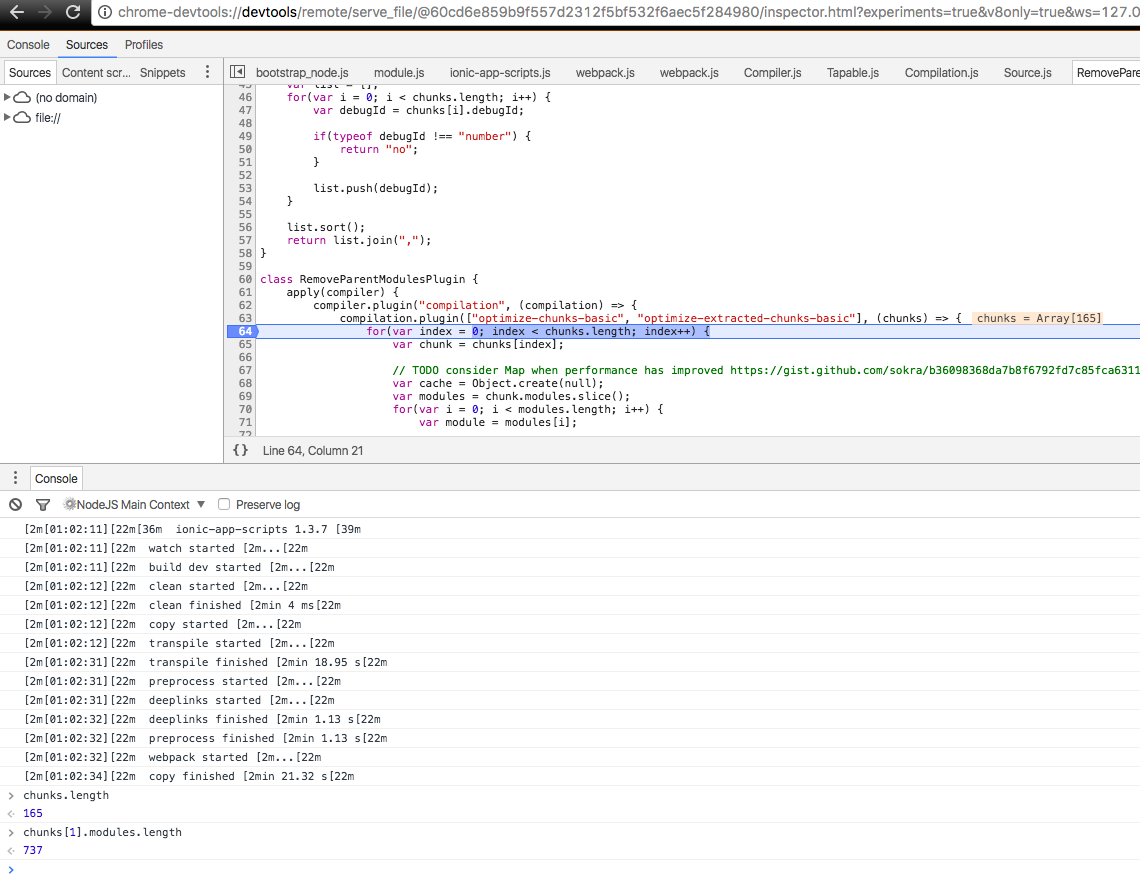
Here is what I am seeing... RemoveParentModules has to loop through many chunks and many modules
ztecharoberts
on 14 Jun 2017
@ztecharoberts based on googling what you just said, this seems to be a webpack problem.
Is there a temporary work around we could do to fix this?
dmastag
on 14 Jun 2017
Not that I have found so far.
ztecharoberts
on 14 Jun 2017
Maybe swap out webpack for something better?? https://github.com/trivago/parallel-webpack
gslender
on 14 Jun 2017
Swapping it out doesn't sound like an easy task that someone can do a PR for
dmastag
on 14 Jun 2017
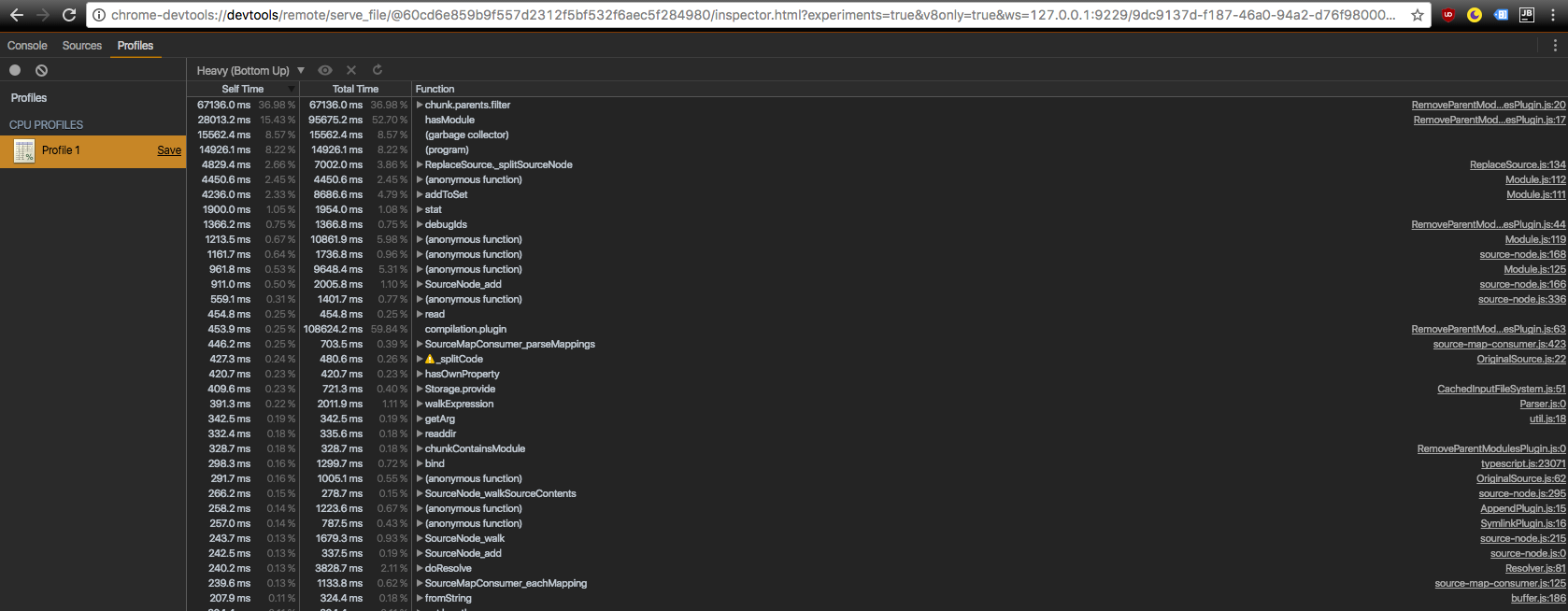
Just to follow up with some data. I ran a profile as well and you can see where the most time is being spent.
ztecharoberts
on 14 Jun 2017
@danbucholtz any thoughts on this? I know that the IonicPage design gets us into a spot where we have a large number of chunks. Any ideas how we may be able to alleviate this in dev mode or all together?
ztecharoberts
on 14 Jun 2017
@ztecharoberts curious?? ... what do you mean by "I know that the IonicPage design gets us into a spot where we have a large number of chunks"... is this a design approach that you now wish you'd avoided or something that Ionic itself is encouraging and causing this problem to manifest in TS / Angular based projects???
gslender
on 15 Jun 2017
Where each page is its own module it allows you to have a large number of chunks you need to check the dependencies of, we have over 100 pages right now. As of now Lazy loading is the only way I could get the app I am working on in a state that I could use it as a production website. The one draw back all of our developers are facing right now is the 200s+ build and rebuild times. Which is why I am looking for a solution that will help speed up the incremental or just development only builds unless there is a better solution I am missing.
ztecharoberts
on 15 Jun 2017
@ztecharoberts I wonder if the issue is the volume of files, or Angular structure - ie if we pushed the content into less number of folders/files etc but still retained the Class objects templates etc I wonder if the performance of the transpile/webpack would be the same?? Might see if I can test that...
gslender
on 15 Jun 2017
@danbucholtz I am facing the same problem, can you help?
 xiexin36
on 17 Jun 2017
xiexin36
on 17 Jun 2017
I wonder what would happen if I try to upgrade webpack to version 3
https://medium.com/webpack/webpack-3-official-release-15fd2dd8f07b
dmastag
on 20 Jun 2017
@dmastag same problem here
 danielehrhardt
on 22 Jun 2017
danielehrhardt
on 22 Jun 2017
It should be an incremental build when running ionic serve. That is strange if you're seeing super long build times or NOT an incremental build in that case. I wonder what is causing that. Are you utilizing lazy loading?
Thanks,
Dan
danbucholtz
on 22 Jun 2017
So for me it actually calls the incremental build part of the script. The issue is that it goes through all the dependencies every time it runs the incremental build.
ztecharoberts
on 22 Jun 2017
Thanks for looking into this. It's a huge issue. I'm in the same boat and am starting to second guess the choice to go with Ionic. Much of the cross-platform coding savings go out the window if I have to twiddle my thumbs for a full minute for every incremental build--and my project is still growing. My two cents: fixing this is far more important than any bug fixes or new features at this point.
 snortblt
on 24 Jun 2017
snortblt
on 24 Jun 2017
Looking into this now.
Thanks,
Dan
danbucholtz
on 6 Jul 2017
Help me out, how do I trigger the long, slow builds?
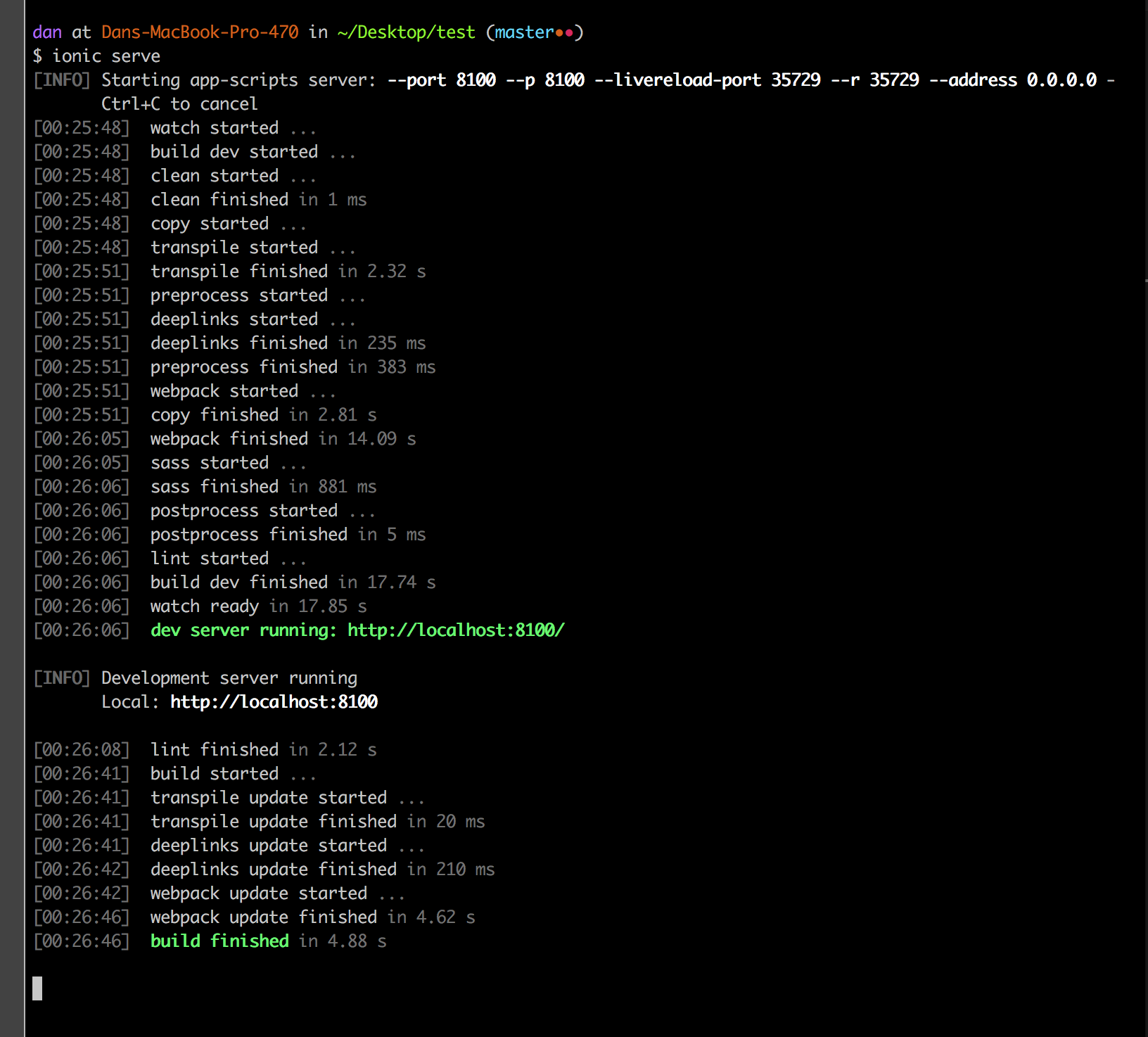
I am using the test repo from @vigneshmahalingam above. Much appreciated for providing this!
Here's my build folder so I am confident it is building correctly.
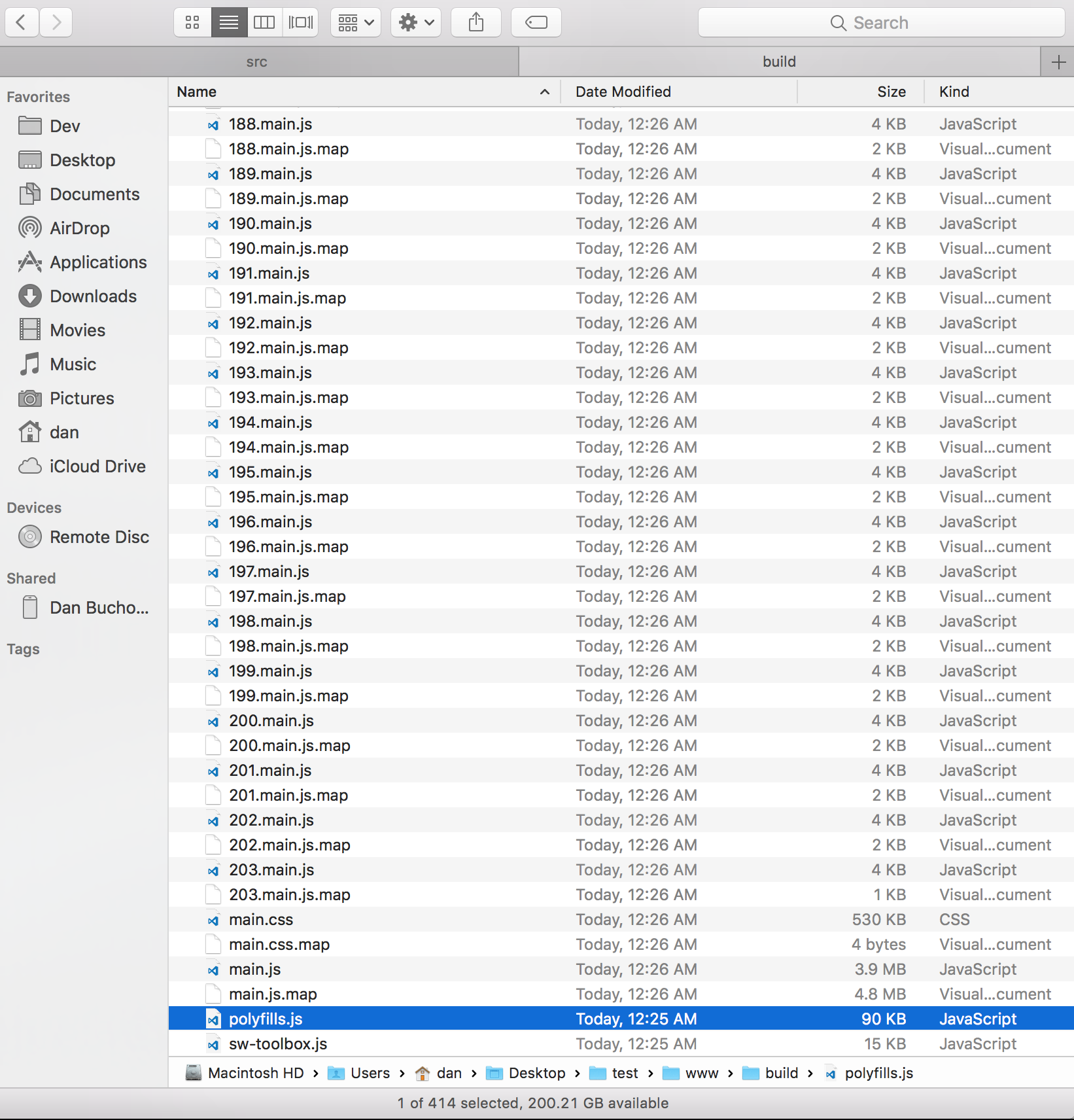
No matter what I do, I finish in ~3-4 seconds at the most.
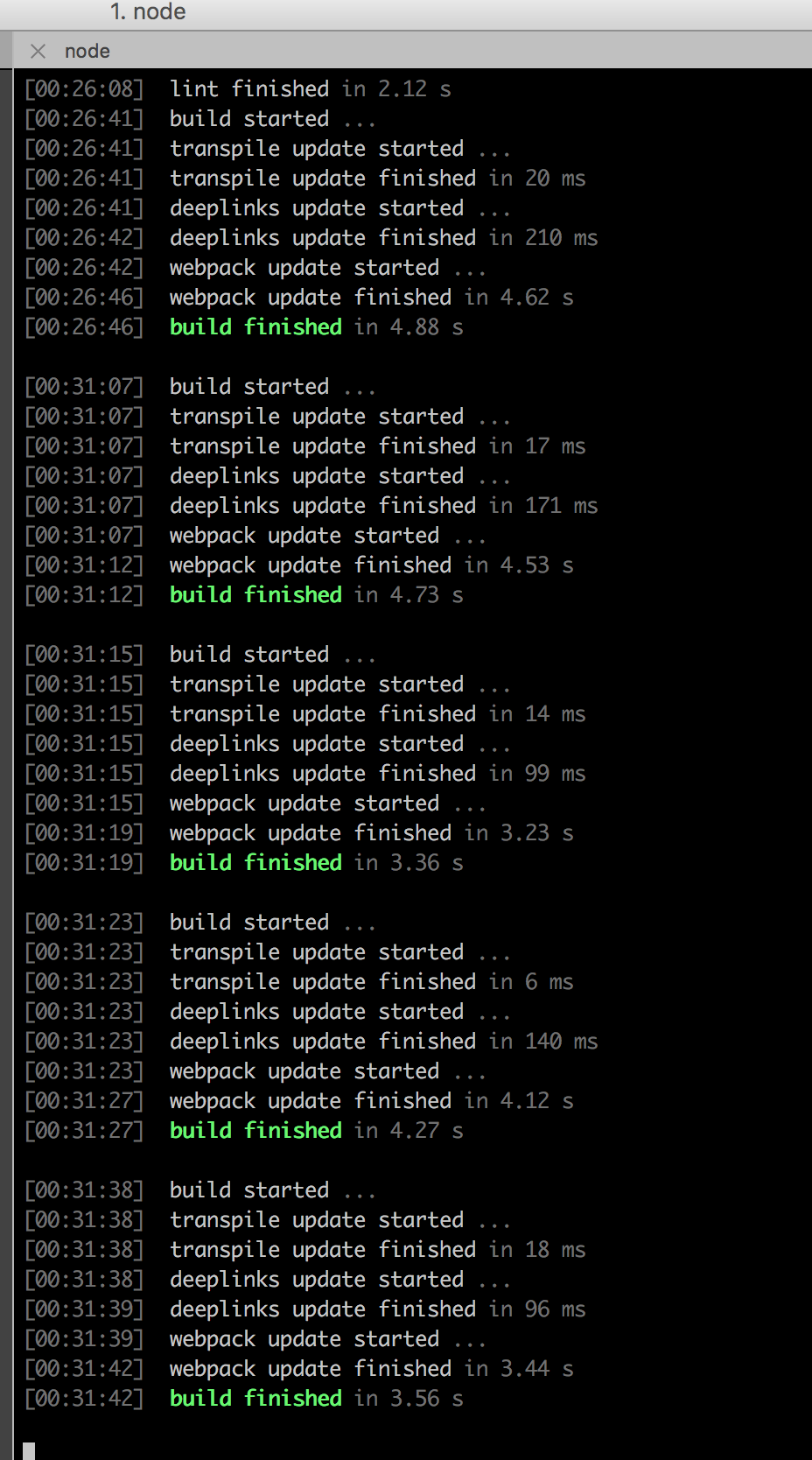
Thanks,
Dan
danbucholtz
on 6 Jul 2017
FWIW, I did cheat and use the latest everything related to Ionic. Angular 4.1.3, Ionic 3.5.0, a nightly release of app-scripts, etc. No custom config at all.
{
  "name": "ionic-hello-world",
  "version": "0.0.0",
  "author": "Ionic Framework",
  "homepage": "http://ionicframework.com/",
  "private": true,
  "scripts": {
    "clean": "ionic-app-scripts clean",
    "build": "ionic-app-scripts build",
    "ionic:build": "ionic-app-scripts build",
    "ionic:serve": "ionic-app-scripts serve"
  },
  "dependencies": {
    "@angular/common": "4.1.3",
    "@angular/compiler": "4.1.3",
    "@angular/compiler-cli": "4.1.3",
    "@angular/core": "4.1.3",
    "@angular/forms": "4.1.3",
    "@angular/http": "4.1.3",
    "@angular/platform-browser": "4.1.3",
    "@angular/platform-browser-dynamic": "4.1.3",
    "@ionic-native/core": "3.4.2",
    "@ionic-native/splash-screen": "3.4.2",
    "@ionic-native/status-bar": "3.4.2",
    "@ionic/storage": "2.0.1",
    "ionic-angular": "3.5.0",
    "ionicons": "3.0.0",
    "rxjs": "5.1.1",
    "sw-toolbox": "3.4.0",
    "zone.js": "^0.8.4"
  },
  "devDependencies": {
    "@ionic/app-scripts": "nightly",
    "@ionic/cli-plugin-ionic-angular": "1.3.1",
    "typescript": "~2.2.1"
  },
  "description": "lazyLoadTabs: An Ionic project"
}
@danbucholtz let me try with that setup and let you know what I see. My quick guess is that the number of dependencies the example app has between modules does not provide a good example for a larger project.
ztecharoberts
on 6 Jul 2017
Okay, I think this is just a Webpack bug, I'm not sure. If I revert to app-scripts 1.3.7, I can see significantly longer build times.
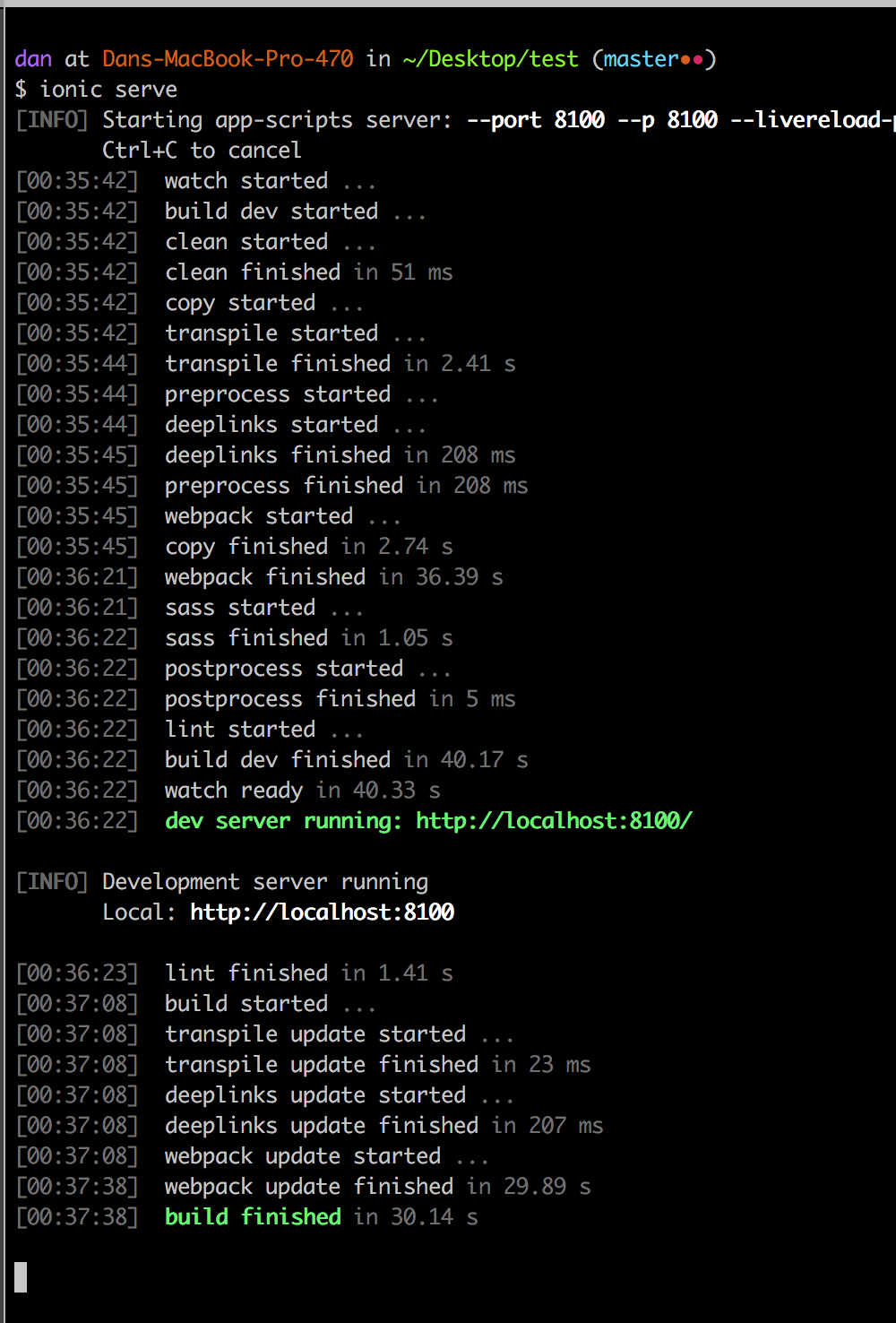
I think the fix is to use nightly for now, and I will publish a proper release in the next few days.
Thanks,
Dan
danbucholtz
on 6 Jul 2017
@danbucholtz
Btw we are using Ionic CLI v2.
Your system information:
Cordova CLI: 7.0.0
Ionic Framework Version: 3.3.0
Ionic CLI Version: 2.2.3
Ionic App Lib Version: 2.2.1
Ionic App Scripts Version: 1.3.7
ios-deploy version: Not installed
ios-sim version: 5.0.8
OS: macOS Sierra
Node Version: v6.9.1
Xcode version: Xcode 8.3.3 Build version 8E3004b
 subhash-ztech
on 6 Jul 2017
subhash-ztech
on 6 Jul 2017
@ztecharoberts,
It is a really large sample project, 200 pages. Are you on worldwide Ionic slack? Shoot me a msg if so. I think I am danb. Let's resolve this. I'll be awake for another hour or so.
Thanks,
Dan
danbucholtz
on 6 Jul 2017
Here's a screenshot of 1.3.12. It sure seems like this is a webpack issue that was fixed in 3.x.
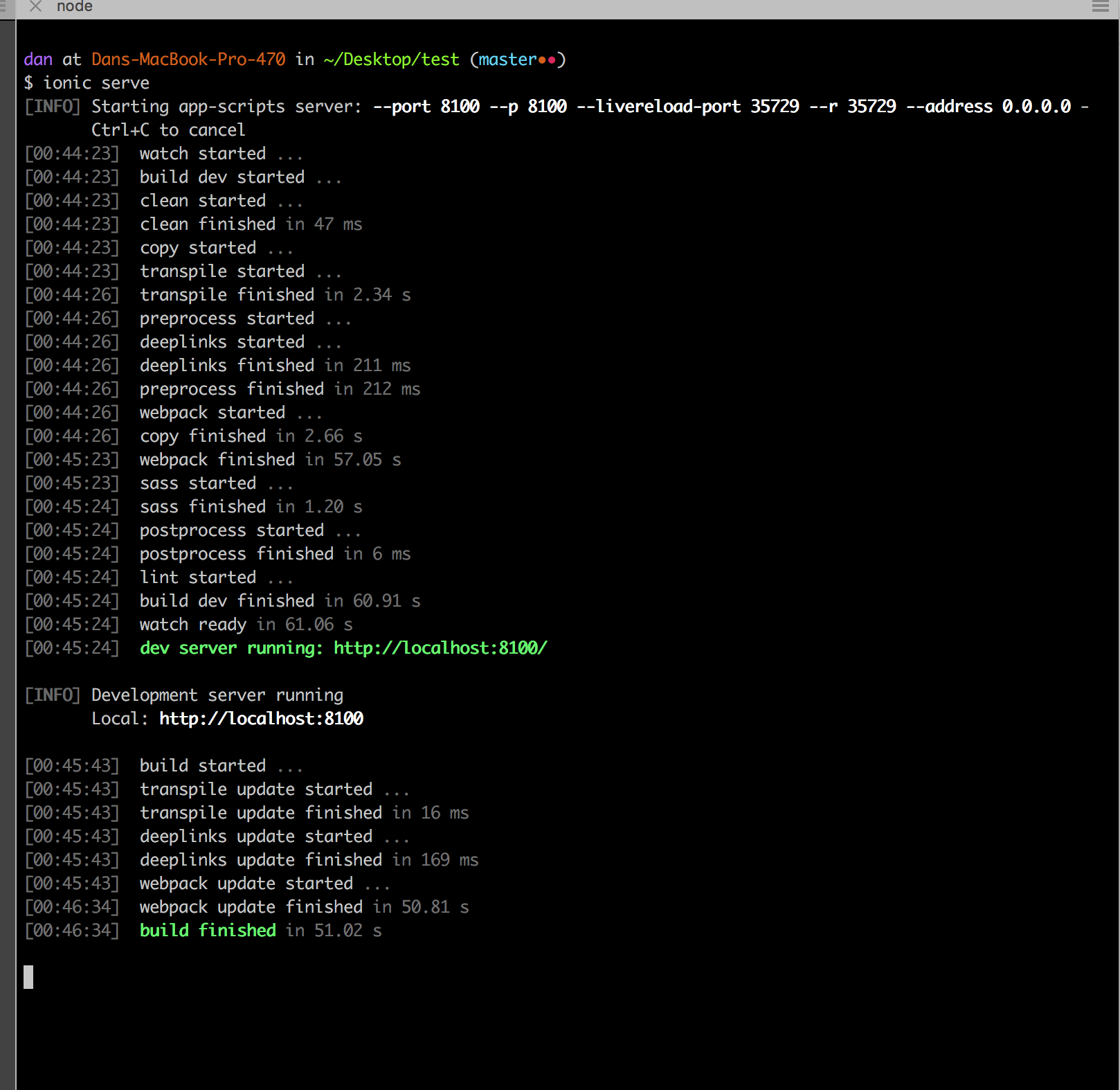
Thanks,
Dan
danbucholtz
on 6 Jul 2017
With the updated config I get better results.
I went from 200s incremental and initial build times to a 53s initial and a 15s incremental as seen below. Thanks Dan for checking in on this! I think you are correct on that this is a webpack issue.
[00:47:48] ionic-app-scripts 1.3.12-201707060514
[00:47:48] watch started ...
[00:47:48] build dev started ...
[00:47:48] clean started ...
[00:47:48] clean finished in 37 ms
[00:47:48] copy started ...
[00:47:48] transpile started ...
[00:47:59] transpile finished in 10.44 s
[00:47:59] preprocess started ...
[00:47:59] deeplinks started ...
[00:48:00] deeplinks finished in 1.07 s
[00:48:00] preprocess finished in 1.45 s
[00:48:00] webpack started ...
[00:48:00] copy finished in 12.00 s
[00:48:39] webpack finished in 39.24 s
[00:48:39] sass started ...
[00:48:40] sass finished in 1.26 s
[00:48:40] postprocess started ...
[00:48:40] postprocess finished in 4 ms
[00:48:40] build dev finished in 52.52 s
[00:48:41] watch ready in 53.13 s
Running live reload server: http://localhost:35729
Watching:
√ Running dev server: http://localhost:8100
Ionic server commands, enter:
restart or r to restart the client app from the root
goto or g and a url to have the app navigate to the given url
consolelogs or c to enable/disable console log output
serverlogs or s to enable/disable server log output
quit or q to shutdown the server and exit
ionic $ [00:49:45] build started ...
[00:49:45] transpile update started ...
[00:49:45] transpile update finished in 24 ms
[00:49:45] deeplinks update started ...
[00:49:46] deeplinks update finished in 961 ms
[00:49:46] webpack update started ...
[00:50:01] webpack update finished in 14.50 s
[00:50:01] build finished in 15.55 s
ztecharoberts
on 6 Jul 2017
I am going to close this issue. Please try npm install @ionic/app-scripts@nightly and let me know how it goes. This should have scope hoisting too so your apps should start up faster. I will publish the official fix tomorrow most likely. I am going to look into splitting out the vendor code to make the incremental build even faster. Will likely result in semver-ing to 2.0.0. Gotta chat with the team before doing that.
Thanks,
Dan
danbucholtz
on 6 Jul 2017
Great news, I am going to run some tests to see if this is working and will let you all know how it goes
dmastag
on 6 Jul 2017
Thanks a lot @danbucholtz
The incremental builds are now fantastic. It got reduced from 100 seconds to 10 seconds.
vigneshmahalingam
on 6 Jul 2017
Moving to the nightly stuffed up the proxy for me... so can't use it...
gslender
on 6 Jul 2017
I was testing it and ionic serve is now much faster than before which is awesome.
Having a different problem with the nightly regarding angular2-moment though which prevents me to production build and will create a separate issue for it.
dmastag
on 6 Jul 2017
So the Dev Build is at 69 secs now, which is awesome. But when doing any updates on the .ts files I am gettings this error.
<--- Last few GCs --->

[26200:000001915F275E60]   226469 ms: Mark-sweep 1406.1 (1520.3) -> 1406.0 (1520.3) MB, 1179.8 / 0.0 ms  last resort


<--- JS stacktrace --->

==== JS stack trace =========================================

Security context: 00000023F10A9891 <JS Object>
    1: decode(aka base64VLQ_decode) [D:\project\node_modules\source-map\lib\base64-vlq.js:138] [pc=0000011DC6FDD1F8](this=0000013EC7910BD9 <an Object with map 000000BED9687BB9>,aStr=0000005C58815259 <String[34]: AAAA,OAAO,EAAE,UAAU,EAAE,MAAM,eAAe>,aIndex=1,aOutParam=0000005C58815571 <an Object with map 0000015AC1B031D1>)
    2: _parseMappings(aka Sou...

FATAL ERROR: CALL_AND_RETRY_LAST Allocation failed - JavaScript heap out of memory
Yes I found despite the build being much quicker, when updating my .ts files the rebuild wasn't including my changes. So something is still not quite right.
 joewoodhouse
on 6 Jul 2017
joewoodhouse
on 6 Jul 2017
Yeah @dmastag Some of our team members are facing the same error
JavaScript heap out of memory
@danbucholtz any idea why ?
vigneshmahalingam
on 6 Jul 2017
Can you try giving ionic more heap space?
node --max_old_space_size=4096 $(which ionic) serve on linux/mac.
Thanks,
Dan
danbucholtz
on 6 Jul 2017
Would you know the same command for Windows ?
dmastag
on 6 Jul 2017
I don't, but it should be the same concept. node --max_old_space_size=4096 /path/to/ionic serve
Thanks,
Dan
danbucholtz
on 6 Jul 2017
That helped to solve the memory issue. Thanks @danbucholtz
vigneshmahalingam
on 7 Jul 2017
Good news folks, apparently Webpack 3.1 coming soon is supposed to be significantly faster than 3.0 🎉
So expect to see a further reduction in build times! Truthfully, we are pretty unhappy with the long build times but our hands are sort of tied right now.
Thanks,
Dan
danbucholtz
on 7 Jul 2017
Hello,
Can you all test @ionic/app-scripts@nightly? The changes required will be adding a <script src="build/vendor.js"></script> to the src/index.html like so:
body>

  <!-- Ionic's root component and where the app will load -->
  <ion-app></ion-app>

  <!-- The polyfills js is generated during the build process -->
  <script src="build/polyfills.js"></script>

  <script src="build/vendor.js"></script>

  <!-- The bundle js is generated during the build process -->
  <script src="build/main.js"></script>

</body>
This will be app-scripts 2.0.0.
Thanks,
Dan
danbucholtz
on 7 Jul 2017
Ok so playing with it build and rebuild times seem to be the same.
[11:55:38] ionic-app-scripts 1.3.12-201707071538
[11:55:38] watch started ...
[11:55:38] build dev started ...
[11:55:38] clean started ...
[11:55:38] clean finished in 37 ms
[11:55:38] copy started ...
[11:55:38] transpile started ...
[11:55:49] transpile finished in 10.69 s
[11:55:49] preprocess started ...
[11:55:49] deeplinks started ...
[11:55:50] deeplinks finished in 1.16 s
[11:55:51] preprocess finished in 1.56 s
[11:55:51] webpack started ...
[11:55:51] copy finished in 12.37 s
[11:56:31] webpack finished in 40.87 s
[11:56:31] sass started ...
[11:56:33] sass finished in 1.62 s
[11:56:33] postprocess started ...
[11:56:33] postprocess finished in 4 ms
[11:56:33] build dev finished in 54.87 s
[11:56:34] watch ready in 55.55 s
Running live reload server: http://localhost:35729
Watching:
√ Running dev server: http://localhost:8100
Ionic server commands, enter:
restart or r to restart the client app from the root
goto or g and a url to have the app navigate to the given url
consolelogs or c to enable/disable console log output
serverlogs or s to enable/disable server log output
quit or q to shutdown the server and exit
ionic $ [11:56:45] build started ...
[11:56:45] transpile update started ...
[11:56:46] transpile update finished in 26 ms
[11:56:46] deeplinks update started ...
[11:56:46] deeplinks update finished in 948 ms
[11:56:46] webpack update started ...
[11:57:07] webpack update finished in 20.53 s
[11:57:07] build finished in 21.58 s
[11:57:45] build started ...
[11:57:45] transpile update started ...
[11:57:45] transpile update finished in 16 ms
[11:57:45] deeplinks update started ...
[11:57:49] deeplinks update finished in 3.84 s
[11:57:49] webpack update started ...
[11:58:03] webpack update finished in 14.32 s
[11:58:03] build finished in 18.17 s
ztecharoberts
on 7 Jul 2017
OMG its so fast now.
Too bad that the angular2-moment problem is still persistent.
dmastag
on 7 Jul 2017
@ztecharoberts could you check into your node_module/@ionic/app-scripts/package.json file and see what webpack dependency you have? I had a similar problem yesterday where it was still on 2, so what I did was run npm uninstall @ionic/app-scripts and then npm install @ionic/app-scripts@nightly --save-dev --save-exact
dmastag
on 7 Jul 2017
@dmastag I am getting a separate vendors js atm. Also seeing webpack 3.1
ztecharoberts
on 7 Jul 2017
So after using the latest Nightly (1.3.12-201707071759) I can show you the comparison between before and after:
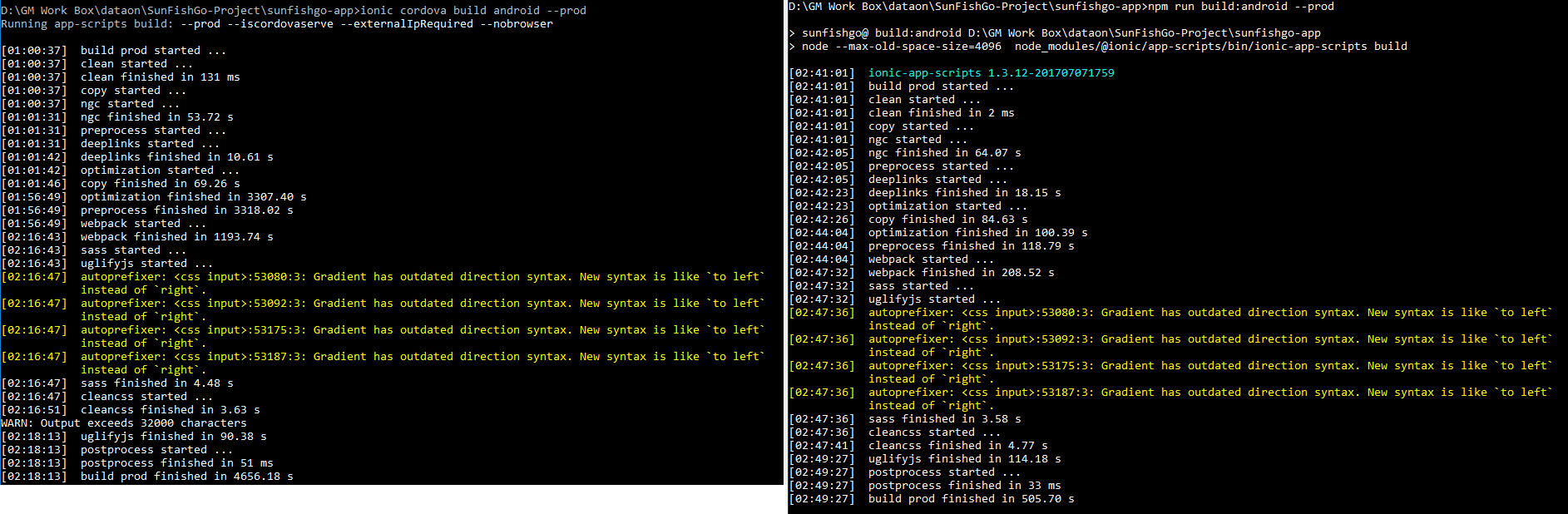
Also the other issue regarding angular2-fire has been solved also.
Am very happy now :-)
dmastag
on 7 Jul 2017
I had similar issues on a large project (200 pages +) and was able to fix by doing the following:
Upgrade dependencies (specifically, Ionic app-scripts):
-        "@ionic/app-scripts": "1.3.12",
-        "@ionic/cli-plugin-cordova": "1.4.1",
-        "@ionic/cli-plugin-ionic-angular": "1.3.2",
+        "@ionic/app-scripts": "^2.1.3",
+        "@ionic/cli-plugin-cordova": "1.5.0",
+        "@ionic/cli-plugin-ionic-angular": "1.4.0",
REQUIREMENT: After upgrading I had an error "webpack json" on trying to run ionic serve. You MUST make sure to add the following to your index.html if its not there.
<!-- With update of ionic scripts we need to add build/vendor -->
<script src="build/vendor.js"></script>
And also upgrading to latest ionic actually puts the version in your local repository, so worth mentioning.
"ionic": "3.6.0"
Best Regards,
@jedihacks
 jedihacks
on 28 Jul 2017
jedihacks
on 28 Jul 2017
{
"name": "SDSM",
"version": "0.0.2",
"author": "Ionic Framework",
"homepage": "http://ionicframework.com/",
"private": true,
"scripts": {
"clean": "ionic-app-scripts clean",
"build": "ionic-app-scripts build",
"lint": "ionic-app-scripts lint",
"ionic:build": "ionic-app-scripts build",
"ionic:serve": "ionic-app-scripts serve"
},
"dependencies": {
"@angular/animations": "5.2.10",
"@angular/common": "5.2.10",
"@angular/compiler": "5.2.10",
"@angular/compiler-cli": "5.2.10",
"@angular/core": "5.2.10",
"@angular/forms": "5.2.10",
"@angular/http": "5.2.10",
"@angular/platform-browser": "5.2.10",
"@angular/platform-browser-dynamic": "5.2.10",
"@ionic-native/core": "4.7.0",
"@ionic-native/firebase-analytics": "^4.7.0",
"@ionic-native/google-plus": "^4.7.0",
"@ionic-native/native-page-transitions": "^4.7.0",
"@ionic-native/splash-screen": "4.7.0",
"@ionic-native/status-bar": "4.7.0",
"@ionic-native/themeable-browser": "^4.7.0",
"@ionic/pro": "1.0.20",
"@ionic/storage": "2.1.3",
"angularfire2": "^5.0.0-rc.10",
"com.telerik.plugins.nativepagetransitions": "^0.6.5",
"cordova-android": "7.0.0",
"cordova-plugin-device": "^2.0.2",
"cordova-plugin-firebase-analytics": "^0.14.0",
"cordova-plugin-googleplus": "^5.3.0",
"cordova-plugin-ionic-keyboard": "^2.0.5",
"cordova-plugin-ionic-webview": "^1.1.19",
"cordova-plugin-splashscreen": "^5.0.2",
"cordova-plugin-whitelist": "^1.3.3",
"cordova-support-android-plugin": "^0.3.7",
"cordova-support-google-services": "^1.1.0",
"firebase": "^5.0.4",
"ionic-angular": "3.9.2",
"ionicons": "3.0.0",
"rxjs": "5.5.10",
"sw-toolbox": "3.6.0",
"zone.js": "0.8.26"
},
"devDependencies": {
"@ionic/app-scripts": "^3.1.7-201801172029",
"typescript": "~2.6.2"
},
"description": "An Ionic project",
"cordova": {
"plugins": {
"cordova-plugin-whitelist": {},
"cordova-plugin-device": {},
"cordova-plugin-splashscreen": {},
"cordova-plugin-ionic-webview": {},
"cordova-plugin-ionic-keyboard": {},
"com.telerik.plugins.nativepagetransitions": {},
"cordova-plugin-googleplus": {
"REVERSED_CLIENT_ID": ""
},
"cordova-plugin-firebase-analytics": {
"FIREBASE_CORE_VERSION": "16.0.+"
}
},
"platforms": [
"android"
]
}
}
i have 13 pages and 10 are lazy loaded
it is taking too long still while using ionic cordova build --prod --release android
 Shiba-Kar
on 16 Jun 2018
Shiba-Kar
on 16 Jun 2018
I have waited 2 hr CPU at full speed still no progress after webpack
Shiba-Kar
on 17 Jun 2018
Related issues
 barbsicle
·
3Comments
barbsicle
·
3Comments
 nalkon
·
4Comments
nalkon
·
4Comments
 brandyscarney
·
4Comments
danbucholtz
·
4Comments
brandyscarney
·
4Comments
danbucholtz
·
4Comments
 hermitdemschoenenleben
·
3Comments
hermitdemschoenenleben
·
3Comments
Most helpful comment
Thanks for looking into this. It's a huge issue. I'm in the same boat and am starting to second guess the choice to go with Ionic. Much of the cross-platform coding savings go out the window if I have to twiddle my thumbs for a full minute for every incremental build--and my project is still growing. My two cents: fixing this is far more important than any bug fixes or new features at this point.