Ionic-app-scripts: fonts not added
_From @ThorConzales on October 3, 2016 13:17_
Many times in my upgrade path to RC0 I encountered an error when all the ionicon fonts were missing. They were just not included in www/assets/fonts folder. Though nothing was outputted to console it seemed to be related to messing up styles. For example when I used "ion-button" together with "icon-right" class when actually I didn't have an icon inside the button element.
_Copied from original issue: driftyco/ionic#8433_
 jgw96
jgw96
All 34 comments
This also seems to be a problem with the "Roboto" font when running in md mode. It doesn't get copied.
 joshgarwood
on 3 Oct 2016
joshgarwood
on 3 Oct 2016
Hello, thanks for using Ionic! Unfortunately I am not able to reproduce this issue. Can you all run npm install in your app to install the latest version of ionic-app-scripts and try again? Thanks!
jgw96
on 3 Oct 2016
This is happening with the ionic-conference-app and ionic-app-scripts v. 0.0.28 (make sure you clone ionic-conference-app into a brand new directory, not an existing clone).
I also noticed that with ionic-app-scripts .28, that I'm getting permission errors (it at least looks like it's trying to copy the ionicons... but still no Roboto :)
[18:22:43] copy failed: Error copying "src/assets/" to "www/assets/": Error: EPERM: operation not permitted, open 'C:\Users\josh\Source\Repos\ionic-help\ionic-conference-app\www\assets\fonts\ionicons.svg',Error: EPERM: operation not permitted, open 'C:\Users\josh\Source\Repos\ionic-help\ionic-conference-app\www\assets\fonts\ionicons.eot',Error: EPERM: operation not permitted, open 'C:\Users\josh\Source\Repos\ionic-help\ionic-conference-app\www\assets\fonts\ionicons.ttf',Error: EPERM: operation not permitted, open 'C:\Users\josh\Source\Repos\ionic-help\ionic-conference-app\www\assets\fonts\ionicons.woff',Error: EPERM: operation not permitted, open 'C:\Users\josh\Source\Repos\ionic-help\ionic-conference-app\www\assets\fonts\ionicons.woff2'
joshgarwood
on 4 Oct 2016
I had the same problem here.
If you delete the src/app/assets/fonts-folder, everything is working.
With the old 0.0.23-app-scripts, i had the problem that the fonts were often not copied, so i created a new folder in assets like in the conference app.
But with 0.0.28 it's no longer necessary because the fonts are now copied from node_modules. So just detele the folder and it works.
 chrste90
on 4 Oct 2016
chrste90
on 4 Oct 2016
I still managed to reproduce it with 0.0.28 version but the second run fixed it.
 ErkoKnoll
on 4 Oct 2016
ErkoKnoll
on 4 Oct 2016
Thanks for the info everyone! So just to be clear, with app-scripts 0.0.28 and a fresh starter is this still reproducible?
jgw96
on 4 Oct 2016
Roboto still isn't loading for me with 0.0.28. I did the following:
ionic start test --v2 --ts
cd test
ionic serve
Ionicons work OK but not Roboto.
 daniel7912
on 5 Oct 2016
daniel7912
on 5 Oct 2016
Thanks for all the info everyone. I can confirm that Roboto is definitely not being loaded, although ionicons are working great for me.
jgw96
on 5 Oct 2016
It happens from time to time here too. Deleting the .tmp folder and then rerun ionic serve solves the problem.
 sveinl
on 6 Oct 2016
sveinl
on 6 Oct 2016
Agree with @sveinl, it happens intermittently. Haven't tried deleting the .tmp folder. But i experienced this problem twice.
 savanvadalia
on 10 Oct 2016
savanvadalia
on 10 Oct 2016
Tried deleting the .tmp folder, deleting assets/*, changing to Read/Write/Execute permissions for "Everyone", still having the same issue.
 wwallace
on 10 Oct 2016
wwallace
on 10 Oct 2016
I also face the same problem.
In copy.config.js in app-sctipt I found this,
{
src: 'src/assets/',
dest: 'www/assets/'
}
{
src: 'node_modules/ionicons/dist/fonts/',
dest: 'www/assets/fonts/'
}
In src/assets/fonts/ and node_modules/ionicons/dist/fonts/ both contain same files for ionicons fonts. I just remove ionicons fonts form src/assets/fonts/ and then rerun ionic serve solves the problem. I also use custom fonts in src/assets/fonts/ which also go to www/assets/fonts without any error.
That's why, I think the main problem is the same name file found in different place for copying.
 math10
on 10 Oct 2016
math10
on 10 Oct 2016
@jgw96 This is also happening on a Windows 10 environment. Please see below
https://forum.ionicframework.com/t/2-0-0-rc0-error-copying-src-assets-to-www-assets/65542
 gigocabrera
on 11 Oct 2016
gigocabrera
on 11 Oct 2016
Is there a workaround for this in the meantime so that I can get the Roboto font included in my ionic package build? We really need it in order to release our app :)
Thanks!
joshgarwood
on 11 Oct 2016
Too often on my computer. the previous version doesn't has this problem.
 lygstate
on 16 Oct 2016
lygstate
on 16 Oct 2016
I am using Windows 10.
lygstate
on 16 Oct 2016
Had the same problem. Second run fixed it.
 zhang5690889
on 26 Oct 2016
zhang5690889
on 26 Oct 2016
Roboto still isn't copied over at all... ionicons are most of the time though.
joshgarwood
on 28 Oct 2016
@jgw96 this issue is still not fixed - if you look at copy and sass config files, there is no reference to node_modules/ionic-angular/fonts/... Roboto and other fonts are not copied...
 MarkChrisLevy
on 9 Nov 2016
MarkChrisLevy
on 9 Nov 2016
getting also these copy errors, every time i start the app-scripts and didn't deleted the contents of www by hand
[09:11:20] copy: Error copying "C:\Users\PROJECT\src\assets"
to "C:\Users\PROJECT\www\assets"
[09:11:20] copy: Error copying
"C:\Users\PROJECT\node_modules\ionicons\dist\fonts"
to "C:\Users\PROJECT\www\assets\fonts
Your system information:
Cordova CLI: 6.3.1
Ionic Framework Version: 2.0.0-rc.2
Ionic CLI Version: 2.1.7
Ionic App Lib Version: 2.1.4
Ionic App Scripts Version: 0.0.42
ios-deploy version: Not installed
ios-sim version: Not installed
OS: Windows 7
Node Version: v6.9.1
Xcode version: Not installed
 ataraxus
on 10 Nov 2016
ataraxus
on 10 Nov 2016
Going to close this for now. This will be fixed in the next release of Ionic 2. Thanks!
jgw96
on 18 Nov 2016
Closed but I'm using version 3 of Ionic(3.6.0 more exactly) and still having the same problem. Any fix please? Tried all of the above advices and none of them worked. Roboto font is missing. When I do ionic cordova run android it's being added in www/assets/fonts for a few seconds and then I can see them being deleted.
Ionic CLI(3.9.2)
OS: Windows 7
 neculaionutni
on 24 Aug 2017
neculaionutni
on 24 Aug 2017
I am having the same issue as neculaionutni too.
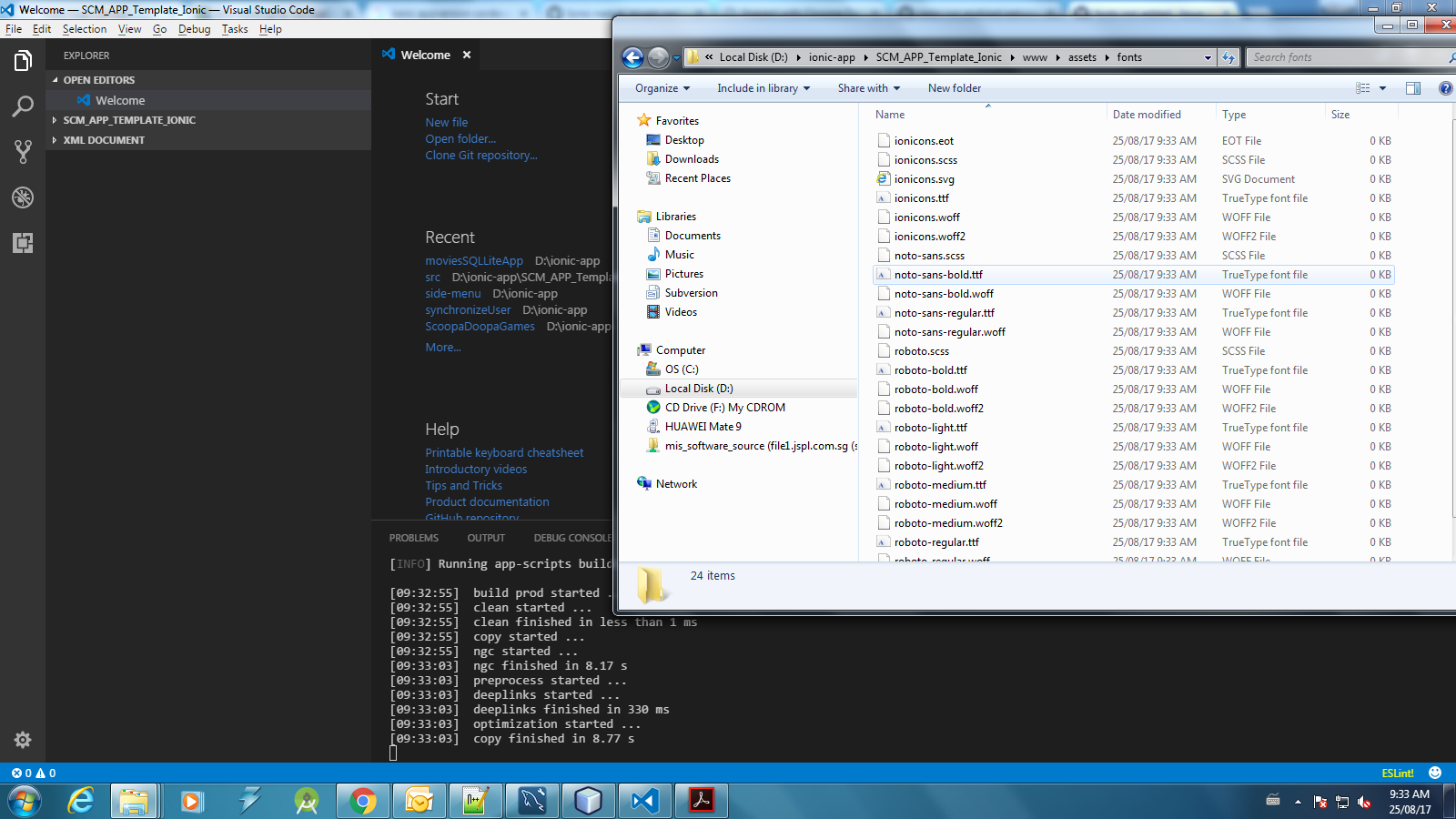
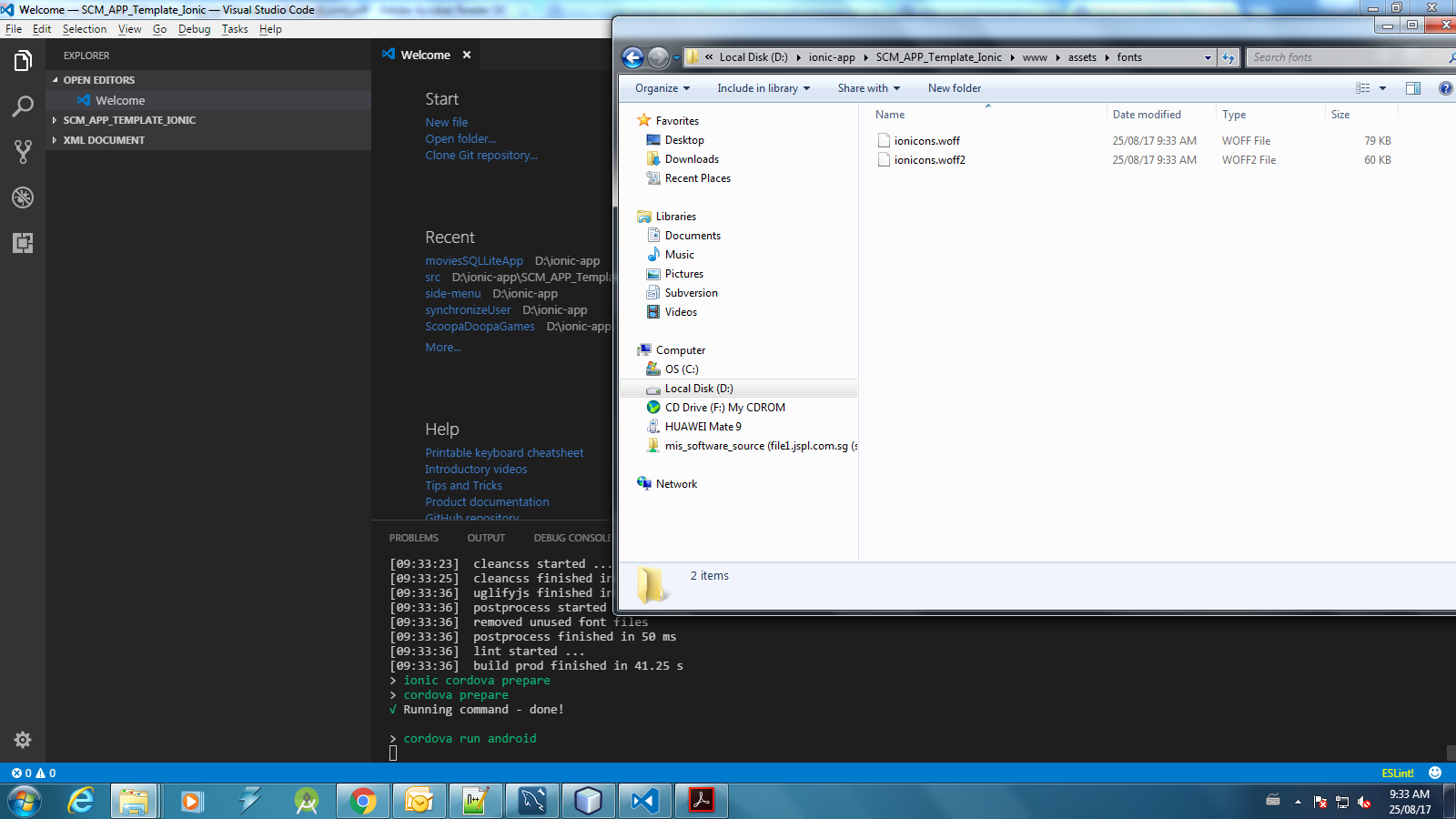
When copying files, i can see roboto fonts but when the script runs ionic cordova prepare, all the fonts were deleted and not copying over.
When copying files
When preparing cordova
@ionic/cli-utils : 1.9.2
ionic (Ionic CLI) : 3.9.2
global packages:
Cordova CLI : 7.0.1
local packages:
@ionic/app-scripts : 2.1.3
Cordova Platforms : android 6.2.3 browser 4.1.0
Ionic Framework : ionic-angular 3.6.0
System:
Node : v6.11.0
npm : 5.3.0
OS : Windows 7
 risen85
on 25 Aug 2017
risen85
on 25 Aug 2017
Same issue with latest ionic CLI, today.
@ionic/cli-utils : 1.9.2
ionic (Ionic CLI) : 3.9.2
global packages:
Cordova CLI : 7.0.1
local packages:
@ionic/app-scripts : 1.3.7
Cordova Platforms : android 6.2.3
Ionic Framework : ionic-angular 3.3.0
System:
Node : v6.10.3
npm : 4.2.0
OS : Windows 10
 martinlombana
on 29 Aug 2017
martinlombana
on 29 Aug 2017
same problem here!
 RafaelSNascimento
on 2 Sep 2017
RafaelSNascimento
on 2 Sep 2017
I have the same issue, there is a workaround?
 MWNemesis
on 6 Sep 2017
MWNemesis
on 6 Sep 2017
Something is overwriting this folder everytime i build...
<app>/www/src/assets/fonts/
See pictures from @risen85 , the fonts are replaced by ionicons.woff/ionicons.woff2
That is why I did not use that damn folder, instead create my own and store my fonts and etc.
<app>/src/custom/fonts/<your fonts and scss font imports are here>I override my own copy.config.js to copy the files we placed in our newly created custom folder into the www folder when building.
e.g., after build will be like this
<app>/www/custom/fonts/<your custom files copied when building using copy.config.js>Update the
$font-pathto use the custom folder path:
<app>/src/theme/variables.scss
From:
$font-path: "../assets/fonts";
To:
$font-path: "../custom/fonts";
Try building again.
I'll edit this comment if i can later, hopefully I'll remember. (Im using my phone typing this whole thing)
 shogunfighter
on 6 Sep 2017
shogunfighter
on 6 Sep 2017
IONIC 3 and ANGULAR 4
- "ionic build" is copying all the fonts(ionicons and roboto) correctly.
it works partially fine with :
(a) "ionic cordova build android"
(b) "ionic cordova run android".
while running this command fonts are present in folders for few seconds and then it suddenly deletes(platform/android/assets/WWW/assets/fonts and WWW/assets/fonts)I guess it removes the fonts when it starts running : "cordova run android"
when the build is finished I found roboto is not available in fonts folder.
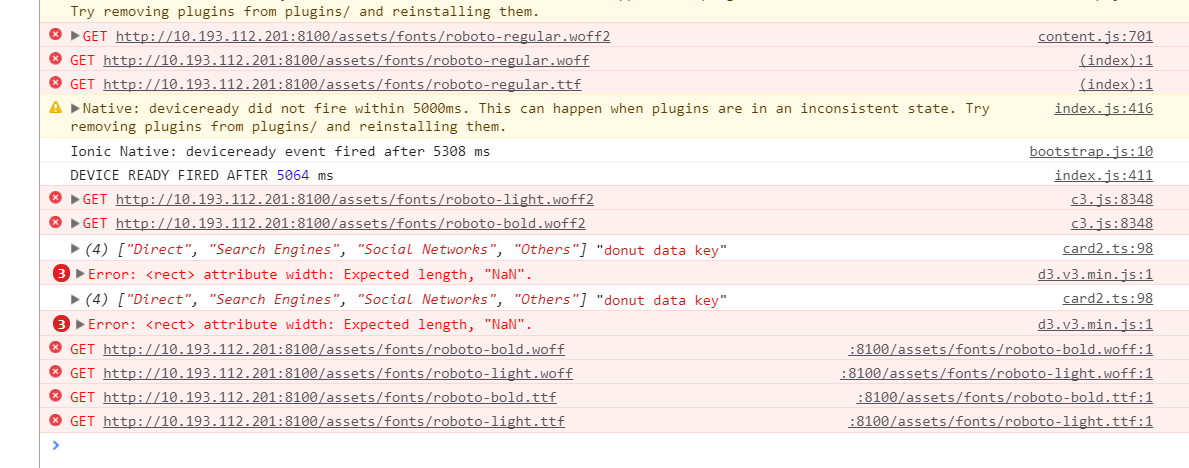
 Raghu-Rocks
on 7 Sep 2017
Raghu-Rocks
on 7 Sep 2017
Same problem, here is my environment info:
@ionic/cli-plugin-proxy : 1.4.8
@ionic/cli-utils : 1.10.1
ionic (Ionic CLI) : 3.10.1
global packages:
Cordova CLI : 7.0.1
local packages:
@ionic/app-scripts : 1.3.7
Cordova Platforms : android 6.2.3
Ionic Framework : ionic-angular 3.3.0
System:
Android SDK Tools : 26.0.2
Node : v6.11.2
npm : 3.10.10
OS : Windows 7
Fonts are deleted when 'build dev finished '
 marcRDZ
on 13 Sep 2017
marcRDZ
on 13 Sep 2017
There was actually a bug that happened. Then, my previous answer wasn't that clear... So if you still get error try this instead.
My Method involves overriding the copy.config.js. Well, you can try this and create a custom folder, away from that buggy assets folder:
First of all:
Check if you have files in your <APP>/src/assets, if yes, just put it over to <APP>/src/custom.
Adjust your codes accordingly to point to custom.
- Copy this file:
<APP>/node_modules/@ionic/app-scripts/config/copy.config.js
- Place the file in here:
<APP>/overrides/copy.config.js
- Adjust the
<APP>/package.json
{
    "scripts": {...},
    "dependencies": {...},
    "devDependencies": {...},
    "x----x----x": "ADD THE CONFIG BELOW SINCE YOU WANT TO OVERWRITE THE COPY CONFIG",
    "config": {
        "ionic_copy": "./overrides/copy.config.js"
    }
}
- Modify the file
<APP>/overrides/copy.config.js
From:
module.exports = {
  copyAssets: {
    src: ['{{SRC}}/assets/**/*'],
    dest: '{{WWW}}/assets'
  },
  copyIndexContent: {
    src: ['{{SRC}}/index.html', '{{SRC}}/manifest.json', '{{SRC}}/service-worker.js'],
    dest: '{{WWW}}'
  },
  copyFonts: {
    src: ['{{ROOT}}/node_modules/ionicons/dist/fonts/**/*', '{{ROOT}}/node_modules/ionic-angular/fonts/**/*'],
    dest: '{{WWW}}/assets/fonts'
  },
  copyPolyfills: {
    src: [`{{ROOT}}/node_modules/ionic-angular/polyfills/${process.env.IONIC_POLYFILL_FILE_NAME}`],
    dest: '{{BUILD}}'
  },
  copySwToolbox: {
    src: ['{{ROOT}}/node_modules/sw-toolbox/sw-toolbox.js'],
    dest: '{{BUILD}}'
  }
}
To:
module.exports = {
  //copyAssets: {           //commented
  //  src: ['{{SRC}}/assets/**/*'], //commented
  //  dest: '{{WWW}}/assets'        //commented
  //},                  //commented
  copyCustom: {             //new
    src: ['{{SRC}}/custom/**/*'],   //new
    dest: '{{WWW}}/custom'      //new
  },
  copyIndexContent: {
    src: ['{{SRC}}/index.html', '{{SRC}}/manifest.json', '{{SRC}}/service-worker.js'],
    dest: '{{WWW}}'
  },
  copyFonts: {
    src: ['{{ROOT}}/node_modules/ionicons/dist/fonts/**/*', '{{ROOT}}/node_modules/ionic-angular/fonts/**/*'],
    dest: '{{WWW}}/custom/fonts'    //new - these are the fonts, ionicon/roboto/noto-sans
  },
  copyPolyfills: {
    src: [`{{ROOT}}/node_modules/ionic-angular/polyfills/${process.env.IONIC_POLYFILL_FILE_NAME}`],
    dest: '{{BUILD}}'
  },
  copySwToolbox: {
    src: ['{{ROOT}}/node_modules/sw-toolbox/sw-toolbox.js'],
    dest: '{{BUILD}}'
  }
}
- Modify the
$font-pathin the scss to load the font from our custom folder
<APP>/src/theme/variables.scss
From:
$font-path: "../assets/fonts";
To:
$font-path: "../custom/fonts";
- ENJOY!
$ ionic cordova run <platform>
Thanks for your quick reply, I´ll give a try
I've found another workaroud through the deprecated appcache as I was using this feature previously.
marcRDZ
on 13 Sep 2017
@marcRDZ once you test these steps please share the result, because I followed the @shogunfighter's
steps but producing the same error.
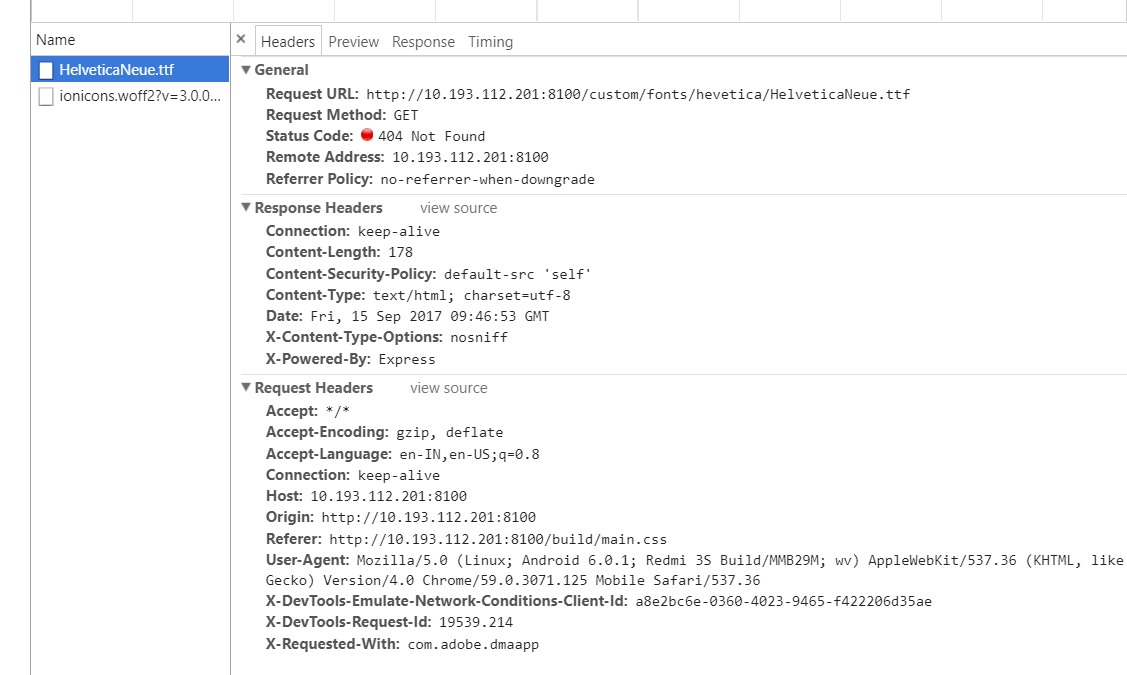
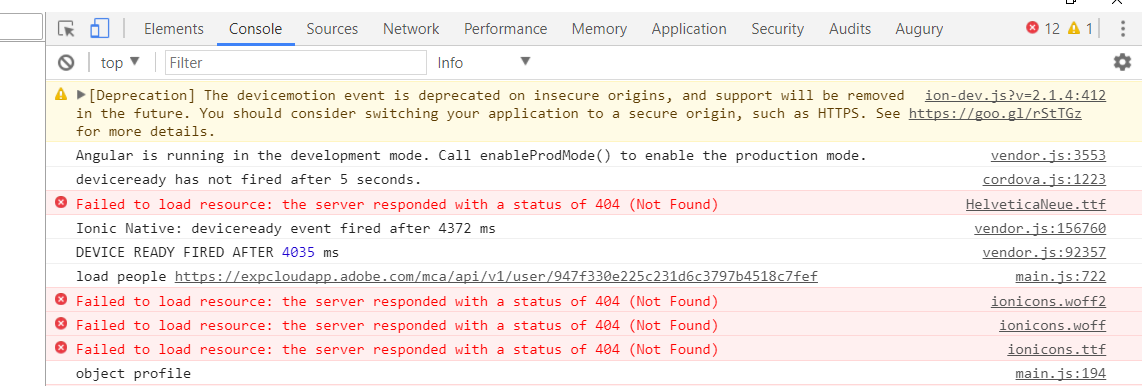
The custom fonts are getting copied in
1. www/custom/fonts
2. platform/android/assets/www/custom
but it still giving the 404 error for me.
and when I change the variable.scss :
From:
$font-path: "../assets/fonts";
To:
$font-path: "../custom/fonts";
It doesn't load even ionicons.
ionic (Ionic CLI) : 3.10.3
@ ionic/cli-utils : 1.10.2
global packages:
Cordova CLI : 7.0.1
local packages:
@ionic/app-scripts : 2.1.4
Cordova Platforms : android 6.2.3
Ionic Framework : ionic-angular 3.5.3
System:
Android SDK Tools : 26.0.2
Node : v6.11.2
npm : 3.10.10
OS : Windows 10
Raghu-Rocks
on 15 Sep 2017
@Raghu-Rocks Somewhere you did not follow instructions,
I created a blank repo for you. link
HTML changes: link
Result test ionicon: link
shogunfighter
on 15 Sep 2017
Thanks @shogunfighter it works for me. I think I missed "npm install" last time. feeling very happy.
Many many thanks for the solution.👌👌👌😊😊😊
Raghu-Rocks
on 18 Sep 2017
Related issues
 isflo96
·
3Comments
isflo96
·
3Comments
 bastibense
·
3Comments
bastibense
·
3Comments
 christofferjjohansen
·
3Comments
jgw96
·
3Comments
christofferjjohansen
·
3Comments
jgw96
·
3Comments
 danbucholtz
·
4Comments
danbucholtz
·
4Comments
Most helpful comment
There was actually a bug that happened. Then, my previous answer wasn't that clear... So if you still get error try this instead.
My Method involves overriding the
copy.config.js. Well, you can try this and create acustomfolder, away from that buggyassetsfolder:First of all:
Check if you have files in your
<APP>/src/assets, if yes, just put it over to<APP>/src/custom.Adjust your codes accordingly to point to
custom.<APP>/node_modules/@ionic/app-scripts/config/copy.config.js<APP>/overrides/copy.config.js<APP>/package.json<APP>/overrides/copy.config.jsFrom:
To:
$font-pathin the scss to load the font from our custom folder<APP>/src/theme/variables.scssFrom:
$font-path: "../assets/fonts";To:
$font-path: "../custom/fonts";