Invidious: RAM usage of self-hosted invidious seems high
I recently hosted my own instance of invidious on my private server using Docker. The installation went fine, and the instance has been running for 2-3 days without anyone watching videos as I am the only one that have access to this server.
Today, before even opening the web page, I went on the server and checked how my containers were working. By checking the resource usage of the server, I found out that invidious was taking 60% of my RAM memory (i.e. ~1.2Go on my server).
This amount seems to continue to grow: I watched a video for 10 minutes and the RAM usage is now over 70%.
Is >1Go of RAM a normal usage for invidious executed via a Docker image with only 1 user that do not watch videos non-stop (as I said, I did not even connected to the instance for the last 2 days)?
If it is normal, have you any tips to lower down the RAM usage? Like an option to avoid keeping too much in cache?
Just to be sure of the "only 1 user" part, here are the statistics of the instance obtained from mydomain.xx/api/v1/stats:
{
  "version": "2.0",
  "software": {
    "name": "invidious",
    "version": "0.20.1-239fb0d",
    "branch": "master"
  },
  "openRegistrations": false,
  "usage": {
    "users": {
      "total": 1,
      "activeHalfyear": 1,
      "activeMonth": 1
    }
  },
  "metadata": {
    "updatedAt": 1583159729,
    "lastChannelRefreshedAt": 0
  }
}
 nelimee
All 20 comments
The "issue" (if it is an issue) is reproducible.
After asking this question, I stopped and started again the docker containers. I watched several videos during ~3h (mostly a live of music) without the RAM usage increasing. When I stopped watching videos, the RAM usage was 5 or 6%, i.e. nearly nothing.
During the night, without any activity, it increased back to more than 60%, i.e. more than 1Go.
nelimee
on 3 Mar 2020
I have the same issue as you, that's why I have to put limits into the docker-compose (https://docs.docker.com/compose/compose-file/#resources) so that Docker kills invidious and restart it automatically when the memory usage is too high.
 unixfox
on 4 Mar 2020
unixfox
on 4 Mar 2020
I am relatively new to the docker ecosystem and did not know about this possibility of limitation! I will add it to my docker-compose, but this does not solve the issue.
nelimee
on 5 Mar 2020
I have added mem_limit: 256M to invidious in my docker-compose file and it runs fine although using 100% RAM. 128M is to little and a high percentage of videos are not loading. You should probably use 512M or more.
Edit: You should use 1GB or more. If invidious runs out of RAM it sometimes silently crashes.
 SuperSandro2000
on 6 Jun 2020
SuperSandro2000
on 6 Jun 2020
I have added
mem_limit: 256Mto invidious in my docker-compose file and it runs fine although using 100% RAM. 128M is to little and a high percentage of videos are not loading. You should probably use 512M or more.Edit: You should use 1GB or more. If invidious runs out of RAM it sometimes silently crashes.
The issue is that even with 4Go of RAM (2Go + 2Go of SWAP) my instance still crashes eventually. For the moment I am "solving" this with a dirty script that restart invidious if it use more than 60% of the RAM:
INVIDIOUS_DOCKER_CONTAINER=`dirname $(readlink -f "$0")`
echo "$INVIDIOUS_DOCKER_CONTAINER"

if [ $(echo "$(ps -o %mem= `pidof invidious`) > 60.0" | bc) -eq "1" ] ; then
        cd "${INVIDIOUS_DOCKER_CONTAINER}"
        docker-compose down
        docker-compose up -d
        cd -
fi
This script is in a file in the same folder as the docker-compose.yml and is executed every 5 minutes with cron.
Not elegant, terribly inefficient, but it works. The only downside I found is that if the reload is triggered when I am watching a video the stream stops and I should refresh. But between this (that happens relatively rarely) and OOM with "random" process kills the choice is quite simple.
nelimee
on 7 Jun 2020
I noticed that it is even crashing when only hitting 40% of the allowed RAM while watching playlists. Not sure why. Feels like a bug.
SuperSandro2000
on 8 Jun 2020
I noticed that it is even crashing when only hitting 40% of the allowed RAM while watching playlists. Not sure why. Feels like a bug.
On my side invidious is not crashing alone, it's the system that kills invidious because it takes too much RAM.
The RAM usage of the invidious instance just increase until there is no more RAM available and the Linux kernel decide to invoke the OOM killer, that will likely kill the invidious process without properly restarting it but can also (and did this at least once on my server) kill more useful program like sshd.
nelimee
on 9 Jun 2020
I'm running invidious in docker environment as well. I have the same problem. Invidious was allocating all available memory and swap. I fixed it by defining a memory limit but it's not a fine solution. Seems that there is a memory leak. I wonder how this is solved on public invidious instances with more traffic and users.
 humarf
on 24 Jun 2020
humarf
on 24 Jun 2020
I'm running invidious in docker environment as well. I have the same problem. Invidious was allocating all available memory and swap. I fixed it by defining a memory limit but it's not a fine solution. Seems that there is a memory leak. I wonder how this is solved on public invidious instances with more traffic and users.
I can confirm this issue as well. I'm running Invidious in Docker (using the example Compose config from the repo) and without putting a limit on it, it would regularly eat up all the available RAM on the server (which only has 4GB) before Docker apparently decides to finally kill it. And this also happens when the instance just idles and no one is using it.
Putting a 1GB RAM limit on the container seems to work (as in, the system will no longer start struggling due to low memory), but causes the Invidious container to get restarted quite often, which of course isn't ideal.
Edit, RAM usage example using docker ps -q | xargs docker stats --no-stream (4th column):
At 17:39:

At 17:50:

At 17:56:

At 18:00:

At 18:05:

At 18:07:

At 18:09:

And the instance has been idling for hours, no one has been using it. The usage steadily increases until it hits the limit, at which point it apparently crashes after a while and Docker restarts it.
 imtbl
on 1 Jul 2020
imtbl
on 1 Jul 2020
I've been monitoring this for over a month now and the behavior is very consistent (see my previous comment); Invidious is definitely leaking memory, at least when running dockerized.
imtbl
on 4 Aug 2020
I've experienced the same thing; an obvious and pretty severe memory leak when running the official Docker image in Docker Compose. So far, I haven't managed to recreate it outside of Docker.
 rfwatson
on 4 Aug 2020
rfwatson
on 4 Aug 2020
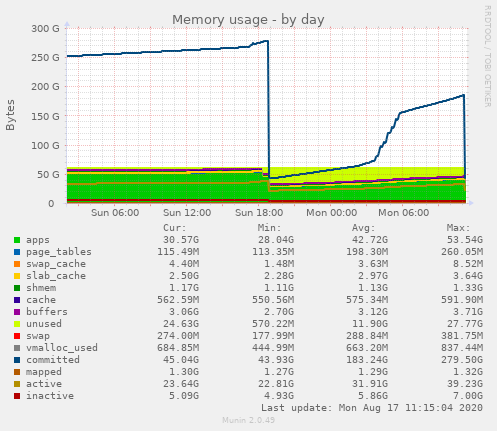
Seeing invidious use a huge amount of virtual memory running in docker:
 SharkyRawr
on 17 Aug 2020
SharkyRawr
on 17 Aug 2020
I'm running my self-hosted instance under valgrind to try to understand what's happening here. Unfortunately, the leak seems to disappear when running under valgrind :facepalm:
rfwatson
on 9 Sep 2020
I'm running my self-hosted instance under valgrind to try to understand what's happening here. Unfortunately, the leak seems to disappear when running under valgrind :facepalm:
Do you run valgrind in Docker?
unixfox
on 9 Sep 2020
Invidious has a memory leak, the only way to fix it currently is to restart the instance often (usually a cronjob restarting every hour works)
 TheFrenchGhosty
on 9 Sep 2020
TheFrenchGhosty
on 9 Sep 2020
@unixfox yes exactly
rfwatson
on 9 Sep 2020
The memory leak comes from the lsquic.cr library; it does not release the memory when the connection is closed. There is a background thread that polls youtube every minute for a decrypt function. This is the reason the memory usage increases when the invidious instance is idle. As a workaround for the memory leak, I add a PR that adds an option to disable the polling and get the decrypt function when needed. The memory usage does not increase when the instance is idle but it still goes up when it's used.
However, I have not been able to properly test the changes. Although I haven't found a video that does not work, I don't see the decrypt function called. The decrypt function is used in video.fmt_stream and video.adaptive_fmts and seams to be related to youtube streams but youtube streams never worked in my instance so I can't verify the change.
 vhuynh3000
on 27 Sep 2020
vhuynh3000
on 27 Sep 2020
The memory leak comes from the lsquic.cr library; it does not release the memory when the connection is closed.
So that's a bug specific to the Crystal bindings and not the LSQUIC library itself?
If so: maybe it would be best to detail @vhuynh3000's findings in a separate issue here? This _sounds_ like a rather easy fix if the assessment about the missing memory freeing is correct.
Or maybe one of the Invidious maintainers could chime in (since the bindings are under the same org). This issue is a pretty big roadblock for running a reliable Invidious instance in Docker that doesn't need to get restarted ever so often (causing interrupts for people currently watching videos). I'd love to help out directly, but I'm not familiar with Crystal at all; but I'm willing to test any potential fixes for this.
imtbl
on 28 Sep 2020
I did some more investigation and there seems to be at least two sources of the memory leaks. The first occurs when a quic connection is closed. I don't know if it's in the binding or the lsquic library itself. The release notes for lsquic mentions fixing a memory leak in a recent version so it maybe worth while to compile the latest lsquic version and see if it fixes it.
There seems to be another leak on the watch and search pages. It does not seem to be related to the quic library (I switched to standard http and it still occurred there) so that will need more investigation to determine the cause.
vhuynh3000
on 16 Oct 2020
Closed in favor of #1438
TheFrenchGhosty
on 24 Oct 2020
Related issues
 haizrul
·
4Comments
haizrul
·
4Comments
 dimqua
·
4Comments
dimqua
·
4Comments
 PureTryOut
·
3Comments
PureTryOut
·
3Comments
 elypter
·
4Comments
elypter
·
4Comments
 Atrate
·
4Comments
Atrate
·
4Comments
Most helpful comment
The memory leak comes from the lsquic.cr library; it does not release the memory when the connection is closed. There is a background thread that polls youtube every minute for a decrypt function. This is the reason the memory usage increases when the invidious instance is idle. As a workaround for the memory leak, I add a PR that adds an option to disable the polling and get the decrypt function when needed. The memory usage does not increase when the instance is idle but it still goes up when it's used.
However, I have not been able to properly test the changes. Although I haven't found a video that does not work, I don't see the decrypt function called. The decrypt function is used in video.fmt_stream and video.adaptive_fmts and seams to be related to youtube streams but youtube streams never worked in my instance so I can't verify the change.