Invidious: Put the docker image on hub.docker.com
Currently the most used Invidious image on hub.docker.com is an Arch Linux based image with 100k+ downloads. I would prefer using an image based on the official Dockerfile in this repo (I love myself some Alpine Linux) but that does mean I have to build it myself everytime there is an update.
If the official image were to be put on Docker hub, I could modify my docker-compose file to just pull the official image.
 PureTryOut
All 7 comments
Hello, I created an image on Quay synced with the master branch of invidious: https://quay.io/repository/unixfox/invidious
To use it in your docker-compose.yml just replace:
yml
build:
      context: .
      dockerfile: docker/Dockerfile
With:
````yml
image: quay.io/unixfox/invidious
volumes:
- "./config/config.yml:/invidious/config/config.yml"
````
I didn't use Docker Hub because only quay is able to use a git as a source for building an image.
 unixfox
on 20 Jan 2020
unixfox
on 20 Jan 2020
@omarroth unfortunately we can't really help you with this. Here's a simple 4-step tutorial: https://docs.docker.com/docker-hub/
Then there's this tutorial on how to auto-push images from Travis CI once they're built.
In case you're interested, I just claimed the invidious user on Docker Hub.
 leonklingele
on 2 Feb 2020
leonklingele
on 2 Feb 2020
You don't need any of that. The default docker hub builder works fine.
Just create an account on hub.docker.com then create a new repository and link it to the github repository. Finally add a build rule at the bottom.
That's it!
unixfox
on 2 Feb 2020
@omarroth
- Signup on https://hub.docker.com/signup
- Create a repository: https://hub.docker.com/repository/create
- Fill out the fields and click on the
+just near toBUILD RULES. You will probably have to authorize the Docker hub app just after clicking on the github icon.
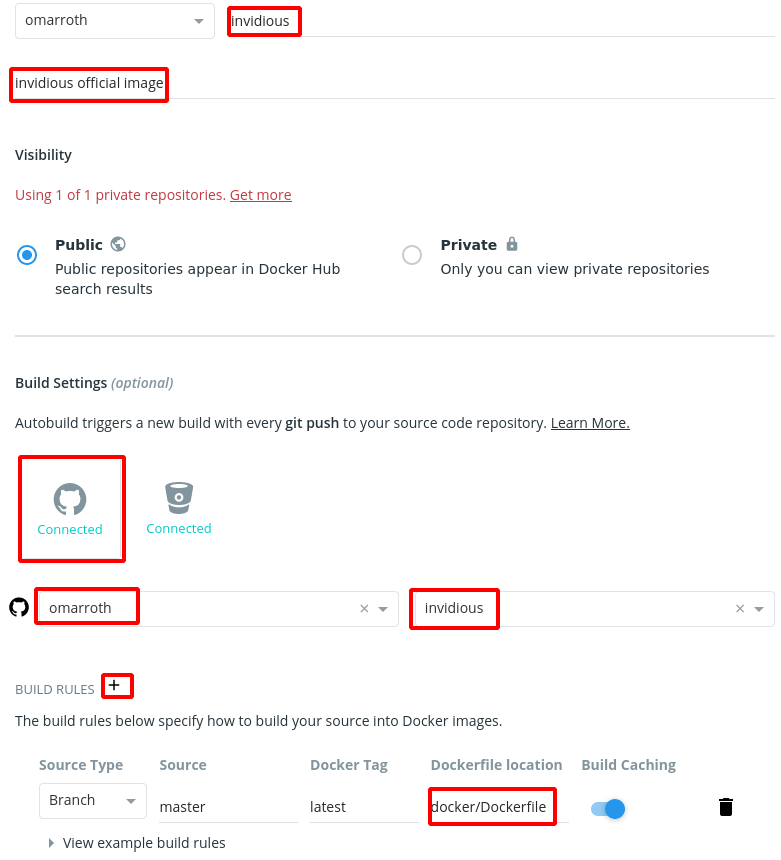
- Click on "create and build"

That's it!
unixfox
on 3 Feb 2020
Much appreciated @unixfox. Should be available here: https://hub.docker.com/r/omarroth/invidious.
 omarroth
on 7 Feb 2020
omarroth
on 7 Feb 2020
Awesome, it works great! Thank you very much for the effort!
PureTryOut
on 7 Feb 2020
Nice! @omarroth it would be nice if you could create Docker tags for each of the upcoming releases.
leonklingele
on 7 Feb 2020
Related issues
 arch-btw
·
4Comments
arch-btw
·
4Comments
 kozross
·
3Comments
kozross
·
3Comments
 SebKranz
·
3Comments
SebKranz
·
3Comments
 tmiland
·
4Comments
tmiland
·
4Comments
 Jtasiu
·
3Comments
Jtasiu
·
3Comments
Most helpful comment
Much appreciated @unixfox. Should be available here: https://hub.docker.com/r/omarroth/invidious.