Intro.js: The "Done" button no longer appears and bug in JSON code (v3)
When upgrading to version 3.1.0 the "done" button no longer appears. I have generated some functions when I click this button and now they cannot be executed because they do not appear.
External JS:
var intro = introJs();
intro.setOptions({
        steps: [
        {
        element: '#buscador',
        intro: '<b>Descubra otros expositores</b> según el <b>tipo de producto</b>, <b>marca</b> o <b>nombre de empresa</b>.',
        position: 'right'
        },
        {
Result:
https://jmp.sh/QKQyOok
 DigitalAndSEO
All 15 comments
@DigitalAndSEO looks like your CSS file is not up to date. How did you install Intro.js?
 afshinm
on 30 Nov 2020
afshinm
on 30 Nov 2020
I have already placed the new CSS, although the problem is that the "DONE" button does not appear in the code even if it is the last step, but the "NEXT" button always appears.
(I use the library from: https://cdnjs.com/libraries/intro.js)
DigitalAndSEO
on 30 Nov 2020
I'm also running into this issue, it started happening today, any fixes?
 solestravis
on 30 Nov 2020
solestravis
on 30 Nov 2020
I can confirm that the skip button has been removed and replaced with a close button but in the last step of the intro, the "Next" button changes to "Done".
@solestravis can you please share a screenshot?
afshinm
on 30 Nov 2020
I have already placed the new CSS, although the problem is that the "DONE" button does not appear in the code even if it is the last step, but the "NEXT" button always appears.
(I use the library from: https://cdnjs.com/libraries/intro.js)
Alright, I see. Can you share your tour settings please?
afshinm
on 30 Nov 2020
I'm assuming your settings hide the next button in the last step, that's why you don't have the "Done" button in the last step.
afshinm
on 30 Nov 2020
Hi @afshinm
My steps component:
<Steps
        enabled={enabled}
        steps={steps}
        initialStep={initialStep}
        onExit={this.handleExit}
        onComplete={this.handleComplete}
        onChange={this.handleOnChange}
        options={{
          hidePrev: true,
          hideNext: true,
          disableInteraction: true,
          exitOnOverlayClick: false,
          showStepNumbers: false,
          scrollToElement: true,
          scrollTo: "tooltip",
          showBullets: false,
          showButtons: true,
          exitOnEsc: true,
          showProgress: true,
          tooltipPosition: "bottom-middle-aligned",
          prevLabel: "Back",
          nextLabel: "Next",
          doneLabel: "Done",
        }}
      />
Screenshot:
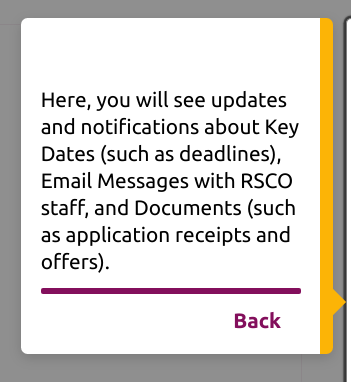
If I hit Enter it works as if I was hitting the "Done" button and the following error comes up on the browser console:
Uncaught DOMException: Failed to execute 'removeChild' on 'Node': The node to be removed is not a child of this node.
I'm also noticing this is only happening up on our stage server, but not locally.
solestravis
on 30 Nov 2020
@solestravis can you remove the hideNext: true from your settings and try again?
afshinm
on 30 Nov 2020
I have already placed the new CSS, although the problem is that the "DONE" button does not appear in the code even if it is the last step, but the "NEXT" button always appears.
https://jmp.sh/7p717Cj
(I use the library from: https://cdnjs.com/libraries/intro.js)Alright, I see. Can you share your tour settings please?
function startIntro(){
    $('#modalBienvenidaEstand').modal('hide');
    var intro = introJs();
    intro.setOptions({
        steps: [
        {
        element: '#buscador',
        intro: '<b>Descubra otros expositores</b> según el <b>tipo de producto</b>, <b>marca</b> o <b>nombre de empresa</b>.'
        },
        {
        element: '#logoExpositor',
        intro: 'Puede ver toda la <b>información del expositor</b>...'
        },
        {
        element: '#agentes',
        intro: '...así como el <b>personal</b> del estand para poder atenderle y sus modos de contactar con ellos, incluso si están <span class="badge badge-success">disponibles</span>, <span class="badge badge-warning">ocupados temporalmente</span> o <span class="badge badge-danger">no disponibles</span> para <b>videoconferencia integrada</b> en directo.'
        },
        {
        intro: 'Ahora puede finalizar el recorrido, visualizar el estand en una visión panoramica e interactuar con cada elemento disponible.<br>Disfrute de <b>NOMBRE DE LA FERIA</b>.<div class="text-center mt-3"><img class="img-fluid" style="max-width:100px" src="filesglobalfo/img/360-grados-flat.svg"></div><div class="text-center mt-3"><img class="img-fluid" style="max-width:39px" src="filesglobalfo/img/click-rotate-black.png"></div>'
        }
        ],
        nextLabel: 'Siguiente <i class="fas fa-arrow-right m-0"></i>',
        prevLabel: '<i class="fas fa-arrow-left m-0"></i> Anterior',
        skipLabel: 'Cerrar recorrido',
        doneLabel: 'Finalizar recorrido',
        overlayOpacity: .8,
        exitOnOverlayClick: false,
        exitOnEsc: false,
        keyboardNavigation: false,
        hideNext: true,
        hidePrev: true,
        showBullets: true,
        showProgress: false,
        showStepNumbers: false,
        disableInteraction: true
    });

    intro.start();
}
I'm assuming your settings hide the next button in the last step, that's why you don't have the "Done" button in the last step.
Yes. By css
DigitalAndSEO
on 30 Nov 2020
@DigitalAndSEO I see. Please remove hideNext: true from your settings and try again. The dedicated "Done" button has been removed in 3.1.0 and the next button's label changes to "Done" in the last step. Can you please confirm that?
afshinm
on 30 Nov 2020
Just updated the docs as well https://introjs.com/docs/intro/options#hideprev -- Apologies for the confusion.
afshinm
on 30 Nov 2020
@afshinm That worked! Thank you so much!
solestravis
on 30 Nov 2020
It worked! Thanks!
DigitalAndSEO
on 1 Dec 2020
thanks folks!
afshinm
on 1 Dec 2020
Related issues
 raviteja83
·
6Comments
raviteja83
·
6Comments
 janroesner
·
6Comments
janroesner
·
6Comments
 zombiezlk
·
6Comments
zombiezlk
·
6Comments
 pehuensolari
·
5Comments
pehuensolari
·
5Comments
 danielgolden
·
7Comments
danielgolden
·
7Comments
Most helpful comment
It worked! Thanks!