Intro.js: Elements white covered in Ionic 3 using Chrome 66
Description
Element to be highlighted is covered (instead of highlighted) by the white underlying intro js overlay in a Ionic 3 app. It happens only on chrome. Works fine on Firefox and Explorer. I found some other reports of people trying to use introjs with ionic failing for this reason.
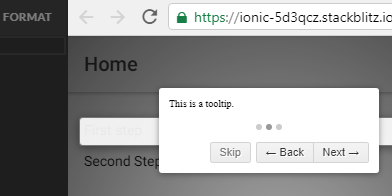
.
Example (recommended)
The issue is showing here.
Environment (optional)
Tried with the introjs npm version, importing in index.html version 2.7. The process used to import introjs in Ionic is described here but it's a bit chaotic. I made a summary here. The issue showed up in Chrome 66, with Ionic 3.
 sagashiftyblow
All 23 comments
@sagashiftyblow Any solution on this ? I am struggling with same issue.
 hupptechnologies
on 23 Apr 2018
hupptechnologies
on 23 Apr 2018
Unfortunately, no... @jshupptechnologies
sagashiftyblow
on 23 Apr 2018
If you find any solution please share @jshupptechnologies Thank you!!
sagashiftyblow
on 24 Apr 2018
Trying to run down the change that caused this issue as I need to use this library too.
@sagashiftyblow did you confirm this is working in chrome 65 as in something that was in 66 caused the issue?
Or could it be in an earlier build of chrome too?
 jwbeech
on 19 Jun 2018
jwbeech
on 19 Jun 2018
Truly, I don't know. I found the issue on Chrome 66, and it's still here on Chrome 67. I haven't tried on earlier versions, unfortunately. Seems, trivially, to be a problem linked to the management of z-index, but I couldn't found a solution still. If I can help, feel free to ask.
sagashiftyblow
on 19 Jun 2018
@sagashiftyblow after much trial and error I found the problem / solution.
The issue is a css property attached to the root ion-app element: contain: strict;.
This appears to be a performance tweak for the ionic app which clearly has z-index issues in chrome.
contain: strict; is actually shorthand for contain: layout paint size style, changing it to: contain: layout size style; is enough to mitigate the problem.
Some background I found: https://termvader.github.io/css-contain/
The following SCSS should allow for this change only when the introjs tips are applied:
ion-app, ion-nav, ion-tab, ion-tabs, .app-root, .ion-page{
&.introjs-fixParent{
contain: layout size style;
}
}
There may be other layouts that require this change not covered by the above style but that is the crux of the issue.
@hupptechnologies
jwbeech
on 19 Jun 2018
It works!! Great! Thank you very very very much for sharing solution!
sagashiftyblow
on 19 Jun 2018
@afshinm considering the intro.js framework supports a work around for adding a class to address parent container issues: i.e. introjs-fixParent.
Don't you think this fix should be integrated into the framework at large. This problem is not restricted to ionic but to parent elements with contain: strict on chrome.
jwbeech
on 19 Jun 2018
I was having problems to highlight itens inside <ion-header> <ion-toolbar> on ionic, even after @jwbeech solution.
To fix it, I just changed to all elements with .introjs-fixParent to have the contain: layout size style.
.introjs-fixParent {
contain: layout size style !important;
}
 Stiveknx
on 17 Aug 2018
Stiveknx
on 17 Aug 2018
Hi, i got the same issue while trying to highlight an element inside an ion-card. Any idea ?
 OAnouman
on 23 Aug 2018
OAnouman
on 23 Aug 2018
Have tou tried to add the CSS rule i've posted?
Stiveknx
on 23 Aug 2018
Yes i did @Stiveknx. It works on all components i used so far but on ion-card. I don't know why. I tried to dive in the CSS rules but nothing worked for now.
EDIT : Same issue with modals
OAnouman
on 23 Aug 2018
Try to add position: absolute !important on introJs-fixParent.
Em qua, 22 de ago de 2018 19:52, Martial Anouman notifications@github.com
escreveu:
Yes i did @Stiveknx https://github.com/Stiveknx. It works on all
components i used so far but on ion-card. I don't know why. I tried to dive
in the CSS rules but nothing worked for now.—
You are receiving this because you were mentioned.
Reply to this email directly, view it on GitHub
https://github.com/usablica/intro.js/issues/840#issuecomment-415211000,
or mute the thread
https://github.com/notifications/unsubscribe-auth/AAeY5Z_qg3v6w7HR_Jn5Zf0AnRBJMWPFks5uTeChgaJpZM4Taxe9
.
Stiveknx
on 23 Aug 2018
I found a fix. It was due to a css rule of .item class. contain was set to "content". Just set it to none or layout size style.
.item {
contain: layout size style | none !important;
}
OAnouman
on 23 Aug 2018
In general we got to deal with contain: strict spread all over ionic native components.
So if the highlighted item doesn't appear look for contain: strict in its parents.
Hope it will help someone.
OAnouman
on 23 Aug 2018
The same problem re-appear if I add a (transform: scale(1.5) !important;) to ion-content (dont' ask why, but I need to scale all the pages). The overlay is correctly positioned but appears with a white cover on it. Someone had this problem, too, maybe?
sagashiftyblow
on 12 Oct 2018
yes, I had the same problem, but I solved downloading the css into the project and adding this command inside the item.
Now I have another mistake, after the tour finishes, the button that was part of the tour does not let me click on it, has anyone else been through this?
While the tour is inside the button it works normally.
 DiegoFSFlor
on 19 Oct 2018
DiegoFSFlor
on 19 Oct 2018
I had the same issue. adding box-shadow and making the overly transparent solved the issue.
.introjs-helperLayer {
 background: transparent !important;
 box-shadow: 0 0 0 9999px rgba(1, 1, 1, 0.8);
}
and
.introjs-overlay {
 background: transparent !important;
}
 fidaktk
on 21 Jan 2019
fidaktk
on 21 Jan 2019
that worked thanks!
 lkovesdi
on 31 Jan 2019
lkovesdi
on 31 Jan 2019
ion-app, ion-nav, ion-tab, ion-tabs, .app-root, .ion-page{
    &.introjs-fixParent{
        contain: layout size style;
    }
}
Not works for me :( Where I have to add this code block?
 lsantaniello
on 26 Nov 2019
lsantaniello
on 26 Nov 2019
Solved appling this css code:
.introjs-helperLayer {
 background: transparent !important;
 box-shadow: 0 0 0 9999px rgba(1, 1, 1, 0.8);
}
.introjs-overlay {
 background: transparent !important;
}
It works for the content but I have problem for the header bar.
Could you please help me?
lsantaniello
on 7 Dec 2019
I was having problems to highlight itens inside
<ion-header> <ion-toolbar>on ionic, even after @jwbeech solution.
To fix it, I just changed to all elements with .introjs-fixParent to have the contain: layout size style..introjs-fixParent { contain: layout size style !important; }
Please @Stiveknx @OAnouman, help me. I have the same issue for ion-header component. How you solved it?
Thanks in advance
lsantaniello
on 7 Dec 2019
I had the same problem in an electron app (based on chrome) i am working on.
While introjs worked as expected for a while it suddenly just renderer white space above the highlighted ui element
Adding the following to the project css solved it
.introjs-helperLayer { background: transparent !important; box-shadow: 0 0 0 9999px rgba(1, 1, 1, 0.8); }
and
.introjs-overlay { background: transparent !important; }
Would be great to have it fixed without having the need to re-write css rules.
 yafp
on 18 Feb 2020
yafp
on 18 Feb 2020
Related issues
 namgiang
·
6Comments
namgiang
·
6Comments
 raviteja83
·
6Comments
raviteja83
·
6Comments
 cssagogo
·
4Comments
cssagogo
·
4Comments
 jaesung2061
·
9Comments
jaesung2061
·
9Comments
 pehuensolari
·
5Comments
pehuensolari
·
5Comments
Most helpful comment
I had the same issue. adding box-shadow and making the overly transparent solved the issue.
.introjs-helperLayer { background: transparent !important; box-shadow: 0 0 0 9999px rgba(1, 1, 1, 0.8); }and
.introjs-overlay { background: transparent !important; }