Intro.js: Selected Element doesn't show on top of overlay... Problem with z index
I tried to use introjs, then everything looks fin, except, when an element is selected then element is placed under the selector box, and because of its background transparency, I can see it but not clear, it looks despite having higher z-index to the selected element by adding two classes "introjs-showElement introjs-relativePosition", but still my element get some other CSS side-effects from another one, I wanted to see have been faced by something like this...
 khcc
khcc
All 67 comments
Thanks for report.
Could you please provide an online example of your problem? Like jsFiddle.
 afshinm
on 28 Apr 2013
afshinm
on 28 Apr 2013
Yes, I can also confirm this is happening. Looks like the intro-js layers are being appended to the DOM in the body, not as siblings of the target's parent. I believe that the z-index won't work unless the intro-js layers are adjacent in the DOM to the target.
 tvpmb
on 29 Apr 2013
tvpmb
on 29 Apr 2013
Yes, Actually, if the selected element is nested through some DIVs (or any
other block elements) with position RELATIVE, this bug will be raised!
Basically when B is nested within A and A is relative, then turn B to an ABSOLUTE
div, just make it absolute in relative to the A region, not to the whole "window", so
that's why, doesn't matter how much is its "z-index", still B is sucked within
A and there is no way to get out!! Moreover if A is nested in another relative element then this story would be more complicated. But there is a solution....I hv to try...
On Mon, Apr 29, 2013 at 6:09 AM, tvpmb [email protected] wrote:
Yes, I can also confirm this is happening. Looks like the intro-js layers
are being appended to the DOM in the body, not as siblings of the target's
parent. I believe that the z-index won't work unless the intro-js layers
are adjacent in the DOM to the target.—
Reply to this email directly or view it on GitHubhttps://github.com/usablica/intro.js/issues/109#issuecomment-17143782
.
khcc
on 29 Apr 2013
I confirm this happening. Any solutions so far?
 drgomesp
on 30 Apr 2013
drgomesp
on 30 Apr 2013
I've created a fiddle to demonstrate the problem: http://jsfiddle.net/Zwr7s/
Looks to be when the parent has both absolute positioning and a z-index.
UPDATE - actually, it happens whether the parent has absolute or relative positioning. Doesn't occur when no position is set (static)
 dozyatom
on 2 May 2013
dozyatom
on 2 May 2013
Thanks @Dozyatom.
I'll work on the patch for next version, marked as bug.
afshinm
on 3 May 2013
Also let me know if you have ideas about how to fix it.
afshinm
on 3 May 2013
I fixed that. Could someone check that the problem is solved or not? I need a confirm.
afshinm
on 3 May 2013
@Dozyatom see: http://jsfiddle.net/Zwr7s/3/
afshinm
on 3 May 2013
Thanks for the quick update, but I've got two problems:
1) it doesn't work for a parent with position: fixed
2) it looks like you're removing the z-index of the parent - this is a little heavy handed! I need my existing z-index attributes to remain as they are, otherwise it breaks existing layout.
I've spent a bit of time fiddling with this now, and I'm not sure it can be solved. My basic fiddle is http://jsfiddle.net/7MPpe/ - you can see I'm trying to cater for any type of nesting. No combination of z-index's seems to be able to elevate the target element above the mask.
And reading https://developer.mozilla.org/en-US/docs/CSS/Understanding_z-index/The_stacking_context seems to indicate that it's impossible to do. It appears the z-index property is relative only to the parent container, so an external div cannot be manipulated to sit in-between.
dozyatom
on 3 May 2013
I confirm the same issue with parents with fixed position. Any updates?
drgomesp
on 6 May 2013
@Dozyatom Really we can't fix this problem in another way, that's the only way! I want your feedback, what you think about the current patch? I believe this patch at least could solve some problems.
afshinm
on 6 May 2013
@drgomesp I'll fix the problem for fixed element positioned today.
afshinm
on 6 May 2013
@afshinm any updates?
drgomesp
on 7 May 2013
Sorry guys but this problem still exists. I need more time to solve this problem.
afshinm
on 10 May 2013
We can help, after all this is an open source project.
Tell us more about what do you think its happening.
drgomesp
on 13 May 2013
I think this problem is not solvable using traditional HTML/CSS -- Its just
the way that z-index + html nesting child/parent relationships work.
However, a somewhat hacky solution that would work is to do something like
the Image Area Select jquery plugin.
Take a look at the way this plugin masks off the selected area.
https://github.com/odyniec/imgareaselect
Matt Babineau
VP, Product Marketing
TVPage, Inc.
6827 Nancy Ridge Drive
San Diego, CA 92121
t: 858 427-4909
f: 858 427-4951
e: [email protected]
www.tvpage.com
On Mon, May 13, 2013 at 6:16 AM, Daniel Ribeiro [email protected]:
We can help, after all this is an open source project.
Tell us more about what do you think its happening.
—
Reply to this email directly or view it on GitHubhttps://github.com/usablica/intro.js/issues/109#issuecomment-17810603
.
tvpmb
on 13 May 2013
@drgomesp Sure, why not?
Actually currently I'm pretty busy for releasing the v0.4.0 and manage other pull request and feature requests, it's really hard to keep the mind focused on the problems like this. But you can take a look at this problem, it's a little bit confusing but I don't think it's an impossible to solve.
afshinm
on 16 May 2013
Was there ever a solution to this problem with fixed elements?
 garnermccloud
on 25 Sep 2013
garnermccloud
on 25 Sep 2013
I think I have solved this with the alternative approach suggested by @tvpmb - take a look at https://github.com/Dozyatom/guide.js
Basically, I surround the element, rather than try raise it above a mask. It's working for me so hopefully useful to others as well...
dozyatom
on 28 Sep 2013
@Dozyatom I have this issue. guide.js solves the problem. but I like the introjs interface items. Did you by any chance make a version using your "surround" method but with intro.js. I'd really like that.
 AwokeKnowing
on 18 Nov 2013
AwokeKnowing
on 18 Nov 2013
Have this problem as well.
 pkpp1233
on 9 Jan 2014
pkpp1233
on 9 Jan 2014
Is there any update on this issue in Intro.js...? I have used it at many places, and currently short of time to switch to Guide.js at all places. Suggest.
 nimitmangal-pt
on 14 Apr 2014
nimitmangal-pt
on 14 Apr 2014
@afshinm Any chance there is a fix in place for this? Check out a possible solution here: https://github.com/heelhook/chardin.js/issues/26
 aprilb
on 23 Apr 2014
aprilb
on 23 Apr 2014
@afshinm Just confirming that this is still an issue. I'm using the angular-intro port, but the issue resides with the positioning/z-indexing. Any ideas on this?
 tannerlinsley
on 18 Jun 2014
tannerlinsley
on 18 Jun 2014
@afshinm In my particular situation, changed the parent z-index to match that of the highlighted element (99999...) worked perfectly. But I agree that in the other scenarios above, there is still error
tannerlinsley
on 18 Jun 2014
@Dozyatom I think using your surround method could be promising in an intro.js context. I would be interested in seeing that.
tannerlinsley
on 18 Jun 2014
https://github.com/Dozyatom/guide.js - still some outstanding issues, but does demonstrate the principle
dozyatom
on 18 Jun 2014
@Dozyatom Have you tried integrating the surround method into intro.js though? I am looking into your code right now and seeing how difficult it would be to replace Intro.js's overlay with the surround method.
tannerlinsley
on 18 Jun 2014
@Dozyatom So, I just submitted a pull request to guide.js with some tiny things, and also just created "angular-guide" which is a port of the angular-intro wrapper but for guide.js I've also registered both with bower, assuming you merge the pull. PM me for more info [email protected], so we don't pollute this thread.
tannerlinsley
on 18 Jun 2014
I experienced this problem only on Webkit browsers (in Firefox, it works). Turns out I had -webkit-transform: translateZ(0) on my parent element. When I commented it out, it works fine. (That's also why it runs OK on Firefox)
 davidchristiandy
on 26 Jun 2014
davidchristiandy
on 26 Jun 2014
Help layer doesn't work with the absolute positioned element. In my case the helplayer prepends the absolute positioned element instead of surrounding it. My header is a fixed element, on using intro.js on header it forms a helplayer div of equal width and height and puts it before the actual header.

 anupamapanchal
on 16 Sep 2014
anupamapanchal
on 16 Sep 2014
@anupamapanchal try onboard.js
tannerlinsley
on 16 Sep 2014
@tannerlinsley : Hey can you please share the link of demo of onboard.js, i can't find it on their repository.
anupamapanchal
on 23 Sep 2014
I don't think they have an online demo yet. Just clone it down and run the example/index . hymn for now. I'll see if I can work up a better online version here soon
tannerlinsley
on 23 Sep 2014
Confirming that this is still an issue. Trying to use this lib on a Bootstrap 3 fixed navigation and the items being highlighted are be masked by the overlay. Its extremely frustrating that this has been marked as "trivial" and no patch has been made for it yet.
 feitla
on 7 Oct 2014
feitla
on 7 Oct 2014
I have same problem you can use $(".introjs-fixParent").removeClass("introjs-fixParent");
after introJs().start();
 erdemucr
on 19 Mar 2015
erdemucr
on 19 Mar 2015
@anupamapanchal, onboard.js is now an angular module called nzTour. If you're in to angular, enjoy!
tannerlinsley
on 27 Mar 2015
Any update on this? I see this _only on Safari_ now, but I see it on iOS and on Mac.
 controversial
on 15 Apr 2016
controversial
on 15 Apr 2016
This is an issue which is _only reproducible_ in Mobile Safari for me. The desktop version of Safari works fine for me, but it might be that this is just a slightly different setup?
 nvaken
on 2 May 2016
nvaken
on 2 May 2016
For anyone else having this problem, you can use this 'hack'.
I forked this repo and made needed change to make it work. Feel free to include danishin/intro.js in package.json and use the following snippet.
var introGuide = introJs();
introGuide.onchange(function(targetElement) {
// Find the parent having the introjs-fixParent class
$parentElement = $(targetElement).parents(".introjs-fixParent");
// Check if the parent has the position fixed
if ($parentElement.css("position") === "fixed") {
// Change the position to absolute
$parentElement.css("position", "absolute");
}
});
introGuide.start();
in place of,
introJs().start();
 danishin
on 22 Sep 2016
danishin
on 22 Sep 2016
For future reference, if you are using WOW.js, it may be conflicting too.
So, I got rid of the "wow fadeIn" and it worked.
 raphaelarias
on 27 Jul 2017
raphaelarias
on 27 Jul 2017
I'm using intro.js (2.7.0) with angularjs and angular-material. I have the same z-index problem with a FAB element (Floating Action Button).
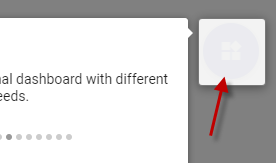
I didn't get this to work. Does anybody still have the same issue?
This problem exists in several browsers (chrome, firefox, edge)
 ccvp
on 15 Dec 2017
ccvp
on 15 Dec 2017
yes we do @ccvp
 picwellwisher12pk
on 20 Dec 2017
picwellwisher12pk
on 20 Dec 2017
Still experiencing this issue with multiple elements in my application, intro.js v 2.4 . Any type of fix I try to do is breaking my layout, this is a major issue that degrades the usefulness of the library substantially.
 overwatch13
on 10 Jan 2018
overwatch13
on 10 Jan 2018
I came across the same issue with an old version of Bootstrap Tour I am using in my Web app Clibu. It revolves around stacking order, z-index etc.
In the end the only solution that worked in all cases for me was to clone the elements you want highlighted and then absolutely position the clone over the original element.
guide.js and I think the current Bootstrap tour use 4 rectangular overlays which surround the element you want highlighted. Clearly this works, however if you wanted to highlight multiple elements, this would quickly get complex.
Here are some good articles:
https://philipwalton.com/articles/what-no-one-told-you-about-z-index/
https://developer.mozilla.org/en-US/docs/Web/CSS/CSS_Positioning/Understanding_z_index/The_stacking_context
https://developer.mozilla.org/en-US/docs/Web/CSS/CSS_Positioning/Understanding_z_index/Stacking_without_z-index
 nevf
on 6 Feb 2018
nevf
on 6 Feb 2018
If somebody wants a quick fix until the issue is resolved, this is how I did it.
I took an inspiration in this CodePen https://codepen.io/iGadget/pen/gpNqWm
and the resulting CSS is:
    .introjs-helperLayer {
        background: transparent;
    }

    .introjs-overlay {
        display: none;
    }

    .introjs-helperLayer:before {
        opacity: 0;
        content: '';
        position: fixed;
        width: inherit;
        height: inherit;
        border-radius: 0.5em;
        border: .2em solid rgba(255, 217, 68, 0.8);
        box-shadow: 0 0 0 1000em rgba(0,0,0, .7);
        opacity: 1;
    }

    .introjs-helperLayer:after {
        content: '';
        left: 0;
        right: 0;
        top: 0;
        bottom: 0;
        position: fixed;
        z-index: 1000;
    }
It will disable introJs' overlay and instead use box-shadow and create a hole in it, which will result in similar behavior.
Note: the last CSS selector:after is probably unnecessary, but I did not have time to test it, so I'm leaving it there, just to be sure. Let me know what you will find out.
 exoJSON
on 13 Feb 2018
exoJSON
on 13 Feb 2018
If it can help anyone...
I read this conversation as I was experiencing the same issue. Thanks to nevf, I realized the problem was stacking context. I installed the Chrome extension z-context, which tells you if an element creates or is part of a stacking context. This helped me to figure out which elements created the context. And then, highlighting these elements, I saw that introjs already had partly fixed the issue using a class called "introjs-fixParent". This class is dynamically added to the parents elements that create stacking context, and sets several css attributes, for instance z-index to "auto", in order to remove temporarily the stacking context. But it missed the attribute "position" (probably because in some cases, it can lead to problems in the page layout).
So just to give it a try, I added the following rule :
.introjs-fixParent{position: absolute !important;}
to my css and it immediately worked like a charm !
 rdacn
on 27 Feb 2018
rdacn
on 27 Feb 2018
As I expected, I found that originally introjs had included
position: absolute !important;
in the fixParent class, but it generated issues with the general layout in some (and maybe the majority) of cases. So it was removed, as we can see in #583
But in my case, this doesn't break my layout and totally solves the present issue, so it's worth giving it a try
rdacn
on 1 Mar 2018
+1
 anasanzari
on 8 Apr 2018
anasanzari
on 8 Apr 2018
+1 to above by @rdacn to add .introjs-fixParent{position: absolute !important;}
 functionalStoic
on 24 Apr 2018
functionalStoic
on 24 Apr 2018
Still a problem and what appears to be a pretty big and easily encountered one, wish it was more openly declared as a "restriction" in the introduction so users would know what they're getting into using this..
 pyroflies
on 19 Jun 2018
pyroflies
on 19 Jun 2018
I do think it's a tough problem with opinionated solutions. Check out #826 for a proposed solution, with possible downsides.
 bozdoz
on 19 Jun 2018
bozdoz
on 19 Jun 2018
If somebody wants a quick fix until the issue is resolved, this is how I did it.
I took an inspiration in this CodePen https://codepen.io/iGadget/pen/gpNqWm
and the resulting CSS is:.introjs-helperLayer { background: transparent; } .introjs-overlay { display: none; } .introjs-helperLayer:before { opacity: 0; content: ''; position: fixed; width: inherit; height: inherit; border-radius: 0.5em; border: .2em solid rgba(255, 217, 68, 0.8); box-shadow: 0 0 0 1000em rgba(0,0,0, .7); opacity: 1; } .introjs-helperLayer:after { content: ''; left: 0; right: 0; top: 0; bottom: 0; position: fixed; z-index: 1000; }It will disable introJs' overlay and instead use box-shadow and create a hole in it, which will result in similar behavior.
Note: the last CSS selector:after is probably unnecessary, but I did not have time to test it, so I'm leaving it there, just to be sure. Let me know what you will find out.
This workaround works for me. I only need to change position to absolute.
 weili1977
on 5 Dec 2018
weili1977
on 5 Dec 2018
If somebody wants a quick fix until the issue is resolved, this is how I did it.
I took an inspiration in this CodePen https://codepen.io/iGadget/pen/gpNqWm
and the resulting CSS is:.introjs-helperLayer { background: transparent; } .introjs-overlay { display: none; } .introjs-helperLayer:before { opacity: 0; content: ''; position: fixed; width: inherit; height: inherit; border-radius: 0.5em; border: .2em solid rgba(255, 217, 68, 0.8); box-shadow: 0 0 0 1000em rgba(0,0,0, .7); opacity: 1; } .introjs-helperLayer:after { content: ''; left: 0; right: 0; top: 0; bottom: 0; position: fixed; z-index: 1000; }It will disable introJs' overlay and instead use box-shadow and create a hole in it, which will result in similar behavior.
Note: the last CSS selector:after is probably unnecessary, but I did not have time to test it, so I'm leaving it there, just to be sure. Let me know what you will find out.This workaround works for me. I only need to change position to absolute.
+1, worked for me too, thanks a lot!
 gTutini
on 20 Dec 2018
gTutini
on 20 Dec 2018
If somebody wants a quick fix until the issue is resolved, this is how I did it.
I took an inspiration in this CodePen https://codepen.io/iGadget/pen/gpNqWm
and the resulting CSS is:.introjs-helperLayer { background: transparent; } .introjs-overlay { display: none; } .introjs-helperLayer:before { opacity: 0; content: ''; position: fixed; width: inherit; height: inherit; border-radius: 0.5em; border: .2em solid rgba(255, 217, 68, 0.8); box-shadow: 0 0 0 1000em rgba(0,0,0, .7); opacity: 1; } .introjs-helperLayer:after { content: ''; left: 0; right: 0; top: 0; bottom: 0; position: fixed; z-index: 1000; }It will disable introJs' overlay and instead use box-shadow and create a hole in it, which will result in similar behavior.
Note: the last CSS selector:after is probably unnecessary, but I did not have time to test it, so I'm leaving it there, just to be sure. Let me know what you will find out.This workaround works for me. I only need to change position to absolute.
+1, worked for me too, thanks a lot!
Also remember to change,
.introjs-overlay {
display: none;
}
to,
.introjs-overlay {
opacity: 0 !important;
}
Otherwise you will be able to click the element below the overlay.
weili1977
on 20 Dec 2018
This fix helped me, thank you
 arianul
on 27 Feb 2019
arianul
on 27 Feb 2019
If somebody wants a quick fix until the issue is resolved, this is how I did it.
I took an inspiration in this CodePen https://codepen.io/iGadget/pen/gpNqWm
and the resulting CSS is:.introjs-helperLayer { background: transparent; } .introjs-overlay { display: none; } .introjs-helperLayer:before { opacity: 0; content: ''; position: fixed; width: inherit; height: inherit; border-radius: 0.5em; border: .2em solid rgba(255, 217, 68, 0.8); box-shadow: 0 0 0 1000em rgba(0,0,0, .7); opacity: 1; } .introjs-helperLayer:after { content: ''; left: 0; right: 0; top: 0; bottom: 0; position: fixed; z-index: 1000; }It will disable introJs' overlay and instead use box-shadow and create a hole in it, which will result in similar behavior.
Note: the last CSS selector:after is probably unnecessary, but I did not have time to test it, so I'm leaving it there, just to be sure. Let me know what you will find out.This workaround works for me. I only need to change position to absolute.
+1, worked for me too, thanks a lot!
Also remember to change,
.introjs-overlay {
display: none;
}to,
.introjs-overlay {
opacity: 0 !important;
}Otherwise you will be able to click the element below the overlay.
I am still unable to click element below the overlay
 IamSachin
on 3 Jul 2019
IamSachin
on 3 Jul 2019
Also remember to change,
.introjs-overlay {
display: none;
}to,
.introjs-overlay {
opacity: 0 !important;
}Otherwise you will be able to click the element below the overlay.
I had to add also
.introjs-overlay {
  opacity: 0 !important;
  z-index: 99999999!important; // <--- this!
}
So, final working code for me is:
/* Based on https://github.com/usablica/intro.js/issues/109 */

.introjs-helperLayer {
  background: transparent;
}

.introjs-overlay {
  opacity: 0 !important;
  z-index: 99999999!important;
}

.introjs-helperLayer:before {
  opacity: 0;
  content: '';
  position: absolute;
  width: inherit;
  height: inherit;
  border-radius: 0.5em;
  border: .2em solid rgba(255, 217, 68, 0.8);
  box-shadow: 0 0 0 1000em rgba(0,0,0, .7);
  opacity: 1;
}

.introjs-helperLayer:after {
  content: '';
  left: 0;
  right: 0;
  top: 0;
  bottom: 0;
  position: absolute;
  z-index: 1000;
}
Thanks!
 ngelx
on 17 Jul 2019
ngelx
on 17 Jul 2019
We used the svg mask approach with Shepherd. If this issue is giving you problems, perhaps give Shepherd a try! https://github.com/shipshapecode/shepherd
 rwwagner90
on 21 Jul 2019
rwwagner90
on 21 Jul 2019
.introjs-helperLayer {
mix-blend-mode: overlay !important;
}
This managed to work beautifully for me
 shivaRamdeen
on 3 Sep 2019
shivaRamdeen
on 3 Sep 2019
In my case,
I just meet this issue on Safari.
So I just put this line to the global CSS:
.introjs-fixParent {
    -webkit-overflow-scrolling: initial !important;
}
 luckyboykg
on 24 Oct 2019
luckyboykg
on 24 Oct 2019
Also remember to change,
.introjs-overlay {
display: none;
}
to,
.introjs-overlay {
opacity: 0 !important;
}
Otherwise you will be able to click the element below the overlay.I had to add also
.introjs-overlay {
  opacity: 0 !important;
  z-index: 99999999!important; // <--- this!
}
So, final working code for me is:
/* Based on https://github.com/usablica/intro.js/issues/109 */

.introjs-helperLayer {
  background: transparent;
}

.introjs-overlay {
  opacity: 0 !important;
  z-index: 99999999!important;
}

.introjs-helperLayer:before {
  opacity: 0;
  content: '';
  position: absolute;
  width: inherit;
  height: inherit;
  border-radius: 0.5em;
  border: .2em solid rgba(255, 217, 68, 0.8);
  box-shadow: 0 0 0 1000em rgba(0,0,0, .7);
  opacity: 1;
}

.introjs-helperLayer:after {
  content: '';
  left: 0;
  right: 0;
  top: 0;
  bottom: 0;
  position: absolute;
  z-index: 1000;
}
Thanks!
I just found this and it seems to work. Would be nice if that got moved to the docs in FAQ / troubleshooting to save some googles
 SumNeuron
on 12 Mar 2020
SumNeuron
on 12 Mar 2020
Yes, I can also confirm this is happening. Looks like the intro-js layers are being appended to the DOM in the body, not as siblings of the target's parent. I believe that the z-index won't work unless the intro-js layers are adjacent in the DOM to the target.
Same issue
 Nashorn
on 18 May 2020
Nashorn
on 18 May 2020
If somebody wants a quick fix until the issue is resolved, this is how I did it.
I took an inspiration in this CodePen https://codepen.io/iGadget/pen/gpNqWm
and the resulting CSS is:.introjs-helperLayer { background: transparent; } .introjs-overlay { display: none; } .introjs-helperLayer:before { opacity: 0; content: ''; position: fixed; width: inherit; height: inherit; border-radius: 0.5em; border: .2em solid rgba(255, 217, 68, 0.8); box-shadow: 0 0 0 1000em rgba(0,0,0, .7); opacity: 1; } .introjs-helperLayer:after { content: ''; left: 0; right: 0; top: 0; bottom: 0; position: fixed; z-index: 1000; }It will disable introJs' overlay and instead use box-shadow and create a hole in it, which will result in similar behavior.
Note: the last CSS selector:after is probably unnecessary, but I did not have time to test it, so I'm leaving it there, just to be sure. Let me know what you will find out.
This help me a lot !!!! Thanks
 HoHoangThai1807
on 4 Jul 2020
HoHoangThai1807
on 4 Jul 2020
This issue has been automatically marked as stale because it has not had recent activity. It will be closed if no further activity occurs. Thank you for your contributions.
![stale[bot] picture](https://avatars.githubusercontent.com/in/1724?v=4&s=40) stale[bot]
on 17 Oct 2020
stale[bot]
on 17 Oct 2020
I believe the correct solution was proposed here by @bozdoz https://github.com/usablica/intro.js/pull/826
Working on a fix here: https://github.com/usablica/intro.js/pull/1075
afshinm
on 21 Nov 2020
Related issues
 alexandernst
·
5Comments
alexandernst
·
5Comments
 jaesung2061
·
9Comments
jaesung2061
·
9Comments
 Themandunord
·
3Comments
Themandunord
·
3Comments
 danielgolden
·
7Comments
danielgolden
·
7Comments
 cssagogo
·
4Comments
cssagogo
·
4Comments
Most helpful comment
If somebody wants a quick fix until the issue is resolved, this is how I did it.
I took an inspiration in this CodePen https://codepen.io/iGadget/pen/gpNqWm
and the resulting CSS is:
It will disable introJs' overlay and instead use box-shadow and create a hole in it, which will result in similar behavior.
Note: the last CSS selector:after is probably unnecessary, but I did not have time to test it, so I'm leaving it there, just to be sure. Let me know what you will find out.