Interact.js: Move a clone of the source
Is interact.js able of leaving the original element alone and moving a clone of it?
 skerit
All 29 comments
Technically, it's not capable of moving anything at all because it only provides event data. However, if you want to move a clone of the element that's being dragged, you can clone the target the dragstart event then move that clone when dragmove events happen.
 taye
on 6 Nov 2014
taye
on 6 Nov 2014
I have this code but when i try to clone it gives me nothing
` .draggable({
onstart: function (event) {
snapTarget = {
x: $('.stage').width() / 2,
y: $('.stage').height() / 2,
range: Infinity
};
var thumb = event.target.cloneNode(true);
thumb.classList.add('dragging');
thumb.dataset.dragX = 0;
thumb.dataset.dragY = 0;
},
onmove: function (event) {
var thumb = event.target,
x = (thumb.dataset.dragX|0) + event.dx,
y = (thumb.dataset.dragY|0) + event.dy;
thumb.style[preTransform] = 'translate(' + x + 'px,' + y + 'px)';
thumb.dataset.dragX = x;
thumb.dataset.dragY = y;
},
onend: function (event) {
var $thumb = $(event.target);
// if the drag was snapped to the stage
if (event.pageX === snapTarget.x && event.pageY === snapTarget.y) {
$('.stage img').removeClass('active');
$(' .thumbnail').removeClass('expanded')
.not($thumb).css(preTransform, '');
$thumb.addClass('expanded');
$('#gallery [data-image=' + $thumb.data('for') + ']').addClass('active');
}
else {
$thumb.css(preTransform, '');
}
$thumb.removeClass('dragging');
}
})`
 regenworm
on 13 Nov 2014
regenworm
on 13 Nov 2014
After you create the thumb, you would have to use that element in the move and end listeners instead of event.target. I would recommend that you keep the thumb variable somewhere where all the listeners can access it.
...
var thumb;
interact('...').draggable({
onstart: function (event) {
...
// assign to the thumb variable that was declared above
thumb = event.target.cloneNode(true);
thumb.classList.add('dragging');
thumb.dataset.dragX = 0;
....
Then in your other listeners, use thumb without changing it.
Another thing that you _could_ do but I don't recommend is event.interaction.element = thumb;. Doing that would change the value of event.target for the next start, move and end event listeners. However, it could break things now and/or in future.
taye
on 13 Nov 2014
I tried this but now the dropzone doesn't fire events when I drag the Clone over it... Any tips what I should do?
 dobromir-hristov
on 14 Aug 2015
dobromir-hristov
on 14 Aug 2015
@dobromir-hristov Here is a better method to do target cloning taken from the faq:
interact('.item')
  .draggable({ manualStart: true })
  .on('move', function (event) {
    var interaction = event.interaction;

    // if the pointer was moved while being held down
    // and an interaction hasn't started yet
    if (interaction.pointerIsDown && !interaction.interacting()) {
      var original = event.currentTarget,
          // create a clone of the currentTarget element
          clone = event.currentTarget.cloneNode(true);

      // insert the clone to the page
      // TODO: position the clone appropriately
      document.body.appendChild(clone);

      // start a drag interaction targeting the clone
      interaction.start({ name: 'drag' },
                        event.interactable,
                        clone);
    }
  });
Yes I saw that example, but I cannot get it to move on drag for the life of me. I tried with ondrag on move, and I get more and more messed up.
Here is a fiddle:
http://jsfiddle.net/djdobro/jh6gofL4/4/
"allowFrom" does not work too :(
I simply want to be able to drag a clone of the figures into a dropZone. Thats it... If I do not use manualStart I manage to make it work, somewhat but not like this.
At best I managed to make it move only when my mouse was over the image (not dragging, just over), but that is not what we want is it :(
dobromir-hristov
on 17 Aug 2015
@dobromir-hristov I used this code to get basic cloning to work. It doesn't meet all your needs, but it should get you started.
http://jsfiddle.net/gv0f16nq/2/
Good luck!
Edit: updated so cloned object are no longer clone-able...
 scattered
on 17 Aug 2015
scattered
on 17 Aug 2015
This is not helping much. It was what I had (just the whole "move it" part is inside the onmove param of draggable. I did not think that onmove and .on('move') were not the same....
Now Im getting some serious weird things like:
If I have images inside the draggable, I get the image dragged instead of the "draggable" element. Ok I will use a handle, no problem.
Same thing. Handle gets dragged on its own then when I drop the handle, then I get my clone following my mouse, but now I`m not holding my mouse button.... I will try and make a fiddle to explain my self.
Edit:
Here it is, a bit more understandable.
http://jsfiddle.net/djdobro/ujr71gww/1/
Try to drag the image and then hover over the handle. Something strange happens.
Also why cant we use the ondrag event?
dobromir-hristov
on 17 Aug 2015
@dobromir-hristov I might not 100% understand what your requirements are. Can you give a breakdown of what you're trying to achieve?
In any case, I've made another fiddle with a clone drag / drop.
scattered
on 18 Aug 2015
Haha you are probably using Chrome :)
Try under Firefox and see what I mean. The arrows and the Image it self are draggable elements, meaning they interfere with the dragging from the plugin it self. On Chrome it looks OK, but try on Firefox and see what I mean.
When you try to drag them, they dont move, but when you stop and let go of the mouse, they they start moving, but you are not even holding the mouse button any more.
I think it is a really good idea, to add such an example to the Main page along with the other examples.
I`m sure @taye will write it much cleaner than I can, and will help allot of others.
dobromir-hristov
on 18 Aug 2015
@dobromir-hristov You're right. I just tried in Firefox and it does exactly as you said. I'm busy for the rest of the day. Once I get some free time I'll try to look into this for you.
If anyone else with more experience using this library is able to provided some advice, it would be appreciated.
scattered
on 18 Aug 2015
I`m still working on it. There are some issues like Chrome and Safari Selecting every text there is on the website while dragging.
Or Iphone triggering clicks on Anchor elements on drag end ?? Really strange stuff :D I will look more into it.
Edit: Iphone 4 (at least thats what I have for tests) doesnt recalculate dropzone (if it is Fixed at bottom of page for example) so you cannot drop a draggable into the zone.
DynamicDrop is On.
dobromir-hristov
on 18 Aug 2015
@dobromir-hristov You need to prevent the browser's native drag events. The following should work in your case:
// listen for HTML5 native drag and drop API dragstart event
document.addEventListener('dragstart', function (event) {
    // use interact.js' matchesSelector polyfil to
    // check for match with your draggable target
    if (interact.matchesSelector(event.target, '.drag-element, .drag-element *')) {
        // prevent and stop the event if it's on a draggable target
        event.preventDefault();
        event.stopPropagation();
    }
});
Yes. This fixes quite allot of things with dragging :) Should be noted somewhere more visible.
dobromir-hristov
on 24 Aug 2015
Yeah, I think it also makes sense to prevent native dragstart on interactable elements by default.
taye
on 25 Aug 2015
Any info on the
// TODO: position the clone appropriately
Haven't got a solution working yet.
 dpekkle
on 22 Mar 2016
dpekkle
on 22 Mar 2016
It's interesting how hard this is to do with interact. Dragula offers clone functionality natively. Just sayin...
 cawoodm
on 19 Nov 2016
cawoodm
on 19 Nov 2016
As for a hack, I did this:
var draggedElement = null;
var draggedFromParent = null;
interact('.js-drag')
    .draggable({ inertia: true,
          max: Infinity,
          restrict: {
          restriction: 'self',
          elementRect: { left: 0, right: 0, top: 1, bottom: 1 },
          endOnly: true
        },
    }).on('dragstart', function (event) {
            draggedFromParent = event.interaction.element.parentNode;
            draggedElement = event.interaction.element.cloneNode(true);
            // and other codes after this.
     }).on('dragend', function (event) {
            draggedFromParent.appendChild(draggedElement);
            draggedElement = null;
            // and other codes after this.
        });
I would also love to have a clone:true option somehow.
 noc2spam
on 13 Dec 2016
noc2spam
on 13 Dec 2016
@taye Any info on the
// TODO: position the clone appropriately
Haven't got a solution working yet.
UPD: i now using fiddle provided by @scattered
Seems hacky to set two different onmove listeners (and remove drag listener), but it works
 koutsenko
on 2 Mar 2017
koutsenko
on 2 Mar 2017
I have tried all above solutions and am sad to say that none works properly on touch devices.
The cloned element behaves like its restriction is the original event.target and not what is specified on the initialization of the .draggable() function. Looks like cloneNode() does not clone the restrictions (on touch devices only?).
You can see what I mean by going here: http://jsfiddle.net/gv0f16nq/2/ and trying Chrome's device emulator.
@taye or anyone else, is there any work around on this?
Thanks in advance!
 wislem
on 13 Jul 2017
wislem
on 13 Jul 2017
I looked a bit into it @wislem . I couldn't get it to work with touch screen even when entirely deleting all your cloning code, try out http://jsfiddle.net/gv0f16nq/41/
Haven't worked with this library in a while but it seems like that's a place to start.
dpekkle
on 13 Jul 2017
Thanks for your time @dpekkle, but this has the exact same behavior. On my end, I'm cloning the draggable element and in no way can it move past the borders of the original element on touch screens. I guess I'll have to try dragula and see what it can do.
wislem
on 13 Jul 2017
but this has the exact same behavior
Well yeah, that's what I'm saying. But yes, I'd go with a different library this one has a lot of difficulties with manual start and events.
dpekkle
on 13 Jul 2017
I've successful made a "clone drag & drop" (https://codepen.io/odahcam/pen/gRqKJj?editors=0010), but its not working in touch devices as well.
If someone needs help to create the manipulation logic, feel free to use my code.
And, I would be glad if someone could help me on make this work in touch devices.
 odahcam
on 24 Jul 2017
odahcam
on 24 Jul 2017
To make it work on touch devices use:
.dragging-container,
.dragging-container * {
  -ms-touch-action: none;
  touch-action: none;
}
found it on stackoverflow and works good
 mrrovot
on 19 Sep 2018
mrrovot
on 19 Sep 2018
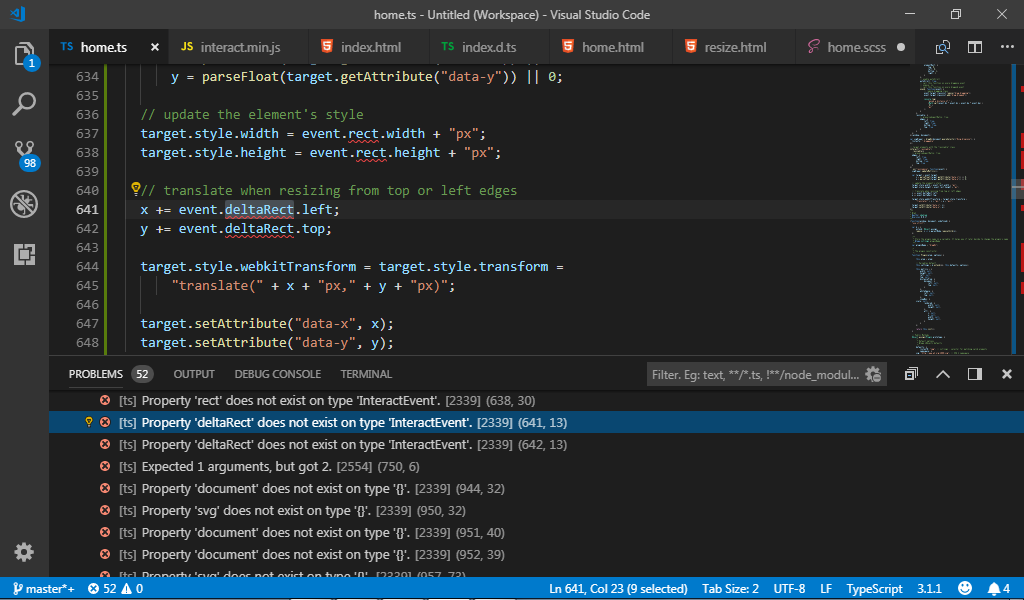
hi sir @odahcam how to fix this thanks
 BryanCalub
on 10 Oct 2018
BryanCalub
on 10 Oct 2018
Hi, I have no idea 😆
More than one year has passed from the time I was using interact, maybe some online demo of your error could help us to help you.
odahcam
on 10 Oct 2018
ok thankyou :)
BryanCalub
on 10 Oct 2018
@dobromir-hristov Here is a better method to do target cloning taken from the faq:
interact('.item')
  .draggable({ manualStart: true })
  .on('move', function (event) {
    var interaction = event.interaction;

    // if the pointer was moved while being held down
    // and an interaction hasn't started yet
    if (interaction.pointerIsDown && !interaction.interacting()) {
      var original = event.currentTarget,
          ... ...
@taye When use .on('move', function (event) {, event.currentTarget value is undefined, I find that event's type is PointerEvent, but when I use onmove property, event's type is InteractEvent, please help! (This happens in latest version 1.4.2, but it works well in 1.3.4. 😒)
 tweet
on 24 May 2019
tweet
on 24 May 2019
Related issues
 idmadj
·
3Comments
idmadj
·
3Comments
 brunolm
·
8Comments
brunolm
·
8Comments
 sualko
·
9Comments
sualko
·
9Comments
 gossi
·
5Comments
gossi
·
5Comments
 aoloe
·
8Comments
aoloe
·
8Comments
Most helpful comment
@dobromir-hristov Here is a better method to do target cloning taken from the faq: