Tracking issue for 2019.3 support.
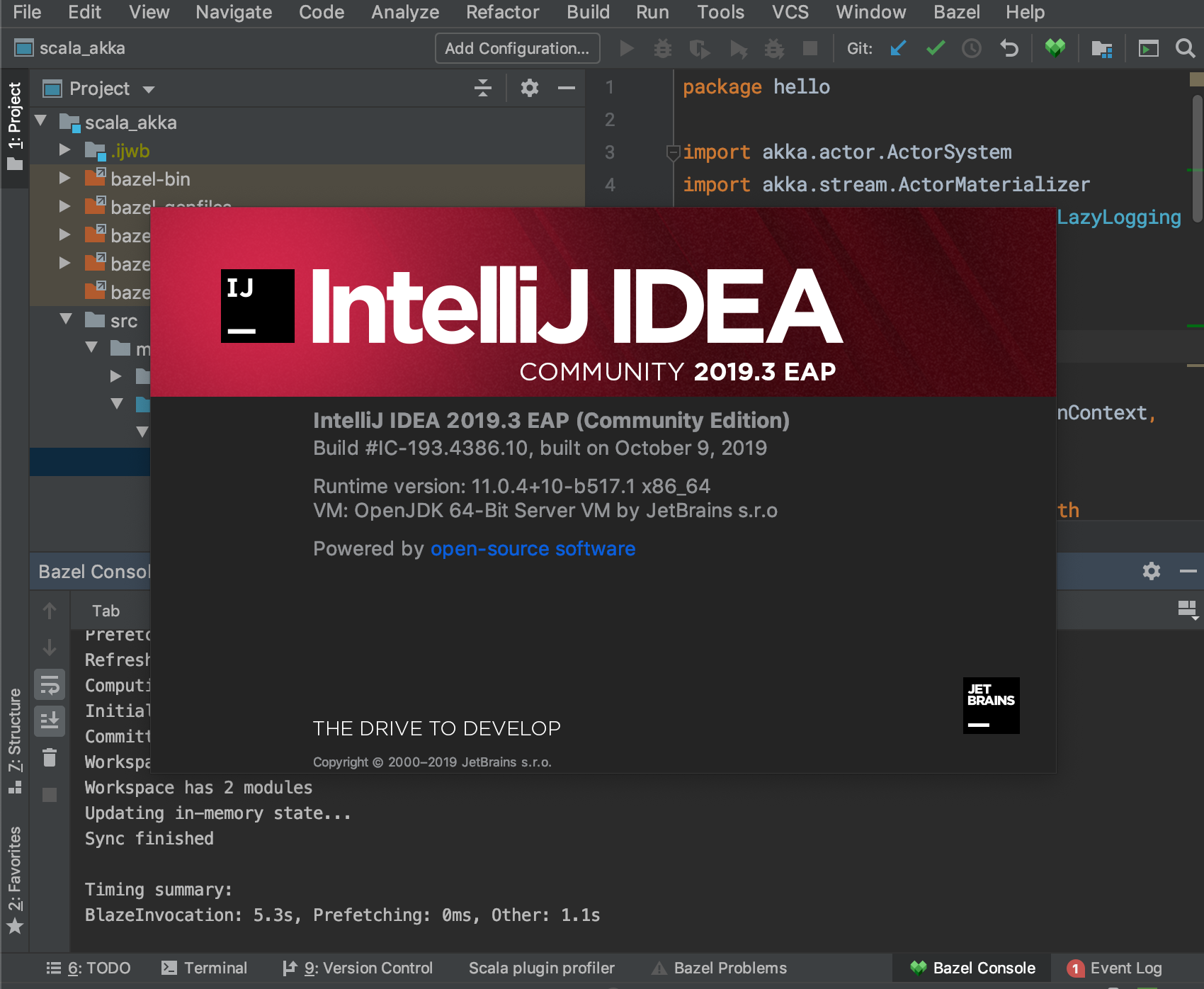
Current status: 2019.3 EAP is released.
 jin
jin
All 37 comments
Update: it's now possible to build the plugin for 2019.3 from master using --define=ij_product=intellij_canary.
jin
on 18 Oct 2019
@jin FWIW in GoLand 2019.3 EAP I am getting errors. Built current head f6fd157ca4892cdbb96e8855b3139659203c11bf
2019-10-18 21:36:45,324 [  14648]  ERROR - idea.blaze.base.sync.SyncScope - GoLand 2019.3 EAP  Build #GO-193.4697.5
2019-10-18 21:36:45,324 [  14648]  ERROR - idea.blaze.base.sync.SyncScope - JDK: 11.0.4; VM: OpenJDK 64-Bit Server VM; Vendor: JetBrains s.r.o
2019-10-18 21:36:45,324 [  14648]  ERROR - idea.blaze.base.sync.SyncScope - OS: Linux
2019-10-18 21:36:45,325 [  14649]  ERROR - idea.blaze.base.sync.SyncScope - Plugin to blame: Bazel version: 9999
2019-10-18 21:36:45,325 [  14649]  ERROR - idea.blaze.base.sync.SyncScope - Last Action:
2019-10-18 21:36:45,325 [  14649]  ERROR - base.sync.SyncPhaseCoordinator - No SyncPlugin present which provides a default workspace type.
java.lang.IllegalStateException: No SyncPlugin present which provides a default workspace type.
    at com.google.common.base.Preconditions.checkState(Preconditions.java:508)
    at com.google.idea.blaze.base.sync.projectview.LanguageSupport.getDefaultWorkspaceType(LanguageSupport.java:47)
    at com.google.idea.blaze.base.sync.projectview.LanguageSupport.createWorkspaceLanguageSettings(LanguageSupport.java:58)
    at com.google.idea.blaze.base.sync.ProjectStateSyncTask.getProjectState(ProjectStateSyncTask.java:141)
    at com.google.idea.blaze.base.sync.SyncScope.push(SyncScope.java:89)
    at com.google.idea.blaze.base.sync.ProjectStateSyncTask.collectProjectState(ProjectStateSyncTask.java:68)
    at com.google.idea.blaze.base.sync.SyncPhaseCoordinator.runSync(SyncPhaseCoordinator.java:361)
    at com.google.idea.blaze.base.sync.SyncPhaseCoordinator.lambda$syncProject$0(SyncPhaseCoordinator.java:225)
    at com.google.idea.blaze.base.scope.Scope.push(Scope.java:57)
    at com.google.idea.blaze.base.scope.Scope.root(Scope.java:33)
    at com.google.idea.blaze.base.sync.SyncPhaseCoordinator.lambda$syncProject$1(SyncPhaseCoordinator.java:217)
    at com.google.idea.blaze.base.async.executor.ProgressiveTaskWithProgressIndicator.lambda$submitTask$0(ProgressiveTaskWithProgressIndicator.java:79)
    at com.google.idea.blaze.base.async.executor.ProgressiveTaskWithProgressIndicator.lambda$submitTaskWithResult$4(ProgressiveTaskWithProgressIndicator.java:127)
    at com.intellij.openapi.progress.impl.CoreProgressManager.lambda$runProcess$3(CoreProgressManager.java:179)
    at com.intellij.openapi.progress.impl.CoreProgressManager.lambda$runProcess$2(CoreProgressManager.java:163)
    at com.intellij.openapi.progress.impl.CoreProgressManager.registerIndicatorAndRun(CoreProgressManager.java:585)
    at com.intellij.openapi.progress.impl.CoreProgressManager.executeProcessUnderProgress(CoreProgressManager.java:531)
    at com.intellij.openapi.progress.impl.ProgressManagerImpl.executeProcessUnderProgress(ProgressManagerImpl.java:59)
    at com.intellij.openapi.progress.impl.CoreProgressManager.runProcess(CoreProgressManager.java:150)
    at com.intellij.openapi.progress.impl.CoreProgressManager.runProcess(CoreProgressManager.java:179)
    at com.google.idea.blaze.base.async.executor.ProgressiveTaskWithProgressIndicator.lambda$submitTaskWithResult$5(ProgressiveTaskWithProgressIndicator.java:127)
    at com.google.common.util.concurrent.TrustedListenableFutureTask$TrustedFutureInterruptibleTask.runInterruptibly(TrustedListenableFutureTask.java:125)
    at com.google.common.util.concurrent.InterruptibleTask.run(InterruptibleTask.java:69)
    at com.google.common.util.concurrent.TrustedListenableFutureTask.run(TrustedListenableFutureTask.java:78)
    at java.base/java.util.concurrent.ThreadPoolExecutor.runWorker(ThreadPoolExecutor.java:1128)
    at java.base/java.util.concurrent.ThreadPoolExecutor$Worker.run(ThreadPoolExecutor.java:628)
    at java.base/java.lang.Thread.run(Thread.java:834)
 krlvi
on 18 Oct 2019
krlvi
on 18 Oct 2019
Actually, I just tested the plugin with GoLand 2019.2.3 (--define=ij_product=intellij-2019.2) from the same commit f6fd157ca4892cdbb96e8855b3139659203c11bf and can observe the same error as above, so this may be unrelated to 2019.3 but a regression. Head from 10 days ago used to work well
krlvi
on 18 Oct 2019
@krlvi thanks for the report. Could you please file a separate issue for GoLand?
jin
on 18 Oct 2019
Bazel 2019.10.18.0.0 is now uploaded and searchable from 2019.3 EAP's plugin marketplace.
Find it here: https://plugins.jetbrains.com/plugin/8609-bazel/update/70820
jin
on 18 Oct 2019
Wow! I missed this. Well done @jin @brendandouglas and the team! Superb...
 ittaiz
on 19 Nov 2019
ittaiz
on 19 Nov 2019
I cannot build from master using intellij_canary
$ bazel build //ijwb:ijwb_bazel_zip --define=ij_product=intellij_canary
Starting local Bazel server and connecting to it...
ERROR: /Users/fsousa/Projects/code/bazel-intellij/third_party/python/BUILD:7:1: Configurable attribute "exports" doesn't match this configuration: define an intellij product version, e.g. --define=ij_product=intellij-latest
INFO: Call stack for the definition of repository 'intellij_ce_2019_2' which is a http_archive (rule definition at /private/var/tmp/_bazel_fsousa/b402c6ebcaa153a20bf24d0347c93aa1/external/bazel_tools/tools/build_defs/repo/http.bzl:292:16):
 - /Users/fsousa/Projects/code/bazel-intellij/WORKSPACE:10:1
INFO: Call stack for the definition of repository 'remote_java_tools_darwin' which is a http_archive (rule definition at /private/var/tmp/_bazel_fsousa/b402c6ebcaa153a20bf24d0347c93aa1/external/bazel_tools/tools/build_defs/repo/http.bzl:292:16):
 - /private/var/tmp/_bazel_fsousa/b402c6ebcaa153a20bf24d0347c93aa1/external/bazel_tools/tools/build_defs/repo/utils.bzl:205:9
 - /DEFAULT.WORKSPACE.SUFFIX:280:1
INFO: Call stack for the definition of repository 'auto_value_annotations' which is a jvm_import_external (rule definition at /private/var/tmp/_bazel_fsousa/b402c6ebcaa153a20bf24d0347c93aa1/external/bazel_tools/tools/build_defs/repo/jvm.bzl:203:23):
 - /private/var/tmp/_bazel_fsousa/b402c6ebcaa153a20bf24d0347c93aa1/external/bazel_tools/tools/build_defs/repo/jvm.bzl:263:5
 - /Users/fsousa/Projects/code/bazel-intellij/WORKSPACE:250:1
ERROR: Analysis of target '//ijwb:ijwb_bazel_zip' failed; build aborted:

/Users/fsousa/Projects/code/bazel-intellij/third_party/python/BUILD:7:1: Configurable attribute "exports" doesn't match this configuration: define an intellij product version, e.g. --define=ij_product=intellij-latest
INFO: Elapsed time: 10.115s
INFO: 0 processes.
FAILED: Build did NOT complete successfully (46 packages loaded, 400 targets configured)
    Fetching @remotejdk11_macos; fetching
    Fetching @local_config_xcode; fetching
But I can build with intellij-ue-2019.3. The problem is that it gives me errors after installing:
[0 / 65] [Prepa] BazelWorkspaceStatusAction stable-status.txt ... (8 actions, 0 running)
ERROR: /Users/fsousa/Projects/demo/demos/java/pt/ipb/demo/weld/dependent/BUILD.bazel:1:1: Couldn't build file java/pt/ipb/demo/weld/dependent/dependent.java-manifest: Parsing java package strings for //java/pt/ipb/demo/weld/dependent:dependent failed (Exit 1) PackageParser_bin failed: error executing command bazel-out/host/bin/external/intellij_aspect/PackageParser_bin --output_manifest bazel-out/darwin-fastbuild/bin/java/pt/ipb/demo/weld/dependent/dependent.java-manifest --sources ... (remaining 1 argument(s) skipped)

Use --sandbox_debug to see verbose messages from the sandbox
Nov 24, 2019 10:07:45 PM com.google.idea.blaze.aspect.PackageParser main
SEVERE: Error parsing package strings
java.lang.NoClassDefFoundError: com/google/common/util/concurrent/internal/InternalFutureFailureAccess
    at java.base/java.lang.ClassLoader.defineClass1(Native Method)
    at java.base/java.lang.ClassLoader.defineClass(ClassLoader.java:1016)
    at java.base/java.security.SecureClassLoader.defineClass(SecureClassLoader.java:174)
    at java.base/jdk.internal.loader.BuiltinClassLoader.defineClass(BuiltinClassLoader.java:802)
    at java.base/jdk.internal.loader.BuiltinClassLoader.findClassOnClassPathOrNull(BuiltinClassLoader.java:700)
    at java.base/jdk.internal.loader.BuiltinClassLoader.loadClassOrNull(BuiltinClassLoader.java:623)
    at java.base/jdk.internal.loader.BuiltinClassLoader.loadClass(BuiltinClassLoader.java:581)
    at java.base/jdk.internal.loader.ClassLoaders$AppClassLoader.loadClass(ClassLoaders.java:178)
    at java.base/java.lang.ClassLoader.loadClass(ClassLoader.java:521)
    at java.base/java.lang.ClassLoader.defineClass1(Native Method)
    at java.base/java.lang.ClassLoader.defineClass(ClassLoader.java:1016)
    at java.base/java.security.SecureClassLoader.defineClass(SecureClassLoader.java:174)
    at java.base/jdk.internal.loader.BuiltinClassLoader.defineClass(BuiltinClassLoader.java:802)
    at java.base/jdk.internal.loader.BuiltinClassLoader.findClassOnClassPathOrNull(BuiltinClassLoader.java:700)
    at java.base/jdk.internal.loader.BuiltinClassLoader.loadClassOrNull(BuiltinClassLoader.java:623)
    at java.base/jdk.internal.loader.BuiltinClassLoader.loadClass(BuiltinClassLoader.java:581)
    at java.base/jdk.internal.loader.ClassLoaders$AppClassLoader.loadClass(ClassLoaders.java:178)
    at java.base/java.lang.ClassLoader.loadClass(ClassLoader.java:521)
    at java.base/java.lang.ClassLoader.defineClass1(Native Method)
    at java.base/java.lang.ClassLoader.defineClass(ClassLoader.java:1016)
    at java.base/java.security.SecureClassLoader.defineClass(SecureClassLoader.java:174)
    at java.base/jdk.internal.loader.BuiltinClassLoader.defineClass(BuiltinClassLoader.java:802)
    at java.base/jdk.internal.loader.BuiltinClassLoader.findClassOnClassPathOrNull(BuiltinClassLoader.java:700)
    at java.base/jdk.internal.loader.BuiltinClassLoader.loadClassOrNull(BuiltinClassLoader.java:623)
    at java.base/jdk.internal.loader.BuiltinClassLoader.loadClass(BuiltinClassLoader.java:581)
    at java.base/jdk.internal.loader.ClassLoaders$AppClassLoader.loadClass(ClassLoaders.java:178)
    at java.base/java.lang.ClassLoader.loadClass(ClassLoader.java:521)
    at java.base/java.lang.ClassLoader.defineClass1(Native Method)
    at java.base/java.lang.ClassLoader.defineClass(ClassLoader.java:1016)
    at java.base/java.security.SecureClassLoader.defineClass(SecureClassLoader.java:174)
    at java.base/jdk.internal.loader.BuiltinClassLoader.defineClass(BuiltinClassLoader.java:802)
    at java.base/jdk.internal.loader.BuiltinClassLoader.findClassOnClassPathOrNull(BuiltinClassLoader.java:700)
    at java.base/jdk.internal.loader.BuiltinClassLoader.loadClassOrNull(BuiltinClassLoader.java:623)
    at java.base/jdk.internal.loader.BuiltinClassLoader.loadClass(BuiltinClassLoader.java:581)
    at java.base/jdk.internal.loader.ClassLoaders$AppClassLoader.loadClass(ClassLoaders.java:178)
    at java.base/java.lang.ClassLoader.loadClass(ClassLoader.java:521)
    at java.base/java.lang.ClassLoader.defineClass1(Native Method)
    at java.base/java.lang.ClassLoader.defineClass(ClassLoader.java:1016)
    at java.base/java.security.SecureClassLoader.defineClass(SecureClassLoader.java:174)
    at java.base/jdk.internal.loader.BuiltinClassLoader.defineClass(BuiltinClassLoader.java:802)
    at java.base/jdk.internal.loader.BuiltinClassLoader.findClassOnClassPathOrNull(BuiltinClassLoader.java:700)
    at java.base/jdk.internal.loader.BuiltinClassLoader.loadClassOrNull(BuiltinClassLoader.java:623)
    at java.base/jdk.internal.loader.BuiltinClassLoader.loadClass(BuiltinClassLoader.java:581)
    at java.base/jdk.internal.loader.ClassLoaders$AppClassLoader.loadClass(ClassLoaders.java:178)
    at java.base/java.lang.ClassLoader.loadClass(ClassLoader.java:521)
    at com.google.common.util.concurrent.AbstractListeningExecutorService.newTaskFor(AbstractListeningExecutorService.java:51)
    at java.base/java.util.concurrent.AbstractExecutorService.submit(AbstractExecutorService.java:139)
    at com.google.common.util.concurrent.AbstractListeningExecutorService.submit(AbstractListeningExecutorService.java:66)
    at com.google.idea.blaze.aspect.PackageParser.parsePackageStrings(PackageParser.java:139)
    at com.google.idea.blaze.aspect.PackageParser.main(PackageParser.java:77)
Caused by: java.lang.ClassNotFoundException: com.google.common.util.concurrent.internal.InternalFutureFailureAccess
    at java.base/jdk.internal.loader.BuiltinClassLoader.loadClass(BuiltinClassLoader.java:583)
    at java.base/jdk.internal.loader.ClassLoaders$AppClassLoader.loadClass(ClassLoaders.java:178)
    at java.base/java.lang.ClassLoader.loadClass(ClassLoader.java:521)
    ... 50 more
IntelliJ IDEA 2019.3 (Ultimate Edition)
Build #IU-193.5233.57, built on November 20, 2019
Licensed to Filipe Sousa
Subscription is active until December 27, 2019
Runtime version: 11.0.4+10-b520.11 x86_64
VM: OpenJDK 64-Bit Server VM by JetBrains s.r.o
macOS 10.15.2
GC: ParNew, ConcurrentMarkSweep
Memory: 1981M
Cores: 8
Registry: ide.scratch.in.project.view=false, ide.mac.file.chooser.native=false
Non-Bundled Plugins: com.intellij.plugins.watcher, BrowseWordAtCaret, GrepConsole, MavenRunHelper, Pythonid, String Manipulation, YourKit Java Profiler 2019.8-b110 Integration, com.bruce.intellijplugin.generatesetter, com.google.idea.bazel.ijwb, com.sburlyaev.terminal.plugin, com.viartemev.requestmapper, de.dm.intellij.maven-archetypes-catalog-plugin, org.mapstruct.intellij
 natros
on 24 Nov 2019
natros
on 24 Nov 2019
@natros I'm way too new at Bazel to know the 'right' way to fix this, so I haven't opened a PR, but if you build from https://github.com/ewiner/intellij/tree/noclassdef it should work!
 ewiner
on 25 Nov 2019
ewiner
on 25 Nov 2019
I found it slightly confusing that this issue is closed - the plugin 2019.11.14.0.1 + IntelliJ 2019.3 does not work, fails with the "java.lang.NoClassDefFoundError: com/google/common/util/concurrent/internal/InternalFutureFailureAccess". There is another issue about that error, though, #1443
 kylecordes
on 1 Dec 2019
kylecordes
on 1 Dec 2019
Possibly when the issue was closed guava was still on 26 or earlier, for the 2019.3 EAP. IntelliJ releases are moving targets, and we don't have the bandwidth to support them immediately.
We're still focused on 2019.2 internally, putting in place workarounds for the few worst performance regressions we've seen in the move from 2019.1 to 2019.2 (and following up with JetBrains to get them fixed upstream in 2019.3).
Going forward, expect to see full support for new versions lag significantly behind upstream -- until new releases stabilize, it's simply not an efficient use of our limited resources.
 brendandouglas
on 2 Dec 2019
brendandouglas
on 2 Dec 2019
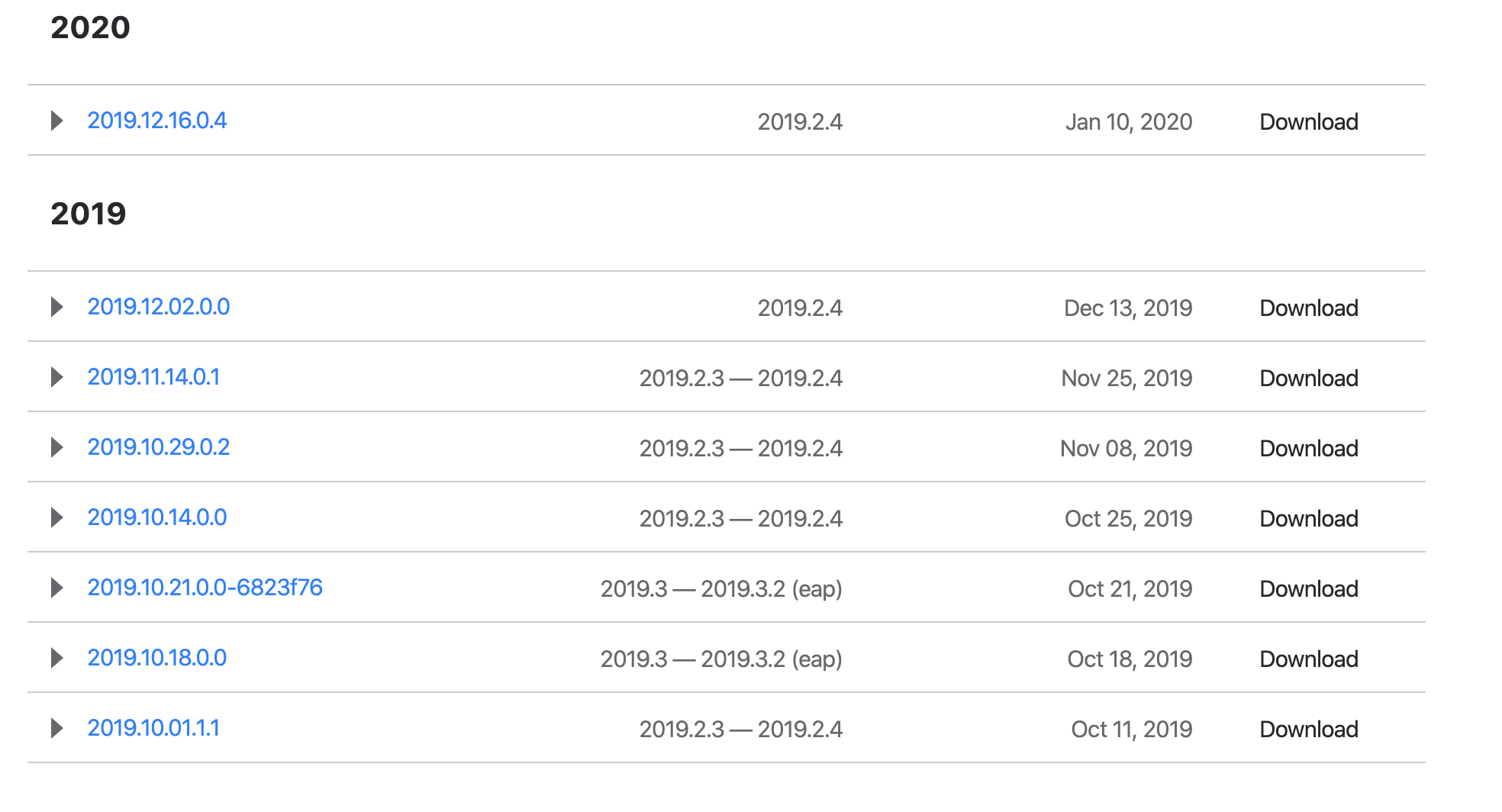
Why is this closed? According to the intelliJ marketplace, there's still no version uploaded with 2019.3 support
https://plugins.jetbrains.com/plugin/8609-bazel/versions
 ZacSweers
on 13 Jan 2020
ZacSweers
on 13 Jan 2020
2019.10.21 was published with 2019.3 support. It looks like there hasn't been a newer version published since.
jin
on 14 Jan 2020
Right, and that version appears to have bugs that are fixed in newer versions as I’m unable to sync the dagger repo unless I downgrade IntelliJ to 2019.2.4 and use a newer plugin version
ZacSweers
on 14 Jan 2020
@brendandouglas could someone on the team build and publish the plugin with --ij_product=intellij-canary manually from HEAD?
jin
on 14 Jan 2020
We're still working on support for 2019.3 internally. Upstream, 2019.3 hasn't yet stabilized, and still has serious performance regressions relative to 2019.2. Until we fix or work around the main performance regressions internally (or they're fixed upstream), we can't officially support 2019.3.
2019.3.2 is looking promising, and once that's out of EAP / RC we'll likely upload another plugin version.
In the meantime, one workaround is to build against 2019.3 from HEAD (bazel build //ijwb:ijwb_bazel_zip --define=ij_product=intellij-2019.3).
brendandouglas
on 14 Jan 2020
@brendandouglas how do you feel about uploading a plugin version for 2019.3 and mentioning the known performance issues in the release notes? That would be a preferable situation that to block users from using 2019.3 altogether (or having to manually build the plugin).
jin
on 14 Jan 2020
That's not something we can reasonably commit to. The previously uploaded plugin wasn't sufficient because there were several uncaught runtime issues.
That will always be the case unless we spend significant time adding support for a new version (and manually testing), which we don't currently have the resources to do until later in the release cycle.
A better balance might be asking users to manually build the plugin, which makes it clearer that it's likely not to work.
brendandouglas
on 14 Jan 2020
There's an October release for 2019.3 currently available for those users that's broken, I'm not sure that's a better experience than something like an "EAP" or snapshot channel. It could be hosted as a separate plugin and opt-in?
ZacSweers
on 14 Jan 2020
I firmly agree - it's asking a lot for infrastructure teams to build the plugin locally, because they have to maintain whatever infrastructure to distribute the plugin to the developer machines, and most of us don't have mechanisms for machine alignment that google has. Mostly we use plugin stores for IDE plugins, etc., and don't maintain internal repositories. Shipping appropriately tagged pre-releases to the stores seems like a small step that can help a lot of people.
 cgruber
on 16 Jan 2020
cgruber
on 16 Jan 2020
If the team doesn't have the resources to support a separate release channel to the one they use internally, which necessarily lags behind, I don't think they should release official unsupported builds, that's going to create a lot of confusion for users.
Having infrastructure teams release the builds internally makes it clear they're maintaining their own internal fork.
@brendandouglas Flipping the requirement around, is there a way to publish the latest IntelliJ version that is officially supported by the plugin, or subscribe to a custom update manifest in the jetbrains toolbox? Suppose we didn't mind waiting on an old version of IntelliJ until the plugin supported it, how do we do that without having to keep track of the compatibility manually?
 uri-canva
on 17 Jan 2020
uri-canva
on 17 Jan 2020
I'd be fine with building from source, but I tried bazel build //ijwb:ijwb_bazel_zip --define=ij_product=intellij-2019.3 on the master branch (28bc33b27988a5e0c469330ad976bea532da1fae) and got the error "Plugin 'Bazel' is incompatible with this installation'. Are there any other flags or steps required to manually install?
 joprice
on 17 Jan 2020
joprice
on 17 Jan 2020
Right, and that version appears to have bugs that are fixed in newer versions as I’m unable to sync the dagger repo unless I downgrade IntelliJ to 2019.2.4 and use a newer plugin version
oh, so that's why I can't open the Dagger repo 🤔
 Zhuinden
on 17 Jan 2020
Zhuinden
on 17 Jan 2020
FWIW I could build the intellij plugin off master (96d29736) and it works with 2019.3.1 CE
 nicolai86
on 19 Jan 2020
nicolai86
on 19 Jan 2020
Trying to do the same.
Do I have to use a specific version of Bazel to build the plugin artifact?
I have a fresh installation of Bazel on Ubuntu and hit the following
> bazel --version
bazel 2.0.0
> java -version
openjdk version "1.8.0_232"
OpenJDK Runtime Environment (build 1.8.0_232-8u232-b09-0ubuntu1~18.04.1-b09)
OpenJDK 64-Bit Server VM (build 25.232-b09, mixed mode)
> bazel build //ijwb:ijwb_bazel_zip --define=ij_product=intellij-2019.3
Starting local Bazel server and connecting to it...
INFO: Analyzed target //ijwb:ijwb_bazel_zip (63 packages loaded, 2013 targets configured).
INFO: Found 1 target...
ERROR: [REDACTED]/intellij/third_party/java/jdk/BUILD:7:1: Executing genrule //third_party/java/jdk:jdk_tools_jar failed (Exit 1) bash failed: error executing command /bin/bash -c 'source external/bazel_tools/tools/genrule/genrule-setup.sh; cp external/local_jdk/lib/tools.jar bazel-out/k8-fastbuild/bin/third_party/java/jdk/tools.jar'

Use --sandbox_debug to see verbose messages from the sandbox
cp: cannot stat 'external/local_jdk/lib/tools.jar': No such file or directory
Target //ijwb:ijwb_bazel_zip failed to build
Use --verbose_failures to see the command lines of failed build steps.
INFO: Elapsed time: 76.093s, Critical Path: 19.05s
INFO: 376 processes: 364 linux-sandbox, 12 worker.
FAILED: Build did NOT complete successfully
 stefanobaghino-da
on 29 Jan 2020
stefanobaghino-da
on 29 Jan 2020
Same issue using bazel-1.0.0. I'm on commit eb7d43dbe71a7b689613971050f051f0418f8cc9.
stefanobaghino-da
on 29 Jan 2020
Last update: I tried to check out 96d29736 (which is reported above as working), run a clean --expunge and run the command again but unfortunately the build fails with the same error. At this point I guess it's something broken in my installation but I wouldn't know what could be causing this.
stefanobaghino-da
on 29 Jan 2020
@stefanobaghino-da I built the plugin yesterday (from master) and it worked after I installed and used java 8 for the build, because java 11 has some known issues for building this plugin #875. But as you are using java 8 already i can't see any difference to my build process. Is your JAVA_HOME set correctly to java 8 ?
 Jakob-em
on 29 Jan 2020
Jakob-em
on 29 Jan 2020
@Jakob-em Thanks for the help, I tried to look for something like what you linked (#875) but couldn't find it. JAVA_HOME is indeed pointing to a JDK 11 for some reason. Making it point to a JDK 8 made it work as expected.
stefanobaghino-da
on 29 Jan 2020
@brendandouglas any update on the progress towards a release?
I know that you and the team at Google are under a lot of pressure, and stretched thin. It would open the door to greater community involvement if you could link to issues in GH regarding the regressions you're attempting to resolve, and ultimately that may help this project in the long run (though I will admit that filing those issues and bringing people up to speed can be… tiring)
 shs96c
on 7 Feb 2020
shs96c
on 7 Feb 2020
Echoing above - we'd love to have official support for 2019.3.x, or a small status update.
Thank you again for the hard work!
 long-stripe
on 14 Feb 2020
long-stripe
on 14 Feb 2020
The latest published version of the plugin (which shows as version 2020.02.11.0.0 in the plugin version, but v2020.02.10 in the changelog) works for me against 2019.3.3 🎉
Thanks for sorting this!
 mr-tim
on 24 Feb 2020
mr-tim
on 24 Feb 2020
I can also confirm. I upgraded from:
- IntelliJ IDEA 2019.2.4 (Community Edition)
- Bazel plugin 2020.01.28.0.3
to:
- IntelliJ IDEA 2019.3.3 (Community Edition)
- Bazel plugin 2020.02.11.0.0
Before the IntelliJ upgrade, the Bazel plugin page showed no upgrades available. When I initiated the IntelliJ upgrade, IntelliJ warned that the Bazel plugin was not compatible with the new version of IntelliJ. The IntelliJ upgrade worked fine and it automatically upgraded the Bazel plugin to 2020.02.11.0.0. I've been using the new version for about an hour with no new issues.
Thank you, Bazel team! :)
 mleonhard
on 25 Feb 2020
mleonhard
on 25 Feb 2020
@brendandouglas @jin does this mean the perf issues were solved?
ittaiz
on 25 Feb 2020
Many thanks for making this happen, I feel it's fair to say that the IntelliJ/Bazel community is always grateful for these updates. :bowing_man:
stefanobaghino-da
on 25 Feb 2020
I still have the issue.
IntelliJ version info:
IntelliJ IDEA 2019.3.3 (Ultimate Edition)
Build #IU-193.6494.35, built on February 10, 2020
Runtime version: 11.0.5+10-b520.38 x86_64
VM: OpenJDK 64-Bit Server VM by JetBrains s.r.o
macOS 10.14.6
I have tries both official plugin from the marketplace and locally built from commit 0c833b2aa36611fa10a40631fb8bc8338334b12e with
bazel build //ijwb:ijwb_bazel_zip --define=ij_product=intellij-ue-2019.3
I see the following exception in the IJ log:
java.lang.IllegalStateException: No SyncPlugin present which provides a default workspace type.
    at com.google.common.base.Preconditions.checkState(Preconditions.java:508)
    at com.google.idea.blaze.base.sync.projectview.LanguageSupport.getDefaultWorkspaceType(LanguageSupport.java:47)
    at com.google.idea.blaze.base.projectview.section.sections.AdditionalLanguagesSection$AdditionalLanguagesDefaultValueProvider.availableAdditionalLanguages(AdditionalLanguagesSection.java:105)
    at com.google.idea.blaze.base.projectview.section.sections.AdditionalLanguagesSection$AdditionalLanguagesDefaultValueProvider.addProjectViewDefaultValue(AdditionalLanguagesSection.java:81)
    at com.google.idea.blaze.base.wizard2.ui.BlazeEditProjectViewControl.modifyInitialProjectView(BlazeEditProjectViewControl.java:262)
    at com.google.idea.blaze.base.wizard2.ui.BlazeEditProjectViewControl.init(BlazeEditProjectViewControl.java:275)
    at com.google.idea.blaze.base.wizard2.ui.BlazeEditProjectViewControl.update(BlazeEditProjectViewControl.java:229)
    at com.google.idea.blaze.base.wizard2.ui.BlazeEditProjectViewControl.<init>(BlazeEditProjectViewControl.java:134)
    at com.google.idea.blaze.base.wizard2.BlazeEditProjectViewImportWizardStep.init(BlazeEditProjectViewImportWizardStep.java:54)
    at com.google.idea.blaze.base.wizard2.BlazeEditProjectViewImportWizardStep.updateStep(BlazeEditProjectViewImportWizardStep.java:46)
    at com.google.idea.blaze.base.wizard2.BlazeNewProjectWizard.updateStep(BlazeNewProjectWizard.java:88)
    at com.intellij.ide.wizard.AbstractWizard.updateStep(AbstractWizard.java:375)
 serg5z
on 27 Feb 2020
serg5z
on 27 Feb 2020
@serg5z: You and I have exactly the same problem.
IntelliJ IDEA 2019.3.3  Build #IU-193.6494.35
JDK: 11.0.5; VM: OpenJDK 64-Bit Server VM; Vendor: JetBrains s.r.o
OS: Mac OS X
Plugin to blame: Bazel version: 9999
Last Action: EditorBackSpace
No SyncPlugin present which provides a default workspace type.
And a very long exception.
I tried disabling majority of my plugins, but no matter what I do I can't seem to get past the second dialog box of the plugin.
I put a detailed report into a gist — please take a look if you need more information.
Would love to get this resolved. Thanks!
Update
I created a separate Issue for this since it's clearly not just happening to me.
 kigster
on 3 Mar 2020
kigster
on 3 Mar 2020
Regarding the comment above, I had the same issue when starting from a blank installation where I disabled a lot of bundled plugins. I believe the Bazel plugin relies on some bundled plugin to be there at runtime and worked around it by restoring my 2019.2 config that had the plugins enabled. Hope this may help.
stefanobaghino-da
on 4 Mar 2020
Related issues
 ghost
·
6Comments
ghost
·
6Comments
 jschaf
·
4Comments
jschaf
·
4Comments
 ruudud
·
8Comments
ghost
·
5Comments
ruudud
·
8Comments
ghost
·
5Comments
 lifeiteng
·
4Comments
lifeiteng
·
4Comments
Most helpful comment
Update: it's now possible to build the plugin for 2019.3 from master using
--define=ij_product=intellij_canary.