Intellij-rust: Debugging unit test in lib does not seem to work
Environment
- Intellij-Rust plugin version: 0.2.96.2122-191
- Rust toolchain version: 1.35.0-nightly (2a65cbeea 2019-03-08)
- IDE name and version: CLion 2019.01
- Operating system: macOS 10.14.4
Problem description
When I try to debug unit tests in a library project, CLion never seems to honor or stop at my break points. It seems unit tests run in debug mode behave as if run in default "run" mode.
Steps to reproduce
Cargo.toml:
[package]
name = "breakpoints"
version = "0.1.0"
edition = "2018"

[[bin]]
name = "my_bin"
path = "src/main.rs"

[lib]
name = "my_lib"
path = "src/lib.rs"
src/main.rs:
fn main() {
    println!("Hello world");
}

#[test]
fn test() {
    println!("Hello debug bin"); // a breakpoint here halts
}
src/lib.rs:
#[test]
fn test() {
    println!("Hello debug lib"); // a breakpoint here doesn't halt
}
Setting a breakpoint in main::test and running the debugger works.
Setting a breakpoint in lib::test and running the debugger simply ignores the breakpoint and executes the test as if running in regular mode.
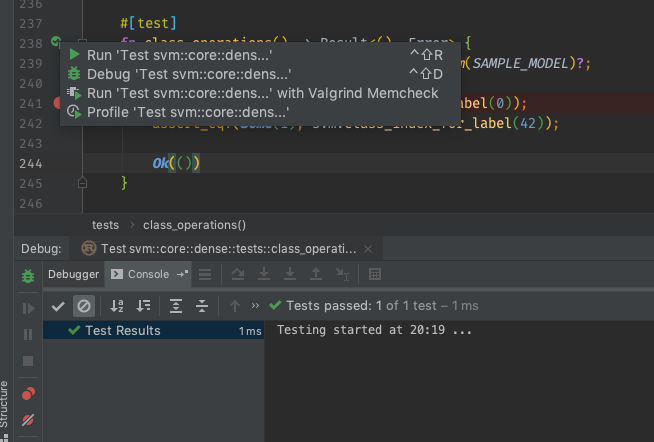
(Image above is taken from actual library project, effect is the same: when I click "Debug Test ...", I just get the output as depicted on the debug console (1 of 1 test passed), but the breakpoint was never hit.)
 ralfbiedert
All 3 comments
I think these are issues with the compiler in rust-lang/rust. I have managed to reproduce this bug without IntelliJ: https://github.com/rust-lang/rust/issues/59907
 mchernyavsky
on 12 Apr 2019
mchernyavsky
on 12 Apr 2019
This should be fixed by https://github.com/rust-lang/cargo/pull/7965
 jiegec
on 6 Mar 2020
jiegec
on 6 Mar 2020
This fix is shipped in cargo v1.44.0 which as of now can be obtained using the nightly toolchain.
rustup toolchain install nightly
rustup default nightly
I installed the nightly version and it did indeed fix these issues for me.
As these changes move to the beta and stable branches this issue can probably be closed.
 Fohlen
on 21 Apr 2020
Fohlen
on 21 Apr 2020
Related issues
 joslopgar
·
3Comments
joslopgar
·
3Comments
 macdevign
·
3Comments
macdevign
·
3Comments
 SomeoneToIgnore
·
3Comments
SomeoneToIgnore
·
3Comments
 dmarcuse
·
3Comments
dmarcuse
·
3Comments
 Undin
·
3Comments
Undin
·
3Comments
Most helpful comment
This fix is shipped in cargo
v1.44.0which as of now can be obtained using the nightly toolchain.I installed the nightly version and it did indeed fix these issues for me.
As these changes move to the beta and stable branches this issue can probably be closed.