Intellij-elixir: [RubyMine + Elixir] "Elixir Facet SDK is not defined" message won't go away
Even after uninstalling Elixir, Erlang, the plugin, and restarting the IDE, the banner prompting me to "Setup Elixir Facet SDK" won't go away in Ubuntu 18.04. As far as I can tell, everything is set up the way it should be set up.


 ryancammer
All 5 comments
If you can see Languages & Frameworks > Elixir you haven't uninstalled the plugin. Did you mean to say "installing" when you said "uninstalling"?
 KronicDeth
on 25 Aug 2018
KronicDeth
on 25 Aug 2018
Assuming you meant to say "installing", the issue is that you have defined the SDK in the application-wide setting, but not said that the SDK is for this specific project.
By JetBrains convention, in the single-language IDEs, application-wide configuration has no annotation, while project-specific configuration has "For current project" and the layered files icon.
- Languages & Frameworks > Elixir > SDKs has neither the icon or the annotation, so that means it is an application-wide setting.
- Languages & Frameworks > Elixir has the icon and "For current project", so it is where you set the SDK for the project you currently have open.

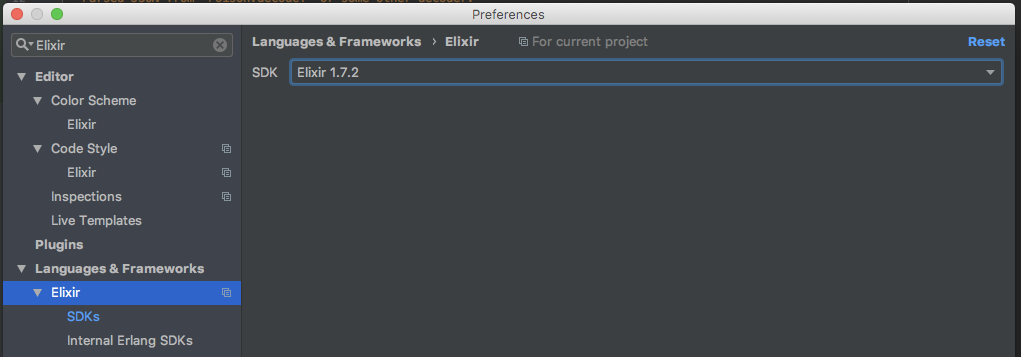
I'm sorry if you find this confusing, but it is a side-effect of the conventions in the single-language IDEs that JetBrains has established. Project vs Application-wide settings are more separated in IntelliJ IDEA which supports multiple languages because the section is labeled "Platform Settings" for application-wide and "Project Settings" for project-specific settings
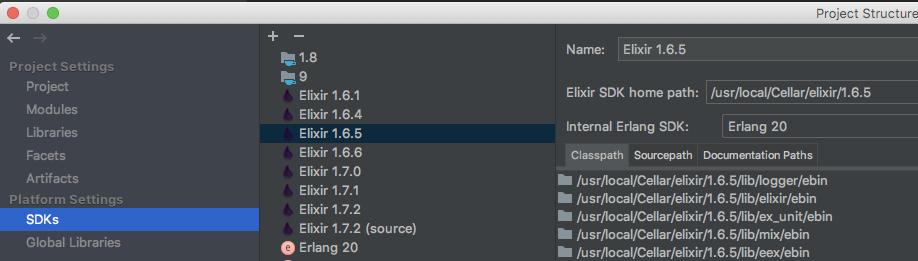
If you're using Elixir a lot and not using your other languages in the same project you may find it easier to use IntelliJ IDEA Community Edition (which is free) or IntelliJ IDEA Ultimate Edition (which is subscription-based like the single-language IDEs) as either version of IDEA makes using other languages easier than the Facet system I have to use to allow you to set Elixir SDKs in the single-language IDEs. The Facet system means that your IDE still thinks the project is a Ruby project in Rubymine or a PHP project in PHPStorm, so if your project is only Elixir, it can be better represented in IntelliJ IDEA, which doesn't require the root Project to be Java-based.
KronicDeth
on 25 Aug 2018
You're right, I totally missed the "For current project" text there, but by clicking on 'Setup Elixir Facet SDK' it took me to the SDKs menu rather than the 'For current project' setting.
But I think you're also right, in that it's time to just switch to Idea.
ryancammer
on 25 Aug 2018
Also, thanks again for all of the work you put into this!
ryancammer
on 25 Aug 2018
thanks friend for explaining things i was in the same problem, now we are going to install intellij
 PabloHdzVizcarra
on 9 Jan 2021
PabloHdzVizcarra
on 9 Jan 2021
Related issues
 develop7
·
8Comments
develop7
·
8Comments
 OvermindDL1
·
7Comments
OvermindDL1
·
7Comments
 merqlove
·
3Comments
merqlove
·
3Comments
 mariuszzak
·
6Comments
mariuszzak
·
6Comments
 tungnt244
·
6Comments
tungnt244
·
6Comments
Most helpful comment
Assuming you meant to say "installing", the issue is that you have defined the SDK in the application-wide setting, but not said that the SDK is for this specific project.
By JetBrains convention, in the single-language IDEs, application-wide configuration has no annotation, while project-specific configuration has "For current project" and the layered files icon.
I'm sorry if you find this confusing, but it is a side-effect of the conventions in the single-language IDEs that JetBrains has established. Project vs Application-wide settings are more separated in IntelliJ IDEA which supports multiple languages because the section is labeled "Platform Settings" for application-wide and "Project Settings" for project-specific settings
If you're using Elixir a lot and not using your other languages in the same project you may find it easier to use IntelliJ IDEA Community Edition (which is free) or IntelliJ IDEA Ultimate Edition (which is subscription-based like the single-language IDEs) as either version of IDEA makes using other languages easier than the Facet system I have to use to allow you to set Elixir SDKs in the single-language IDEs. The Facet system means that your IDE still thinks the project is a Ruby project in Rubymine or a PHP project in PHPStorm, so if your project is only Elixir, it can be better represented in IntelliJ IDEA, which doesn't require the root Project to be Java-based.