Intellij-elixir: Can't select SDK on Windows 10
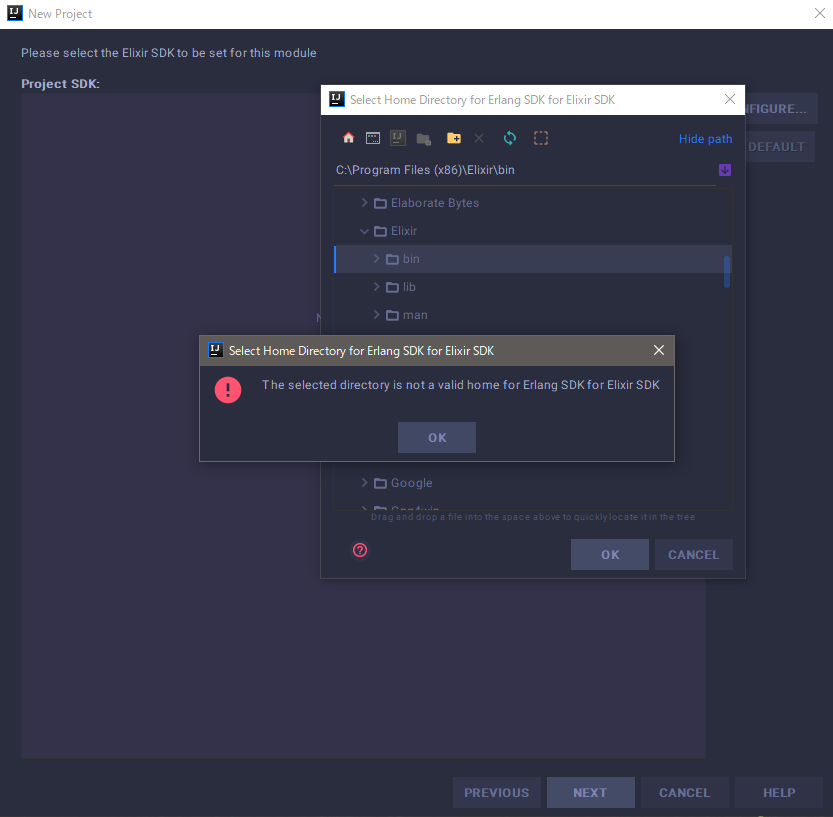
Environments
- Win10Home (x64)
- Intelij Ultimate 2018.1
- Elixir 1.6.4
- Erlang/OTP20 [erts-9.2]
 fuyutsuki
All 14 comments
The picture shows you selecting the bin directory, the SDK home is the
common ancestor of both the binaries like iex and mix and the lib .beam
files. It should work if you select the Elixir directory, not the bin
directory.
On Sun, Apr 15, 2018 at 10:29 PM yuko fuyutsuki notifications@github.com
wrote:
[image: image]
https://user-images.githubusercontent.com/16377174/38788871-6f22280e-4171-11e8-9cd3-2d98bd42d666.png
Environments
- Win10Home (x64)
- Intelij Ultimate 2018.1
- Elixir 1.6.4
- Erlang/OTP20 [erts-9.2]
—
You are receiving this because you are subscribed to this thread.
Reply to this email directly, view it on GitHub
https://github.com/KronicDeth/intellij-elixir/issues/1080, or mute the
thread
https://github.com/notifications/unsubscribe-auth/AASNE4MjX57hLI06sjbeBVR25kOqS50nks5tpBAUgaJpZM4TV0N0
.
 KronicDeth
on 16 Apr 2018
KronicDeth
on 16 Apr 2018
Dear @KronicDeth.
No, this does not work even if Elixir directory is chosen.
fuyutsuki
on 16 Apr 2018
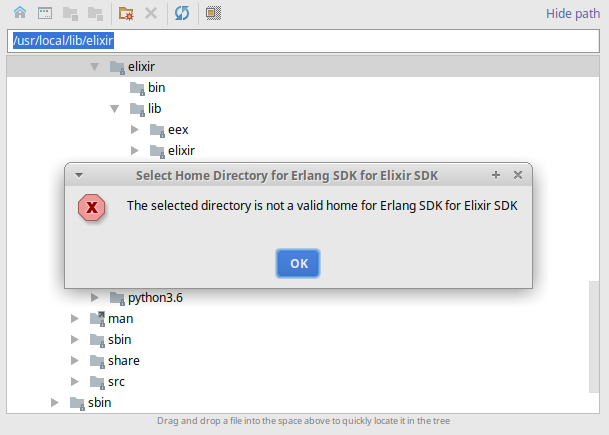
I'm encountering the same issue on Ubuntu 17.10.
 onethawt
on 24 Apr 2018
onethawt
on 24 Apr 2018
Same issue using Elixir 1.5.1 via ASDF, Ubuntu 16.04
 crertel
on 24 Apr 2018
crertel
on 24 Apr 2018
@onethawt and @crertel, you each are using different package managers and neither is using Windows 10 the way @fuyutsuki is. This issue does not apply to you, open a different issue.
KronicDeth
on 20 May 2018
@fuyutsuki how did you install Erlang and Elixir?
KronicDeth
on 20 May 2018
@KronicDeth I download and install by use installer from here
fuyutsuki
on 20 May 2018
@KronicDeth I installed Win 10 in a VM and got the same issue. I'll take a look at how the SDK detection is done because it seems off.
I'm not sure what OS/Package Manager has to do with it as of yet.
onethawt
on 4 Jun 2018
I'm running Window 10 Pro.
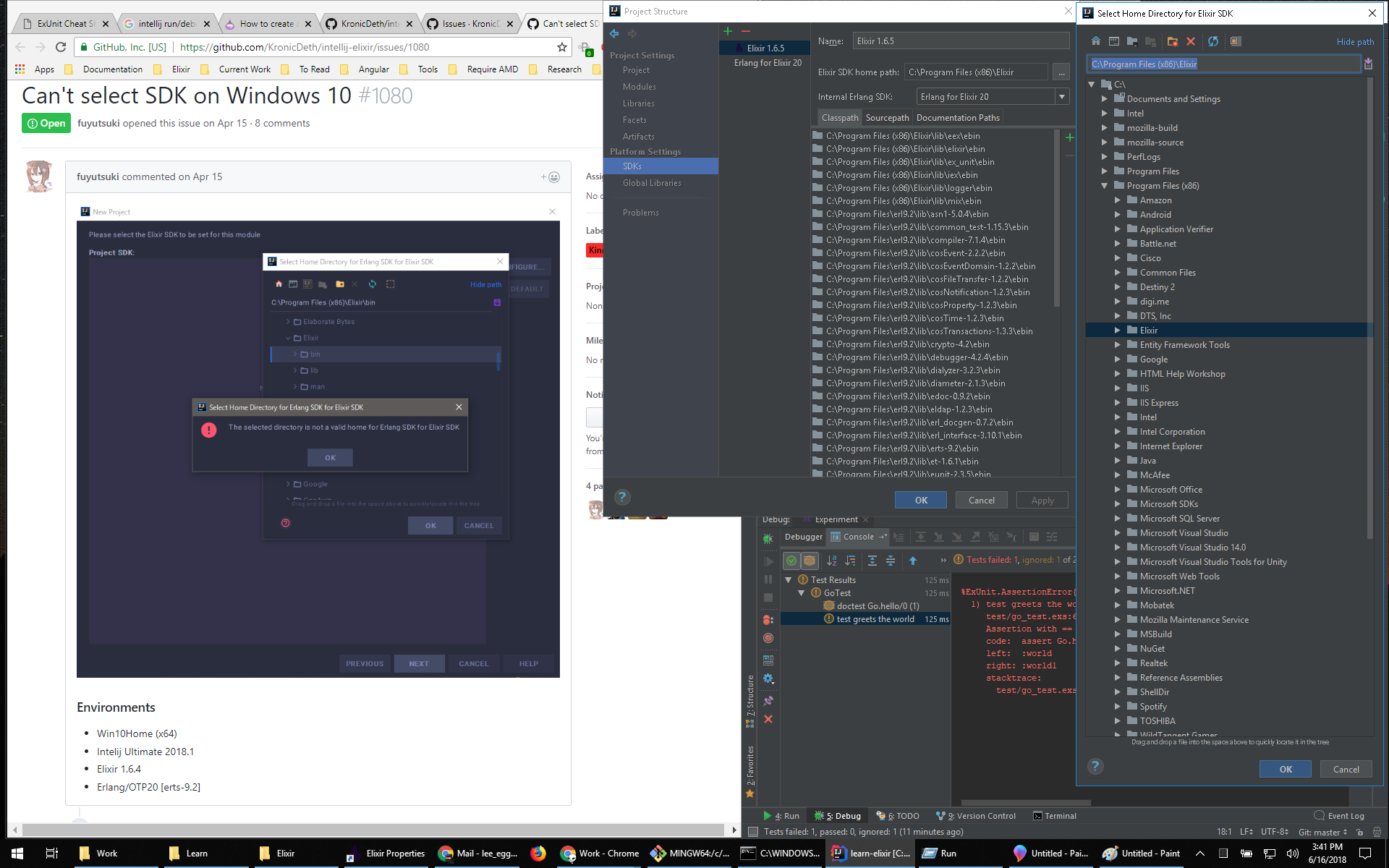
And like KronicDeth said you have to select the root Elixir directory.
 leggebroten
on 16 Jun 2018
leggebroten
on 16 Jun 2018
Hi,
So when using the windows installer of Elixir, I can select the Erlang and Elixir SDKS from C:\Program Files\erl10.0.1 and C:\Program Files (x86)\Elixir with out a problem. However I use my complete dev environment in WSL (Ubuntu) while having the source on the windows side at C:\User\smeevil\dev\elixir\<PROJECT>. This works quite ok except that I cannot run the tasks from IntelliJ because it wants to use the windows side of erlang and elixir.
If I point to erlang SDK to C:\Users\smeevil\AppData\Local\Packages\CanonicalGroupLimited.UbuntuonWindows_79rhkp1fndgsc\LocalState\rootfs\home\smeevil\.kerl\builds\21.0\release_21.0 It tells me that it's not a valid directory, however if I add the Elixir SDK with the path C:\Users\smeevil\AppData\Local\Packages\CanonicalGroupLimited.UbuntuonWindows_79rhkp1fndgsc\LocalState\rootfs\home\smeevil\.kiex\builds\elixir-git it does except that without a problem. Though when trying to run tests from within IntelliJ it will still use the windows side of the erlang sdk…
Not sure how to solve this, but hope it helps with getting more insight :)
 smeevil
on 13 Jul 2018
smeevil
on 13 Jul 2018
@smeevil Open a separate issue for WSL SDK support
KronicDeth
on 19 Jul 2018
Hey any advice on how to fix this? Or how to bypass it...
 N-0x90
on 3 Nov 2018
N-0x90
on 3 Nov 2018
Ok i got it, you need select firts the path for erl and next the path for elixir... thats all...
N-0x90
on 3 Nov 2018
@Ox90 I'll try it later, thx :)
fuyutsuki
on 3 Nov 2018
Related issues
 bengro
·
3Comments
KronicDeth
·
3Comments
bengro
·
3Comments
KronicDeth
·
3Comments
 merqlove
·
3Comments
merqlove
·
3Comments
 joshuataylor
·
3Comments
joshuataylor
·
3Comments
 wooque
·
3Comments
wooque
·
3Comments
Most helpful comment
I'm encountering the same issue on Ubuntu 17.10.