Intellij-elixir: No file named error
I configured Intellij with Elixir plugin as described in README.md.
I'm using OS X and brew-installed Elixir (/usr/local/Cellar/elixir/1.1.1/bin/elixir).
When I run test configuration I get:

Everything is done as described in manual.
 KamilLelonek
All 20 comments
@zyuyou, any ideas?
 KronicDeth
on 7 Nov 2015
KronicDeth
on 7 Nov 2015
@KamilLelonek can you show the run configuration?
 zyuyou
on 9 Nov 2015
zyuyou
on 9 Nov 2015
I have this issue too if you would like any info
On Mon, Nov 9, 2015 at 1:57 AM, Yuyou Chow [email protected] wrote:
@KamilLelonek https://github.com/KamilLelonek can you show the run
configuration?—
Reply to this email directly or view it on GitHub
https://github.com/KronicDeth/intellij-elixir/issues/203#issuecomment-154901770
.
 davidcotter
on 9 Nov 2015
davidcotter
on 9 Nov 2015
@KamilLelonek @davidcotter the Elixir plugin only support Mix runconfigure which based on the Elixir's mix executable tool by far. so running test configuration should ensure that the project is a mix-project which can be created by command mix new [app_name]
I will try to make it support ExUnit if I have free time to work for it.
zyuyou
on 11 Nov 2015
The issue happened during "Import project from external model". I did it once again, selecting external model instead of existing sources and it works.
KamilLelonek
on 11 Nov 2015
I'm getting the same error. Any workarounds?
 8822
on 8 Dec 2015
8822
on 8 Dec 2015
Hi
I think I am doing something wrong. I have never been able to run a project from IntelliJ and always get this same error
"C:\Program Files (x86)Elixir\bin\elixir.bat" ""
"No file named "
Maybe it doesn't work on Windows? I have tried it with mix - with the latest Intellij - the latest elixir plugin - the latest elixir lang - with a new project - with an existing project - I think I am missing something basic.
Thanks
davidcotter
on 21 Mar 2016
The argument to elixir.bat is an empty string, "". It means your project is missing the path to whatever it is trying to run with elixir.bat. Have you tried @KamilLelonek's process?
It works on Windows: whenever someone reports a Windows bug, I debug and make test builds from Windows. I have a Windows box for gaming primarily and an OSX laptop for primary development. The only environment I don't test in (unless I got around to setting up an environment in a VM) is Linux.
KronicDeth
on 21 Mar 2016

@davidcotter Is it possible that you forgot to input a Command ?
zyuyou
on 22 Mar 2016
Thanks.
If I use the "Import project from external model" it uses mix ad the
command (not elixir) and you can pas in "compile" or any other mix command
and it runs. Thanks.
On Tue, Mar 22, 2016 at 2:47 AM, Yuyou Chow [email protected]
wrote:
[image: 2016-03-22 10 41 16]
https://cloud.githubusercontent.com/assets/1913492/13940725/0da41b04-f01b-11e5-9fb1-db4191850677.png@davidcotter https://github.com/davidcotter Is it possible that you
forgot to input a Command ?—
You are receiving this because you were mentioned.
Reply to this email directly or view it on GitHub
https://github.com/KronicDeth/intellij-elixir/issues/203#issuecomment-199602008
davidcotter
on 24 Mar 2016
@zyuyou users keep having this issue when not importing from mix. Do you think we should should detect if they are using mix when they pick import project without select import from mix? When does the non-mix import work?
KronicDeth
on 25 Mar 2016
I think it should be some kind of auto detection of mix project structure and suggesting to import all needed files.
After installation of Elixir plugin I have created new project inside Intellij IDEA and plugin wasn't work with it properly. I had same "file not found" bug.
Only after looking into this issue on github I was able to create mix project from console and import it. It resolved empty-file issue.
 Nihisil
on 3 Jun 2016
Nihisil
on 3 Jun 2016
I agree with @Nihisil that it should probably do auto-detect. @zyuyou based the project support on intellij-erlang's where rebar support is equivalent to mix support, but unlike rebar in Erlang project, mix is more prevalent in Elixir projects, so assuming mix support is probably not a bad idea for intellij-elixir. We'll get to it eventually. For now, there is a work-around, unlike a lot of other features, so it will be lower priority since people only have to remember how to import a project once per project.
KronicDeth
on 4 Jun 2016
There is an difference between rebar and mix, mix do nothing without mix.exs but rebar can.

You means giving some tips when they run mix run configuration in a non-mix project?
zyuyou
on 4 Jun 2016
@zyuyou I was thinking that the user should not have to do File > New > Project from existing Sources > Import from external model > Mix, but instead doing File > Open and picking a directory with a mix.exs will assume it's a mix project or prompt to set it up as one. Users seem to keep missing that they need to import using the MIx external model to get the Run configurations to work. I'm not sure how we would go about doing that detection and prompting however. Rubymine seems to do that for detecting Rails projects, but I'm not sure how it does that.
KronicDeth
on 4 Jun 2016
@KronicDeth MixProjectOpenProcessor can do this work with <projectOpenProcessor implementation="org.elixir_lang.mix.importWizard.MixProjectOpenProcessor" />, and it works with mix project, but prompt to set it up as one, because we don't know if it will work fine after set it up as a mix project.
zyuyou
on 6 Jun 2016
So what is the solution? i don't understand?
 HangingClowns
on 8 Dec 2016
HangingClowns
on 8 Dec 2016
@HangingClowns the solution is import as a mix project, like that:
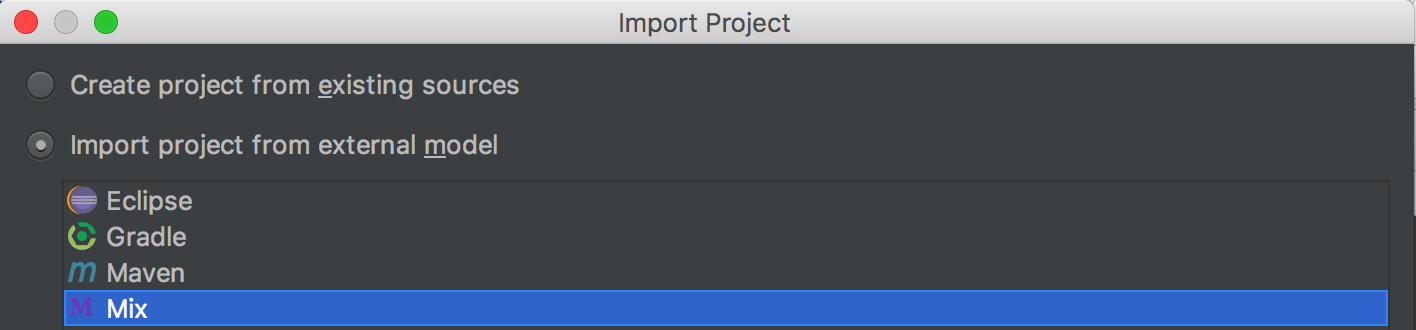
It worked for me :)
 fhsgoncalves
on 15 Jun 2017
fhsgoncalves
on 15 Jun 2017
@fhsgoncalves correct! :)
HangingClowns
on 16 Jun 2017
@fhsgoncalves Thanks. Importing as Mix project and setting the run configurations as shown below worked.

 sheshankkodam
on 28 Jun 2018
sheshankkodam
on 28 Jun 2018
Related issues
 SyedWasiHaider
·
4Comments
SyedWasiHaider
·
4Comments
 merqlove
·
4Comments
merqlove
·
4Comments
 joshuataylor
·
7Comments
joshuataylor
·
7Comments
 Istiakmorsalin
·
4Comments
Istiakmorsalin
·
4Comments
 Nicholi
·
6Comments
Nicholi
·
6Comments
Most helpful comment
@zyuyou I was thinking that the user should not have to do
File > New > Project from existing Sources > Import from external model > Mix, but instead doingFile > Openand picking a directory with amix.exswill assume it's a mix project or prompt to set it up as one. Users seem to keep missing that they need to import using the MIx external model to get the Run configurations to work. I'm not sure how we would go about doing that detection and prompting however. Rubymine seems to do that for detecting Rails projects, but I'm not sure how it does that.