Instapy: [Windows] - Firefox portable - Instructions to avoid "binary is not a Firefox executable"
Expected Behavior
Testing how InstaPy works.
Current Behavior
Same troubles even if I tried a lot.
I tried InstaPy, instapy-quickstart, to install drivers for firefox or chrome, setting the drivers in PATH ... nothing
I have not firefox on my pc because I want to use Google Chrome.
Possible Solution (optional)
InstaPy configuration
last release

 MCilento93
All 9 comments
Chrome is not supported,
use FireFox instead.
13 ## [0.6.0] - 2019-08-12
12
11 ### Added
10
9 - Firefox Extension which hides Selenium
8 - Black code formatter
7 - Mobile user agent
6 - Mobile Mode to enable mobile features
5 - Screen shots (rotative screen shots are taken and saved in your InstaPy user folde r)
4 - Connection State
3
2 ### Breaking Changes
1
216 - removed chromedriver
1 - signature changes:
2 - set_action_delays(random_range) -> (random_range_from, random_range_to)
3 - set_delemit_liking(max, min) ->(max_likes, min_likes)
4 - set_delemit_commenting(max, min) ->(max_comments, min_comments)
5 - unfollow_users(customList, instapyfollowed) -> (custom_list_enabled, custom_list , custom_list_param, instapy_followed_enabled, instapy_followed_param)
6 - set*quota_supervisor(peak*_) ->(peak\_\_\_hourly, peak_\*\_daily)
 elulcao
on 12 Dec 2020
elulcao
on 12 Dec 2020
Firefox portable will work?
MCilento93
on 12 Dec 2020
@MCilento93
I don't know if FF portable will work, you also have to check geckodriver functionality with the FF portable.
However, you could try InstaPy Docker,
so your host machine will be using Chrome but the Docker container will
start the InstaPy session with the embebed Firefox.
elulcao
on 12 Dec 2020
Thank you,
I don't use docker commonly
In the afternoon I see from reference of instapy how to callback a Firefox portable
I will give a try
MCilento93
on 12 Dec 2020
i switched to portable firefox. i get:
selenium.common.exceptions.InvalidArgumentException: Message: binary is not a Firefox executable
i tried installing gecko, maybe not correctly. somebody know how to fix this?
MCilento93
on 12 Dec 2020
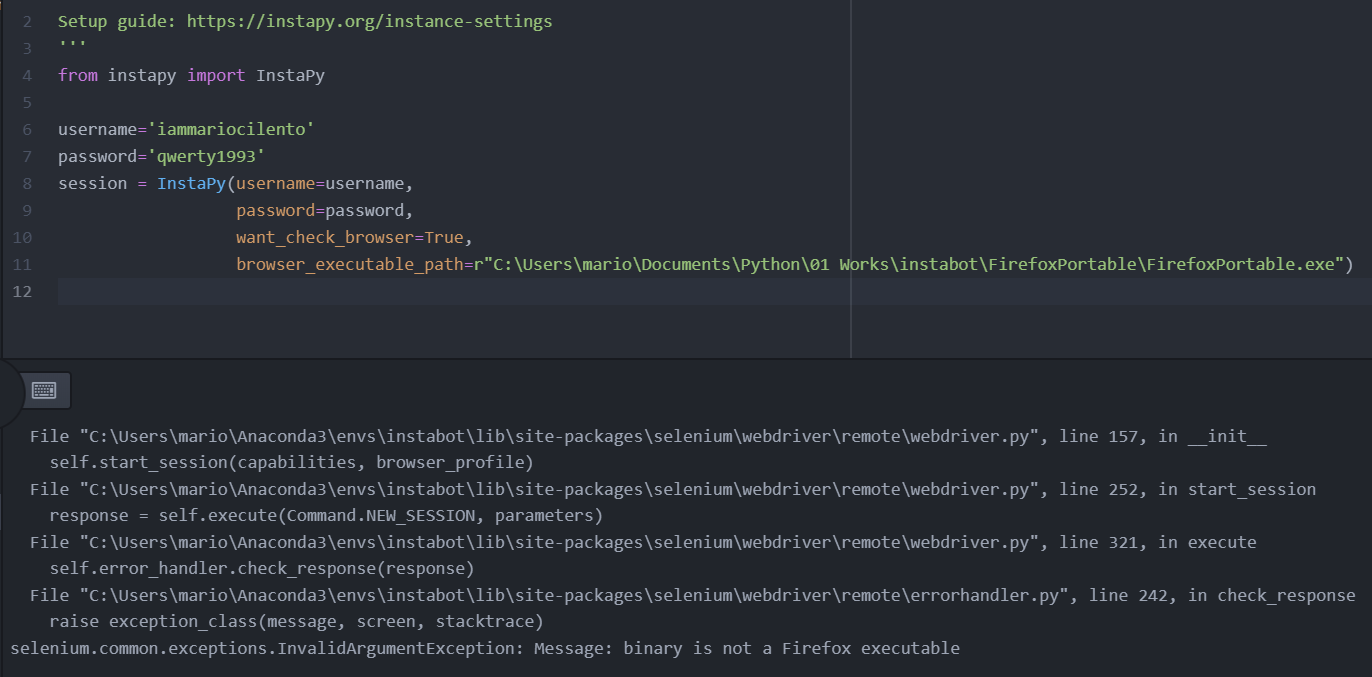
MCilento93
on 12 Dec 2020
@MCilento93
I'm not a Windows lover, but here we are.
To use a portable app, use the binary inside the App directory,
All portables apps so far I know have the same structure.
I'm quite sure your machine is x64, so cd to FFPortable -> App -> FireFox64 -> firefox
That's it, you found the executable file.
session = InstaPy(
    username="iammariocilento",
    password="qwerty1993",
    browser_executable_path="C:\\Users\\internet\\Downloads\\FirefoxPortable\\App\\Firefox64\\firefox.exe",
    geckodriver_path="C:\\Users\\internet\\Downloads\\geckodriver",)
@MCilento93
I'm not a Windows lover, but here we are.
To use a portable app, use the binary inside the App directory,
All portables apps so far I know have the same structure.
I'm quite sure your machine is x64, socdtoFFPortable->App->FireFox64->firefox
That's it, you found the executable file.session = InstaPy( username="iammariocilento", password="qwerty1993", browser_executable_path="C:\\Users\\internet\\Downloads\\FirefoxPortable\\App\\Firefox64\\firefox.exe", geckodriver_path="C:\\Users\\internet\\Downloads\\geckodriver",)
YOU ARE A F** GENIUS!!!
It works greatly as you recommended!
Finally it is going, the whole day through selenium and the bot finding nothing.
Thank you for you help!
Small guides for everybody using Conda and don't want to install Firefox:
- Install Conda
- install instapy with
pip install instapy(create new env. first, recommended, many packages will be installed) - download Firefox Portable, install the portable file in your project subfolder, like project/firefox
- download and extract last geckdriver in the project root (project/geckodriver.exe)
- copy samewhere the absolute path to geckodriver.exe and firefox.exe (use the one in the nested path of portable installation folder, like FirefoxPortableApp\Firefox64firefox.exe) and use like below:
'''
Setup guide: https://instapy.org/instance-settings
'''
from instapy import InstaPy

username='aa'
password='bb'
session = InstaPy(username=username,
                  password=password,
                  want_check_browser=True,
                  browser_executable_path=r"C:\Users\mario\Documents\Python\01 Works\instabot\FirefoxPortable\App\Firefox64\firefox.exe",
                  geckodriver_path=r'C:\Users\mario\Documents\Python\01 Works\instabot\geckodriver.exe').login()

# Like posts based on hashtags
session.like_by_tags(['tsitsipas', 'tennis'], amount=10)
Enjoy
MCilento93
on 13 Dec 2020
Closing for now,
Solution and instructions described above.
elulcao
on 13 Dec 2020
Related issues
 thisishotdog
·
3Comments
thisishotdog
·
3Comments
 n0sw34r
·
3Comments
n0sw34r
·
3Comments
 ghost
·
3Comments
ghost
·
3Comments
 46960
·
3Comments
46960
·
3Comments
 harrypython
·
3Comments
harrypython
·
3Comments
Most helpful comment
@MCilento93
I'm not a Windows lover, but here we are.
To use a portable app, use the binary inside the App directory,
All portables apps so far I know have the same structure.
I'm quite sure your machine is x64, so
cdtoFFPortable->App->FireFox64->firefoxThat's it, you found the executable file.