Instapy: Timed out with failure while explicitly waiting until visibility of element located!
INFO [2020-11-11 14:19:09] [techno_booster] -- Connection Checklist [2/2] (Hide Selenium Extension)
INFO [2020-11-11 14:19:09] [techno_booster] - window.navigator.webdriver response: None
INFO [2020-11-11 14:19:09] [techno_booster] - Hide Selenium Extension: ok
Cookie file not found, creating cookie...
INFO [2020-11-11 14:19:54] [techno_booster] Timed out with failure while explicitly waiting until visibility of element located!
Traceback (most recent call last):
File "us_bot.py", line 26, in
session.login()
File "/home/pc/.local/lib/python3.6/site-packages/instapy/instapy.py", line 433, in login
self.want_check_browser,
File "/home/pc/.local/lib/python3.6/site-packages/instapy/login_util.py", line 316, in login_user
input_username = browser.find_element_by_xpath(input_username_XP)
File "/home/pc/.local/lib/python3.6/site-packages/selenium/webdriver/remote/webdriver.py", line 394, in find_element_by_xpath
return self.find_element(by=By.XPATH, value=xpath)
File "/home/pc/.local/lib/python3.6/site-packages/selenium/webdriver/remote/webdriver.py", line 978, in find_element
'value': value})['value']
File "/home/pc/.local/lib/python3.6/site-packages/selenium/webdriver/remote/webdriver.py", line 321, in execute
self.error_handler.check_response(response)
File "/home/pc/.local/lib/python3.6/site-packages/selenium/webdriver/remote/errorhandler.py", line 242, in check_response
raise exception_class(message, screen, stacktrace)
selenium.common.exceptions.NoSuchElementException: Message: Unable to locate element: //input[@name='username']
This happen yesterday till now everything was working fine I update instapy version and selenium and still can`t login to instagram try instapy.Any suggestions why this happen.
 mikebgrep
All 9 comments
system is Ubuntu 18.04 python version 3.6.9 selenium version selenium==3.141.0 instapy==0.6.12
Same on windows 10
 mikegrep
on 12 Nov 2020
mikegrep
on 12 Nov 2020
Can you send your config?
 v0lumehi
on 13 Nov 2020
v0lumehi
on 13 Nov 2020
from instapy import InstaPy
from instapy import smart_run
session = InstaPy(username=username, password=.password, headless_browser=True)
session.login()
Quota Supervisior dhourly and day limits
session.set_quota_supervisor(enabled=True, sleep_after=["likes", "comments_d", "follows", "unfollows", "server_calls_h"], sleepyhead=True, stochastic_flow=True, notify_me=True,
peak_likes_hourly=45,
peak_likes_daily=1000,
peak_comments_hourly=21,
peak_comments_daily=182,
peak_follows_hourly=48,
peak_follows_daily=None,
peak_unfollows_hourly=35,
peak_unfollows_daily=402,
peak_server_calls_hourly=None,
peak_server_calls_daily=4700)
session.like_by_locations(data, amount=amount)
This is the confifg nothing special I try on Windows 10 same result eaven after this there give me problem whit permission for geckodriver.exe
mikegrep
on 13 Nov 2020
geckodirver.log
/geckodriver.log
1605283202466 geckodriver INFO Listening on 127.0.0.1:47619
1605283202613 mozrunner::runner INFO Running command: "/usr/bin/firefox" "--marionette" "-headless" "-foreground" "-no-remote" "-profile" "/tmp/rust_mozprofileMeUdhy"
* You are running in headless mode.
console.warn: SearchSettings: "get: No settings file exists, new profile?" (new Error("", "(unknown module)"))
1605283215473 Marionette INFO Listening on port 46083
1605283215714 Marionette WARN TLS certificate errors will be ignored for this session
JavaScript error: resource://gre/modules/URIFixup.jsm, line 271: NS_ERROR_FAILURE: Should pass a non-null uri
mikegrep
on 13 Nov 2020
There appears to be an error on line 4
v0lumehi
on 13 Nov 2020
I make the change and result is same
mikegrep
on 13 Nov 2020
This issue has been automatically marked as stale because it has not had recent activity. It will be closed if no further activity occurs. Thank you for your contributions.
If this problem still occurs, please open a new issue
![stale[bot] picture](https://avatars3.githubusercontent.com/in/1724?v=4&s=40) stale[bot]
on 19 Dec 2020
stale[bot]
on 19 Dec 2020
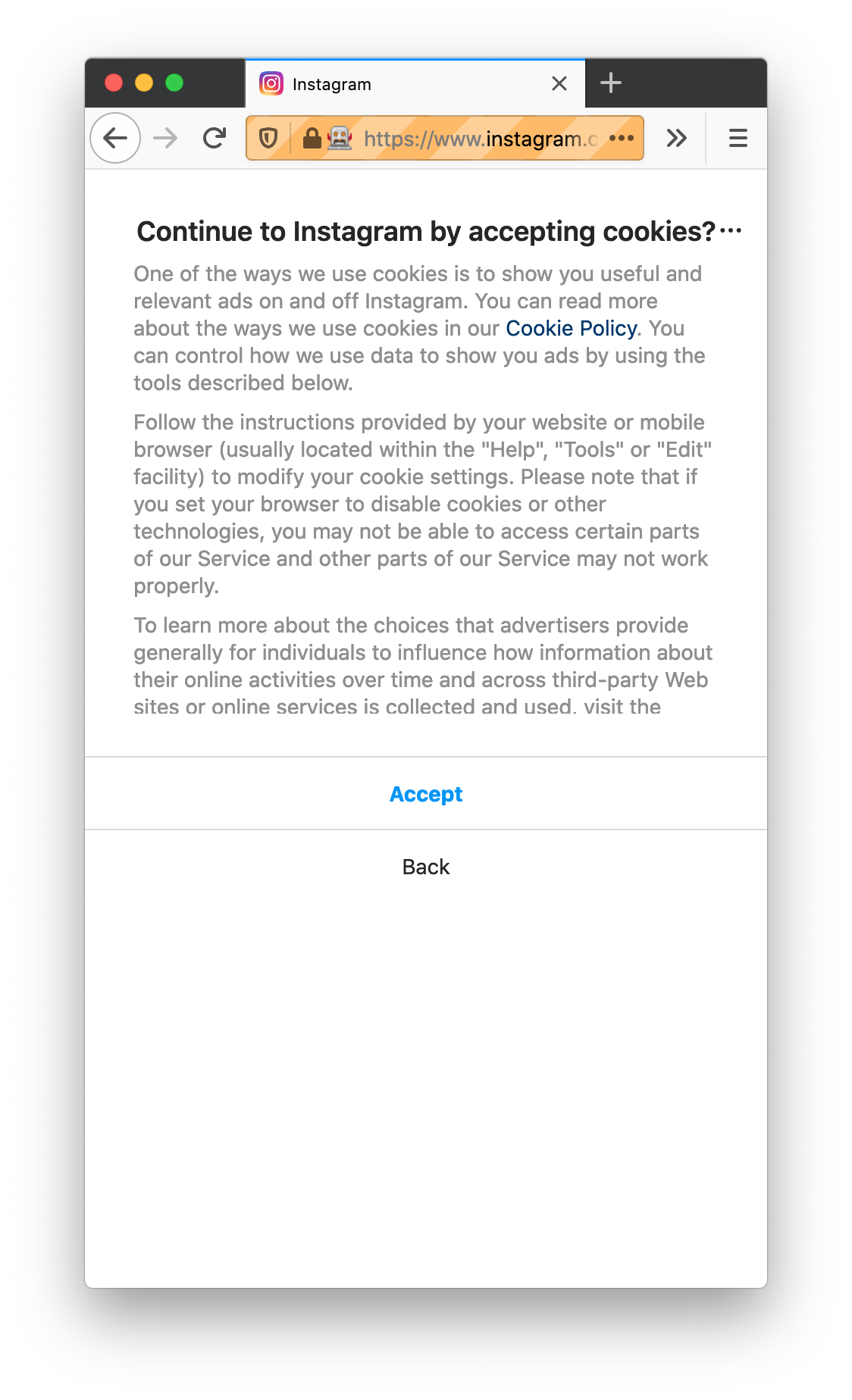
I believe, the trouble here is new/updated screen to accept cookies (see screenshot). As soon as I click on Accept cookies, everything works.
 valchonedelchev
on 20 Dec 2020
valchonedelchev
on 20 Dec 2020
Here's a work around I came up with that works for me.
diff --git a/instapy/login_util.py b/instapy/login_util.py
index ab109ed..3c7eced 100644
--- a/instapy/login_util.py
+++ b/instapy/login_util.py
@@ -248,6 +248,7 @@ def login_user(

     # try to load cookie from username
     try:
+        accept_igcookie_dialogue(browser, logger)
         for cookie in pickle.load(open(cookie_file, "rb")):
             # SameSite = Strict, your cookie will only be sent in a
             # first-party context. In user terms, the cookie will only be sent
Related issues
 tibor
·
3Comments
tibor
·
3Comments
 Spyd3r0us
·
3Comments
Spyd3r0us
·
3Comments
 ghost
·
3Comments
ghost
·
3Comments
 deronsizemore
·
3Comments
deronsizemore
·
3Comments
 ediooo
·
3Comments
ediooo
·
3Comments
Most helpful comment
20201220-102734.html.zip
I believe, the trouble here is new/updated screen to accept cookies (see screenshot). As soon as I click on Accept cookies, everything works.