Instapy: I built myself a Dashboard using https://metabase.com/
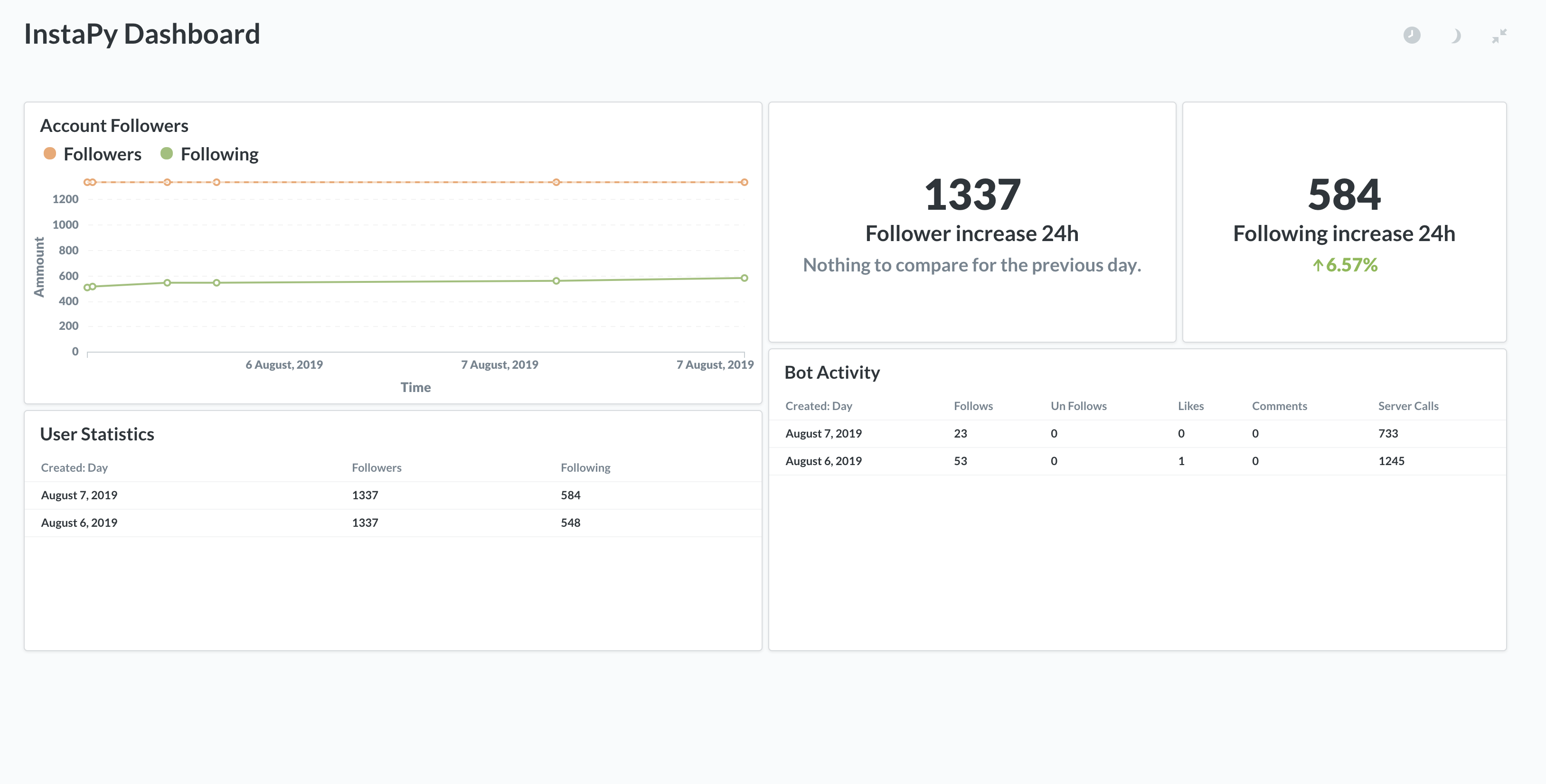
Now I want much more data in the database!
 GaWr26
All 13 comments
Hey this is pretty cool! How did you set this up?
 ArdyBeheshti
on 7 Aug 2019
ArdyBeheshti
on 7 Aug 2019
Wow nice!
 mrallanodreman
on 7 Aug 2019
mrallanodreman
on 7 Aug 2019
First of all I got inspired by https://github.com/converge/instapy-dashboard so thanks a buch for that!
The problem I was facing there was the multiple databases as i run multiple accounts.
If you install metabase which is a written in java and run it you can connect to many databases.
I just connected it to each sqllite database of instapy.
Then you need to start building your dashboard which is pretty straight forward and really easy.
No coding required.
I have it running on a RaspberryPi 3B and love it. It also starts a webserver and is responsive so now I can always see whats going on. Even on the go.
GaWr26
on 7 Aug 2019
First of all I got inspired by https://github.com/converge/instapy-dashboard so thanks a buch for that!
The problem I was facing there was the multiple databases as i run multiple accounts.
If you install metabase which is a written in java and run it you can connect to many databases.
I just connected it to each sqllite database of instapy.
Then you need to start building your dashboard which is pretty straight forward and really easy.
No coding required.I have it running on a RaspberryPi 3B and love it. It also starts a webserver and is responsive so now I can always see whats going on. Even on the go.
Sweet! When you mean multi dbs/account issues, does displaying them not work so seamlessly as showing just one account's information?
ArdyBeheshti
on 7 Aug 2019
Sweet! When you mean multi dbs/account issues, does displaying them not work so seamlessly as showing just one account's information?
I use split_db as I had quite some crashes with writing to only one db. The instapy-dashboard can only connect to one db and running multiple instances of it made no sense to me.
Metabase works great with multiple databases.
GaWr26
on 7 Aug 2019
Do you have a docker image + instructions to share? :-)
 lerra
on 9 Aug 2019
lerra
on 9 Aug 2019
Do you have a docker image + instructions to share? :-)
Sorry, no docker image or documentation. I just played with it and am quite happy with the result.
It's super straight forward as metabase is a really well built tool with a great UI. All you need to do is install it and select the appropriate database(s) and then go ahead and create a dashboard to your liking.
GaWr26
on 9 Aug 2019
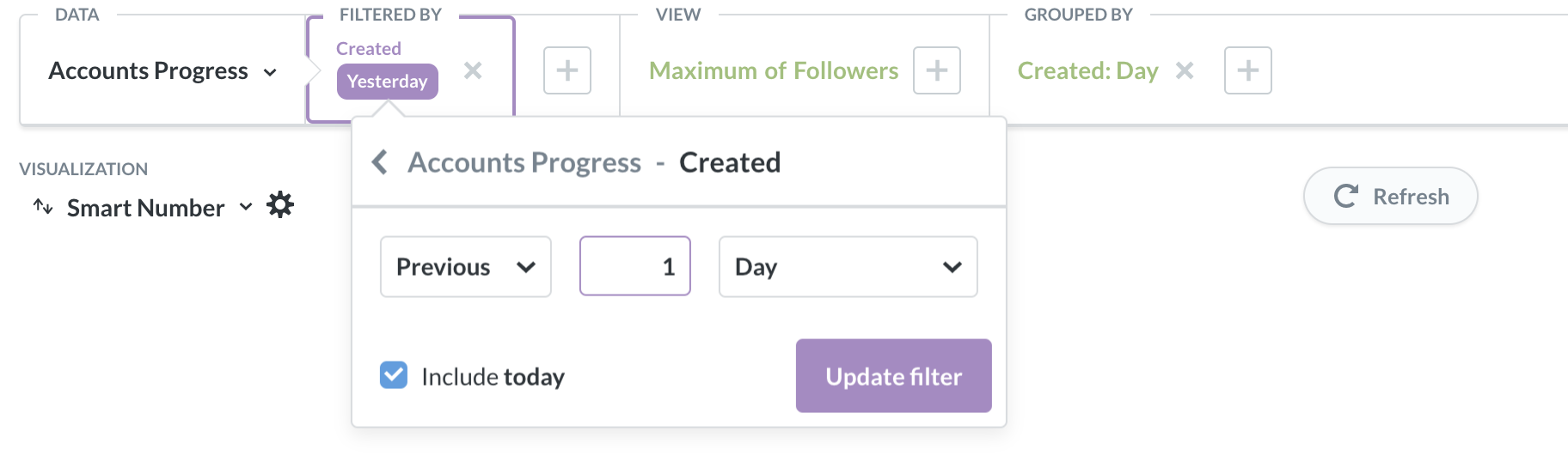
Trying it out. How did you get the two in the top right? The increase from the previous day?
 ExoCode17
on 14 Aug 2019
ExoCode17
on 14 Aug 2019
Trying it out. How did you get the two in the top right? The increase from the previous day?
that's a smart Number. This should help:
GaWr26
on 15 Aug 2019
Gotcha! Now I have them too. And how did you get the reverse ordering by date in the bottom two? Can't get my head around it
ExoCode17
on 15 Aug 2019

ExoCode17
on 15 Aug 2019
Reverse ordering can be done on the far right with the three dots menu. There you can sort by created date and then select desc.
Also you could group by created if you want to get only one row per day.
GaWr26
on 15 Aug 2019
This issue has been automatically marked as stale because it has not had recent activity. It will be closed if no further activity occurs. Thank you for your contributions.
If this problem still occurs, please open a new issue
![stale[bot] picture](https://avatars3.githubusercontent.com/in/1724?v=4&s=40) stale[bot]
on 14 Sep 2019
stale[bot]
on 14 Sep 2019
Related issues
 converge
·
3Comments
converge
·
3Comments
 Spyd3r0us
·
3Comments
Spyd3r0us
·
3Comments
 CodeMaster1
·
3Comments
CodeMaster1
·
3Comments
 neomh
·
3Comments
neomh
·
3Comments
 46960
·
3Comments
46960
·
3Comments
Most helpful comment
First of all I got inspired by https://github.com/converge/instapy-dashboard so thanks a buch for that!
The problem I was facing there was the multiple databases as i run multiple accounts.
If you install metabase which is a written in java and run it you can connect to many databases.
I just connected it to each sqllite database of instapy.
Then you need to start building your dashboard which is pretty straight forward and really easy.
No coding required.
I have it running on a RaspberryPi 3B and love it. It also starts a webserver and is responsive so now I can always see whats going on. Even on the go.