Instapy: Can't create cookie new account & more issues
This is my first post! sorry im noob but i try to read & search before making a threat.
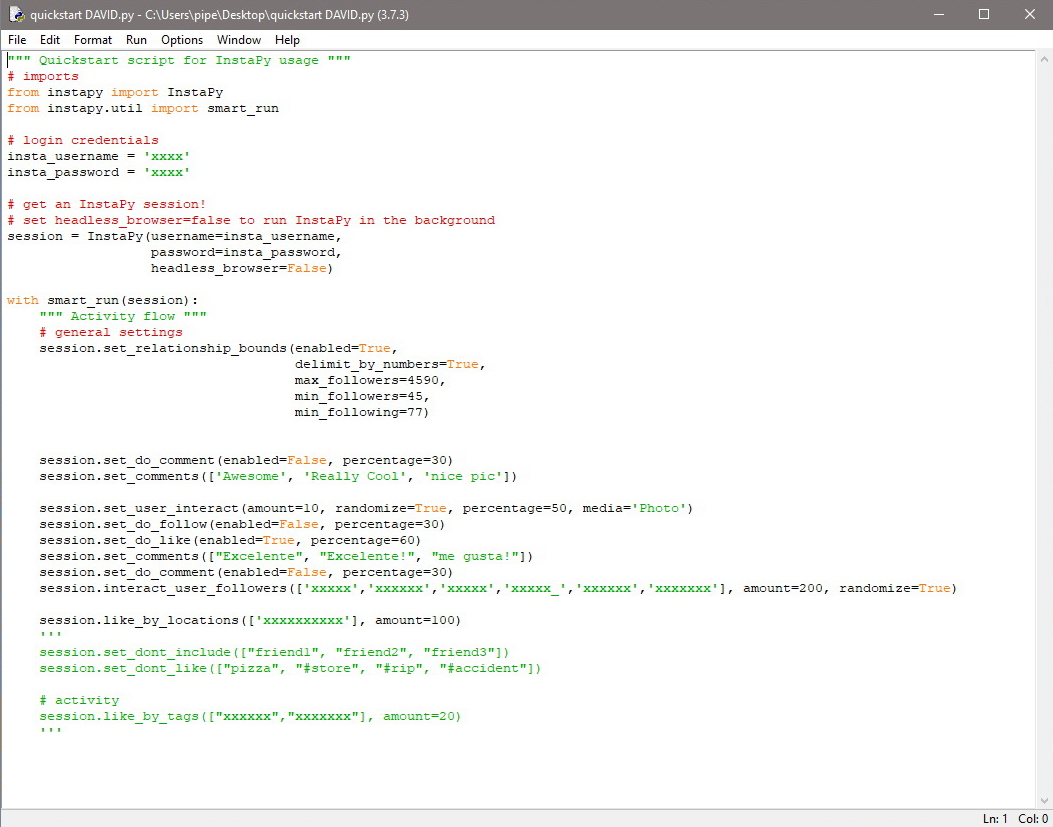
Im trying to help a friend on his IG, i have more accounts that working fine, but when im trying to start with his account (first time, dont have cookie), show me this result...
(i try the #4240 - #4066 and dont have any results) Sorry for my english and this is the log
Python 3.7.3 (v3.7.3:ef4ec6ed12, Mar 25 2019, 21:26:53) [MSC v.1916 32 bit (Intel)] on win32
Type "help", "copyright", "credits" or "license()" for more information.
RESTART: C:\Users\pipe\AppData\Local\Programs\Python\Python37-32\quickstart DAVID.py
._. ._. ._. ._. ._. ._. ._. ._. ._.
Workspace in use: "C:/Users/pipe/InstaPy"
._. ._. ._. ._. ._. ._. ._. ._. ._. ._. ._. ._. ._. ._. ._. ._. ._. ._. ._. ._. ._.
INFO [2019-04-03 03:54:41] [david] Using built in instapy-chromedriver executable (version 2.46)
OOOOOOOOOOOOOOOOOOOOOOOOOOOOOOOOOOOOOOOOOOOOOOOOOOOOOO
INFO [2019-04-03 03:54:44] [david] Session started!
oooooooooooooooooooooooooooooooooooooooooooooooooooooo
Cookie file not found, creating cookie...
Login A/B test detected! Trying another string...
If raising an issue, please also upload the file located at:
C:\Users\pipe\AppData\Local\Temp\20190403-035545.html
INFO [2019-04-03 03:55:48] [david] Sessional Live Report:
|> No any statistics to show
[Session lasted 1.11 minutes]
OOOOOOOOOOOOOOOOOOOOOOOOOOOOOOOOOOOOOOOOOOOOOOOOOOOOOOOO
INFO [2019-04-03 03:55:48] [david] Session ended!
oooooooooooooooooooooooooooooooooooooooooooooooooooooooo
Traceback (most recent call last):
File "C:\Users\pipe\AppData\Local\Programs\Python\Python37-32\lib\site-packages\instapy\login_util.py", line 260, in login_user
"//button//div[text()='Log in']")
File "C:\Users\pipe\AppData\Local\Programs\Python\Python37-32\lib\site-packages\selenium\webdriver\remote\webdriver.py", line 394, in find_element_by_xpath
return self.find_element(by=By.XPATH, value=xpath)
File "C:\Users\pipe\AppData\Local\Programs\Python\Python37-32\lib\site-packages\selenium\webdriver\remote\webdriver.py", line 978, in find_element
'value': value})['value']
File "C:\Users\pipe\AppData\Local\Programs\Python\Python37-32\lib\site-packages\selenium\webdriver\remote\webdriver.py", line 321, in execute
self.error_handler.check_response(response)
File "C:\Users\pipe\AppData\Local\Programs\Python\Python37-32\lib\site-packages\selenium\webdriver\remote\errorhandler.py", line 242, in check_response
raise exception_class(message, screen, stacktrace)
selenium.common.exceptions.NoSuchElementException: Message: no such element: Unable to locate element: {"method":"xpath","selector":"//button//div[text()='Log in']"}
(Session info: chrome=73.0.3683.86)
(Driver info: chromedriver=2.46.628402 (536cd7adbad73a3783fdc2cab92ab2ba7ec361e1),platform=Windows NT 10.0.16299 x86_64)
During handling of the above exception, another exception occurred:
Traceback (most recent call last):
File "C:\Users\pipe\AppData\Local\Programs\Python\Python37-32\quickstart DAVID.py", line 16, in
with smart_run(session):
File "C:\Users\pipe\AppData\Local\Programs\Python\Python37-32\lib\contextlib.py", line 112, in __enter__
return next(self.gen)
File "C:\Users\pipe\AppData\Local\Programs\Python\Python37-32\lib\site-packages\instapy\util.py", line 1679, in smart_run
session.login()
File "C:\Users\pipe\AppData\Local\Programs\Python\Python37-32\lib\site-packages\instapy\instapy.py", line 385, in login
self.bypass_with_mobile):
File "C:\Users\pipe\AppData\Local\Programs\Python\Python37-32\lib\site-packages\instapy\login_util.py", line 264, in login_user
"//button//div[text()='Log in']")
File "C:\Users\pipe\AppData\Local\Programs\Python\Python37-32\lib\site-packages\selenium\webdriver\remote\webdriver.py", line 394, in find_element_by_xpath
return self.find_element(by=By.XPATH, value=xpath)
File "C:\Users\pipe\AppData\Local\Programs\Python\Python37-32\lib\site-packages\selenium\webdriver\remote\webdriver.py", line 978, in find_element
'value': value})['value']
File "C:\Users\pipe\AppData\Local\Programs\Python\Python37-32\lib\site-packages\selenium\webdriver\remote\webdriver.py", line 321, in execute
self.error_handler.check_response(response)
File "C:\Users\pipe\AppData\Local\Programs\Python\Python37-32\lib\site-packages\selenium\webdriver\remote\errorhandler.py", line 242, in check_response
raise exception_class(message, screen, stacktrace)
selenium.common.exceptions.NoSuchElementException: Message: no such element: Unable to locate element: {"method":"xpath","selector":"//button//div[text()='Log in']"}
(Session info: chrome=73.0.3683.86)
(Driver info: chromedriver=2.46.628402 (536cd7adbad73a3783fdc2cab92ab2ba7ec361e1),platform=Windows NT 10.0.16299 x86_64)
i have the same config on others accounts and works fine with this template that i show (i have sometime with the cookie created on the other accounts and works great) the problem is with new account
THANKS!
 LuisGav
All 10 comments
Same here
 tlovestatus
on 3 Apr 2019
tlovestatus
on 3 Apr 2019
I have PR this change #4218 it should fix your issue. waiting @timgrossmann to merge it.
 CharlesCCC
on 3 Apr 2019
CharlesCCC
on 3 Apr 2019
today i try (from #4218) change the login_util.py with the new parameters
print("Login A/B test detected! Trying another...1")
try:
login_button = browser.find_element_by_xpath(
"//button//div[text()='Log in']")
except NoSuchElementException:
print("Login button A/B test detected! Trying another...2")
try:
login_button = browser.find_element_by_xpath(
"//button[text()='Log in']")
except NoSuchElementException:
print("Login button A/B test detected! Trying another... 3")
try:
login_button = browser.find_element_by_xpath(
"//button[@type='submit']")
except NoSuchElementException:
print("Login button A/B test detected! ran out of option..quite")
return False
*try to change the Log in" vs "Log In too
*i change my quickstart.py with the #4218
*even i trying changing the last login_util.py that appears on fix a typo and any happens
make a test with my old accounts that works fine and move the cookie folder from 1 of this accounts to try to make a new
cookie but dont create and show the same issue, i see that the button Log In is not press by the bot =(
LOG
Python 3.7.3 (v3.7.3:ef4ec6ed12, Mar 25 2019, 21:26:53) [MSC v.1916 32 bit (Intel)] on win32
Type "help", "copyright", "credits" or "license()" for more information.
RESTART: C:\Users\pipe\AppData\Local\Programs\Python\Python37-32\prueba para david.py
._. ._. ._. ._. ._. ._. ._. ._. ._.
Workspace in use: "C:/Users/pipe/InstaPy"
._. ._. ._. ._. ._. ._. ._. ._. ._. ._. ._. ._. ._. ._. ._. ._. ._. ._. ._. ._. ._.
INFO [2019-04-03 17:18:11] [david] Using built in instapy-chromedriver executable (version 2.46)
OOOOOOOOOOOOOOOOOOOOOOOOOOOOOOOOOOOOOOOOOOOOOOOOOOOOOO
INFO [2019-04-03 17:18:14] [david] Session started!
oooooooooooooooooooooooooooooooooooooooooooooooooooooo
Cookie file not found, creating cookie...
Login A/B test detected! Trying another string...
If raising an issue, please also upload the file located at:
C:\Users\pipe\AppData\Local\Temp\20190403-171916.html
INFO [2019-04-03 17:19:19] [david] Sessional Live Report:
|> No any statistics to show
[Session lasted 1.14 minutes]
OOOOOOOOOOOOOOOOOOOOOOOOOOOOOOOOOOOOOOOOOOOOOOOOOOOOOOOO
INFO [2019-04-03 17:19:19] [david] Session ended!
oooooooooooooooooooooooooooooooooooooooooooooooooooooooo
Traceback (most recent call last):
File "C:\Users\pipe\AppData\Local\Programs\Python\Python37-32\lib\site-packages\instapy\login_util.py", line 260, in login_user
"//button//div[text()='Log in']")
File "C:\Users\pipe\AppData\Local\Programs\Python\Python37-32\lib\site-packages\selenium\webdriver\remote\webdriver.py", line 394, in find_element_by_xpath
return self.find_element(by=By.XPATH, value=xpath)
File "C:\Users\pipe\AppData\Local\Programs\Python\Python37-32\lib\site-packages\selenium\webdriver\remote\webdriver.py", line 978, in find_element
'value': value})['value']
File "C:\Users\pipe\AppData\Local\Programs\Python\Python37-32\lib\site-packages\selenium\webdriver\remote\webdriver.py", line 321, in execute
self.error_handler.check_response(response)
File "C:\Users\pipe\AppData\Local\Programs\Python\Python37-32\lib\site-packages\selenium\webdriver\remote\errorhandler.py", line 242, in check_response
raise exception_class(message, screen, stacktrace)
selenium.common.exceptions.NoSuchElementException: Message: no such element: Unable to locate element: {"method":"xpath","selector":"//button//div[text()='Log in']"}
(Session info: chrome=73.0.3683.86)
(Driver info: chromedriver=2.46.628402 (536cd7adbad73a3783fdc2cab92ab2ba7ec361e1),platform=Windows NT 10.0.16299 x86_64)
During handling of the above exception, another exception occurred:
Traceback (most recent call last):
File "C:\Users\pipe\AppData\Local\Programs\Python\Python37-32\quickstart DAVID.py", line 16, in
with smart_run(session):
File "C:\Users\pipe\AppData\Local\Programs\Python\Python37-32\lib\contextlib.py", line 112, in __enter__
return next(self.gen)
File "C:\Users\pipe\AppData\Local\Programs\Python\Python37-32\lib\site-packages\instapy\util.py", line 1679, in smart_run
session.login()
File "C:\Users\pipe\AppData\Local\Programs\Python\Python37-32\lib\site-packages\instapy\instapy.py", line 385, in login
self.bypass_with_mobile):
File "C:\Users\pipe\AppData\Local\Programs\Python\Python37-32\lib\site-packages\instapy\login_util.py", line 264, in login_user
"//button//div[text()='Log in']")
File "C:\Users\pipe\AppData\Local\Programs\Python\Python37-32\lib\site-packages\selenium\webdriver\remote\webdriver.py", line 394, in find_element_by_xpath
return self.find_element(by=By.XPATH, value=xpath)
File "C:\Users\pipe\AppData\Local\Programs\Python\Python37-32\lib\site-packages\selenium\webdriver\remote\webdriver.py", line 978, in find_element
'value': value})['value']
File "C:\Users\pipe\AppData\Local\Programs\Python\Python37-32\lib\site-packages\selenium\webdriver\remote\webdriver.py", line 321, in execute
self.error_handler.check_response(response)
File "C:\Users\pipe\AppData\Local\Programs\Python\Python37-32\lib\site-packages\selenium\webdriver\remote\errorhandler.py", line 242, in check_response
raise exception_class(message, screen, stacktrace)
selenium.common.exceptions.NoSuchElementException: Message: no such element: Unable to locate element: {"method":"xpath","selector":"//button//div[text()='Log in']"}
(Session info: chrome=73.0.3683.86)
(Driver info: chromedriver=2.46.628402 (536cd7adbad73a3783fdc2cab92ab2ba7ec361e1),platform=Windows NT 10.0.16299 x86_64)
LuisGav
on 3 Apr 2019
You still seems the error telling me the change didn't apply successfully. because if it did, it will eventually quite saying Login button A/B test detected! ran out of option..quit instead of blow up with exception.
CharlesCCC
on 3 Apr 2019
You still seems the error telling me the change didn't apply successfully. because if it did, it will eventually quite saying
Login button A/B test detected! ran out of option..quitinstead of blow up with exception.
So sorry i dont copy the log complete, edited.
LuisGav
on 4 Apr 2019
im having the same problem, this still an issue waiting to be merged to the master? any way i can resolve the problem myself until then?
thanks
 poonasor
on 11 Apr 2019
poonasor
on 11 Apr 2019
@poonasor the change has been merged, make sure you got the latest version of Instapy and try again.
CharlesCCC
on 11 Apr 2019
@CharlesCCC thank you, its working again appreciate the help
poonasor
on 14 Apr 2019
@CharlesCCC its working 100% THANK YOU!!!!!
LuisGav
on 14 Apr 2019
This issue has been automatically marked as stale because it has not had recent activity. It will be closed if no further activity occurs. Thank you for your contributions.
If this problem still occurs, please open a new issue
![stale[bot] picture](https://avatars3.githubusercontent.com/in/1724?v=4&s=40) stale[bot]
on 14 May 2019
stale[bot]
on 14 May 2019
Related issues
 ediooo
·
3Comments
ediooo
·
3Comments
 ghost
·
3Comments
ghost
·
3Comments
 n0sw34r
·
3Comments
n0sw34r
·
3Comments
 CodeMaster1
·
3Comments
CharlesCCC
·
3Comments
CodeMaster1
·
3Comments
CharlesCCC
·
3Comments
Most helpful comment
@poonasor the change has been merged, make sure you got the latest version of Instapy and try again.