Instapy: Error occurred while deleting cookies from web browser
Hello,
Since last week the scripts are failing with following error message at random time.
started to see this after the built-in instapy-chrome driver update i guess.

Error occurred while deleting cookies from web browser
Any fix for this?
 imewish
All 32 comments
Does it still happen? as far i can see the latest version (at least on mac osx) is using chromedriver version 2.46.
._.  ._.  ._.  ._.  ._.  ._.  ._.  ._.  ._.  ._.  ._.  ._.  ._.  ._.  ._.  ._.  ._.  ._.  ._.  ._.
INFO [2019-03-16 08:08:50] [....]  Using built in instapy-chromedriver executable (version 2.46)
At the start of the session, is there any error/warning about loading the cookie
Could you check the logs for other occurrences, if all only have this error line? According to source code, after "...web browser!" should be a new-line followed by the exception description.
def close_browser(browser,
                  threaded_session,
                  logger):
    with interruption_handler(threaded=threaded_session):
        # delete cookies
        try:
            browser.delete_all_cookies()
        except Exception as exc:
            if isinstance(exc, WebDriverException):
                logger.exception(
                    "Error occurred while deleting cookies "
                    "from web browser!\n\t{}"
                    .format(str(exc).encode("utf-8")))
 bugre
on 16 Mar 2019
bugre
on 16 Mar 2019
@bugre
Yes, i have cron job which runs the script on a Ubuntu 16.04 VPS. i can see this happens every day since last week.
And there is no warning in the beginning of the session. it goes like this,
INFO [2019-03-16 14:34:02] [capture.io]  Using built in instapy-chromedriver executable (version 2.44)
INFO [2019-03-16 14:34:03] [capture.io]  Session started!
INFO [2019-03-16 14:34:39] [capture.io]  Logged in successfully!
INFO [2019-03-16 14:34:39] [capture.io]  Saving account progress...
INFO [2019-03-16 14:34:43] [capture.io]  Tag [1/1]
INFO [2019-03-16 14:34:43] [capture.io]  --> b'mobilephotography'
INFO [2019-03-16 14:34:54] [capture.io]  desired amount: 1500  |  top posts [disabled]: 9  |  possible posts: 11884407
Once this error occurs, script stops
imewish
on 16 Mar 2019
i don't have access to an Ubuntu, so i don't know if different OS's have different chromedriver versions.
Please, could you verify that you are running InstaPy 0.3.3?
In instapy source code the only place i found this error message is when it's shutting down the browser. And this happens (in the regular flow) if you call "session".end(), or in some way interrupt the script.
bugre
on 16 Mar 2019
I do git pull every day to get updated. So i guess i have the latest version.
imewish
on 16 Mar 2019
how did you do the install?
any reason you're not using the PIP install / upgrade method?
python3 -m pip install instapy (on mac that is all i've to do, eventually y do a '-U' to update.
bugre
on 16 Mar 2019
@bugre sorry, my bad, with git i only do code updates. Let me try updating Instapy.
imewish
on 16 Mar 2019
After updating, the current version, is 0.1.3
imewish
on 16 Mar 2019
0.1.3 for instapy? should be 0.3.3 (https://github.com/timgrossmann/InstaPy/releases)
bugre
on 16 Mar 2019
@bugre My bad again. update didnt work on first try. Now it is 0.3.3
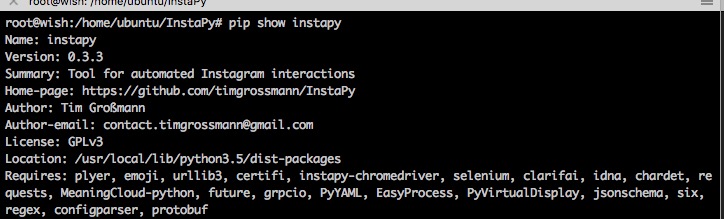
Hope this will fix the cookie issue.
imewish
on 16 Mar 2019
let's hope. out of curiosity, could you check in the logs if going to 0.3.3 on ubuntu also does go to chromedriver 2.46?
bugre
on 16 Mar 2019
tip.. if you want mess with the code, update from dev branch, you could install it with '-e' (https://github.com/timgrossmann/InstaPy#-install-manually-and-manage-using-advanced-git-commands)
bugre
on 16 Mar 2019
Just checked. It still goes to 2.44.
imewish
on 16 Mar 2019
This error is still happening,
ERROR [2019-03-18 20:54:45] [imewish] Error occurred while deleting cookies from web browser!
imewish
on 19 Mar 2019
I am having the same issue on my side, Ubuntu, AWS
 couturelp
on 21 Mar 2019
couturelp
on 21 Mar 2019
This issue has been automatically marked as stale because it has not had recent activity. It will be closed if no further activity occurs. Thank you for your contributions.
If this problem still occurs, please open a new issue
![stale[bot] picture](https://avatars3.githubusercontent.com/in/1724?v=4&s=40) stale[bot]
on 21 Apr 2019
stale[bot]
on 21 Apr 2019
same here
 mgconejero
on 24 Apr 2019
mgconejero
on 24 Apr 2019
Same here!
 Luismij
on 27 Apr 2019
Luismij
on 27 Apr 2019
still having this issue. Is there a specific issue of chrome drive to fixate on to fix this one?
 ZBarthelemy
on 28 Apr 2019
ZBarthelemy
on 28 Apr 2019
We need help, i'm getting this error many times
Luismij
on 28 Apr 2019
I've got a feeling is more relate the the google chrome driver and finding an organic way to flush the cookies on after a renew fresh driver installation...
Opting for either a shell script to reinstall google chrome on apt - get purge and apt - get or an improvement on the current InstaPy framework.
In the mean time uninstalling with apt-get purge google chrome or whatever fixes it.
ZBarthelemy
on 28 Apr 2019
@Luismij solved this issue on my end with a bit of shell scripting before re running
the root cause is opened chrome drivers that are not close when you are done with one python 'instaPy sript'
If you run the following commands on Linux PC or VM
top (find pid of command chrome)
ps -ef | grep insta
Make sure that all processes are 'kill' before relaunching.
Fixed the 'bug' for me. Hope that helps.
ZBarthelemy
on 4 May 2019
@ZBarthelemy sorry, but, what should i do with this command?
ps -ef | grep insta?
if I press tab they send me to a folder
Luismij
on 7 May 2019
@ZBarthelemy im still having this problem in AWS. Could you expand on your solution? What does "ps -ef | grep insta" do? Sorry i am new to code
mgconejero
on 7 May 2019
@mgconejero I've been doing some research and I think it's because the server, in my case, runs out of RAM.
I have a droplet with 1gb of ram, so when running 5 accounts, the memory is exceeded and some of the accounts fail.
what I did was reduce to 3 accounts by droplet.
I am analyzing if it works, I let you know soon.
Luismij
on 7 May 2019
@Luismij thanks for the response! i have also 1 gb of ram per instance. Only have 3 accounts per instance but the ones having the issue are the ones with more followers and following numbers... might be the same problem. Will try to re-organize the accounts to reduce the load per instance.
Thanks again! i will let yoy know the results too
mgconejero
on 7 May 2019
@mgconejero i better increased the RAM in the droplet to 2GB
Luismij
on 8 May 2019
Hey sorry for the belated response, @Luismij
ps -ef in machine show open tasks
Top show open apps (chrome driver)
You can make shell scripts to restart or handle your high memory or pay for more memory. Up to you.
ZBarthelemy
on 10 May 2019
I am running with raspberry pi. I used "top" did not see any chromedriver using the resources. and I have restarted.
What other way that possibly causes this issue?
 silensinator
on 16 May 2019
silensinator
on 16 May 2019
This has started happening for me too on raspberry pi
Error occurred while deleting cookies from web browser!
    b'Message: no such session\n  (Driver info: chromedriver=2.36 (a81166ad79e68fbfe7cf5ba243192d6412e26b37),platform=Linux 4.14.98-v7+ armv7l)
Are there any known workarounds?
Edit
Updating chromedriver to the latest version fixed this issue for me
pip3 install instapy-chromedriver -U
 malimccalla
on 16 May 2019
malimccalla
on 16 May 2019
This issue has been automatically marked as stale because it has not had recent activity. It will be closed if no further activity occurs. Thank you for your contributions.
If this problem still occurs, please open a new issue
stale[bot]
on 15 Jun 2019
Since the new update I have been receiving this error too. Any fix for this?
ERROR [2019-07-02 08:16:54] [USERNAME]  Error occurred while deleting cookies from web browser!
        b'Message: timeout\n  (Session info: headless chrome=74.0.3729.169)\n  (Driver info: chromedriver=2.46.628388 (4a34a70827ac54148e092aafb70504c4ea7ae926),platform=Linux 4.18.0-1015-gcp x86_64)\n'
Traceback (most recent call last):
  File "/usr/local/lib/python3.6/dist-packages/instapy/util.py", line 1045, in web_address_navigator
    browser.get(link)
  File "/usr/local/lib/python3.6/dist-packages/selenium/webdriver/remote/webdriver.py", line 333, in get
    self.execute(Command.GET, {'url': url})
  File "/usr/local/lib/python3.6/dist-packages/selenium/webdriver/remote/webdriver.py", line 321, in execute
    self.error_handler.check_response(response)
  File "/usr/local/lib/python3.6/dist-packages/selenium/webdriver/remote/errorhandler.py", line 242, in check_response
    raise exception_class(message, screen, stacktrace)
selenium.common.exceptions.TimeoutException: Message: timeout
  (Session info: headless chrome=74.0.3729.169)
  (Driver info: chromedriver=2.46.628388 (4a34a70827ac54148e092aafb70504c4ea7ae926),platform=Linux 4.18.0-1015-gcp x86_64)

During handling of the above exception, another exception occurred:

Traceback (most recent call last):
  File "/usr/local/lib/python3.6/dist-packages/instapy/util.py", line 1680, in smart_run
    yield
  File "instabot.py", line 94, in job
    session.like_by_tags(random.sample(hashtaglist, random.randint(60,65)), amount=2, use_smart_hashtags=False, interact = False)
  File "/usr/local/lib/python3.6/dist-packages/instapy/instapy.py", line 1785, in like_by_tags
    self.logger)
  File "/usr/local/lib/python3.6/dist-packages/instapy/like_util.py", line 510, in check_link
    web_address_navigator(browser, post_link)
  File "/usr/local/lib/python3.6/dist-packages/instapy/util.py", line 1058, in web_address_navigator
    str(exc).encode("utf-8")))
selenium.common.exceptions.TimeoutException: Message: Retried 7 times to GET 'b'https://www.instagram.com/p/.../'' webpage but failed out of a timeout!
        b'Message: timeout\n  (Session info: headless chrome=74.0.3729.169)\n  (Driver info: chromedriver=2.46.628388 (4a34a70827ac54148e092aafb70504c4ea7ae926),platform=Linux 4.18.0-1015-gcp x86_64)\n'

During handling of the above exception, another exception occurred:

Traceback (most recent call last):
  File "/usr/local/lib/python3.6/dist-packages/instapy/browser.py", line 230, in close_browser
    browser.delete_all_cookies()
  File "/usr/local/lib/python3.6/dist-packages/selenium/webdriver/remote/webdriver.py", line 878, in delete_all_cookies
    self.execute(Command.DELETE_ALL_COOKIES)
  File "/usr/local/lib/python3.6/dist-packages/selenium/webdriver/remote/webdriver.py", line 321, in execute
    self.error_handler.check_response(response)
  File "/usr/local/lib/python3.6/dist-packages/selenium/webdriver/remote/errorhandler.py", line 242, in check_response
    raise exception_class(message, screen, stacktrace)
selenium.common.exceptions.TimeoutException: Message: timeout
  (Session info: headless chrome=74.0.3729.169)
  (Driver info: chromedriver=2.46.628388 (4a34a70827ac54148e092aafb70504c4ea7ae926),platform=Linux 4.18.0-1015-gcp x86_64)
 FancyRobot
on 2 Jul 2019
FancyRobot
on 2 Jul 2019
Still not working.
 githubbbie
on 15 Jan 2020
githubbbie
on 15 Jan 2020
Related issues
 drcyber975
·
3Comments
drcyber975
·
3Comments
 CharlesCCC
·
3Comments
CharlesCCC
·
3Comments
 ediooo
·
3Comments
ediooo
·
3Comments
 CodeMaster1
·
3Comments
CodeMaster1
·
3Comments
 tibor
·
3Comments
tibor
·
3Comments
Most helpful comment
Hey sorry for the belated response, @Luismij
ps -ef in machine show open tasks
Top show open apps (chrome driver)
You can make shell scripts to restart or handle your high memory or pay for more memory. Up to you.