Instapy: unexpected keyword argument 'ticker'
Expected Behavior
Current Behavior
INFO [2018-09-22 17:48:13] [user]  Quota Supervisor: hourly likes reached quotient!      ~going to sleep 15 minutes long
        take a black tea break? :>
Exception in thread Thread-1:
Traceback (most recent call last):
  File "C:\Users\user\AppData\Local\Programs\Python\Python37-32\lib\threading.py", line 917, in _bootstrap_inner
    self.run()
  File "C:\Users\user\AppData\Local\Programs\Python\Python37-32\lib\threading.py", line 865, in run
    self._target(*self._args, **self._kwargs)
  File "C:\Users\user\AppData\Local\Programs\Python\Python37-32\lib\site-packages\plyer\platforms\win\libs\balloontip.py", line 145, in balloon_tip
    WindowsBalloonTip(**kwargs)
TypeError: __init__() got an unexpected keyword argument 'ticker'
Possible Solution (optional)
InstaPy configuration
    session.set_quota_supervisor(enabled=True, sleep_after=["likes", "comments_d", "follows", "unfollows", "server_calls_h"], sleepyhead=True, stochastic_flow=True, notify_me=True,
                                  peak_likes=(57, 585),
                                   peak_comments=(21, 182),
                                    peak_follows=(48, None),
                                     peak_unfollows=(35, 402),
                                      peak_server_calls=(None, 4700))

    session.set_relationship_bounds(enabled=True,
                                     potency_ratio=None,
                                      delimit_by_numbers=True,
                                       max_followers=100000,
                                        max_following=7000,
                                         min_followers=60,
                                          min_following=77)
    session.set_user_interact(amount=2, randomize=True, percentage=85, media='Photo')
    session.set_do_like(enabled=True, percentage=85)
    session.set_comments(comments)
    session.set_do_comment(enabled=True, percentage=45)
    session.set_simulation(enabled=True, percentage=66)
    session.like_by_feed(amount=300, randomize=True, unfollow=True, interact=True)
 HCWcoder
All 13 comments
@HCWcoder
Make sure your files are up-to-date,
you can run git status to verify it.
If it is exact with the main repo's live state, let me know to troubleshoot it.
Cheers 😁
 uluQulu
on 22 Sep 2018
uluQulu
on 22 Sep 2018
@HCWcoder
Make sure your files are up-to-date,
you can rungit statusto verify it.If it is exact with the main repo's live state, let me know to troubleshoot it.
Cheers 😁
Hey @uluQulu
i downloaded a fresh copy of instapy
all was working good till the quota supervisor reach its limit :
INFO [2018-09-23 17:27:24] [user] Quota Supervisor: hourly likes reached quotient! ~going to sleep 46 minutes long
take a green tea break? :>
Exception in thread Thread-1:
Traceback (most recent call last):
File "C:\Users\user\AppData\Local\Programs\Python\Python37-32\lib\threading.py", line 917, in _bootstrap_inner
self.run()
File "C:\Users\user\AppData\Local\Programs\Python\Python37-32\lib\threading.py", line 865, in run
self._target(*self._args, **self._kwargs)
File "C:\Users\user\AppData\Local\Programs\Python\Python37-32\lib\site-packages\plyer\platforms\win\libs\balloontip.py", line 145, in balloon_tip
WindowsBalloonTip(**kwargs)
TypeError: __init__() got an unexpected keyword argument 'ticker'
checking installed Ticker:
C:\Users\user\AppData\Local\Programs\Python\Python37-32\Scripts>pip install ticker
Requirement already satisfied: ticker in c:\users\user\appdata\local\programs\python\python37-32\lib\site-packages (0.13)
Requirement already satisfied: BeautifulSoup4 in c:\users\user\appdata\local\programs\python\python37-32\lib\site-packages (from ticker) (4.6.3)
Requirement already satisfied: requests in c:\users\user\appdata\local\programs\python\python37-32\lib\site-packages (from ticker) (2.9.1)
@HCWcoder
Yes it's a pity that I thought I solved it earlier but I understood it clearly only after your report and included a fix for that:
https://github.com/uluQulu/InstaPy/commit/cd5815193af58fac8f3bc6086e7f1e5a9fab1ae9
The problem is clear I stated it in the QS pull but it is a bit different than I thought.
It seems like it throws that exception normally.
But it does not.
It is being held by a thread by which our except has no control of..
That's why it always prints that error message and does not interrupt other stuff.
Well, right. It is an ugly bug and it has been solved by the plyer team in their beta version but that version is not yet released to PyPI [to be downloaded with pip].
In the link I shared I turned off toast nofitications for python 2 in Windows, so, you will neither have that error and nor get a toast notification.
IF you still want to get a toast notification on python 2 in Windows, go download the beta release of plyer package from its repository which has fixed that issue.
Note: you shouldn't install ticker package from pip, it is another package. You only needed plyer [ticker is a feature of it].
Cheers 🙂
uluQulu
on 23 Sep 2018
@HCWcoder
Yes it's a pity that I thought I solved it earlier but I understood it clearly only after your report and included a fix for that:
uluQulu@cd58151The problem is clear I stated it in the QS pull but it is a bit different than I thought.
It seems like it throws that exception normally.
But it does not.
It is being held by a thread by which our except has no control of..
That's why it always prints that error message and does not interrupt other stuff.Well, right. It is an ugly bug and it has been solved by the plyer team in their beta version but that version is not yet released to PyPI [to be downloaded with pip].
In the link I shared I turned off toast nofitications for python 2 in Windows, so, you will neither have that error and nor get a toast notification.
IF you still want to get a toast notification on python 2 in Windows, go download the beta release of plyer package from its repository which has fixed that issue.
Note: you shouldn't install ticker package from pip, it is another package. You only needed plyer [ticker is a feature of it].
Cheers 🙂
@uluQulu
I don't know how much i love you already , your support for this community is wonderfull !!
I must say you are an awesome person ! the way you help and give full information about it .. Really thanks.
I did the fixes on the uluQulu@cd58151
I still got the error :
INFO [2018-09-24 00:47:55] [user] Quota Supervisor: hourly likes reached quotient! ~going to sleep 19 minutes long
take a lemon tea break? :>
Exception in thread Thread-1:
Traceback (most recent call last):
File "C:\Users\user\AppData\Local\Programs\Python\Python37-32\lib\threading.py", line 917, in _bootstrap_inner
self.run()
File "C:\Users\user\AppData\Local\Programs\Python\Python37-32\lib\threading.py", line 865, in run
self._target(*self._args, **self._kwargs)
File "C:\Users\user\AppData\Local\Programs\Python\Python37-32\lib\site-packages\plyer\platforms\win\libs\balloontip.py", line 145, in balloon_tip
WindowsBalloonTip(**kwargs)
TypeError: __init__() got an unexpected keyword argument 'ticker'
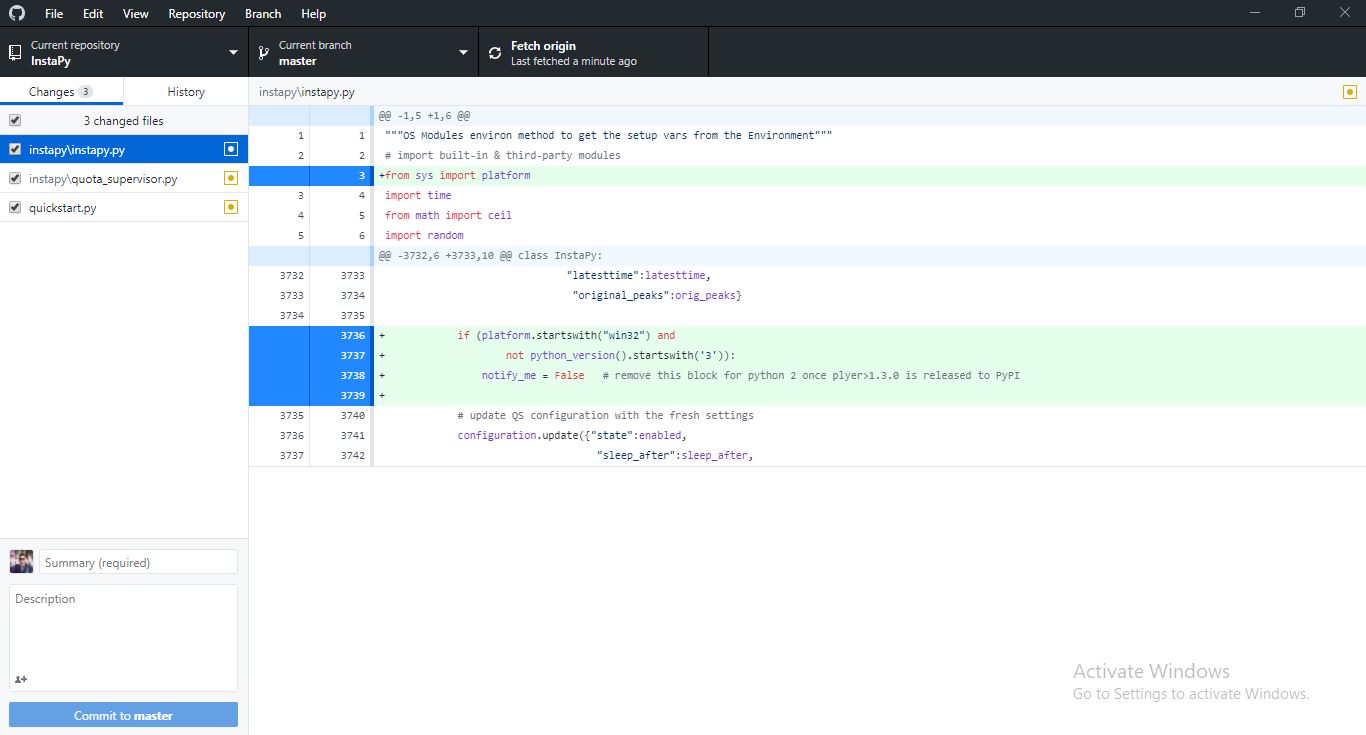
I Even did pip uninstall ticker
pip uninstall plyer
i didnt find the plyer beta version ? where can i find it. i searched all over the places
then my last hope i installed the latest pip plyer
Successfully built plyer
Installing collected packages: plyer
Successfully installed plyer-1.3.0
same error again :
Traceback (most recent call last):
File "C:\Users\JayPixx\AppData\Local\Programs\Python\Python37-32\lib\threading.py", line 917, in _bootstrap_inner
self.run()
File "C:\Users\JayPixx\AppData\Local\Programs\Python\Python37-32\lib\threading.py", line 865, in run
self._target(*self._args, **self._kwargs)
File "C:\Users\JayPixx\AppData\Local\Programs\Python\Python37-32\lib\site-packages\plyer\platforms\win\libs\balloontip.py", line 145, in balloon_tip
WindowsBalloonTip(**kwargs)
TypeError: __init__() got an unexpected keyword argument 'ticker'
Thanks @HCWcoder for all the praising words.
I am honoured 🎖 to read it 🤩
pip install plyer
installs the stable version pushed to PyPI [1.3.0]pip install https://github.com/kivy/plyer/zipball/master
installs right from the master [the live version- currently1.3.1.dev0]
Fine, I did not notice your python version (3.7) cos that problem occurred only in python 2 versions in my experiences before.
And it seems that python 3.7 is also affected by that bug.
I just have added a new commit- https://github.com/timgrossmann/InstaPy/pull/2978/commits/082d89d086e2dd500f4c5d47f5d35ca121d4ec8d which does solve that problem.
Now it will disable the plyer toast notifications you could get while using QS.
_But if you decide to install that package's beta [master] version and use it, then after installing it, remove [or comment out] those lines I shared with you in the commits above which disables notify_me parameter in python 2 and 3.7 versions_ on Windows platforms.
Hope that plyer package releases their new version to PyPI soon.
Cheers 😄
uluQulu
on 24 Sep 2018
@uluQulu
My Pleasure you really are and i hope you keep helping this community and teach us so we can help others too with there issue :) !!
okey so i did 👍
pip uninstall plyer
then
pip install https://github.com/kivy/plyer/zipball/master
Successfully installed plyer-1.3.1.dev0
Results :
INFO [2018-09-25 11:27:52] [user]  Quota Supervisor: hourly likes reached quotient!    ~going to sleep 37 minutes long
        take a green tea break? :>
Exception in thread Thread-1:
Traceback (most recent call last):
  File "C:\Users\user\AppData\Local\Programs\Python\Python37-32\lib\threading.py", line 917, in _bootstrap_inner
    self.run()
  File "C:\Users\user\AppData\Local\Programs\Python\Python37-32\lib\threading.py", line 865, in run
    self._target(*self._args, **self._kwargs)
  File "C:\Users\user\AppData\Local\Programs\Python\Python37-32\lib\site-packages\plyer\platforms\win\libs\balloontip.py", line 208, in balloon_tip
    WindowsBalloonTip(**kwargs)
  File "C:\Users\user\AppData\Local\Programs\Python\Python37-32\lib\site-packages\plyer\platforms\win\libs\balloontip.py", line 132, in __init__
    raise Exception('Could not load icon {}'.format(app_icon))
Exception: Could not load icon ./icons/Windows/qs_sleep_windows.ico
i didn't try 082d89d
will try and edit my post !
Edit:
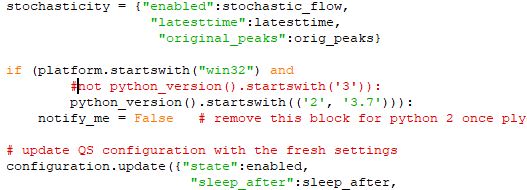
I did that and the result:
INFO [2018-09-25 11:35:33] [user]  Quota Supervisor: hourly likes reached quotient!    ~going to sleep 29 minutes long
        take a green tea break? :>
thanks alot @uluQulu so now i leave the new plyer version or i switched back for 1.3.0 ?.
1 more thing please we have a serious issue with unfollowing now we have 6k+ following and we couldn't unfollow this week because of a bug addressed here : issues 3002
please if you can take a look .
thanks for your kind support <3
HCWcoder
on 25 Sep 2018
Thanks again @HCWcoder
Make sure you have the icons folder [containing the icons for QS] in your project root folder.
If you don't have them, just download it from the GitHub page and put it into project root folder.
Then [comment out those blocker lines for python 3.7 in Windows from my above commits] and enable QS with notify_me=True.
Then assuming you still have the plyer 1.3.1.dev0, you will see a nice toast notification rising up 😛
I just have a hint that you are managing your local repo in crazy ways 😂
Do you have lots of customizations in source files?
1 more thing please we have a serious issue with unfollowing...
That issue has been solved in my live PR.
Cheers 😁
uluQulu
on 25 Sep 2018
@uluQulu
Im sure i have the icon folder in my project root folder 👍
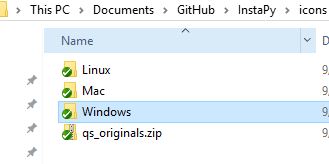
before changing notify_me everything was working but when i changed to get the crazy notifications 💃
i got this
Then [comment out those blocker lines for python 3.7 in Windows from my above commits] and enable QS with notify_me=True.
done!
Traceback (most recent call last):
  File "C:\Users\user\AppData\Local\Programs\Python\Python37-32\lib\threading.py", line 917, in _bootstrap_inner
    self.run()
  File "C:\Users\user\AppData\Local\Programs\Python\Python37-32\lib\threading.py", line 865, in run
    self._target(*self._args, **self._kwargs)
  File "C:\Users\user\AppData\Local\Programs\Python\Python37-32\lib\site-packages\plyer\platforms\win\libs\balloontip.py", line 208, in balloon_tip
    WindowsBalloonTip(**kwargs)
  File "C:\Users\user\AppData\Local\Programs\Python\Python37-32\lib\site-packages\plyer\platforms\win\libs\balloontip.py", line 132, in __init__
    raise Exception('Could not load icon {}'.format(app_icon))
Exception: Could not load icon ./icons/Windows/qs_sleep_windows.ico
Even i made sure i have the icons in my root folder
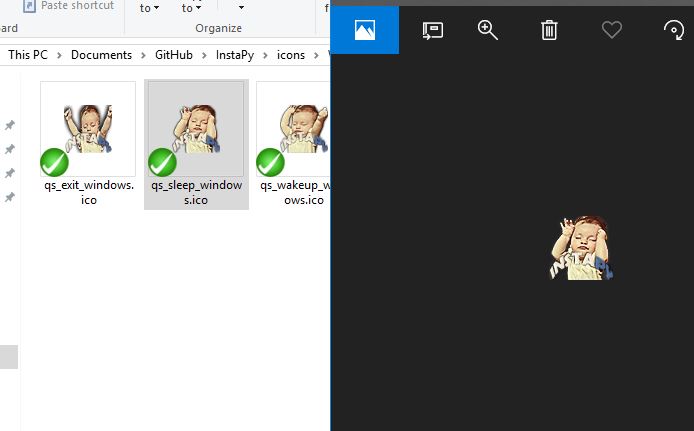
Do you have lots of customizations in source files?
Im not a noob but i know alot of stuff and try to manage some issues alone, but i always fix with issues i post then i install a fresh one after you release the new master. then issue start again and again :D
I saw somewhere a discussion where we need to have a branch where everything is working and if we need to add or upgrade a function or idea thats PRs then to master .
anw everything you guys are doing is just so great i have no issue going through all this everytime i just love to learn and work with people like you @uluQulu
That issue has been solved in my live PR.
oke thanks i will check it
HCWcoder
on 25 Sep 2018
@HCWcoder
...i install a fresh one after you release the new master. . then issue start again and again
I am sorry. But don't worry, I will not stay here longer. It's just still a few more ideas I think to share then you will not see those errors from my PRs 🤝🏼
I saw somewhere a discussion where we need to have a branch where everything is working..
Do you know how hard it is to work on a cross-platform and python version independent software and test it WHERE there are even no any testers?
For that issue with the icon.
In case of you really have the icon files located in the correct project root directory, it means your operating systems cannot use the given ICO file as an icon for the _balloontip_ library [for Windows].
Solutions:
- Make a custom icon from the original icons provided in the zip folder that will work for your OS
- Just turn off and do not use
notify_meparameter-notify_me=False - Comment out the
app_icon=icons[alert],line in quota_supervisor.py file and still get a toast notification without an icon.
_Also, I have got a latest python 3.7.0 x84-64 installed on the latest Windows 10 Pro release (_64-bit_) and have no any problems with your issue_.
Cheers 😄
uluQulu
on 25 Sep 2018
@uluQulu
Wait you are leaving this community ? why ? i was so happy working with you now im so sad!!
no one asked for testers i can be one of them !
thanks a lot i followed all your instructions and now all my issues solved !
thanks for the great support ! but im so sad to hear you are leaving !
HCWcoder
on 25 Sep 2018
This issue has been automatically marked as stale because it has not had recent activity. It will be closed if no further activity occurs. Thank you for your contributions. > If this problem still occurs, please open a new issue
![stale[bot] picture](https://avatars3.githubusercontent.com/in/1724?v=4&s=40) stale[bot]
on 13 Nov 2018
stale[bot]
on 13 Nov 2018
@timgrossmann
Hello, I noticed your application in our repo dependents and damn, you made a good job with InstaPy!
Just to notify you, plyer releasing process got finally kicked in the butt and hopefully we'll keep the pace in a monthly release manner. Feel free to check all your issues regarding plyer and test with the newest version (1.3.2), hopefully it's already fixed. If not, just ping us in the repo or on Discord channel. Cheers! :dango:
 KeyWeeUsr
on 17 Nov 2018
KeyWeeUsr
on 17 Nov 2018
Inactive issue, reopen if you need assistance.
 converge
on 27 Nov 2018
converge
on 27 Nov 2018
Related issues
 tibor
·
3Comments
tibor
·
3Comments
 ingorichter
·
3Comments
ingorichter
·
3Comments
 Naramsim
·
3Comments
Naramsim
·
3Comments
 deronsizemore
·
3Comments
deronsizemore
·
3Comments
 46960
·
3Comments
46960
·
3Comments
Most helpful comment
@uluQulu
My Pleasure you really are and i hope you keep helping this community and teach us so we can help others too with there issue :) !!
okey so i did 👍
pip uninstall plyer
then
pip install https://github.com/kivy/plyer/zipball/master
Successfully installed plyer-1.3.1.dev0Results :
i didn't try 082d89d
will try and edit my post !
Edit:
I did that and the result:
thanks alot @uluQulu so now i leave the new plyer version or i switched back for 1.3.0 ?.
1 more thing please we have a serious issue with unfollowing now we have 6k+ following and we couldn't unfollow this week because of a bug addressed here : issues 3002
please if you can take a look .
thanks for your kind support <3