Instapy: Can't get Users followers
Expected Behavior
Get users followers
Current Behavior
Traceback (most recent call last):
File "/InstaPy/instapy/unfollow_util.py", line 821, in get_given_user_followers
allfollowers = format_number(browser.find_element_by_xpath("//a[contains"
File "/home/user/.local/lib/python3.6/site-packages/selenium/webdriver/remote/webdriver.py", line 293, in find_element_by_xpath
return self.find_element(by=By.XPATH, value=xpath)
File "/home/user/.local/lib/python3.6/site-packages/selenium/webdriver/remote/webdriver.py", line 752, in find_element
'value': value})['value']
File "/home/user/.local/lib/python3.6/site-packages/selenium/webdriver/remote/webdriver.py", line 236, in execute
self.error_handler.check_response(response)
File "/home/user/.local/lib/python3.6/site-packages/selenium/webdriver/remote/errorhandler.py", line 192, in check_response
raise exception_class(message, screen, stacktrace)
selenium.common.exceptions.NoSuchElementException: Message: no such element: Unable to locate element: {"method":"xpath","selector":"//a[contains(@href,'followers')]/span"}
(Session info: chrome=67.0.3396.99)
(Driver info: chromedriver=2.38.552522 (437e6fbedfa8762dec75e2c5b3ddb86763dc9dcb),platform=Linux 4.15.0-23-generic x86_64)## Possible Solution (optional)
InstaPy configuration
Using proxy
 fgisslen
All 12 comments
During handling of the above exception, another exception occurred:
Traceback (most recent call last):
File "/home/user/InstaPy/instapy/unfollow_util.py", line 826, in get_given_user_followers
"return window._sharedData.entry_data."
File "/home/user/.local/lib/python3.6/site-packages/selenium/webdriver/remote/webdriver.py", line 465, in execute_script
'args': converted_args})['value']
File "/home/user/.local/lib/python3.6/site-packages/selenium/webdriver/remote/webdriver.py", line 236, in execute
self.error_handler.check_response(response)
File "/home/user/.local/lib/python3.6/site-packages/selenium/webdriver/remote/errorhandler.py", line 192, in check_response
raise exception_class(message, screen, stacktrace)
selenium.common.exceptions.WebDriverException: Message: unknown error: Cannot read property '0' of undefined
(Session info: chrome=67.0.3396.99)
(Driver info: chromedriver=2.38.552522 (437e6fbedfa8762dec75e2c5b3ddb86763dc9dcb),platform=Linux 4.15.0-23-generic x86_64)
During handling of the above exception, another exception occurred:
Traceback (most recent call last):
File "/home/user/InstaPy/instapy/unfollow_util.py", line 832, in get_given_user_followers
"return window._sharedData.entry_data."
File "/home/user/.local/lib/python3.6/site-packages/selenium/webdriver/remote/webdriver.py", line 465, in execute_script
'args': converted_args})['value']
File "/home/user/.local/lib/python3.6/site-packages/selenium/webdriver/remote/webdriver.py", line 236, in execute
self.error_handler.check_response(response)
File "/home/user/.local/lib/python3.6/site-packages/selenium/webdriver/remote/errorhandler.py", line 192, in check_response
raise exception_class(message, screen, stacktrace)
selenium.common.exceptions.WebDriverException: Message: unknown error: Cannot read property '0' of undefined
(Session info: chrome=67.0.3396.99)
(Driver info: chromedriver=2.38.552522 (437e6fbedfa8762dec75e2c5b3ddb86763dc9dcb),platform=Linux 4.15.0-23-generic x86_64)
During handling of the above exception, another exception occurred:
Traceback (most recent call last):
File "5b50be7ee6a5610014972b69.py", line 19, in
session.follow_user_followers(['rpsblzs','Reakciom'], amount=150, randomize=False, interact=True)
File "/home/user/InstaPy/instapy/instapy.py", line 2040, in follow_user_followers
self.logfolder)
File "/home/user/InstaPy/instapy/unfollow_util.py", line 837, in get_given_user_followers
"//span[contains(@class,'g47SY')]")[1].text)
IndexError: list index out of range
fgisslen
on 20 Jul 2018
Same for me :/ Class "g47SY" has changed. Someone know how to repair?
 JMuffin
on 21 Jul 2018
JMuffin
on 21 Jul 2018
It looks like many people getting this one (including myself):
https://github.com/timgrossmann/InstaPy/issues/2340
https://github.com/timgrossmann/InstaPy/issues/2330
 Tachenz
on 22 Jul 2018
Tachenz
on 22 Jul 2018
@uluQulu Summoning the Great Wizard uluQulu :)
This started to happen quite often:
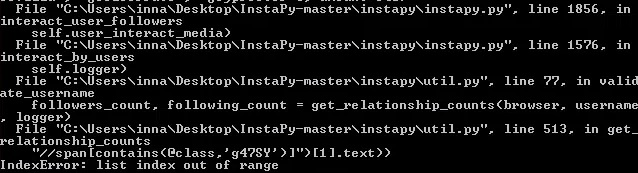
And while this happens - Chrome displays our favourite "Sorry, this page is not available" message
Tachenz
on 22 Jul 2018
Same issue here when following likers, it happens twice a week or so:
[...]
  File "/home/pi/Desktop/Projects/InstaPy/instapy/util.py", line 513, in get_relationship_counts
    "//span[contains(@class,'g47SY')]")[1].text))
IndexError: list index out of range
 joanroig
on 23 Jul 2018
joanroig
on 23 Jul 2018
Hey @Tachenz
Sorry for being late but I got so less free time.
Finally could have a bit of time to look into your problem and found the cause of the issue and solved it.
Do this to solve that issue:
Open up util.py file, then find and replace,
followers_count = format_number((browser.find_elements_by_xpath(
    "//span[contains(@class,'g47SY')]")[1].text))
with
topCount_elements = browser.find_elements_by_xpath(
    "//span[contains(@class,'g47SY')]")
if topCount_elements:
    followers_count = format_number(topCount_elements[1].text)
else:
    logger.info("Failed to get followers count of '{}'  ~empty list".format(username))
    followers_count = None
SIMILARLY
following_count = format_number(browser.find_elements_by_xpath(
    "//span[contains(@class,'g47SY')]")[2].text)
with
topCount_elements = browser.find_elements_by_xpath(
    "//span[contains(@class,'g47SY')]")
if topCount_elements:
    following_count = format_number(topCount_elements[2].text)
else:
    logger.info("Failed to get following count of '{}'  ~empty list".format(username))
    following_count = None
I have not tested much, please let me know if not works as intended.
_I still wonder one thing, @Tachenz, do you get that "_Sorry, this page is not available_" webpage often last times on valid pages?_
It would be great if any of you could PR this change since I have a busy schedule 🙌
Cheers 🤩
 uluQulu
on 24 Jul 2018
uluQulu
on 24 Jul 2018
@uluQulu I was waiting for you :) I'll check your solution and I'll leave the bot working for some days, thanks!
joanroig
on 24 Jul 2018
Traceback (most recent call last):
File "lech.py", line 27, in
session.interact_user_followers(['paniswojegoczasu', 'kamilarowinska.pl', 'joannaceplin.pl', 'markaonline.pl', 'kobietaniezalezna.pl', 'dramattofficial', 'fryderyk.karzelek', 'annaurbanskapl', 'hakerkisukcesu', 'mentorka_kobiet_sukcesu', 'ilona.adamska', 'beatajurasz', 'osobistastylistka'], amount=10, randomize=True)
File "/home/pi/InstaPy-lech/instapy/instapy.py", line 1786, in interact_user_followers
self.logfolder)
File "/home/pi/InstaPy-lech/instapy/unfollow_util.py", line 832, in get_given_user_followers
"//span[contains(@class,'g47SY')]")[1].text)
IndexError: list index out of range
Still getting the same error message. I think it's not about util.py but unfollow_util.py
Applying those changes to unfollow_util.py occurs with error:
Traceback (most recent call last):
File "lech.py", line 27, in
session.interact_user_followers(['paniswojegoczasu', 'kamilarowinska.pl', 'joannaceplin.pl', 'markaonline.pl', 'kobietaniezalezna.pl', 'dramattofficial', 'fryderyk.karzelek', 'annaurbanskapl', 'hakerkisukcesu', 'mentorka_kobiet_sukcesu', 'ilona.adamska', 'beatajurasz', 'osobistastylistka'], amount=10, randomize=True)
File "/home/pi/InstaPy-lech/instapy/instapy.py", line 1786, in interact_user_followers
self.logfolder)
File "/home/pi/InstaPy-lech/instapy/unfollow_util.py", line 836, in get_given_user_followers
logger.info("Failed to get following count of '{}' ~empty list".format(username))
NameError: global name 'username' is not defined
So... still not good :/
Update: I had wrong username added in user followers interaction. So... testing :)
JMuffin
on 24 Jul 2018
Hey Muffin
You are sailing in the wrong boat🛶
The idea I added there is handling the situations in case of an empty value returned.
That spot in util.py was the place in the context of this issue raised by the guys here.
But the issue you have encountered belongs to other file- unfollow_util.py which is gonna be fixed the same way.
You have probably used username but the variable holding _username_ in there is user_name.
Good luck!
uluQulu
on 24 Jul 2018
On util.py file, replace:
followers_count = format_number((browser.find_elements_by_xpath(
    "//span[contains(@class,'g47SY')]")[1].text))
With:
topCount_elements = browser.find_elements_by_xpath(
    "//span[contains(@class,'g47SY')]")
if topCount_elements:
    followers_count = format_number(topCount_elements[1].text)
else:
    logger.error("Failed to get followers count of '{}'  ~empty list".format(username))
    followers_count = None
And, replace:
following_count = format_number(browser.find_elements_by_xpath(
    "//span[contains(@class,'g47SY')]")[2].text)
With:
topCount_elements = browser.find_elements_by_xpath(
    "//span[contains(@class,'g47SY')]")
if topCount_elements:
    following_count = format_number(topCount_elements[2].text)
else:
    logger.error("Failed to get following count of '{}'  ~empty list".format(username))
    following_count = None
On unfollow_util.py file, replace :
allfollowers = format_number((browser.find_elements_by_xpath(
    "//span[contains(@class,'g47SY')]")[1].text))
With:
topCount_elements = browser.find_elements_by_xpath(
    "//span[contains(@class,'g47SY')]")
if topCount_elements:
    allfollowers = format_number(topCount_elements[1].text)
else:
    logger.error("Error occured during getting the followers count of '{}'  ~empty list".format(username))
    allfollowers = None
And replace:
allfollowing = format_number((browser.find_elements_by_xpath(
    "//span[contains(@class,'g47SY')]")[2].text))
With:
topCount_elements = browser.find_elements_by_xpath(
    "//span[contains(@class,'g47SY')]")
if topCount_elements:
    allfollowing = format_number(topCount_elements[2].text)
else:
    logger.error("Error occured during getting the following count of '{}'  ~empty list".format(username))
    allfollowing = None
Hope it helps!
Based on @uluQulu proposal!
 Floflokiki
on 25 Jul 2018
Floflokiki
on 25 Jul 2018
above fix doesn't help. I still see the issue
 sunnygill
on 26 Jul 2018
sunnygill
on 26 Jul 2018
This issue has been automatically marked as stale because it has not had recent activity. It will be closed if no further activity occurs. Thank you for your contributions. > If this problem still occurs, please open a new issue
![stale[bot] picture](https://avatars3.githubusercontent.com/in/1724?v=4&s=40) stale[bot]
on 14 Nov 2018
stale[bot]
on 14 Nov 2018
Related issues
 CharlesCCC
·
3Comments
CharlesCCC
·
3Comments
 ediooo
·
3Comments
ediooo
·
3Comments
 ghost
·
3Comments
ghost
·
3Comments
 wyvers
·
3Comments
wyvers
·
3Comments
 neomh
·
3Comments
neomh
·
3Comments
Most helpful comment
@uluQulu I was waiting for you :) I'll check your solution and I'll leave the bot working for some days, thanks!