Instapy: Cookie file not found, creating cookie...
Getting following while try to follow someone's followers
INFO [2018-06-27 04:03:48] [removed] Session started - 2018-06-27 04:03:48
CRITICAL [2018-06-27 04:04:02] [removed] Wrong login data!
INFO [2018-06-27 04:04:03] [removed] User 'fc_sonam' [1/2]
ERROR [2018-06-27 04:04:31] [removed] Could not determine if fc_sonam has followers
INFO [2018-06-27 04:04:31] [removed] Session ended - 2018-06-27 04:04:31
INFO [2018-06-27 04:04:31] [removed] --------------------
[u'fc_sonam', u'being_fukre']
Cookie file not found, creating cookie...
Traceback (most recent call last):
File "./follow.py", line 65, in
session.follow_user_followers(accs, amount=10, randomize=False, sleep_delay=60)
File "/var/www/html/InstaPy/instapy/instapy.py", line 1911, in follow_user_followers
self.logfolder)
ValueError: need more than 0 values to unpack
INFO [2018-06-27 04:04:33] [alfo.mx] Session started - 2018-06-27 04:04:33
 testsoftuvo
All 18 comments
what's your question ??????
 CharlesCCC
on 29 Jun 2018
CharlesCCC
on 29 Jun 2018
Why getting following?
Cookie file not found, creating cookie...
CRITICAL [2018-06-27 04:04:02] [removed] Wrong login data!
Even all login info is fine.
testsoftuvo
on 29 Jun 2018
add bypass_suspicious_attempt=True in session = InstaPy(username=insta_username, password=insta_password, bypass_suspicious_attempt=True)
 botpadawan
on 12 Jul 2018
botpadawan
on 12 Jul 2018
I'm getting the same error here, I added bypass_suspicious_attempt=True and got
Unable to locate email or phone button, maybe bypass_suspicious_login=True isn't needed anymore.
CRITICAL [2018-07-27 12:03:41] [jeninhol] Wrong login data!
@testsoftuvo did u solve the problem?
 Jenuan
on 27 Jul 2018
Jenuan
on 27 Jul 2018
i have 'Wrong login data' issue and i'm pretty sure my creds are just fine
 moeinrahimi
on 2 Aug 2018
moeinrahimi
on 2 Aug 2018
@moeinrahimi your cookie has expired. delete your cookie file and try that again.
CharlesCCC
on 2 Aug 2018
but this is my first attempt to run the script , where is cookie located at ?
moeinrahimi
on 2 Aug 2018
@moeinrahimi logs/ folder
did you keep eyes on the automated brower window when you run the script ? if not, try to do that, it usually give you a better idea on what is going on.
CharlesCCC
on 2 Aug 2018
@CharlesCCC
I'm running instapy on a vps in headless mode, so i can't see the browser
moeinrahimi
on 2 Aug 2018
@moeinrahimi okay, then I would suggest try to turn off headless mode and try it locally and to see what is going on.
CharlesCCC
on 3 Aug 2018
@CharlesCCC I get We Detected An Unusual Login Attempt message after login via instapy.
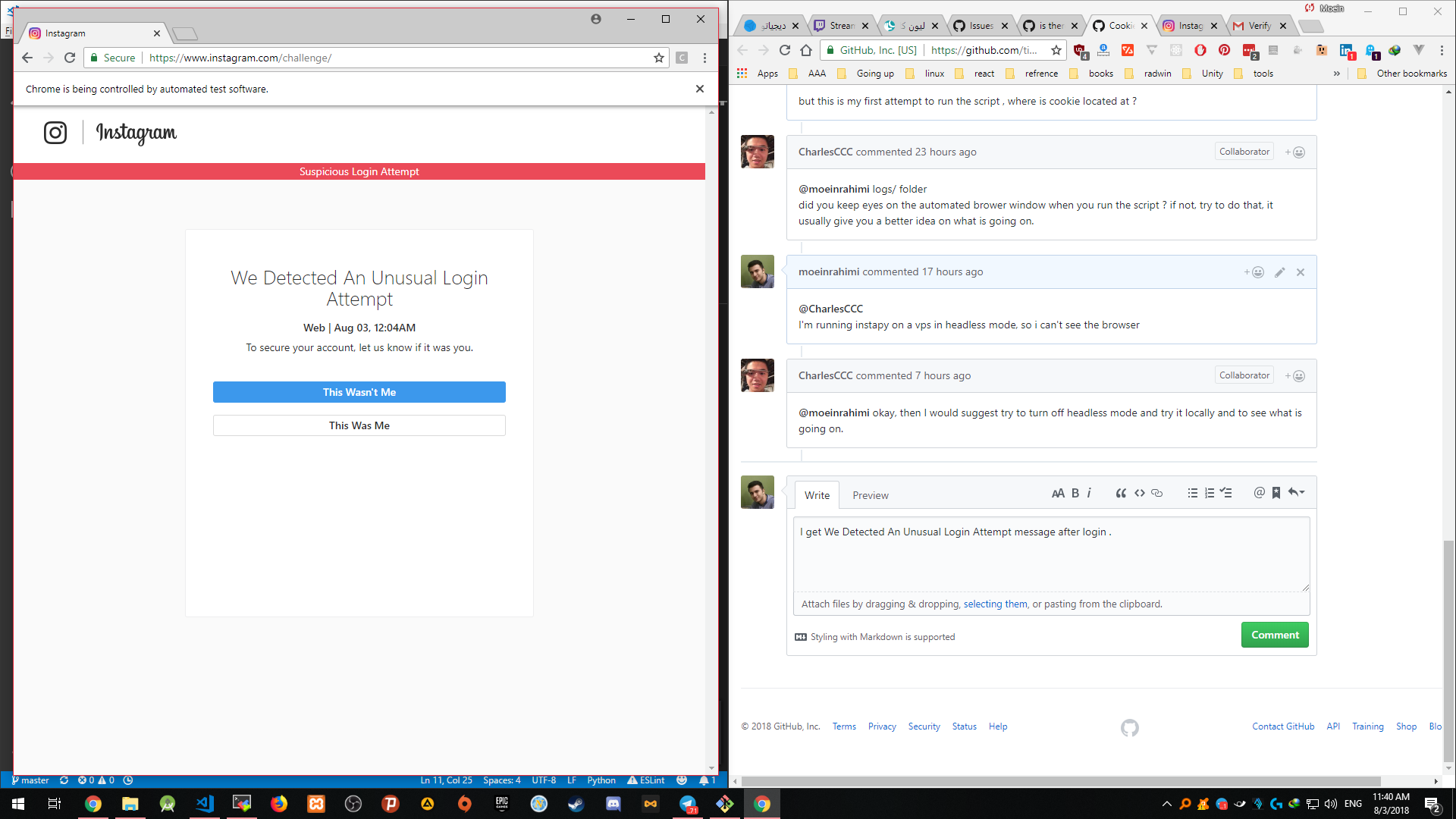
clicking it was me button makes instapy working just fine
moeinrahimi
on 3 Aug 2018
@moeinrahimi great, I'm glad you are able to resolve this issue.
CharlesCCC
on 3 Aug 2018
@CharlesCCC well i haven't , i get this when headless is off , i have to manually click the 'this was me ' button in order to instapy keep working , what should i do in on a vps when headless mode is on ?
moeinrahimi
on 3 Aug 2018
Same here. It runs locally but when I run in an digitalocean vps it just says:
Cookie file not found, creating cookie...
Unable to locate email or phone button, maybe bypass_suspicious_login=True isn't needed anymore.
..........................................................
CRITICAL [2018-08-04 03:50:49] [xxxx]  Wrong login data!
''''''''''''''''''''''''''''''''''''''''''''''''''''''''''
In my quickstart, I have bypass_suspicious_attempt=True so I don't what could be happening.
 focux
on 4 Aug 2018
focux
on 4 Aug 2018
@moeinrahimi actually this should be an old issue that already been addressed by @sionking , I'm not sure why it wasn't working anymore, please make sure you have the latest version and then try it again.
CharlesCCC
on 7 Aug 2018
@focux after cookie successfully created, you don't need set that to true anymore.
CharlesCCC
on 7 Aug 2018
just wrote a bugfix, are you available to help testing it ? https://github.com/timgrossmann/InstaPy/pull/3384
 converge
on 18 Nov 2018
converge
on 18 Nov 2018
@converge Sorry I was out for the past week, looks like it already been tested and merged. Thank you for the PR :)
CharlesCCC
on 26 Nov 2018
Related issues
 ghost
·
3Comments
ghost
·
3Comments
 tibor
·
3Comments
tibor
·
3Comments
 harrypython
·
3Comments
harrypython
·
3Comments
 Spyd3r0us
·
3Comments
Spyd3r0us
·
3Comments
 drcyber975
·
3Comments
drcyber975
·
3Comments