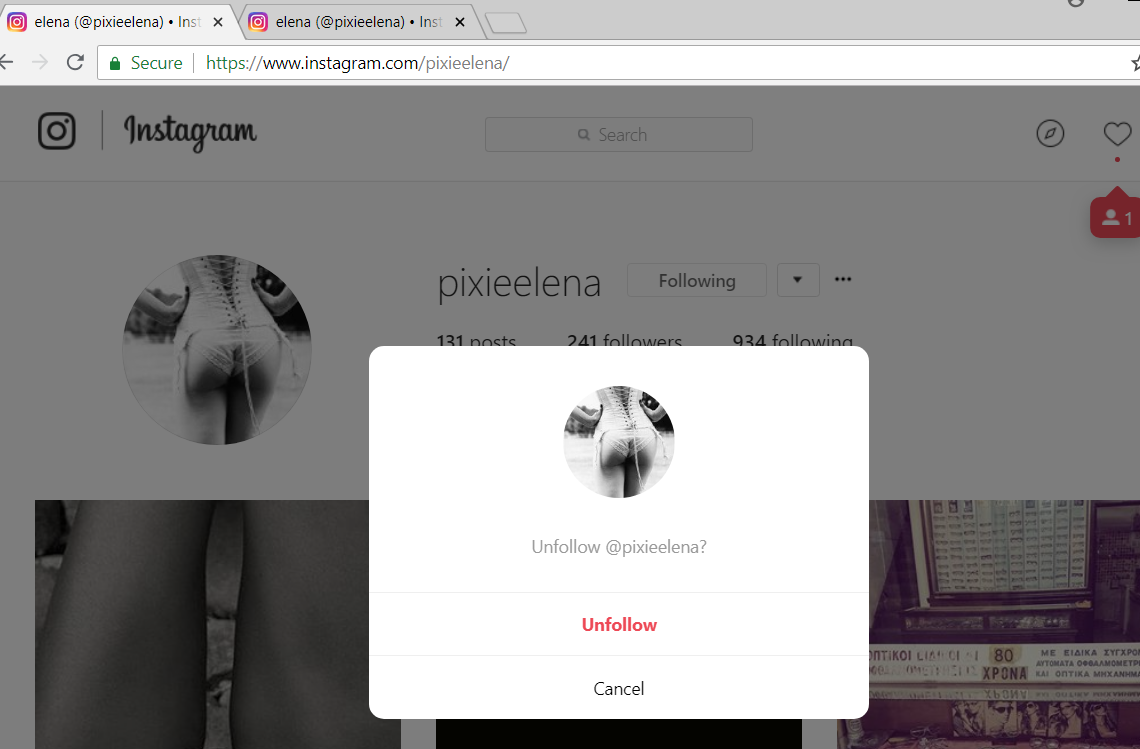
Instapy: New confirmation msg show when unfollow!
I forgot to capture but this fails the unfollow.
not always shown!
 sionking
All 19 comments
Can you please provide a screen-shot what is looks like ?
 CharlesCCC
on 6 Jun 2018
CharlesCCC
on 6 Jun 2018
Pop-up window, we need to catch it when failing to unfollow.
sionking
on 6 Jun 2018
sionking
on 6 Jun 2018
I have it stopped (locky me getting telegram msg when unfollow not working!)
sionking
on 6 Jun 2018
/html/body/div[3]/div/div/div/div[3]/button[1]
sionking
on 6 Jun 2018
the unfollow confirmation
sionking
on 6 Jun 2018
uhh, good catch, we will need add this to the part of unfollow function.
CharlesCCC
on 6 Jun 2018
<button class="aOOlW -Cab_ " tabindex="0">Unfollow</button>
Can someone give me proper xpath to use ? kind of button with text eq to Unfollow?
I am bad at this :(
sionking
on 6 Jun 2018
@sionking This is based off of the few mins/maybe one hour I read about xpath after seeing this PR lol
(//button[contains(@class ,'aOOlW -Cab_')])[1]
?
I noticed your original was an absolute path; I opted to try a relative path.
Used a few assumptions here:
There is only one button on the page with the class attribute value set to
aOOlW -Cab_and as such it's the "first" button on the page with that value (because you wrote button[1] in your original)I used the xpath
contains()function because I wasn't sure if the spaces in the tag you presented are part of the actual class or if they're a typo
I'm testing it right now and will let you know as soon as I see a success or failure!
Cheers 🍻
Update: Followed pool sample size wasn't large enough to trigger the confirmation box 😅 will have to continue testing to confirm results
 jeremycjang
on 9 Jun 2018
jeremycjang
on 9 Jun 2018
Update: My xpath didn't work. Trying the more general //*[contains(text(), 'Unfollow')] using the pattern of pre-existing code tomorrow.
jeremycjang
on 9 Jun 2018
Hi, this xpath works. Just make sure you put sleeps above and below so it gives the dialog box enough time to load.
@timgrossmann
@jeremycjang
@sionking
unfollow_button = browser.find_element_by_xpath(
                    "//*[contains(@class, '-Cab_')]")
unfollow_button.click()
 dgursh
on 11 Jun 2018
dgursh
on 11 Jun 2018
@dgursh can you clarify the sleep amounts you’ve used to make this code work with the dialog box load time? Currently testing this setup after sleep(2) in the first sleep proved to not be enough:
try:
logger.info('we might have gotten a confirmation request')
 sleep(5)
unfollow_button = browser.find_element_by_xpath("//*[contains(@class, '-Cab_')]")
 sleep(2)
 unfollow_button.click()
Here is my code, I've placed it in the section where you unfollow each user from their own account page, since that's where I've seen the confirm box appear. I am using a sleep(2) after the follow button is clicked, and then again once I confirm the follow button text still says "following" (meaning the dialog box has appeared. Then I search for the unfollow button and then click unfollow.
Hope this helps
@timgrossmann
@jeremycjang
               browser.get('https://www.instagram.com/{}'.format(person))
                sleep(2)
                follow_button = browser.find_element_by_xpath(
                    "//*[contains(text(), 'Follow')]")

                if follow_button.text == 'Following':
                    unfollowNum += 1
                    click_element(browser, follow_button) # follow_button.click()
                    sleep(2)
                    # If diaglog pops up confirm
                    if follow_button.text == 'Following':
                        sleep(2)
                        unfollow_button = browser.find_element_by_xpath(
                    "//*[contains(@class, '-Cab_')]")
                        unfollow_button.click()
                    logger.info('--> Ongoing Unfollow ' + str(unfollowNum) +
                          ', now unfollowing: {}'
                          .format(person.encode('utf-8')))
                    sleep(15)
                    if hasSlept:
                        hasSlept = False
Hello, i got a new clone master, but Its not working , I have the same problem, is it work for yor?
 aleeepp
on 18 Jun 2018
aleeepp
on 18 Jun 2018
I confirmed @dgursh 's code worked; thank you!
jeremycjang
on 18 Jun 2018
@jeremycjang @dgursh , can you please pass the unfollow_util.py ??, I try but Its not working for me.
aleeepp
on 20 Jun 2018
@sionking @timgrossmann Should we add this to the master to check for confirmation boxes? I think it'll have to be modified now to fit with the most recent unfollow_util.py code
jeremycjang
on 23 Jun 2018
This issue has been automatically marked as stale because it has not had recent activity. It will be closed if no further activity occurs. Thank you for your contributions. > If this problem still occurs, please open a new issue
![stale[bot] picture](https://avatars3.githubusercontent.com/in/1724?v=4&s=40) stale[bot]
on 14 Nov 2018
stale[bot]
on 14 Nov 2018
Related issues
 ediooo
·
3Comments
ediooo
·
3Comments
 deronsizemore
·
3Comments
deronsizemore
·
3Comments
 rahulkapoor90
·
3Comments
CharlesCCC
·
3Comments
rahulkapoor90
·
3Comments
CharlesCCC
·
3Comments
 CodeMaster1
·
3Comments
CodeMaster1
·
3Comments
Most helpful comment
I confirmed @dgursh 's code worked; thank you!