Instapy: Unfollow leads to a not authorized page
Expected Behavior
When running the unfollow function by itself, it should go through and unfollow people on my list with the settings I have chosen.
Current Behavior
What is currently happening is it leads to unauthorized page and then the application crashes since it doesn't know how to continue.
Any help is appreciated.
I am able to run the script just fine as soon as I remove the unfollow function.
Possible Solution (optional)
Is the method we are currently using no longer working to unfollow users?
InstaPy configuration
Latest instapy build as of today.
 ghost
ghost
All 8 comments
Yea having same issue !!!!
 omidedipidizi
on 12 Apr 2018
omidedipidizi
on 12 Apr 2018
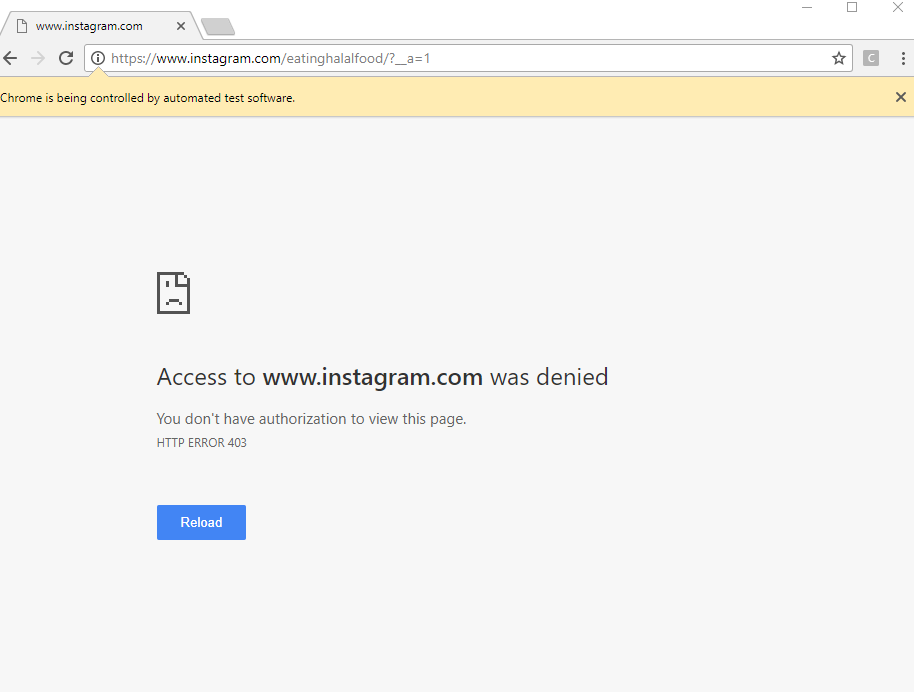
Here's the photo for reference.
session.unfollow_users(amount=1, onlyInstapyFollowed=False, onlyNotFollowMe=True, onlyInstapyMethod='FIFO',
sleep_delay=60)
Here's my code snippet.
ghost
on 12 Apr 2018
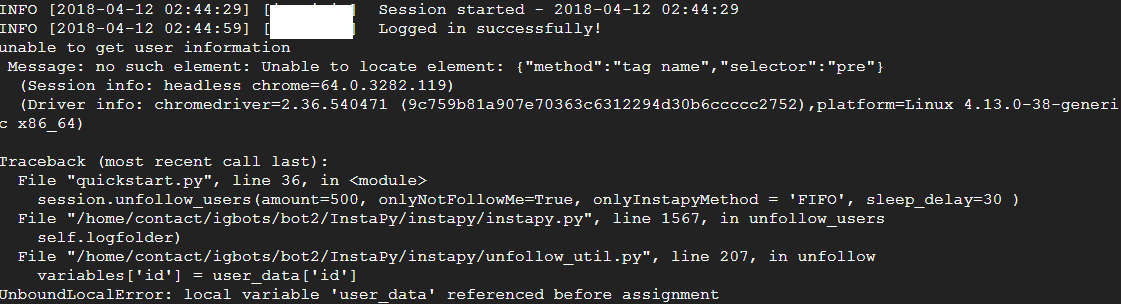
Got also issue using headless browser
 botpadawan
on 12 Apr 2018
botpadawan
on 12 Apr 2018
instagram blocked access to ?__a=1 but it easyly can be scarped from page source
this will return the JSON in JS
This is only happen when you want to capture all of your followers to a list, bed idea as it is to fake some url requests that is not how human behave!
Currently: change onlyInstapyFollowed to True for now.
 sionking
on 12 Apr 2018
sionking
on 12 Apr 2018
We use it to get the user id (bad usage) since it can be take from page:
change:
        # unfollow only not follow me
        try:
            browser.get(
                'https://www.instagram.com/' + username + '/?__a=1')
            pre = browser.find_element_by_tag_name("pre").text
            user_data = json.loads(pre)['graphql']['user']
        except BaseException as e:
            print("unable to get user information\n", str(e))

        graphql_endpoint = 'https://www.instagram.com/graphql/query/'
        graphql_followers = (
            graphql_endpoint + '?query_id=17851374694183129')
        graphql_following = (
            graphql_endpoint + '?query_id=17874545323001329')

        all_followers = []
        all_following = []

        variables = {}
        variables['id'] = user_data['id']
        variables['first'] = 100
to:
        # unfollow only not follow me
        user_data = {}

        graphql_endpoint = 'https://www.instagram.com/graphql/query/'
        graphql_followers = (
            graphql_endpoint + '?query_id=17851374694183129')
        graphql_following = (
            graphql_endpoint + '?query_id=17874545323001329')

        all_followers = []
        all_following = []

        variables = {}
        user_data['id'] = browser.execute_script(
            "return window._sharedData.entry_data.ProfilePage[0]."
            "graphql.user.id")
        variables['id'] = user_data['id']
        variables['first'] = 100
Tested and working.
sionking
on 12 Apr 2018
Something changed.
I have the "ooops, something went wrong.." message in chrome while using onlyinstapyfollowed, nothing is unfollowed.
session.unfollow_users(amount=loop_dquota_unfollow, onlyInstapyFollowed = True, onlyInstapyMethod = 'FIFO', sleep_delay=600, unfollow_after=72*60*60)
It's on and off since this morning.
Edit: latest everything /instapy-master/chrome/selenium
 visualheroes
on 12 Apr 2018
visualheroes
on 12 Apr 2018
@sionking tanks buddy ! it work
omidedipidizi
on 12 Apr 2018
Fixed by latest commits
ghost
on 5 May 2018
Related issues
 thisishotdog
·
3Comments
thisishotdog
·
3Comments
 rahulkapoor90
·
3Comments
rahulkapoor90
·
3Comments
 deronsizemore
·
3Comments
deronsizemore
·
3Comments
 converge
·
3Comments
converge
·
3Comments
 ingorichter
·
3Comments
ingorichter
·
3Comments
Most helpful comment
We use it to get the user id (bad usage) since it can be take from page:
change:
to:
Tested and working.