Instapy: Can't Follow, Like or Comment: Says "already follows" - incorrectly!
Expected Behavior
To like and comment. To follow people I don't already follow, according to the % assigned in "quickstart" file
Current Behavior
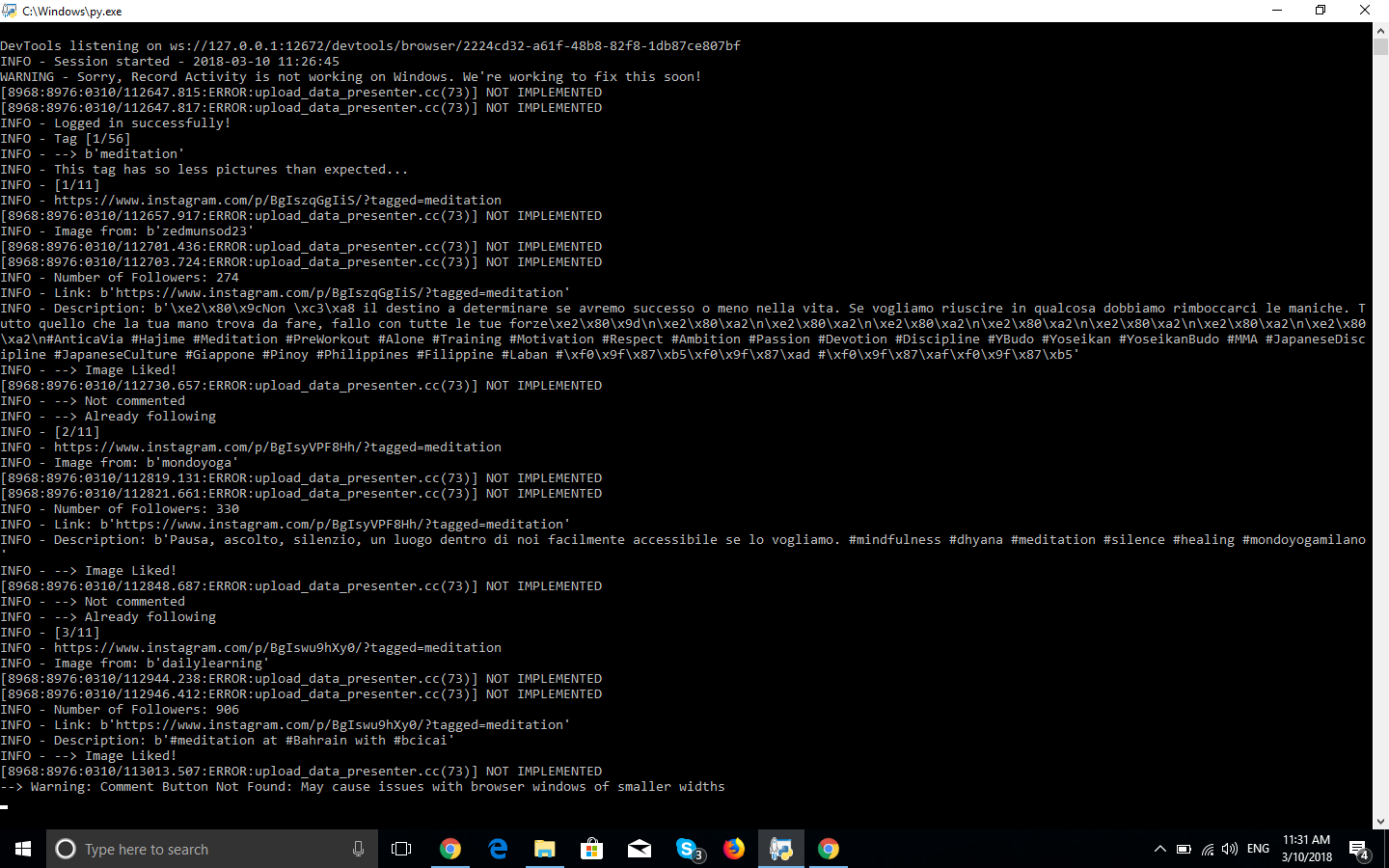
- Doesn't like (says it does)
- Doesn't comment (says it does - but with possible error)
- Doesn't follow, says "already follows" when, in fact, I DON'T follow this account.
As a result, session ends with zero followed, liked or commented
Session runs normally, except that various errors appear
NOT a block - I can manually press "follow", like or comment
Thanks in advance to all who troubleshoot and help our InstaPy community grow!
Alex.
Possible Solution (optional)
OBSERVATION: in my geographic area Insta just rolled out a new desktop interface, so I suspect it is also coming to a screen near you in a matter of days.
InstaPy configuration
latest Instapy, Chrome 65.0.3325.146, chromedriver 2.36
 Wisdomlocker
All 28 comments
Looks like another update for instagram, started getting this one today as well.
Says “now following” and does not press the button (if I press the button manually - it does follow, so does not seem to be a block or anything like it)
 Tachenz
on 9 Mar 2018
Tachenz
on 9 Mar 2018
that's right @tachenz, not a block for me as well.
Wisdomlocker
on 9 Mar 2018
I am getting this error too. What I have noticed is that after liking. It goes to a blank page that says page isn't working. It gets stuck on this other page. If i manually hit back on my browser the follow works and the script continues. I think a quick fix is just telling the browser to hit back after liking and it will follow the page properly. testing in a min
 dwai03
on 9 Mar 2018
dwai03
on 9 Mar 2018
Here's a quick solution. What I did was pass back the userlink parameter so that the browser would go back to the orginal page that you were liking. In the like_util.py add this line:
line 546 userlink = 'https://www.instagram.com/' + username
line 565 browser.get(userlink)
line 571 browser.get(userlink)
You are essentially modifying the like_image function to return to the orginal page after clicking the Like button because that is what is throwing the error.
dwai03
on 9 Mar 2018
This is a problem with this solution if you are commenting on the post as well.. I would have to look more indepth at the solution because it would need to go back to the post versus the users main page.
dwai03
on 9 Mar 2018
Currently running into the exact same issue. Probably change on Instagram's end as mentioned above. Looking for a fix :)
 bisak
on 9 Mar 2018
bisak
on 9 Mar 2018
@bisak Look at my solution above.
dwai03
on 9 Mar 2018
@dwai03 I'm also commenting on posts so didn't bother to try it because you are saying there's a problem.
bisak
on 9 Mar 2018
thanks @dwai03 yea.. I am commenting on posts so.... may need a more comprehensive fix.
you are right, "it goes to a blank page that says page isn't working" . mine started just 2 days ago, what abou you?
Wisdomlocker
on 9 Mar 2018
I think the issues starts with Chrome 65.0.3325.146, chromedriver 2.36 and not instagram side.
I have 1 account with many selenium errors and he is the only updated one.
 sionking
on 9 Mar 2018
sionking
on 9 Mar 2018
@sionking actually, I updated Chrome to 65.0.3325.146 hoping it would fix the issue. The issue started on a previous version. Pretty sure it coincided with the new rollout of the desktop Insta. For instance, now I see this on my desktop (before I couldn't)
Wisdomlocker
on 9 Mar 2018
Ok did not get the new one yet
sionking
on 10 Mar 2018
Hi @Wisdomlocker
I was in a travel last days, also I do not use IG & InstaPy anymore
But I will help
Did you try the recommendations from @dwai03?
 uluQulu
on 10 Mar 2018
uluQulu
on 10 Mar 2018
HI @uluQulu thanks for getting back to me! really appreciate it. Well, I didn't because @dwai03 said in his second message "This is a problem with this solution if you are commenting on the post as well.. I would have to look more indepth at the solution because it would need to go back to the post versus the users main page." Since I also comment on posts, I didn't follow through..
Wisdomlocker
on 10 Mar 2018
@uluQulu I just realized the full extent of the problem. It actually doesn't comment, doesn't follow and doesn't like (although it says it does - except for the follow, where it says "already follows" here is a screenshot:

Wisdomlocker
on 10 Mar 2018
Ok the problem is bigger then I expected. So I tried to like the image and I was actually able to bring back the post so that the users that wanted to comment could do it. When I did get it to work I realized that even the like isn't registering. Something changed on instagrams end or maybe its the chrome driver but the like element gets clicked but in reality does nothing on the web interface. I tested it by manually liking a image, getting the blank page, then hitting back to check on the post and when I did the like doesn't register as anything that I clicked, nor do commenting, but following does work.
dwai03
on 10 Mar 2018
They are after Instapy!!! :(
On Sat, Mar 10, 2018 at 7:03 PM, dwai03 notifications@github.com wrote:
Ok the problem is bigger then I expected. So I tried to like the image and
I was actually able to bring back the post so that the users that wanted to
comment could do it. When I did get it to work I realized that even the
like isn't registering. Something changed on instagrams end or maybe its
the chrome driver but the like element gets clicked but in reality does
nothing on the web interface. I tested it by manually liking a image,
getting the blank page, then hitting back to check on the post and when I
did the like doesn't register as anything that I clicked, nor do
commenting, but following does work.—
You are receiving this because you were mentioned.
Reply to this email directly, view it on GitHub
https://github.com/timgrossmann/InstaPy/issues/1570#issuecomment-372056054,
or mute the thread
https://github.com/notifications/unsubscribe-auth/AiZwPgrvdx66Cm3QcPAO0-WFuhHDjzMiks5tdCOUgaJpZM4SkIL0
.
Tachenz
on 10 Mar 2018
Soft block as expected; use my like_image to check every 5 post (by reload the page) if the user got blocked, if so I stop for 1 hour and send telegram msg.
sionking
on 10 Mar 2018
But in my case - if I manually like/follow/comment from the browser page -
it works...
On Sat, Mar 10, 2018 at 8:24 PM, sionking notifications@github.com wrote:
Soft block as expected; use my like_image to check every 5 post (by reload
the page) if the user got blocked, if so I stop for 1 hour and send
telegram msg.—
You are receiving this because you were mentioned.
Reply to this email directly, view it on GitHub
https://github.com/timgrossmann/InstaPy/issues/1570#issuecomment-372063228,
or mute the thread
https://github.com/notifications/unsubscribe-auth/AiZwPrbNNBDPupWaf8EYjQY0AMNRQRiWks5tdDaIgaJpZM4SkIL0
.
Tachenz
on 10 Mar 2018
@sionking yea its only happening on my account. I made a new one and it works fine. What is the soft block and how long does it last? I can still like images on my phone and thru my phone browser just not the browser on my computer. Why?
Thanks,
dwai03
on 10 Mar 2018
@sionking same issue as @Tachenz. If I open another browser window (same computer, same account) , I can like and comment manually all I want. Can this really then be a soft block?
Wisdomlocker
on 10 Mar 2018
Please see other post, remove the cookie file, you got chrome updated and cookie file is not match (probably certification issue)
sionking
on 11 Mar 2018
@sionking, are you talking about #1140 ?
Wisdomlocker
on 11 Mar 2018
no, there is another guy here that click and don't see it counted.
Try removing the cookies.
sionking
on 12 Mar 2018
I deleted the cookie and still during the script when it goes to hit the like button its brings me to a blank page and when I go back to the post to check nothign is liked. I can manually like photos though. Anyone else getting this?
dwai03
on 12 Mar 2018
Tried deleting the cookie, to no avail..
Tachenz
on 13 Mar 2018
HI @sionking I finally figured out what and where to delete - it worked. thanks for your help! @dwai03 @Tachenz thanks for you input! First, I thought it was about deleting Chrome cookie, then looked the other issue read where to find cookie file in Instapy. Cheers and thanks again!
Wisdomlocker
on 13 Mar 2018
This issue has been automatically marked as stale because it has not had recent activity. It will be closed if no further activity occurs. Thank you for your contributions.
If this problem still occurs, please open a new issue
![stale[bot] picture](https://avatars3.githubusercontent.com/in/1724?v=4&s=40) stale[bot]
on 15 Nov 2018
stale[bot]
on 15 Nov 2018
Related issues
 46960
·
3Comments
46960
·
3Comments
 wyvers
·
3Comments
wyvers
·
3Comments
 tibor
·
3Comments
tibor
·
3Comments
 Spyd3r0us
·
3Comments
Spyd3r0us
·
3Comments
 ediooo
·
3Comments
ediooo
·
3Comments