Instapy: Simple 24/7 bot metod, logs adjustments, visuality improvements
Features provided here
I've just made few changes to my config file, so it will:
- run in infinite loop without any cron or schedule, just a simple python loop
- delete every loop _descriptions_ from logs/general.log in order to save some space as we don't need it anymore
- make your bot available to run 24/7 due to Instagram web limits (#1140)
- clear terminal window on each loop in order to make it look _cleaner_
Here is my config file:
quickstart.py.zip
 mateuszpokojowczyk
All 24 comments
Great work!
How about adding this?:
linelist = open("logs/general.log").readlines()
newfile = open('logs/general.log', 'w')
_os.remove("/root/InstaPy/logs/stef_himself_cookie.pkl")
print("Cookie File Removed!")_
flag = 1
Not sure if it works like this, haven't tried it yet. Will wait till the 24h are over as you advised. (:
 ghost
on 4 Jan 2018
ghost
on 4 Jan 2018
@stefhimself I wouldn't do that in a loop, just delete the cookie once (now, when it doesn't work) and I think it will just work in the future, but deleting the cookie every time is probably not a good idea to my knowledge.
We should test how long will a cookie work with this settings, but I think it will work until Instagram ban you somehow (which shouldn't happen, because we use very safe settings).
mateuszpokojowczyk
on 4 Jan 2018
Ah ok, thanks for clarifying this! :+1:
ghost
on 4 Jan 2018
@stefhimself Just wait now at least 24 hours, delete the cookie once, create settings based on mine and remember to set bypass_suspicious_attempt=True.
If you do that all, you should be just fine :)
mateuszpokojowczyk
on 4 Jan 2018
@stefhimself You're welcome.
mateuszpokojowczyk
on 4 Jan 2018
@mateuszpokojowczyk I'll do exactly as you described! Will keep you updated!
ghost
on 4 Jan 2018
I saw you have in the very last row an amount of 100 unfollows.
Is that an error or what are the thoughts behind?
session.unfollow_users(
amount=100, onlyInstapyFollowed=True, onlyInstapyMethod='FIFO', sleep_delay=1800)
session.end()
ghost
on 4 Jan 2018
@stefhimself My mistake, you should set it to 20.
Actually, as you see, I've made few unfollow tasks, so I'll be sure I will unfollow every user bot has followed (if error occurs at previous unfollow task), it also increases the time of following people (lowers chance to get banned).
You could delete 1 of 3 of unfollowing tasks, but I haven't tested it yet.
Also, if you want to unfollow users your bot hasn't followed, you can just set onlyInstapyFollowed=False
Here is the updated file :
quickstart.py.zip
mateuszpokojowczyk
on 4 Jan 2018
mateuszpokojowczyk
on 4 Jan 2018
How much do you earn from followers via this script on average per day? @mateuszpokojowczyk
 kevindjf
on 5 Jan 2018
kevindjf
on 5 Jan 2018
@kevindjf Hard to say, depends on day, haven't been testing it long enough to make it average.
mateuszpokojowczyk
on 5 Jan 2018
Not use comment why ?
kevindjf
on 5 Jan 2018
@kevindjf I don't want to write something about somebody that I actually don't think it's true, so I'm not gonna say "this photo is amazing!" when I haven't even seen it.
mateuszpokojowczyk
on 5 Jan 2018
Ok thank you for your answers, I will test your script on one of my accounts
kevindjf
on 5 Jan 2018
@kevindjf No problem, you can also try the other config (6 comments above), because it might work even better, but note that it hasn't been tested yet, so I can't give you any guarantee.
mateuszpokojowczyk
on 5 Jan 2018
Anyway to enable the comments please?
Have tried to insert
session.set_do_comment(enabled=True, percentage=40)
session.set_comments(['Great shot', '])
session.set_dont_include(['friend1', 'friend2', 'friend3'])
but im just getting no where.
Thank you for the hard work everyone
 cbyrt
on 6 Jan 2018
cbyrt
on 6 Jan 2018
@cbyrt can you send your whole Quickstart.py? are your session.set setting above your interact setting like, liking/following ect?
 Kurt6
on 6 Jan 2018
Kurt6
on 6 Jan 2018
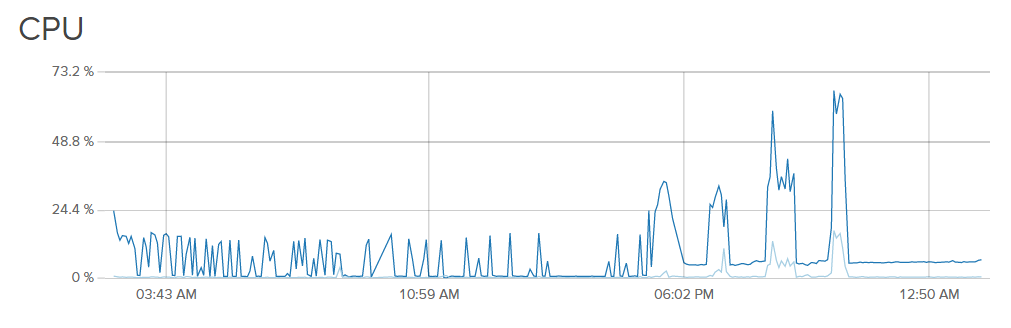
The script works, but is not a infinite loop. In the end is the session ending after the four like and follow sessions. there is the end(jump back) of the while loop missing.
ghost
on 7 Jan 2018
quickstart.py.zip
Thank you for having a look @Kurt6
cbyrt
on 7 Jan 2018
@cbyrt on line 43, you havesession.set_upper_follower_count(limit=0), I'm not sure if this is affecting it or not but I would suggest either removing this line or set up an upper follower count limit.
Is your bot liking pictures with that script?
Kurt6
on 7 Jan 2018
@Kurt6 Fantastic! Thank you.
Yes, working.
cbyrt
on 7 Jan 2018
@stefhimself Any solution for this?
mateuszpokojowczyk
on 7 Jan 2018
Hey, run this in a docker environment. Link your customized quickstart.py in the container and set the restart option to always. Every run in an clean environment, voilà
 jnmcfly
on 5 Feb 2018
jnmcfly
on 5 Feb 2018
This issue has been automatically marked as stale because it has not had recent activity. It will be closed if no further activity occurs. Thank you for your contributions.
If this problem still occurs, please open a new issue
![stale[bot] picture](https://avatars3.githubusercontent.com/in/1724?v=4&s=40) stale[bot]
on 15 Nov 2018
stale[bot]
on 15 Nov 2018
Related issues
 CharlesCCC
·
3Comments
CharlesCCC
·
3Comments
 neomh
·
3Comments
neomh
·
3Comments
 CodeMaster1
·
3Comments
CodeMaster1
·
3Comments
 converge
·
3Comments
converge
·
3Comments
 harrypython
·
3Comments
harrypython
·
3Comments