Instapy: CRITICAL - Wrong login data!
Expected Behavior
I've been running InstaPy for quite a while now, thank you very much for this amazing community!
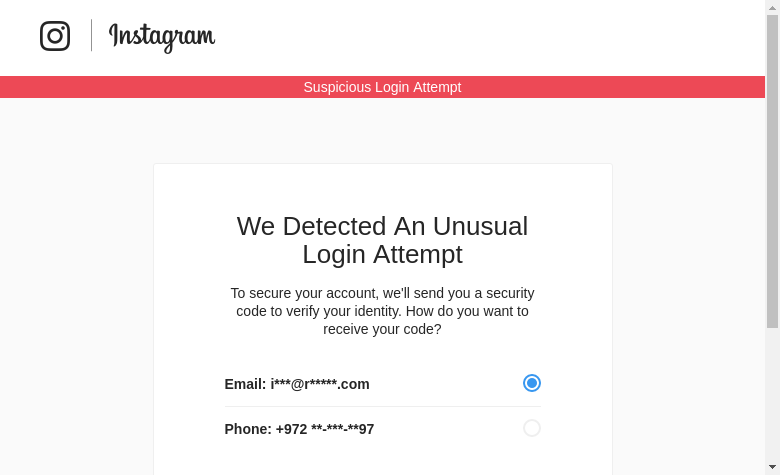
In the past few days, I've been running into issues logging into already verified accounts. I usually expect "Logged in successfully!" alert after starting the script from a Linux server, however, logging in fails.
Current Behavior
The login attempts fail again and again. I also can't input a verification code.
I also click on "It was me" from the mobile app, and when I try to login again it still fails.
I've took an image of the browser and this is what it shows:
InstaPy configuration
I've updated chromedriver to the latest (2.33) and am running the latest InstaPy version. I'm using a AWS linux server.
Thank you!
 assafelovic
All 37 comments
Having the same issue running at digital ocean.
 TGIFelix
on 8 Dec 2017
TGIFelix
on 8 Dec 2017
@assafelovic Simply login with your account from the browser once and verify it.
Once you did, everything should work fine
 timgrossmann
on 8 Dec 2017
timgrossmann
on 8 Dec 2017
What if I'm running headless?
TGIFelix
on 8 Dec 2017
The same problem :( Instagram requires verification each time, even after logining in and verifying from browser. There were no problems three days ago
 nsgolosoff
on 8 Dec 2017
nsgolosoff
on 8 Dec 2017
no @timgrossmann it's not working. I think we should add cookie management to the software.
I'm testing your software with some modifications to keep session cookies, and it's working. :-)
No need to log-in every time.
1) login first time with VNC and do authentication with code verification
2) save cookies
3) do instapy work and then quit
4) start again instapy? no login! load cookies and go
 thomasuno
on 8 Dec 2017
thomasuno
on 8 Dec 2017
@thomasuno can you share your modifications, please?
nsgolosoff
on 8 Dec 2017
yes @nsgolosoff I'll do here because last time I tried to commit something, someone hasn't appreciated
* file instapy.py *
1) after line self.logger.info('Logged in successfully!') add this line (Remember indentation)
pickle.dump(self.browser.get_cookies() , open("instacookies.pkl","wb"))
3) at the beginning add import pickle
4) touch file instacookies.pkl (create a blank file named that way)
4) NOW start a session of instapy and do verification trought vnc
5) then edit your python script and comment #session.login()
add after these lines
session.browser.get("https://www.instagram.com")
for cookie in pickle.load(open("instacookies.pkl", "rb")):
session.browser.add_cookie(cookie)
and at beginning this
import pickle
I suggest you also to edit this line sleep(5) in login_util.py and put something higher like 60 seconds because the email or sms verification doesn't arrive so quickly.
enjoy
P.S. An alternative could be using a chrome profile
thomasuno
on 8 Dec 2017
@thomasuno Thank you very much!!
nsgolosoff
on 8 Dec 2017
@nsgolosoff no problem. if something doesn't work maybe you need to touch the file instacookies.pkl (create it blank).
thomasuno
on 8 Dec 2017
@thomasuno Would be awesome if you could create a PR out of this once it's ready!
Thank you very much
timgrossmann
on 8 Dec 2017
Thanks for the cookie solution when running interactive. Is there a solution yet for running headless? I have a server that I don't have any sort of window server on as well.
 randysinnott
on 8 Dec 2017
randysinnott
on 8 Dec 2017
@randysinnott you can try to export cookies from a live browser and then save to the headless server. maybe its going to work =)
thomasuno
on 8 Dec 2017
Thank you @timgrossmann @thomasuno, however, after loading the cookies when logging back in, there's an Instagram login error with the loaded cookies.
assafelovic
on 8 Dec 2017
@assafelovic , you should not login again... if you are logged in and you have cookies, no login again.
thomasuno
on 8 Dec 2017
Dear Folks,
Need help if possible on https://github.com/instabot-py/instabot.py/issues/842
i know that are other project, other developer but this cause is Same!
thank you and sorry for anything
 pinnabruno
on 9 Dec 2017
pinnabruno
on 9 Dec 2017
hi @ @timgrossmann
i like to know when u make new version with this fix, because i´ll download the project :)
thank you
pinnabruno
on 9 Dec 2017
 sionking
on 9 Dec 2017
sionking
on 9 Dec 2017
same issue happening on 10 accounts across several vps
 wizarduk
on 9 Dec 2017
wizarduk
on 9 Dec 2017
should we work on something where right after the login, the script will check whether its the security page and issue an appropriate exception than the wrong login data ?
also if possible an interactive option in the script itself to input the code and handle this case ?
 sojan-official
on 9 Dec 2017
sojan-official
on 9 Dec 2017
@sojan-official we can use this piece of code for it. Just need something that interact with io for the code.
THIS IS FOR GETTING PAST THE VERIFICATION BLOCK
from selenium.webdriver.common.action_chains import ActionChains
session.browser.get('https://www.instagram.com')
login_elem = session.browser.find_element_by_xpath("//article/div/div/p/a[text()='Log in']")
action = ActionChains(session.browser).move_to_element(login_elem).click().perform()
input_username = session.browser.find_elements_by_xpath("//input[@name='username']")
action = ActionChains(session.browser).move_to_element(input_username[0]).click().send_keys(session.username).perform()
input_password = session.browser.find_elements_by_xpath("//input[@name='password']")
ActionChains(session.browser).move_to_element(input_password[0]).click().send_keys(session.password).perform()
login_button = session.browser.find_element_by_xpath("//form/span/button[text()='Log in']")
action = ActionChains(session.browser).move_to_element(login_button).click().perform()
radio_button = session.browser.find_element_by_xpath("//input[@id='choice_1']")
action = ActionChains(session.browser).move_to_element(radio_button).click().perform()
sec_button = session.browser.find_element_by_xpath("//button[text()='Send Security Code']")
action = ActionChains(session.browser).move_to_element(sec_button).click().perform()
CHECK EMAIL FOR CODE AND ADD HERE
sec_input = session.browser.find_element_by_xpath("//input[@id='securityCode']")
ActionChains(session.browser).move_to_element(sec_input).click().send_keys('#### CODE GOES HERE ####').perform()
sec_button = session.browser.find_element_by_xpath("//button[text()='Submit']")
action = ActionChains(session.browser).move_to_element(sec_button).click().perform()
AT THIS POINT YOU SHOULD BE LOGGED IN AND THE COOKIES CAN BE DUMPED TO THE LOCAL FILE
thomasuno
on 9 Dec 2017
If you want to get the cookie and you are using a headless instapy version (like docker-compose), you can create a SOCKS5 proxy to your machine and use Firefox to login to Instagram and save the cookie.
 Naramsim
on 9 Dec 2017
Naramsim
on 9 Dec 2017
The bot is working with new account but is not working with old account. Maybe Instagram apply different security level to some account and block some type of connection.
 IKDH
on 9 Dec 2017
IKDH
on 9 Dec 2017
Thank you everyone! Currently, it seems that this solves the issue locally on PC/Mac, however when running it headless on a Linux machine, there's an error loading the cookies - "unable to set cookie".
Any idea why this might be happening? Thanks!
assafelovic
on 9 Dec 2017
@assafelovic have you created the blank file?
thomasuno
on 9 Dec 2017
i created a socks5 proxy for my headless aws mashine and opened firefox locally, logged in successfully.
but how can i save the cookie from firefox to my aws?
created the blank file with touch file instacookies.pkl
added to my quickstart.py
#session.login()
session.browser.get('https://www.instagram.com')
for cookie in pickle.load(open("instacookies.pkl", "rb")):
      session.browser.add_cookie(cookie)
 gerdmueller2
on 9 Dec 2017
gerdmueller2
on 9 Dec 2017
@thomasuno yes. Locally on my Mac it works perfectly, but when running on my AWS Linux server, there's an error loading the cookies.
This is the flow:
- Created a blank file
- Started instapy
- Entered verification number and logged in successfully
- Logged out
- Started instapy again -> Error with loading cookies.
The process above worked perfectly running locally on Mac
assafelovic
on 9 Dec 2017
I'm getting this error now, but nothing about suspicious login data.
- ) set up new digital ocean server 1 GB Memory with 16.04
- ) Git clone this repo and install docker
- ) Put in my user details in docker_quickstart.py
this seems so temperamental on a server
 ethandunford
on 9 Dec 2017
ethandunford
on 9 Dec 2017
Could you guys help test if #1066 is working correctly? Please
timgrossmann
on 9 Dec 2017
When I follow @thomasuno 's instructions from a day ago I get this error:
for cookie in pile.load(open("instacookies.pkl", "rb")):
EOFError: Ran out of input
Please advise
 ppx45
on 10 Dec 2017
ppx45
on 10 Dec 2017
@ppx45 Nice catch!
timgrossmann
on 10 Dec 2017
That is because the file is empty right?
ppx45
on 10 Dec 2017
@timgrossmann fixed the problem for me. However, I'd recommend combining it with @thomasuno solution, since their might be end use cases in which despite the cookies, the user is not logged in.
Also add a validation check for entering instagram.com and checking for nav == 2 after adding cookies.
All in all, great solution, thank you @sionking !
assafelovic
on 10 Dec 2017
@assafelovic Good to hear that!
Is the given solution working correctly?
If not, could you contribute the rest to make it work correctly?
timgrossmann
on 10 Dec 2017
@assafelovic Could you explain how to combine @timgrossmann and @thomasuno solutions, please? In one account everything is ok after adding cookies as timgrossmann explained, but in another one the user is not logged in. I'm new to python and selenium... Thank you!
nsgolosoff
on 10 Dec 2017
Dumped the code here :)
In general, this is the logic:
- Try to add cookies
- Check if user is logged in.
- If so, return True, else, try to log in
- If verification code is needed, enter it and submit
- Repeat 2
def login_user(browser, username, password, switch_language=True):
    """Logins the user with the given username and password"""

    try:
        # check if we have login cookies
        browser.get('https://www.google.com')
        for cookie in pickle.load(open("cookies/{0}.pkl".format(username), "rb")):
            browser.add_cookie(cookie)
        sleep(2)
    except Exception as e:
        print e
        print "Identified first login for user. Entering login credentials."

    browser.get('https://www.instagram.com')
    if is_logged_in(browser, username):
        return True
    # update server calls
    update_activity()

    if switch_language:
        browser.find_element_by_xpath(
            "//footer[@class='_s5vm9']/div[@class='_g7lf5 _9z659']/nav["
            "@class='_luodr']/ul[@class='_g8wl6']/li[@class='_538w0'][10]/"
            "span[@class='_pqycz _hqmnd']/select[@class='_fsoey']/option"
            "[text()='English']").click()

    # Check if the first div is 'Create an Account' or 'Log In'
    login_elem = browser.find_element_by_xpath(
        "//article/div/div/p/a[text()='Log in']")
    if login_elem is not None:
        ActionChains(browser).move_to_element(login_elem).click().perform()

    # Enter username and password and logs the user in
    # Sometimes the element name isn't 'Username' and 'Password'
    # (valid for placeholder too)
    input_username = browser.find_elements_by_xpath(
        "//input[@name='username']")

    ActionChains(browser).move_to_element(input_username[0]). \
        click().send_keys(username).perform()
    sleep(1)
    input_password = browser.find_elements_by_xpath(
        "//input[@name='password']")
    ActionChains(browser).move_to_element(input_password[0]). \
        click().send_keys(password).perform()
    sleep(1)
    login_button = browser.find_element_by_xpath(
        "//form/span/button[text()='Log in']")
    ActionChains(browser).move_to_element(login_button).click().perform()
    # update server calls
    # update_activity()

    sleep(10)

    result = is_logged_in(browser, username)
    if not result:
        result = enter_verification_code(browser, username)
    return result

def is_logged_in(browser, username):
    # Check if user is logged-in (If there's two 'nav' elements)
    nav = browser.find_elements_by_xpath('//nav')
    if len(nav) == 2:
        pickle.dump(browser.get_cookies(), open("cookies/{0}.pkl".format(username), "wb"))
        return True
    else:
        return False

def enter_verification_code(browser, username):
    phone_options = browser.find_element_by_xpath("//label[@for='choice_0']/div")
    ActionChains(browser).move_to_element(phone_options).click().perform()
    print "Clicked!"
    sleep(3)

    send_code_option = browser.find_element_by_xpath("//form/span/button[text()='Send Security Code']")
    ActionChains(browser).move_to_element(send_code_option).click().perform()
    print ">> Insert a 6 digit code:"
    code = raw_input(">>")
    print ">> Inserting {0}...".format(code)
    browser.find_element_by_xpath("//input[@id='securityCode']").send_keys(code)
    sleep(2)

    submit_code = browser.find_element_by_xpath("//form/span/button[text()='Submit']")
    sleep(1)
    ActionChains(browser).move_to_element(submit_code).click().perform()
    result = is_logged_in(browser, username)
    return result
@assafelovic is sharing an updated login_util.py file. @assafelovic Can you recommend an approach for headless chrome running on a VPS?
 Phazz
on 11 Dec 2017
Phazz
on 11 Dec 2017
it should be added another check: when logging just with cookies instagram can detect the suspicious login attempt so it asks if "this was or wasn't me", it should be added the check and press of the button "this was me"
 ceribbo
on 16 Dec 2017
ceribbo
on 16 Dec 2017
Related issues
 tibor
·
3Comments
tibor
·
3Comments
 deronsizemore
·
3Comments
deronsizemore
·
3Comments
 converge
·
3Comments
converge
·
3Comments
 ingorichter
·
3Comments
ingorichter
·
3Comments
 wyvers
·
3Comments
wyvers
·
3Comments
Most helpful comment
Having the same issue running at digital ocean.