Expected Behavior
Log in works
Current Behavior
Log in doesnt work
Possible Solution (optional)
Double click Log In button
InstaPy configuration
Latest on docker
Hi, with one of my account Instapy seems to not fully click the login button, leaving greyed out as in the image below
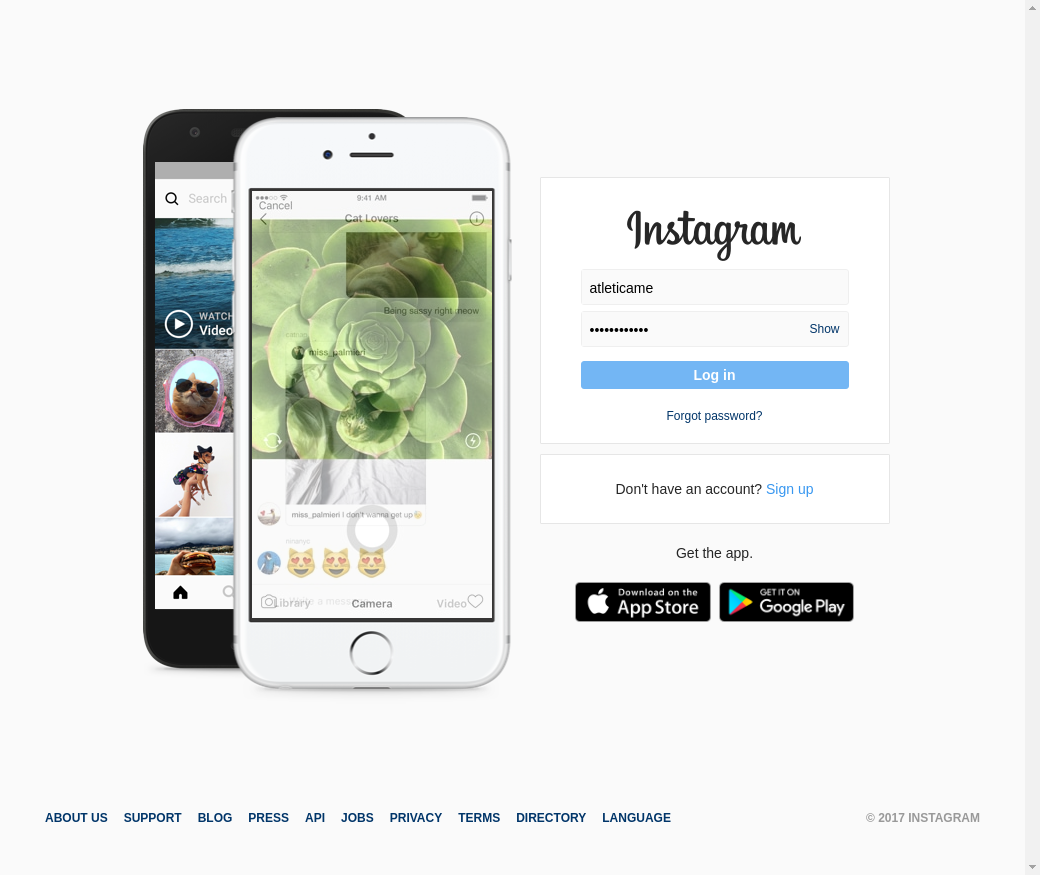
Duplicating the line below
https://github.com/timgrossmann/InstaPy/blob/f28d38df36d65b153a301153f6c0393692eb2664/instapy/login_util.py#L45
fixes the issue and logs me in successfully.
Is it possible to duplicate the Line45 call, so this error will be fixed?
Thanks very much
 Naramsim
All 14 comments
I have an almost similar Problem: Seems like when entering the password, the InstaPy Bot clicks the wrong field (which leads to google settings). Can someone help? :)
 ghost
on 16 Nov 2017
ghost
on 16 Nov 2017
Had to download the current Chromedriver and put it into assets 👍 Now working again
ghost
on 17 Nov 2017
@Naramsim , did the @flothousand solution fixes your issue ?
 converge
on 17 Nov 2017
converge
on 17 Nov 2017
@converge Nope, since I run it through Docker Compose and Chromedriver is not necessary using Selenium image
Naramsim
on 17 Nov 2017
Same here directly in cmdline
# python3 quickstart.py
Wrong login data!
not sure if it's the same problem tho
 tuxity
on 17 Nov 2017
tuxity
on 17 Nov 2017
Same here with fresh new install on Windows,
duplicating Line45 solved this issue !
 jbsness
on 24 Nov 2017
jbsness
on 24 Nov 2017
I just started receiving the 'wrong login data' error on all my accounts suddenly, even though I changed absolutely nothing with them. They are running on a Scaleway Ubuntu server.
I tried duplicating Line45 and it didn't help, I tried changing the IP and then reactivating one of them and I tried updating chromedriver which didn't help either.
What could it be?
 theolux
on 4 Dec 2017
theolux
on 4 Dec 2017
One thing you can do is take a screenshot with selenium right when instapy prints ('cant login')
Naramsim
on 4 Dec 2017
Hmm how do I do that?
theolux
on 4 Dec 2017
Google has the answer
after this line
put a browser.save_screenshot('screenie.png')
Naramsim
on 4 Dec 2017
Hey guys, I'm not able to reproduce the issue. I'm at our Slack workspace, if you give me remote access I can try to fix it.
converge
on 4 Dec 2017
OK the screenshot says 'the username you entered doesn't belong to an account'...
I tried both username and email and I still get this error... WTF?
theolux
on 4 Dec 2017
Any idea what could cause this and how this could be fixed?
This is how I'm logging into my accounts:
session = InstaPy(username='USERNAME', password='PASSWORD', nogui=True)
This has worked perfectly up to a few days ago...
theolux
on 5 Dec 2017
This issue has been automatically marked as stale because it has not had recent activity. It will be closed if no further activity occurs. Thank you for your contributions.
If this problem still occurs, please open a new issue
![stale[bot] picture](https://avatars3.githubusercontent.com/in/1724?v=4&s=40) stale[bot]
on 15 Nov 2018
stale[bot]
on 15 Nov 2018
Related issues
 n0sw34r
·
3Comments
n0sw34r
·
3Comments
 ingorichter
·
3Comments
ingorichter
·
3Comments
 tibor
·
3Comments
converge
·
3Comments
tibor
·
3Comments
converge
·
3Comments
 neomh
·
3Comments
neomh
·
3Comments
Most helpful comment
I have an almost similar Problem: Seems like when entering the password, the InstaPy Bot clicks the wrong field (which leads to google settings). Can someone help? :)