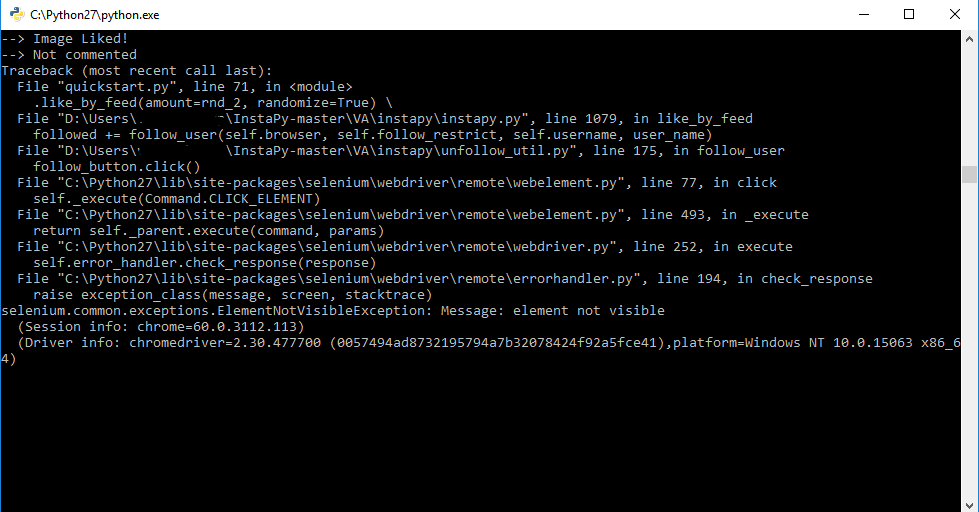
Instapy: ERROR - Message: element not visible
Traceback (most recent call last):
File "D:\Users\user\InstaPy-master\quickstart.py", line 77, in
.like_by_tags(sample(tag_list, 30), amount=20) \
File "D:\Users\user\InstaPy-master\instapy\instapy.py", line 531, in like_by_tags
followed += follow_user(self.browser, self.follow_restrict, self.username, user_name)
File "D:\Users\user\InstaPy-master\instapy\unfollow_util.py", line 139, in follow_user
follow_button.click()
File "C:\Python27\lib\site-packages\selenium\webdriver\remote\webelement.py", line 77, in click
self._execute(Command.CLICK_ELEMENT)
File "C:\Python27\lib\site-packages\selenium\webdriver\remote\webelement.py", line 493, in _execute
return self._parent.execute(command, params)
File "C:\Python27\lib\site-packages\selenium\webdriver\remote\webdriver.py", line 252, in execute
self.error_handler.check_response(response)
File "C:\Python27\lib\site-packages\selenium\webdriver\remote\errorhandler.py", line 194, in check_response
raise exception_class(message, screen, stacktrace)
selenium.common.exceptions.ElementNotVisibleException: Message: element not visible
(Session info: chrome=60.0.3112.101)
(Driver info: chromedriver=2.30.477700 (0057494ad8732195794a7b32078424f92a5fce41),platform=Windows NT 10.0.15063 x86_64)
 datteba
All 4 comments
Don't know if is the same error @timgrossmann
datteba
on 15 Sep 2017
HI, got the same error. I think it appears when the script wants to follow someone who your are already following
 janlink
on 16 Sep 2017
janlink
on 16 Sep 2017
Got this error as well.
Might be related to the fact that liking and following is broken. The script says it liked and followed, but it doesn't actually do it.
 GonzaloZiadi
on 16 Sep 2017
GonzaloZiadi
on 16 Sep 2017
did #824 fixed it ?
 converge
on 27 Oct 2017
converge
on 27 Oct 2017
Related issues
 seuraltimez
·
3Comments
seuraltimez
·
3Comments
 CharlesCCC
·
3Comments
CharlesCCC
·
3Comments
 CodeMaster1
·
3Comments
CodeMaster1
·
3Comments
 v77v
·
3Comments
v77v
·
3Comments
 tibor
·
3Comments
tibor
·
3Comments