Instapy: Script crashes on Server
My script has been crashing on the server for quite some time now, I am not really sure what the reason for this is. Please find below an excerpt from the server syslog:
Jul 27 06:40:22 ubuntu-instaliker kernel: [1180440.984909] traps: chrome[28359] trap int3 ip:55a5166dc58c sp:7ffc919bf560 error:0
Jul 27 06:40:23 ubuntu-instaliker kernel: [1180442.279852] apport invoked oom-killer: gfp_mask=0x24280ca, order=0, oom_score_adj=0
Jul 27 06:40:23 ubuntu-instaliker kernel: [1180442.279856] apport cpuset=/ mems_allowed=0
Jul 27 06:40:23 ubuntu-instaliker kernel: [1180442.279861] CPU: 0 PID: 28581 Comm: apport Not tainted 4.4.0-83-generic #106-Ubuntu
Jul 27 06:40:23 ubuntu-instaliker kernel: [1180442.279863] Hardware name: DigitalOcean Droplet, BIOS 20161103 11/03/2016
Jul 27 06:40:23 ubuntu-instaliker kernel: [1180442.279864]  0000000000000286 000000004042e267 ffff88000c2a3ad8 ffffffff813f9513
Jul 27 06:40:23 ubuntu-instaliker kernel: [1180442.279867]  ffff88000c2a3c90 ffff880012ed0000 ffff88000c2a3b48 ffffffff8120b53e
Jul 27 06:40:23 ubuntu-instaliker kernel: [1180442.279869]  ffffffff81cd6fd7 0000000000000000 ffffffff81e677e0 0000000000000206
Jul 27 06:40:23 ubuntu-instaliker kernel: [1180442.279871] Call Trace:
Jul 27 06:40:23 ubuntu-instaliker kernel: [1180442.279877]  [<ffffffff813f9513>] dump_stack+0x63/0x90
Jul 27 06:40:23 ubuntu-instaliker kernel: [1180442.279881]  [<ffffffff8120b53e>] dump_header+0x5a/0x1c5
Jul 27 06:40:23 ubuntu-instaliker kernel: [1180442.279886]  [<ffffffff81192ae2>] oom_kill_process+0x202/0x3c0
Jul 27 06:40:23 ubuntu-instaliker kernel: [1180442.279888]  [<ffffffff81192f09>] out_of_memory+0x219/0x460
It does look like the server is running out of memory?
 FBosler
All 17 comments
@FBosler Yes, when InstaPy crashes, it is not closing off any pyvirutaldisplay and chrome instances...
What you an do to fight that, is wrapping the InstaPy part in a try-catch and in the catch area, simply do a reboot of the server.
 timgrossmann
on 27 Jul 2017
timgrossmann
on 27 Jul 2017
@timgrossmann thx for the quick feedback. As always, much appreciated. I had rebooted the droplet quite a few times, but even after that its still crashing, well maybe its just coincidence I will keep checking the logs and try to see if it does run successfully now.
Cheers
FBosler
on 27 Jul 2017
@FBosler What you can also do is using the try-catch to get an error log:
try:
  InstaPy(...)\
    .login()....
except Exception as err:
  with open('./logs/error.log', 'w') as err_file:
    err_file.write(str(err))
You can then paste the actual crashing reason here
timgrossmann
on 27 Jul 2017
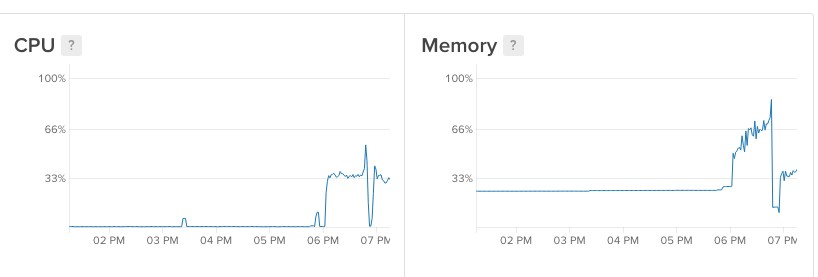
Having the same issue. This is on a droplet from Digital Ocean with 2GBs ram. Crashes after only about an hour of running. See screen shot, you can see where the ram hits 100% then crashes. Then I start it again, then crashes again before my instapy "session" is ever completed. Using pything3.5 and noGui=true.
Error message is below.

Message: unknown error: session deleted because of page crash
from unknown error: cannot determine loading status
from tab crashed
  (Session info: chrome=60.0.3112.78)
  (Driver info: chromedriver=2.29.461571 (8a88bbe0775e2a23afda0ceaf2ef7ee74e822cc5),platform=Linux 4.4.0-83-generic x86_64)
 imovertheinternet
on 28 Jul 2017
imovertheinternet
on 28 Jul 2017
this is the error I get:
Message: unknown error: session deleted because of page crash
from unknown error: cannot determine loading status
from tab crashed
  (Session info: chrome=60.0.3112.78)
  (Driver info: chromedriver=2.30.477691 (6ee44a7247c639c0703f291d320bdf05c1531b57),platform=Linux 4.4.0-83-generic x86_64)
@imovertheinternet I have the same problem - Im not great with this but learning and I was wondering, why does the RAM consumption trend up? what is it that we have in memory?
Thanks, sorry if this is a basic question
 RealMakAttak
on 28 Jul 2017
RealMakAttak
on 28 Jul 2017
I faced the same problem here. Can anybody share their image numbers?
My script fails on pic 170, and i guess lowering the image count could help. Running with 1GB RAM
 diveu
on 28 Jul 2017
diveu
on 28 Jul 2017
Well if you look at my first graph that was an array of 20 images with an amount=50 my second spike was an array of 7 images at amount=100. This script use to work fine, then I did a git pull and updated my chrome/chromedriver now im getting these issues.
@diveu what versions are you running? Me and @FBosler seem to have similar setups.
Looks like there are chrome processes that never get killed which is why i think the memory keeps leaking. You can see on my graph that even after the crash it doesnt close everything (stays at 25% usage) as @timgrossmann has already mentioned
imovertheinternet
on 28 Jul 2017
@imovertheinternet I'm probably running the same setup as you did because it all started after a git pull too.
diveu
on 28 Jul 2017
@imovertheinternet @RealMakAttak @FBosler @timgrossmann
Hey, everybody. I guess the commit #416 was the reason for the problem. I commented these added lines and RAM consumption decreased significantly (see the screenshot). Hope this helps you guys.
diveu
on 29 Jul 2017
@diveu Interesting, this should actually decrease the bandwidth and memory used...
Thank you for reporting
timgrossmann
on 30 Jul 2017
@diveu Funny, I found that same commit and commented it out a couple days ago and let script run for a day before I jumped to any conclusions and I agree it does seem to have helped with the RAM issue (I couldnt last over 1.5hours before).
However, I ran into another issue after I did that which was issue #335 but im running in nogui mode so I was a bit confused as to why it would happen. As a bandaid I just added sleep around line 130 on unfollow.py to make sure everything is loading and it seems to have fixed it. Iv been running great for hours straight now
imovertheinternet
on 30 Jul 2017
Are you guys on Docker?, mount dev/shm to the host, it needs it.
-v /dev/shm:/dev/shm
 Naramsim
on 2 Aug 2017
Naramsim
on 2 Aug 2017
I can confirm that #416 crashes the script after a while. (DO 1GB droplet)
 razvanilin
on 7 Aug 2017
razvanilin
on 7 Aug 2017
@razvanilin Are you completely sure?
I can't really see what would cause the problems
timgrossmann
on 7 Aug 2017
@timgrossmann yes, the problem started to appear right after I did a git pull. I did as @diveu said, rolled back those changes and now the script is running without problems.
razvanilin
on 7 Aug 2017
I removed these lines from InstaPy to make sure less people get your problems
Thank you for finding this problem
timgrossmann
on 7 Aug 2017
Related issues
 CharlesCCC
·
3Comments
CharlesCCC
·
3Comments
 wyvers
·
3Comments
wyvers
·
3Comments
 thisishotdog
·
3Comments
thisishotdog
·
3Comments
 neomh
·
3Comments
neomh
·
3Comments
 Spyd3r0us
·
3Comments
Spyd3r0us
·
3Comments