Hello i made all the steps except the 4*, but my bot is not working.
*What i have to do in the step 4? add the line inside:
from clarifai.client import ClarifaiApi and it's ok?
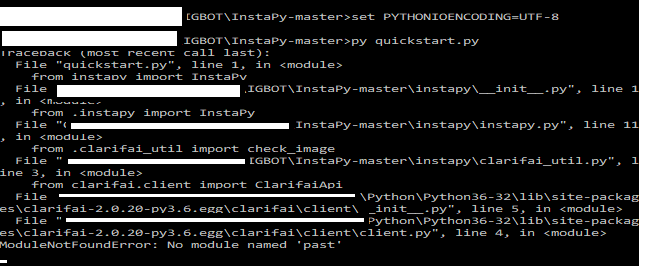
once i run the GUI it starts and closes in 2 seconds, i tried to see what is saying and it appears this:
 mynameisearl
All 11 comments
@Nemixalone
 timgrossmann
on 27 Jul 2017
timgrossmann
on 27 Jul 2017
@timgrossmann Hello Tim, as i see the clarifai word in the console, can you tell me exactly what i need to do in the step 4? i tried to search in the document the line: from clarifai.client import ClarifaiApi but i haven't see it.
So i decided to insert it inside.
But the bot still don't open.
mynameisearl
on 27 Jul 2017
@mynameisearl To be honest, I don't know, that's why I linked @Nemixalone , he wrote the GUI with the instructions 😉
I use the GUI without commenting out the stuff from "step 4"
timgrossmann
on 27 Jul 2017
@timgrossmann Oh, well i downloaded the repository and followed the step using windows, this downloaded the GUI too, i'm gonna try without the GUI.
mynameisearl
on 27 Jul 2017
@mynameisearl For me, both works fine. Hadn't had any issues with the GUI as well as the command line...
timgrossmann
on 27 Jul 2017
Go to master folder then go to instapy folder open instapy.py file with notepad or notepad++ and find the line from clarifai.client import ClarifaiApi and delete it, save it and you will be good to go.
 komad1na
on 27 Jul 2017
komad1na
on 27 Jul 2017
@Nemixalone As i tried it's the first thing i tried and when i search for: from clarifai.client import ClarifaiApi It says not found, as if this line isn't there.
mynameisearl
on 27 Jul 2017
Is it possible if you can upload the instapy.py file that you have?
I reinstaled the whole bot, and still have the same screen that i uploaded
mynameisearl
on 27 Jul 2017
Only this way
komad1na
on 28 Jul 2017
@Nemixalone Thanks, using that one now it works, , but i get a floating window: Chromedriver.exe - no disc telling: there's no disc in the unity E:
But it looks like the bot is working.
Will test it asap.
edit1: Follow by list not working
mynameisearl
on 28 Jul 2017
@mynameisearl One guy fix it this way
komad1na
on 28 Jul 2017
Related issues
 CodeMaster1
·
3Comments
CodeMaster1
·
3Comments
 rahulkapoor90
·
3Comments
rahulkapoor90
·
3Comments
 wyvers
·
3Comments
wyvers
·
3Comments
 46960
·
3Comments
46960
·
3Comments
 neomh
·
3Comments
neomh
·
3Comments