Instapy: Docker run doing nothing
Hi, I'd like to know what should happen once I run InstaPy with docker on the terminal. I get this code: ec7c4610ab425846fd57b66c22d8af200f6a766ffe13fc51de7e26b07eec1c04 but Chrome doesn't open and nothing happens. I have the latest chromedriver and have uninstalled and reinstalled the necessary packages.
 eurunuela
All 23 comments
Docker image in the master branch seems to be broken now. I've made pull request which have approved not so long time ago. I think Tim will merge it soon, when checked it up.
If you want some really working solution with docker right now, just look at my private fork, branch docker_microservice. Look at the readme file - there are new instructions.
 onyxim
on 11 Jul 2017
onyxim
on 11 Jul 2017
How am I supposed to open the docker_quickstart.py if when I clone or download the branch the file isn't there?
# Edit:
Don't know why clone didn't work but the zip did. Seems to be working now. Thanks!
# Edit 2:
I get this error message:
ERROR: for instapy_selenium_1 Cannot start service selenium: driver failed programming external connectivity on endpoint instapy_selenium_1 (2ae7109a941deae7b32a3e53ff68b8e8ab320d3b5a1601c772315027b9b30890): Error starting userland proxy: Bind for 0.0.0.0:5900 failed: port is already allocated
eurunuela
on 11 Jul 2017
Your 5900 port simply have been already allocated with the old docker image. Either change port for selenium before ":" (to 5092 for example) in docker-compose.yml or kill the old docker image. And try again.
onyxim
on 11 Jul 2017
Okay thanks, and what about the username I get asked for along with the "secret" password?
eurunuela
on 11 Jul 2017
There is no username. Leave it blank or use tighVNC, which is not asks any usernames.
onyxim
on 11 Jul 2017
the password "secret" doesnt seem to work - am I being stupid?
 RealMakAttak
on 12 Jul 2017
RealMakAttak
on 12 Jul 2017
Yes I was, have to set the password in tightVNC
RealMakAttak
on 13 Jul 2017
I tried tighVNC but had no success. I have a Mac and I get this message:
No security types supported. Server sent '[30,36,35]' security types, but we do not support any of their. Try another connection?
eurunuela
on 13 Jul 2017
Oh, Mac. You have to think different, you know:-) I've never tried docker on Mac, so I have no clues about cheats and tricks on that platform.
But fast googling shows to me that you enabled forced encryption in your viewer. Disable encryption and it may help.
By the way, tightVNC have no official support for Mac. Please, try to use other tool something like realVNC, which is officially support Mac OS. I've tried realVNC on windows and it works flawlessly. Actually any VNC viewer (because it's standardized protocol) should work, if there no problems with port mapping.
Docker containers should run everywhere without any troubles, that's the core idea of docker.
If you resolve your problem, please, feel free and post there you solution. It may helps others Mac's users.
onyxim
on 13 Jul 2017
Yeah, I tried realVNC. That's why I asked about the username. RealVNC asked for a username. I'll try once again... Do you know of any other VNC viewer I could check?
Of course I will post the solution. I guess I'm not the only one experiencing this problem so, if I can help other people, I will.
eurunuela
on 13 Jul 2017
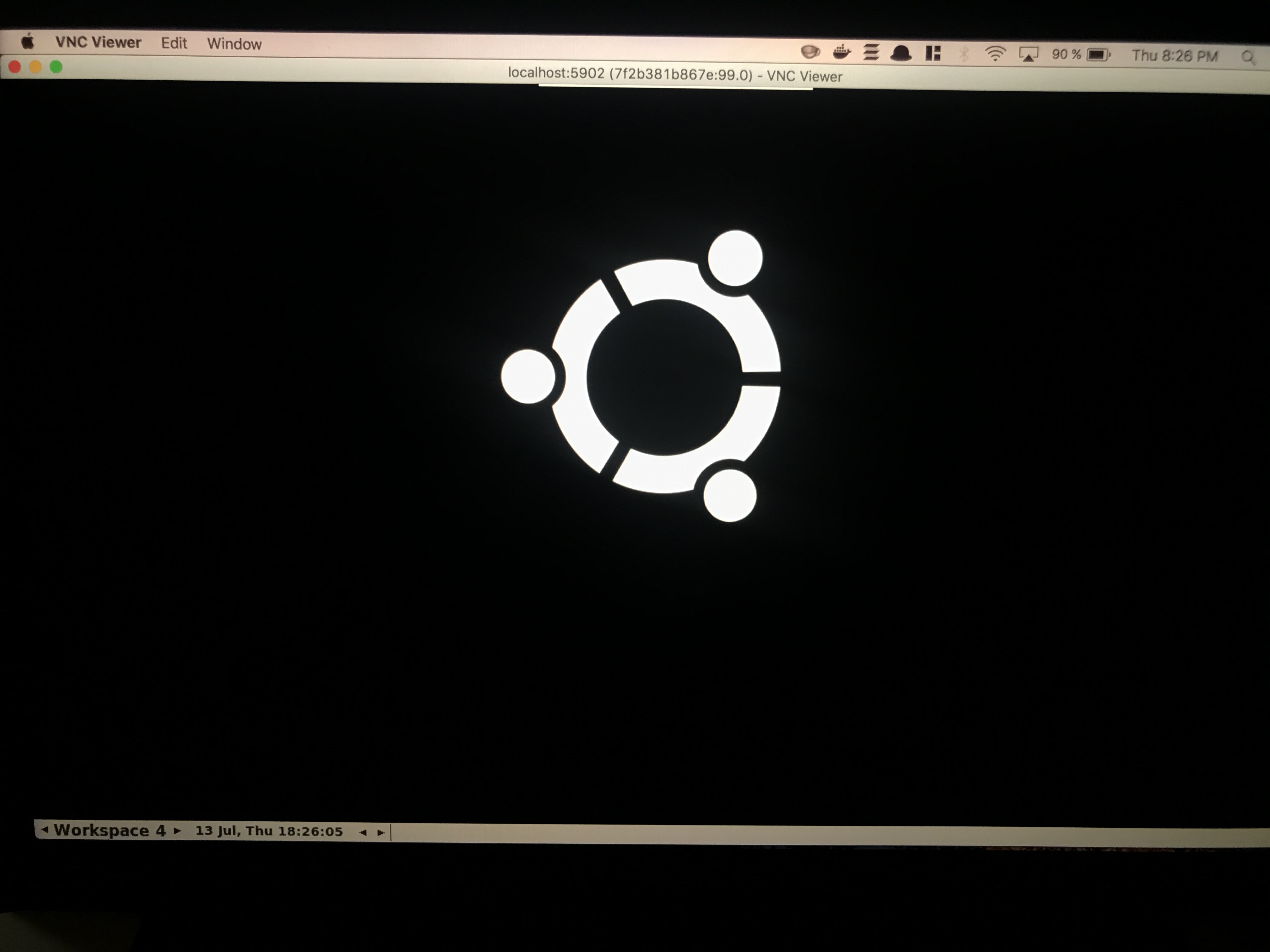
I managed to use realVNC with localhost:5902. It didn't work two days ago on localhost:5900. However, this is all I see:
eurunuela
on 13 Jul 2017
Click on the right arrow near "workspace 4" before there will be "workspace 1". When the bot is running, chrome window will be there.
onyxim
on 13 Jul 2017
To rerun only bot service just type: docker-compose up -d --build web
onyxim
on 13 Jul 2017
It looks the same on every workspace.
eurunuela
on 13 Jul 2017
Type this docker-compose up --force-recreate and connect again. All logs from containers will be show in the terminal.
onyxim
on 13 Jul 2017
There was an error:
web_1       | Traceback (most recent call last):
web_1       |   File "/usr/local/lib/python3.6/urllib/request.py", line 1318, in do_open
web_1       |     encode_chunked=req.has_header('Transfer-encoding'))
web_1       |   File "/usr/local/lib/python3.6/http/client.py", line 1239, in request
web_1       |     self._send_request(method, url, body, headers, encode_chunked)
web_1       |   File "/usr/local/lib/python3.6/http/client.py", line 1285, in _send_request
web_1       |     self.endheaders(body, encode_chunked=encode_chunked)
web_1       |   File "/usr/local/lib/python3.6/http/client.py", line 1234, in endheaders
web_1       |     self._send_output(message_body, encode_chunked=encode_chunked)
web_1       |   File "/usr/local/lib/python3.6/http/client.py", line 1026, in _send_output
web_1       |     self.send(msg)
web_1       |   File "/usr/local/lib/python3.6/http/client.py", line 964, in send
web_1       |     self.connect()
web_1       |   File "/usr/local/lib/python3.6/http/client.py", line 936, in connect
web_1       |     (self.host,self.port), self.timeout, self.source_address)
web_1       |   File "/usr/local/lib/python3.6/socket.py", line 722, in create_connection
web_1       |     raise err
web_1       |   File "/usr/local/lib/python3.6/socket.py", line 713, in create_connection
web_1       |     sock.connect(sa)
web_1       | ConnectionRefusedError: [Errno 111] Connection refused
web_1       |
web_1       | During handling of the above exception, another exception occurred:
web_1       |
web_1       | Traceback (most recent call last):
web_1       |   File "docker_quickstart.py", line 18, in <module>
web_1       |     bot.set_selenium_remote_session(selenium_url='http://selenium:4444/wd/hub')
web_1       |   File "/code/instapy/instapy.py", line 102, in set_selenium_remote_session
web_1       |     desired_capabilities=DesiredCapabilities.CHROME)
web_1       |   File "/usr/local/lib/python3.6/site-packages/selenium/webdriver/remote/webdriver.py", line 98, in __init__
web_1       |     self.start_session(desired_capabilities, browser_profile)
web_1       |   File "/usr/local/lib/python3.6/site-packages/selenium/webdriver/remote/webdriver.py", line 188, in start_session
web_1       |     response = self.execute(Command.NEW_SESSION, parameters)
web_1       |   File "/usr/local/lib/python3.6/site-packages/selenium/webdriver/remote/webdriver.py", line 254, in execute
web_1       |     response = self.command_executor.execute(driver_command, params)
web_1       |   File "/usr/local/lib/python3.6/site-packages/selenium/webdriver/remote/remote_connection.py", line 464, in execute
web_1       |     return self._request(command_info[0], url, body=data)
web_1       |   File "/usr/local/lib/python3.6/site-packages/selenium/webdriver/remote/remote_connection.py", line 526, in _request
web_1       |     resp = opener.open(request, timeout=self._timeout)
web_1       |   File "/usr/local/lib/python3.6/urllib/request.py", line 526, in open
web_1       |     response = self._open(req, data)
web_1       |   File "/usr/local/lib/python3.6/urllib/request.py", line 544, in _open
web_1       |     '_open', req)
web_1       |   File "/usr/local/lib/python3.6/urllib/request.py", line 504, in _call_chain
web_1       |     result = func(*args)
web_1       |   File "/usr/local/lib/python3.6/urllib/request.py", line 1346, in http_open
web_1       |     return self.do_open(http.client.HTTPConnection, req)
web_1       |   File "/usr/local/lib/python3.6/urllib/request.py", line 1320, in do_open
web_1       |     raise URLError(err)
web_1       | urllib.error.URLError: <urlopen error [Errno 111] Connection refused>
eurunuela
on 13 Jul 2017
Please, post here your full bot code (without credentials for sure). Or better attach it to message.
onyxim
on 14 Jul 2017
Please delete your credentials from archive and better change your insta password quick. Now it is obviously exposed.
onyxim
on 14 Jul 2017
Oh... I thought I only had to change them on quickstart! Thanks for the alert! Here it is.
eurunuela
on 14 Jul 2017
Ok, @Nkuutz . I wish, but couldn't help you right now, because docker on mac still very young, and have a lot of restrictions. And what is the worst fact, that I currently know nothing about this restrictions:-D
So, I suggest you prepare and post an issue to the official docker repository. Put there docker-compose.yml file and log above and describe behavior.
As I can see, somehow, there is no connection from one container to another.
After your creating an issue, put there link to it.
onyxim
on 14 Jul 2017
I just got a Raspberry so tomorrow I'll be trying it on NOOBS which is basically Linux, I hope it works. In case it doesn't, I would post an issue to the official docker repository.
Thank you very much for your patience, effort and help. I really appreciate it @onyxim .
eurunuela
on 14 Jul 2017
Is there a solution right now?
 enadgermani
on 16 Mar 2018
enadgermani
on 16 Mar 2018
Hi everyone! I am experiencing the same issue trying with Docker on a Mac, i.e. the Docker machine just sits there doing nothing. However, my logs point to a more specific error:
web_1       | Traceback (most recent call last):
web_1       |   File "/usr/local/lib/python3.6/site-packages/selenium/webdriver/common/service.py", line 76, in start
web_1       |     stdin=PIPE)
web_1       |   File "/usr/local/lib/python3.6/subprocess.py", line 709, in __init__
web_1       |     restore_signals, start_new_session)
web_1       |   File "/usr/local/lib/python3.6/subprocess.py", line 1344, in _execute_child
web_1       |     raise child_exception_type(errno_num, err_msg, err_filename)
web_1       | FileNotFoundError: [Errno 2] No such file or directory: '/code/assets/chromedriver': '/code/assets/chromedriver'
web_1       |
web_1       | During handling of the above exception, another exception occurred:
web_1       |
web_1       | Traceback (most recent call last):
web_1       |   File "docker_quickstart.py", line 15, in <module>
web_1       |     session = InstaPy(username=insta_username, password=insta_password)
web_1       |   File "/code/instapy/instapy.py", line 148, in __init__
web_1       |     self.set_selenium_local_session()
web_1       |   File "/code/instapy/instapy.py", line 239, in set_selenium_local_session
web_1       |     chrome_options=chrome_options)
web_1       |   File "/usr/local/lib/python3.6/site-packages/selenium/webdriver/chrome/webdriver.py", line 68, in __init__
web_1       |     self.service.start()
web_1       |   File "/usr/local/lib/python3.6/site-packages/selenium/webdriver/common/service.py", line 83, in start
web_1       |     os.path.basename(self.path), self.start_error_message)
web_1       | selenium.common.exceptions.WebDriverException: Message: 'chromedriver' executable needs to be in PATH. Please see https://sites.google.com/a/chromium.org/chromedriver/home
web_1       |
instapy_web_1 exited with code 1
I figured perhaps this is because my chromedriver file is the Mac 64 bit version, so I downloaded the Linux 64 bit version instead. This did not help, I still get the same error. And the error seems to say that the file is actually not found. Isn't "/code" mapped to the InstaPy directory on my Mac?
If I connect to the Docker image and open XTerm I can see that there is no "/code" folder at all on the machine. I figure that might be where things go wrong. However, I clearly see step 7 being executed when building the machine, i.e. copying "./" to "/code".
Does anyone have any suggestions on how to troubleshoot this further?
EDIT: My bad. I had forgotten the selenium_local_session=False parameter when initiating my bot in docker_quickstart.py. Now it works just fine.
 danniefraim
on 22 Mar 2018
danniefraim
on 22 Mar 2018
Related issues
 deronsizemore
·
3Comments
deronsizemore
·
3Comments
 ingorichter
·
3Comments
ingorichter
·
3Comments
 n0sw34r
·
3Comments
n0sw34r
·
3Comments
 Naramsim
·
3Comments
Naramsim
·
3Comments
 CodeMaster1
·
3Comments
CodeMaster1
·
3Comments