Could you also include information about how to do this using Macs? To the setup tutorial?
 HaginCodes
All 17 comments
I've set it up on MacOS and Linux using the instructions on the github. MacOS is based on Unix. It should the the same instructions. Did you run into any errors/problems while following the instructions?
 atomhax
on 27 May 2017
atomhax
on 27 May 2017
can't even enter wget commands listed on the page, most of the terminal commands for ubuntu there don't work, you also can't install deb files as such on mac.
HaginCodes
on 28 May 2017
cd InstaPy
python setup.py install
 converge
on 29 May 2017
converge
on 29 May 2017
Trying to run this on a Mac using Python 3.6. Receive the following error;
File "quickstart.py", line 14, in
InstaPy(username="xusername", password="password")\
TypeError: 'module' object is not callable
Any ideas?
confirmed setup.py install was successful.
I modified __init__.py :
from instapy import InstaPy (removed the '.' in front of instapy, if I leave it in, I receive an error: mportError: No module named instapy)
 gitpatrickhub
on 16 Jun 2017
gitpatrickhub
on 16 Jun 2017
@gitpatrickhub Never touch the code....
This is not recommended...
I modified init.py
Make sure the quickstart file is at the right place... You need the same folder structure as in the repo
 timgrossmann
on 19 Jun 2017
timgrossmann
on 19 Jun 2017
Ok, so I reverted the code back to original state. And I have verified the same file structure (screenshot below);
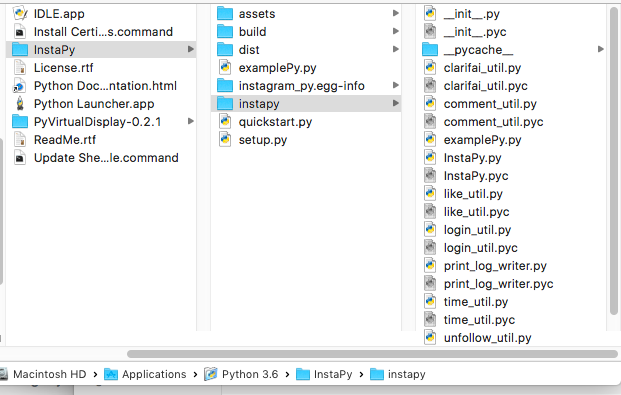
Error below from executing the code with original __init__.py code;
Traceback (most recent call last):
File "quickstart.py", line 1, in
from instapy import InstaPy
File "/Applications/Python 3.6/InstaPy/instapy/__init__.py", line 1, in
from .instapy import InstaPy
ImportError: No module named instapy
gitpatrickhub
on 19 Jun 2017
@gitpatrickhub That's weird, do you start the quickstart file with
python3 quickstart.py ?
Did you install all the dependencies ?
timgrossmann
on 19 Jun 2017
I was only using the command; python quickstart.py
but just tried it with python3 quickstart.py and same error.
The dependencies look to be the issue;
writing manifest file 'instagram_py.egg-info/SOURCES.txt'
file i.py (for module i) not found
file n.py (for module n) not found
file s.py (for module s) not found
file t.py (for module t) not found
file a.py (for module a) not found
file p.py (for module p) not found
file y.py (for module y) not found
reading manifest file 'instagram_py.egg-info/SOURCES.txt'
writing manifest file 'instagram_py.egg-info/SOURCES.txt'
installing library code to build/bdist.macosx-10.10-x86_64/egg
running install_lib
running build_py
file i.py (for module i) not found
file n.py (for module n) not found
file s.py (for module s) not found
file t.py (for module t) not found
file a.py (for module a) not found
file p.py (for module p) not found
file y.py (for module y) not found
file i.py (for module i) not found
file n.py (for module n) not found
file s.py (for module s) not found
file t.py (for module t) not found
file a.py (for module a) not found
file p.py (for module p) not found
file y.py (for module y) not found
warning: install_lib: 'build/lib' does not exist -- no Python modules to install
Not sure what happened here. Any ideas?
gitpatrickhub
on 19 Jun 2017
@gitpatrickhub Never've seen that...
Could you clone the repo to a different location and simply do:
cd InstaPy
python setup.py install
?
timgrossmann
on 19 Jun 2017
Created a new directory "production" and executed the clone command on the git repo. Then executed the install (same errors see attached). Lastly ran the python quickstart.py (error now related to pyvirtualdisplay)
gitpatrickhub
on 19 Jun 2017
@gitpatrickhub pip install pyvirtualdisplay?
timgrossmann
on 19 Jun 2017
Before I execute the command, what directory should I be executing it from? I had initially installed at the Python 3.6 directory. Should I execute from Python 3.6/production/InstaPy or Python 3.6/production or Python 3.6?
gitpatrickhub
on 19 Jun 2017
@gitpatrickhub doesn't mind. Everywhere is fine
timgrossmann
on 19 Jun 2017
Looks like it was installed correctly;
Dallass-MacBook-Air:InstaPy dallasdenver$ pip install pyvirtualdisplay
Requirement already satisfied: pyvirtualdisplay in /usr/local/lib/python2.7/site-packages
Requirement already satisfied: EasyProcess in /usr/local/lib/python2.7/site-packages (from pyvirtualdisplay)
gitpatrickhub
on 19 Jun 2017
@gitpatrickhub
pip3 install pyvirutaldisplay of course this is not working if you install things for 2.7 but use 3 to execute the quickstart file 😉
Let's see if this fixes things
timgrossmann
on 19 Jun 2017
Doh! Ok, I think I need to revert to Python 2.7, as it doesn't appear that 3.6 is supported for pyvirtualdisplay
gitpatrickhub
on 19 Jun 2017
@gitpatrickhub It is 😉
timgrossmann
on 19 Jun 2017
Related issues
 Spyd3r0us
·
3Comments
converge
·
3Comments
Spyd3r0us
·
3Comments
converge
·
3Comments
 Naramsim
·
3Comments
Naramsim
·
3Comments
 ingorichter
·
3Comments
ingorichter
·
3Comments
 n0sw34r
·
3Comments
n0sw34r
·
3Comments
Most helpful comment
cd InstaPy
python setup.py install