Instantsearch.js: Address widget - without map
Hi there,
I'm trying to master the instantsearch widgets and I can't find an example of the map widget but...without the map. Say one wants to find the list of events around a particular address, i'd like to link the google autocompete address widget with the proximity search of algolia.
Does anyone has a working widget in mind or do I have to make it from scratch ?
Thanks for your help !
 florentdestremau
All 13 comments
You will have to make it from scratch but that may not be that hard, here's a quick example:
var placesWidget = {
  init: function(opts) {
    var autocomplete = new google.maps.places.Autocomplete(/* ... */);
    autocomplete.addListener('place_changed', onPlaceChanged);

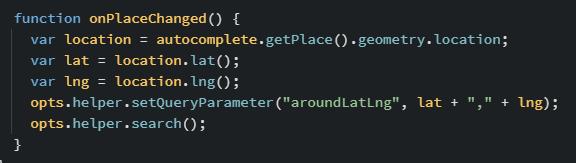
    function onPlaceChanged() {
      var location = autocomplete.getPlace().geometry.location;
      var lat = location.lat();
      var lng = location.lng();
      opts.helper.setQueryParameter('aroundLatLng', lat + ',' + lng);
      opts.helper.search();
    }
  }
};

search.addWidget(placesWidget);
 vvo
on 7 Jun 2016
vvo
on 7 Jun 2016
Wow thanks for the tip !
florentdestremau
on 7 Jun 2016
Let me know if it works for you, I am very interested. Thanks
vvo
on 7 Jun 2016
I will try this out this week-end ! But it inspired me to set up a datepicker widget ! :smiley:
florentdestremau
on 8 Jun 2016
Awesome!
vvo
on 8 Jun 2016
@vvo
I've run into a similar issue and tried to implement a similar solution to what you described, however it does not seem to actually update the query parameter.
Here is my search function:
searchFunction(helper) {
        console.log(helper);

        // only search if there is a query
        if (helper.state.query) {
            $('#main-content').hide();

            helper.search();
        } else {
            $('#algolia-hits').empty();
            $('#main-content').show();
        }
    }
And here is my widget:
const nearLocationWidget = {
    init(options) {
        const updateQueryLocation = () => {
            const lat = window.locationService.searchNear.latitude;
            const lng = window.locationService.searchNear.longitude;

            if (lat && lng) {
                const value = lat + ',' + lng;
                console.log('aroundLatLng param: ' + value);

                options.helper.state.setQueryParameter('aroundLatLng', value);
            }

            options.helper.search();
        };

        updateQueryLocation();
        EVENTS.on(EVENTS.SEARCH_NEAR_CHANGE, updateQueryLocation);
    }
};
I know the handler runs because I get aroundLatLng param: 39.73203559999999,-104.9798384 in the console.
However this is what the request looks like after the helper supposedly updated it. As you can see the aroundLatLng parameter isn't added.
{"requests":[{"indexName":"web_dev_locations","params":"query=beerss&hitsPerPage=11&page=0&facets=%5B%5D&tagFilters="}]}
Am I doing something terribly wrong?
 mihaiscurtucb
on 9 Jun 2016
mihaiscurtucb
on 9 Jun 2016
Nevermind, i had
options.helper.state.setQueryParameter('aroundLatLng', value);
instead of
options.helper.setQueryParameter('aroundLatLng', value);
Awesome, thanks for getting there!
If one of you guys could publish that widget as a reusable widget, this would be awesome :)
vvo
on 9 Jun 2016
Sorry for commenting on an old issue, but I'm in the exact same use case, and although it works perfectly, it doesn't update the browser URL.
I've read countless pages of doumentation without finding the solution, can you help?
 bouiboui
on 3 Jul 2018
bouiboui
on 3 Jul 2018
@bouiboui Could you provide us a woking example of your widget? It will help to better understand what you need to synchronise in the URL. Here is a template that will avoid you the boilerplate part.
 samouss
on 3 Jul 2018
samouss
on 3 Jul 2018
Here you go: https://codesandbox.io/s/6y00r9mkj3
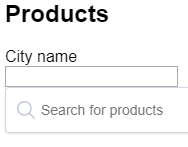
If you update the city name, the (fake) Google Maps Autocomplete returns the geolocation and updates the aroundLatLng queryParameter of the search.
But the URL isn't updated. (should be something like /?latLng=43.0%2C2.0

I found a workaround using getWidgetState and getWidgetSearchParameters, but it feels like a hack and I'd like to know the right / recommended / best way to do it.
bouiboui
on 4 Jul 2018
Thanks for the example, but the workaround that you are already using is the way to go. Those functions are built to provide information to InstantSearch about the widgets state. Then the routing module use those functions to compute the URL. You are completely on track!
Here is an example that implements those methods with a custom places widget.
samouss
on 4 Jul 2018
Awesome, it looks really close to what I'm doing.
Thanks for your quick answer!
bouiboui
on 4 Jul 2018
Related issues
 mthuret
·
3Comments
mthuret
·
3Comments
 egyprotech
·
3Comments
egyprotech
·
3Comments
 bobylito
·
3Comments
bobylito
·
3Comments
 anthonyBertrant
·
3Comments
anthonyBertrant
·
3Comments
 jvreeken
·
3Comments
jvreeken
·
3Comments