Installer: Bootstrap failed to complete: waiting for Kubernetes API: context deadline exceeded
Version 4.3
$ openshift-install version
./openshift-install v4.3.0
built from commit 2055609f95b19322ee6cfdd0bea73399297c4a3e
release image quay.io/openshift-release-dev/ocp-release@sha256:3a516480dfd68e0f87f702b4d7bdd6f6a0acfdac5cd2e9767b838ceede34d70d
Platform:
AWS - region us-west-2 / us-east-2
What happened?
Hello, trying to create a cluster always got the below issue:
DEBUG Apply complete! Resources: 131 added, 0 changed, 0 destroyed.
DEBUG OpenShift Installer v4.3.0
DEBUG Still waiting for the Kubernetes API: Get https://api.ocp3.openshift.lab.com:6443
/version?timeout=32s: dial tcp 91.195.240.126:6443: connect: connection refused
DEBUG Log bundle written to /var/home/core/log-bundle-20200129173047.tar.gz
INFO Bootstrap gather logs captured here "log-bundle-20200129173047.tar.gz"
FATAL Bootstrap failed to complete: waiting for Kubernetes API: context deadline exceeded
What you expected to happen?
Get a running Openshift console
How to reproduce it (as minimally and precisely as possible)?
launch the destroy of the cluster and launch again the create
$ ./openshift-install create cluster --dir=. --log-level=debug
Anything else we need to know?
I noticed the ssh key was not in each each EC2 instances so I cannot login into.
Running on WSL Ubuntu 18.04
References
no real solution in -> https://github.com/openshift/installer/issues/1745#
 Philippe73
All 44 comments
Trying that command
./openshift-install wait-for install-complete
INFO Waiting up to 30m0s for the cluster at https://api.ocp3.openshift.lab.com:6443 to initialize...
ERROR Attempted to gather ClusterOperator status after wait failure: listing ClusterOperator objects: Get https://api.ocp3.openshift.lab.com:6443/apis/config.openshift.io/v1/clusteroperators: dial tcp 91.195.240.126:6443: connect: connection refused
FATAL failed to initialize the cluster: timed out waiting for the condition
Philippe73
on 29 Jan 2020
DEBUG Still waiting for the Kubernetes API: Get https://api.ocp3.openshift.lab.com:6443
/version?timeout=32s: dial tcp 91.195.240.126:6443: connect: connection refused
DEBUG Log bundle written to /var/home/core/log-bundle-20200129173047.tar.gz
INFO Bootstrap gather logs captured here "log-bundle-20200129173047.tar.gz"
FATAL Bootstrap failed to complete: waiting for Kubernetes API: context deadline exceeded
The installer captures the logs from bootstrap-host for debugging.. log-bundle-20200129173047.tar.gz
the log bundle includes logs from bootstrap-host, control-plane-hosts etc..
so you should be able to check the bootstrap folder and journal folder to see which units are failing or why.
if you can attach the log bundle here that would help debugging.. and if attaching that here is problematic for security reasons.. try attaching that to a bugzilla.. https://bugzilla.redhat.com/enter_bug.cgi?product=OpenShift%20Container%20Platform
 abhinavdahiya
on 29 Jan 2020
abhinavdahiya
on 29 Jan 2020
log-bundle-20200129173047.tar.gz
Hi Abhinav, many thanks for your response. I push the requested log.
I also noticed the AWS target group corresponding to the 'bootstrap' node is 'unhealthy' ->
10.0.1.196 | 22623 | us-west-2a | unhealthy | Health checks failed
Thanks
Philippe73
on 30 Jan 2020
Hello, I have additional question, I have created an 'hosted zone' (openshift.lab.com) in AWS Route53.
The OpenShift installer use this domain an create another one prefixed with cluster name provided during the installation process.
Do I need to register that damain (12$) ?
Thanks
Philippe73
on 30 Jan 2020
Got the same results on AWS.
- The installation timed out.
- SSH did not work
Then, tried a different version of the installer
https://mirror.openshift.com/pub/openshift-v4/clients/ocp/4.2.16/openshift-install-linux-4.2.16.tar.gz
and it completed.
 sdarwin
on 30 Jan 2020
sdarwin
on 30 Jan 2020
@Philippe73 looks like the bootstrapping is working looking at the bootstrap/journal/bootkube.service...
but strangely the installer is failing to connect to the api server... _confused_
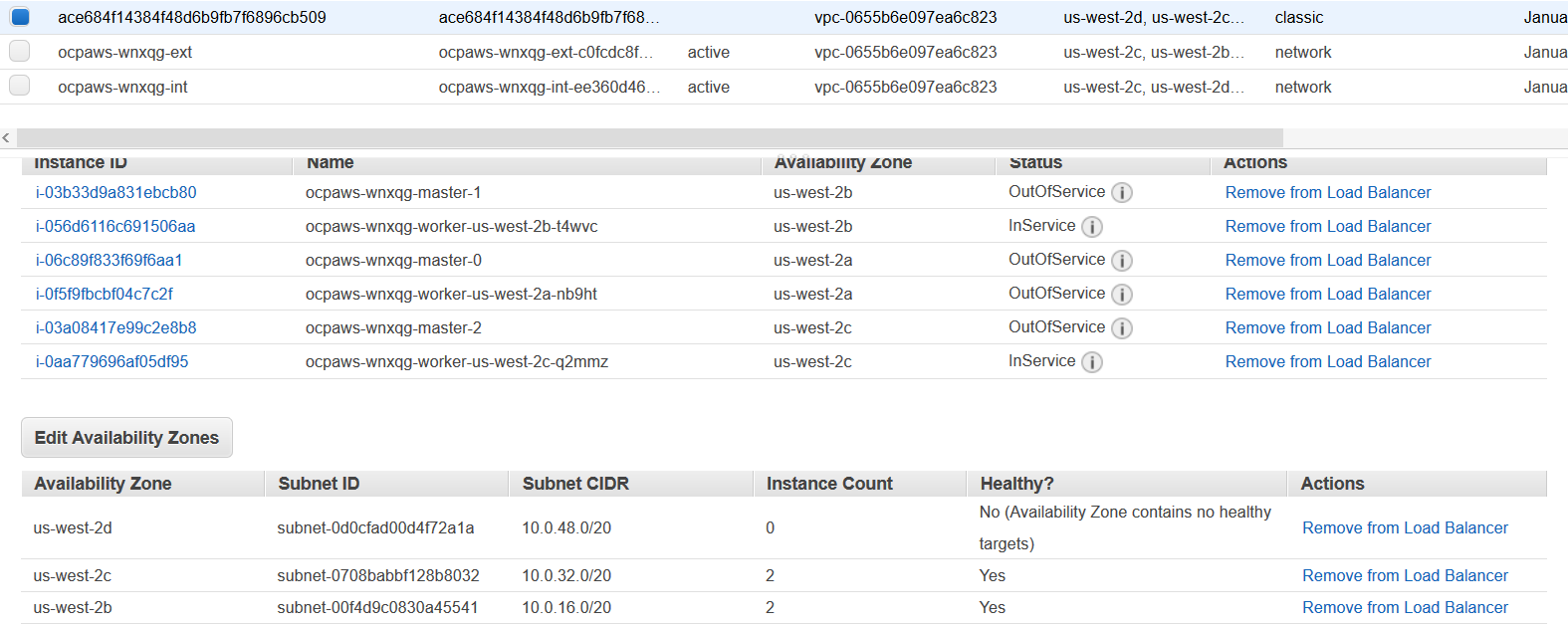
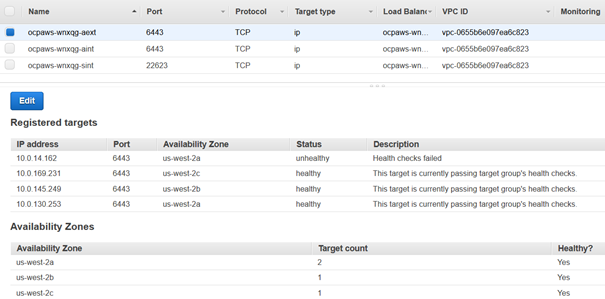
Can you attach a screen shot of the healthcheck status for both the LBs ?
Also I see you are using WSL.. can you try to run on another platform, we have seen some weirdness with it before strangely..
Hello, I have additional question, I have created an 'hosted zone' (openshift.lab.com) in AWS Route53.
The OpenShift installer use this domain an create another one prefixed with cluster name provided during the installation process.
Do I need to register that damain (12$) ?
You don't need to register the <clustername>.openshift.lab.com, the installer creates a private DNS zone for DNS for the VPC.
but you definitely need to register/link openshift.lab.com to the AWS r53 zone.. see https://github.com/openshift/installer/blob/master/docs/user/aws/route53.md
abhinavdahiya
on 31 Jan 2020
Hello,
I reproduced the error after creating registrar
Thanks very much for your help.

here are some screen shot
-> of LB
-> of target groups
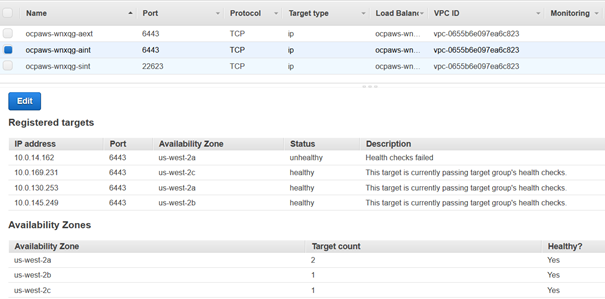
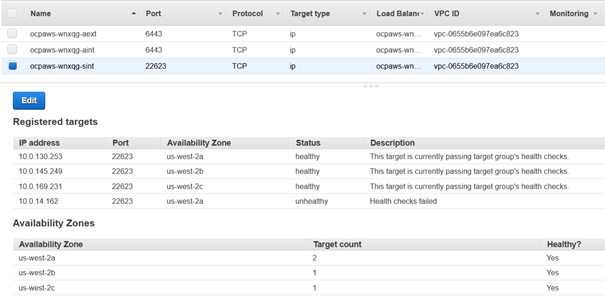 Philippe73
on 31 Jan 2020
Philippe73
on 31 Jan 2020
@sdarwin I have tested with 4.2.14 & 4.2.16 and encountered the same problem.
Thanks
Philippe73
on 3 Feb 2020
@Philippe73, there was another difference in the test cases. When I ran 4.3.0 and it timed out, that was built with hack/build.sh. The successful installation of 4.2.16 was the downloaded installer https://mirror.openshift.com/pub/openshift-v4/clients/ocp/4.2.16/openshift-install-linux-4.2.16.tar.gz
After more testing, it seems that the downloaded installer works and the build doesn't, regardless of version. Could you check?
sdarwin
on 4 Feb 2020
Seeing the same behaviour in GCP with: openshift-install 4.3.8
 amorenoz
on 25 Mar 2020
amorenoz
on 25 Mar 2020
anyone find a resolution?
 RANGERBEE
on 24 Apr 2020
RANGERBEE
on 24 Apr 2020
@RANGERBEE My problem on GCP was due to my project name being too long. Also, with regards to @sdarwin 's comment above, I think using a non-released version (i.e: built from source) requires the use of IMAGE_OVERRIDE
amorenoz
on 24 Apr 2020
Thanks @amorenoz
Would you happen to have a link to a doc that speaks to IMAGE_OVERRIDE?
RANGERBEE
on 24 Apr 2020
got it... thanks..
RANGERBEE
on 24 Apr 2020
As others have said above, I was not able to install correctly to GCP following the installer guide and using a locally built binary. I downloaded a binary of 4.2.18 following the URL syntax in this comment https://github.com/openshift/installer/issues/3015#issuecomment-582003829 and was able to get openshift set up correctly. 4.3.18 had a breaking change for the Syndesis CRD
 kevinmershon
on 28 Apr 2020
kevinmershon
on 28 Apr 2020
I had similar error when I deployed to AWS. But it was due to the public hosted zone, I got this error with the first hosted zone that I chose, after changing to a new one, the issue is resolved and I am able to deploy the cluster successfully.
 shudonglin
on 3 Jul 2020
shudonglin
on 3 Jul 2020
I am facing the same issue in AWS. I tried these regions: us-east-1, us-east-2, us-west-2 with no success. Also tried using using openshift-install-linux-4.5.0-0.okd-2020-10-15-235428.tar.gz, openshift-install-linux-4.5.0-0.okd-2020-10-03-012432.tar.gz, openshift-install-linux-4.2.16.tar.gz but all failed at the same point.
Still waiting for the Kubernetes API: Get https://api.test.okd.testing.fake.com:6443/version?timeout=32s: dial tcp: lookup api.test.okd.testing.fake.com on 10.0.0.2:53: no such host
for me also target group health check is failing.
Does someone has a workaround for this?
 Satyam1210
on 20 Oct 2020
Satyam1210
on 20 Oct 2020
- Latest version still does not work for GCP nor AWS. Issues as everybody complains here.
- Everyone is complaining for 6+ months now - Red Hat, I find it very appalling when your core products simply don't work and are not tested. What a shame.
 marksaitis
on 17 Nov 2020
marksaitis
on 17 Nov 2020
@marksaitis , what I found out from my testing is:
- There are many issues that can appear as the same (when I added a comment in this issue, I was in fact hitting #2243)
- Building the installer from source requires IMAGE_OVERRIDE.
amorenoz
on 17 Nov 2020
@amorenoz I am not interested in building from source. I would 100% expect that a typical install as written in Red Hat's documentation would just work with latest released installer of theirs and latest AWS.
I find it seriously appalling when a big company like Red Hat releases so much documentation and such great software - but then a simple guide just doesn't work. How can such a company grow? 0 chance. Losing trust in those guys already
marksaitis
on 17 Nov 2020
And no, my whole subdomain is nowhere near that long. Furthermore, if you hit that - it's a clear bug. The installer should be responsible to tell us and check such URL for length. Low-quality stuff here seriously. The team who does the installer 0/10
marksaitis
on 17 Nov 2020
I am facing the same issue in AWS. I tried these regions: us-east-1, us-east-2, us-west-2 with no success. Also tried using using openshift-install-linux-4.5.0-0.okd-2020-10-15-235428.tar.gz, openshift-install-linux-4.5.0-0.okd-2020-10-03-012432.tar.gz, openshift-install-linux-4.2.16.tar.gz but all failed at the same point.
Still waiting for the Kubernetes API: Get https://api.test.okd.testing.fake.com:6443/version?timeout=32s: dial tcp: lookup api.test.okd.testing.fake.com on 10.0.0.2:53: no such host
for me also target group health check is failing.
Does someone has a workaround for this?
How are you handling the DNS resolution for the okd.testing.fake.com domain? Do you own that domain?
 staebler
on 17 Nov 2020
staebler
on 17 Nov 2020
@staebler I can pronounce this Red Hat OC installer as dead. Been digging a bit deeper - and it seems it's really buggy. That kubernettes URL and subdomain - this installer does not even set the right IP addresses which are given by elastic IP's. Seriously, broken stuff, would not call this even an ALPHA version when core features don't work.
marksaitis
on 17 Nov 2020
Yeah I had to produce my own scripted fixes with watchdogs... Need to look
at my scripts to see exactly how I fixed them, its been some time..
This e-mail and any attachments are intended only for the use of the
addressee(s) named herein and may contain proprietary information. If you
are not the intended recipient of this e-mail or believe that you received
this email in error, please take immediate action to notify the sender of
the apparent error by reply e-mail and permanently delete the e-mail and
any attachments from your computer. Do not disseminate, distribute, use, or
copy this message and any attachments.
On Tue, Nov 17, 2020 at 11:12 AM marksaitis notifications@github.com
wrote:
@staebler https://github.com/staebler I can pronounce this Red Hat OC
installer as dead. Been digging a bit deeper - and it seems it's really
buggy. That kubernettes URL and subdomain - this installer does not even
set the right IP addresses which are given by elastic IP's. Seriously,
broken stuff, would not call this even an ALPHA version when core features
don't work.—
You are receiving this because you were mentioned.
Reply to this email directly, view it on GitHub
https://github.com/openshift/installer/issues/3015#issuecomment-729072126,
or unsubscribe
https://github.com/notifications/unsubscribe-auth/APIO27EXZCVXHPF4HVP3VCLSQKVIJANCNFSM4KNICUZA
.
RANGERBEE
on 17 Nov 2020
@staebler I can pronounce this Red Hat OC installer as dead. Been digging a bit deeper - and it seems it's really buggy. That kubernettes URL and subdomain - this installer does not even set the right IP addresses which are given by elastic IP's. Seriously, broken stuff, would not call this even an ALPHA version when core features don't work.
Could you please elaborate on what specifically is getting incorrect IP addresses? Which IP addresses are being used and which do you expect to be used? If you include the .openshift_install.log and the log bundle from the failed installation attempt, that would be helpful as well.
staebler
on 17 Nov 2020
@staebler I did nslookup for the api.clustername.domain.com URL (The one installer says is waiting for kubernetes) and it gave me 3ip's. I then went to elastic IP's for my AWS and I had 3 ip's - but none of them were the ones given to me by nslookup. Meaning that clusters API URL had wrong records to start with...
Well let's give it another go. Now I have fresh AWS.
- I have my rsa keys, pull secret, zone hosted in route53 (yes I own domain and I host one of it's zones in route53) and IAM programmatic user with ALL rights.
- Now, I am using latest installer version and doing create config. I select aws, Frankfurt, my base domain and just in case, I just give it a new cluster name. So all is in order here.
- I now run a "./openshift-install create cluster --dir=install_dir --log-level=debug" and watch it.
So I am watching debug messages. Seems like all is going well, access is right, it's creating terraform stuff, then creating nat's instances and other resources. Looks good. I am looking at route53 zone and record creation which is taking over 4 minutes total but all succeeds okay.
4. And, as before, it's now waiting for this damn kubernetes nonsense. And, that URL which is mentioned has IP's which are nothing to do with what IP's I observe in AWS elastic IP page!!! Also I noticed in route53 - it creates a new zone for this new cluster AND it says private.... why private. If I am installing cluster from my mac in local shell? And I'm following a Red Hat guide to simply install a cluster with customisation on AWS.
===Installer end====
maskeduser
DEBUG module.dns.aws_route53_record.api_external_internal_zone_alias[0]: Creation complete after 1m0s [id=Z0731133OGASFEGXRKD2_api.cluster2.aws2.maskeddomain.org_A]
DEBUG module.dns.aws_route53_record.api_internal_alias[0]: Creation complete after 1m0s [id=Z0731133OGASFEGXRKD2_api-int.cluster2.aws2.maskeddomain.org_A]
DEBUG
DEBUG Apply complete! Resources: 122 added, 0 changed, 0 destroyed.
DEBUG OpenShift Installer 4.6.4
DEBUG Built from commit 6e02d049701437fa81521fe981405745a62c86c5
INFO Waiting up to 20m0s for the Kubernetes API at https://api.cluster2.aws2.maskeddomain.org:6443...
INFO API v1.19.0+9f84db3 up
INFO Waiting up to 30m0s for bootstrapping to complete...
===nslookup===
maskednames-MacBook-Pro:aws2.maskeddomain.org-installer maskeduser$ api.cluster2.aws2.maskeddomain.org
maskednames-MacBook-Pro:aws2.maskeddomain.org-installer maskeduser$ nslookup api.cluster2.aws2.maskeddomain.org
Server: 8.8.4.4
Address: 8.8.4.4#53
Non-authoritative answer:
Name: api.cluster2.aws2.maskeddomain.org
Address: 18.198.47.186
Name: api.cluster2.aws2.maskeddomain.org
Address: 18.158.94.126
Name: api.cluster2.aws2.maskeddomain.org
Address: 18.185.29.205
===elastic ip's for the cluster in aws console===
I observed this cluster2 has these ips(THEY DONT EVEN MATCH!):
18.193.194.175
18.194.158.175
18.198.163.85
marksaitis
on 17 Nov 2020
@staebler And, surprisingly a miracle happened in the end! I didn't do nothing. But it seemed to work. I must say, that 4 times I was trying on GCP in same fashion - it failed with this kubernetes stuff. And it took me 2 attempts on AWS. I also noticed that route53 doesn't point URL's to elastic ips but rather to nlb IP's - I assume.
Still, really troublesome install to be honest. The fact that it failed so many times before - somehow strange. Below is the log just in case if you can spot anything still not normal here.
1. And a question - is it not possible to run openshift on just 3 nodes? Each node being controlplane + compute? I think it's possible in openstack? But then whats the issue with openshift?
===LOG===
INFO Waiting up to 20m0s for the Kubernetes API at https://api.cluster2.aws2.maskeduser.org:6443...
INFO API v1.19.0+9f84db3 up
INFO Waiting up to 30m0s for bootstrapping to complete...
DEBUG Bootstrap status: complete
INFO Destroying the bootstrap resources...
DEBUG Symlinking plugin terraform-provider-openstack src: "/Users/maskeduser/Desktop/aws2.maskeduser.org-installer/openshift-install" dst: "/var/folders/6w/0xhqnwrx6n30qy8sxvh2qy3h0000gn/T/openshift-install-434284198/plugins/terraform-provider-openstack"
DEBUG Symlinking plugin terraform-provider-ovirt src: "/Users/maskeduser/Desktop/aws2.maskeduser.org-installer/openshift-install" dst: "/var/folders/6w/0xhqnwrx6n30qy8sxvh2qy3h0000gn/T/openshift-install-434284198/plugins/terraform-provider-ovirt"
DEBUG Symlinking plugin terraform-provider-random src: "/Users/maskeduser/Desktop/aws2.maskeduser.org-installer/openshift-install" dst: "/var/folders/6w/0xhqnwrx6n30qy8sxvh2qy3h0000gn/T/openshift-install-434284198/plugins/terraform-provider-random"
DEBUG Symlinking plugin terraform-provider-vsphere src: "/Users/maskeduser/Desktop/aws2.maskeduser.org-installer/openshift-install" dst: "/var/folders/6w/0xhqnwrx6n30qy8sxvh2qy3h0000gn/T/openshift-install-434284198/plugins/terraform-provider-vsphere"
DEBUG Symlinking plugin terraform-provider-azureprivatedns src: "/Users/maskeduser/Desktop/aws2.maskeduser.org-installer/openshift-install" dst: "/var/folders/6w/0xhqnwrx6n30qy8sxvh2qy3h0000gn/T/openshift-install-434284198/plugins/terraform-provider-azureprivatedns"
DEBUG Symlinking plugin terraform-provider-azurerm src: "/Users/maskeduser/Desktop/aws2.maskeduser.org-installer/openshift-install" dst: "/var/folders/6w/0xhqnwrx6n30qy8sxvh2qy3h0000gn/T/openshift-install-434284198/plugins/terraform-provider-azurerm"
DEBUG Symlinking plugin terraform-provider-google src: "/Users/maskeduser/Desktop/aws2.maskeduser.org-installer/openshift-install" dst: "/var/folders/6w/0xhqnwrx6n30qy8sxvh2qy3h0000gn/T/openshift-install-434284198/plugins/terraform-provider-google"
DEBUG Symlinking plugin terraform-provider-ignition src: "/Users/maskeduser/Desktop/aws2.maskeduser.org-installer/openshift-install" dst: "/var/folders/6w/0xhqnwrx6n30qy8sxvh2qy3h0000gn/T/openshift-install-434284198/plugins/terraform-provider-ignition"
DEBUG Symlinking plugin terraform-provider-local src: "/Users/maskeduser/Desktop/aws2.maskeduser.org-installer/openshift-install" dst: "/var/folders/6w/0xhqnwrx6n30qy8sxvh2qy3h0000gn/T/openshift-install-434284198/plugins/terraform-provider-local"
DEBUG Symlinking plugin terraform-provider-vsphereprivate src: "/Users/maskeduser/Desktop/aws2.maskeduser.org-installer/openshift-install" dst: "/var/folders/6w/0xhqnwrx6n30qy8sxvh2qy3h0000gn/T/openshift-install-434284198/plugins/terraform-provider-vsphereprivate"
DEBUG Symlinking plugin terraform-provider-aws src: "/Users/maskeduser/Desktop/aws2.maskeduser.org-installer/openshift-install" dst: "/var/folders/6w/0xhqnwrx6n30qy8sxvh2qy3h0000gn/T/openshift-install-434284198/plugins/terraform-provider-aws"
DEBUG Initializing modules...
DEBUG - bootstrap in ../../../../private/var/folders/6w/0xhqnwrx6n30qy8sxvh2qy3h0000gn/T/openshift-install-434284198/bootstrap
DEBUG - dns in ../../../../private/var/folders/6w/0xhqnwrx6n30qy8sxvh2qy3h0000gn/T/openshift-install-434284198/route53
DEBUG - iam in ../../../../private/var/folders/6w/0xhqnwrx6n30qy8sxvh2qy3h0000gn/T/openshift-install-434284198/iam
DEBUG - masters in ../../../../private/var/folders/6w/0xhqnwrx6n30qy8sxvh2qy3h0000gn/T/openshift-install-434284198/master
DEBUG - vpc in ../../../../private/var/folders/6w/0xhqnwrx6n30qy8sxvh2qy3h0000gn/T/openshift-install-434284198/vpc
DEBUG
DEBUG Initializing the backend...
DEBUG
DEBUG Initializing provider plugins...
DEBUG
DEBUG Terraform has been successfully initialized!
DEBUG
DEBUG You may now begin working with Terraform. Try running "terraform plan" to see
DEBUG any changes that are required for your infrastructure. All Terraform commands
DEBUG should now work.
DEBUG
DEBUG If you ever set or change modules or backend configuration for Terraform,
DEBUG rerun this command to reinitialize your working directory. If you forget, other
DEBUG commands will detect it and remind you to do so if necessary.
DEBUG module.bootstrap.data.aws_ebs_default_kms_key.current: Refreshing state...
DEBUG module.bootstrap.data.aws_partition.current: Refreshing state...
DEBUG module.vpc.aws_vpc.new_vpc[0]: Refreshing state... [id=vpc-04d59bd9f1cea03c8]
DEBUG module.bootstrap.aws_iam_role.bootstrap: Refreshing state... [id=cluster2-6wwdv-bootstrap-role]
DEBUG module.bootstrap.aws_s3_bucket.ignition: Refreshing state... [id=cluster2-6wwdv-bootstrap]
DEBUG module.bootstrap.aws_iam_role_policy.bootstrap: Refreshing state... [id=cluster2-6wwdv-bootstrap-role:cluster2-6wwdv-bootstrap-policy]
DEBUG module.bootstrap.aws_iam_instance_profile.bootstrap: Refreshing state... [id=cluster2-6wwdv-bootstrap-profile]
DEBUG module.vpc.data.aws_vpc.cluster_vpc: Refreshing state...
DEBUG module.bootstrap.aws_s3_bucket_object.ignition: Refreshing state... [id=bootstrap.ign]
DEBUG module.vpc.aws_lb_target_group.api_internal: Refreshing state... [id=arn:aws:elasticloadbalancing:eu-central-1:877258136400:targetgroup/cluster2-6wwdv-aint/422dad2f319e6488]
DEBUG module.vpc.aws_security_group.master: Refreshing state... [id=sg-0e6f4228e22684e4b]
DEBUG module.vpc.aws_lb_target_group.api_external[0]: Refreshing state... [id=arn:aws:elasticloadbalancing:eu-central-1:877258136400:targetgroup/cluster2-6wwdv-aext/1b8ef7dc8ee6196a]
DEBUG module.vpc.aws_lb_target_group.services: Refreshing state... [id=arn:aws:elasticloadbalancing:eu-central-1:877258136400:targetgroup/cluster2-6wwdv-sint/135dd2761c403d7f]
DEBUG module.vpc.aws_subnet.private_subnet[0]: Refreshing state... [id=subnet-03c7af9be5d05d125]
DEBUG module.vpc.aws_subnet.public_subnet[0]: Refreshing state... [id=subnet-0b2ab2bd52487eb52]
DEBUG module.vpc.aws_subnet.public_subnet[2]: Refreshing state... [id=subnet-0b6f2c644741113df]
DEBUG module.vpc.aws_subnet.private_subnet[1]: Refreshing state... [id=subnet-0baa8c41bce57f870]
DEBUG module.vpc.aws_subnet.public_subnet[1]: Refreshing state... [id=subnet-0670cd0e57d5495c9]
DEBUG module.bootstrap.aws_security_group.bootstrap: Refreshing state... [id=sg-0d140475c6b75ffe1]
DEBUG module.vpc.aws_subnet.private_subnet[2]: Refreshing state... [id=subnet-035bde92ca43f9c78]
DEBUG module.bootstrap.aws_security_group_rule.bootstrap_journald_gateway: Refreshing state... [id=sgrule-3561536709]
DEBUG module.bootstrap.aws_security_group_rule.ssh: Refreshing state... [id=sgrule-1321321266]
DEBUG module.vpc.data.aws_subnet.public[2]: Refreshing state...
DEBUG module.vpc.data.aws_subnet.public[0]: Refreshing state...
DEBUG module.vpc.data.aws_subnet.public[1]: Refreshing state...
DEBUG module.vpc.data.aws_subnet.private[2]: Refreshing state...
DEBUG module.vpc.data.aws_subnet.private[1]: Refreshing state...
DEBUG module.vpc.data.aws_subnet.private[0]: Refreshing state...
DEBUG module.bootstrap.aws_instance.bootstrap: Refreshing state... [id=i-03b4c9e1c10fa1d78]
DEBUG module.bootstrap.aws_lb_target_group_attachment.bootstrap[1]: Refreshing state... [id=arn:aws:elasticloadbalancing:eu-central-1:877258136400:targetgroup/cluster2-6wwdv-sint/135dd2761c403d7f-20201117173700248900000004]
DEBUG module.bootstrap.aws_lb_target_group_attachment.bootstrap[0]: Refreshing state... [id=arn:aws:elasticloadbalancing:eu-central-1:877258136400:targetgroup/cluster2-6wwdv-aint/422dad2f319e6488-20201117173700267100000006]
DEBUG module.bootstrap.aws_lb_target_group_attachment.bootstrap[2]: Refreshing state... [id=arn:aws:elasticloadbalancing:eu-central-1:877258136400:targetgroup/cluster2-6wwdv-aext/1b8ef7dc8ee6196a-20201117173700255100000005]
DEBUG module.bootstrap.aws_lb_target_group_attachment.bootstrap[0]: Destroying... [id=arn:aws:elasticloadbalancing:eu-central-1:877258136400:targetgroup/cluster2-6wwdv-aint/422dad2f319e6488-20201117173700267100000006]
DEBUG module.bootstrap.aws_lb_target_group_attachment.bootstrap[1]: Destroying... [id=arn:aws:elasticloadbalancing:eu-central-1:877258136400:targetgroup/cluster2-6wwdv-sint/135dd2761c403d7f-20201117173700248900000004]
DEBUG module.bootstrap.aws_iam_role_policy.bootstrap: Destroying... [id=cluster2-6wwdv-bootstrap-role:cluster2-6wwdv-bootstrap-policy]
DEBUG module.bootstrap.aws_lb_target_group_attachment.bootstrap[2]: Destroying... [id=arn:aws:elasticloadbalancing:eu-central-1:877258136400:targetgroup/cluster2-6wwdv-aext/1b8ef7dc8ee6196a-20201117173700255100000005]
DEBUG module.bootstrap.aws_security_group_rule.ssh: Destroying... [id=sgrule-1321321266]
DEBUG module.bootstrap.aws_security_group_rule.bootstrap_journald_gateway: Destroying... [id=sgrule-3561536709]
DEBUG module.bootstrap.aws_s3_bucket_object.ignition: Destroying... [id=bootstrap.ign]
DEBUG module.bootstrap.aws_lb_target_group_attachment.bootstrap[0]: Destruction complete after 0s
DEBUG module.bootstrap.aws_lb_target_group_attachment.bootstrap[2]: Destruction complete after 0s
DEBUG module.bootstrap.aws_s3_bucket_object.ignition: Destruction complete after 0s
DEBUG module.bootstrap.aws_lb_target_group_attachment.bootstrap[1]: Destruction complete after 0s
DEBUG module.bootstrap.aws_instance.bootstrap: Destroying... [id=i-03b4c9e1c10fa1d78]
DEBUG module.bootstrap.aws_s3_bucket.ignition: Destroying... [id=cluster2-6wwdv-bootstrap]
DEBUG module.bootstrap.aws_security_group_rule.ssh: Destruction complete after 0s
DEBUG module.bootstrap.aws_iam_role_policy.bootstrap: Destruction complete after 1s
DEBUG module.bootstrap.aws_s3_bucket.ignition: Destruction complete after 1s
DEBUG module.bootstrap.aws_security_group_rule.bootstrap_journald_gateway: Destruction complete after 1s
DEBUG module.bootstrap.aws_instance.bootstrap: Still destroying... [id=i-03b4c9e1c10fa1d78, 10s elapsed]
DEBUG module.bootstrap.aws_instance.bootstrap: Still destroying... [id=i-03b4c9e1c10fa1d78, 20s elapsed]
DEBUG module.bootstrap.aws_instance.bootstrap: Still destroying... [id=i-03b4c9e1c10fa1d78, 30s elapsed]
DEBUG module.bootstrap.aws_instance.bootstrap: Still destroying... [id=i-03b4c9e1c10fa1d78, 40s elapsed]
DEBUG module.bootstrap.aws_instance.bootstrap: Still destroying... [id=i-03b4c9e1c10fa1d78, 50s elapsed]
DEBUG module.bootstrap.aws_instance.bootstrap: Still destroying... [id=i-03b4c9e1c10fa1d78, 1m0s elapsed]
DEBUG module.bootstrap.aws_instance.bootstrap: Still destroying... [id=i-03b4c9e1c10fa1d78, 1m10s elapsed]
DEBUG module.bootstrap.aws_instance.bootstrap: Still destroying... [id=i-03b4c9e1c10fa1d78, 1m20s elapsed]
DEBUG module.bootstrap.aws_instance.bootstrap: Destruction complete after 1m21s
DEBUG module.bootstrap.aws_iam_instance_profile.bootstrap: Destroying... [id=cluster2-6wwdv-bootstrap-profile]
DEBUG module.bootstrap.aws_security_group.bootstrap: Destroying... [id=sg-0d140475c6b75ffe1]
DEBUG module.bootstrap.aws_security_group.bootstrap: Destruction complete after 1s
DEBUG module.bootstrap.aws_iam_instance_profile.bootstrap: Destruction complete after 1s
DEBUG module.bootstrap.aws_iam_role.bootstrap: Destroying... [id=cluster2-6wwdv-bootstrap-role]
DEBUG module.bootstrap.aws_iam_role.bootstrap: Destruction complete after 1s
DEBUG
DEBUG Warning: Resource targeting is in effect
DEBUG
DEBUG You are creating a plan with the -target option, which means that the result
DEBUG of this plan may not represent all of the changes requested by the current
DEBUG configuration.
DEBUG
DEBUG The -target option is not for routine use, and is provided only for
DEBUG exceptional situations such as recovering from errors or mistakes, or when
DEBUG Terraform specifically suggests to use it as part of an error message.
DEBUG
DEBUG
DEBUG Warning: Applied changes may be incomplete
DEBUG
DEBUG The plan was created with the -target option in effect, so some changes
DEBUG requested in the configuration may have been ignored and the output values may
DEBUG not be fully updated. Run the following command to verify that no other
DEBUG changes are pending:
DEBUG terraform plan
DEBUG
DEBUG Note that the -target option is not suitable for routine use, and is provided
DEBUG only for exceptional situations such as recovering from errors or mistakes, or
DEBUG when Terraform specifically suggests to use it as part of an error message.
DEBUG
DEBUG
DEBUG Destroy complete! Resources: 12 destroyed.
DEBUG Loading Install Config...
DEBUG Loading SSH Key...
DEBUG Using SSH Key loaded from state file
DEBUG Loading Base Domain...
DEBUG Loading Platform...
DEBUG Using Platform loaded from state file
DEBUG Using Base Domain loaded from state file
DEBUG Loading Cluster Name...
DEBUG Loading Base Domain...
DEBUG Loading Platform...
DEBUG Using Cluster Name loaded from state file
DEBUG Loading Pull Secret...
DEBUG Using Pull Secret loaded from state file
DEBUG Loading Platform...
DEBUG Using Install Config loaded from state file
INFO Waiting up to 40m0s for the cluster at https://api.cluster2.aws2.maskeduser.org:6443 to initialize...
DEBUG Still waiting for the cluster to initialize: Working towards 4.6.4: 98% complete
DEBUG Still waiting for the cluster to initialize: Working towards 4.6.4: 99% complete, waiting on authentication, console, image-registry, ingress, kube-storage-version-migrator, monitoring
DEBUG Still waiting for the cluster to initialize: Working towards 4.6.4: 99% complete
DEBUG Still waiting for the cluster to initialize: Multiple errors are preventing progress:
- Cluster operator authentication is reporting a failure: WellKnownReadyControllerDegraded: kube-apiserver oauth endpoint https://10.0.129.171:6443/.well-known/oauth-authorization-server is not yet served and authentication operator keeps waiting (check kube-apiserver operator, and check that instances roll out successfully, which can take several minutes per instance)
- Cluster operator console is reporting a failure: RouteHealthDegraded: route not yet available, https://console-openshift-console.apps.cluster2.aws2.maskeduser.org/health returns '503 Service Unavailable'
DEBUG Still waiting for the cluster to initialize: Working towards 4.6.4: 100% complete
DEBUG Still waiting for the cluster to initialize: Cluster operator authentication is reporting a failure: WellKnownReadyControllerDegraded: kube-apiserver oauth endpoint https://10.0.129.171:6443/.well-known/oauth-authorization-server is not yet served and authentication operator keeps waiting (check kube-apiserver operator, and check that instances roll out successfully, which can take several minutes per instance)
DEBUG Still waiting for the cluster to initialize: Cluster operator authentication is reporting a failure: WellKnownReadyControllerDegraded: kube-apiserver oauth endpoint https://10.0.129.171:6443/.well-known/oauth-authorization-server is not yet served and authentication operator keeps waiting (check kube-apiserver operator, and check that instances roll out successfully, which can take several minutes per instance)
DEBUG Still waiting for the cluster to initialize: Cluster operator authentication is reporting a failure: WellKnownReadyControllerDegraded: need at least 3 kube-apiservers, got 2
DEBUG Cluster is initialized
INFO Waiting up to 10m0s for the openshift-console route to be created...
DEBUG Route found in openshift-console namespace: console
DEBUG Route found in openshift-console namespace: downloads
DEBUG OpenShift console route is created
INFO Install complete!
INFO To access the cluster as the system:admin user when using 'oc', run 'export KUBECONFIG=/Users/maskeduser/Desktop/aws2.maskeduser.org-installer/install_dir/auth/kubeconfig'
INFO Access the OpenShift web-console here: https://console-openshift-console.apps.cluster2.aws2.maskeduser.org
INFO Login to the console with user: "kubeadmin", and password: "masked"
DEBUG Time elapsed per stage:
DEBUG Infrastructure: 5m55s
DEBUG Bootstrap Complete: 9m40s
DEBUG Bootstrap Destroy: 1m35s
DEBUG Cluster Operators: 16m26s
INFO Time elapsed: 33m48s
marksaitis
on 17 Nov 2020
- And a question - is it not possible to run openshift on just 3 nodes? Each node being controlplane + compute? I think it's possible in openstack? But then whats the issue with openshift?
You can add a MachineConfig to make the masters schedulable, which they are not by default. See https://docs.openshift.com/container-platform/4.6/nodes/nodes/nodes-nodes-working.html#nodes-nodes-working-master-schedulable_nodes-nodes-working
staebler
on 17 Nov 2020
@staebler thanks. Im exploring the cluster now.
- Is there no GUI to at least easily configure a VM guest there?
- MachineConfig, I just explored this feature and understand what you are saying. Imagine I have 3 bare metal nodes + spare laptop for bootstraping, am I still able to achieve this? During the setup, do I just say I want 2 master and 1 computer, and later on I convert these 2 masters to master + computer nodes using MachineConfig?
marksaitis
on 17 Nov 2020
@staebler thanks. Im exploring the cluster now.
1. Is there no GUI to at least easily configure a VM guest there?
https://console-openshift-console.apps.cluster2.aws2.maskeduser.org
2. MachineConfig, I just explored this feature and understand what you are saying. Imagine I have 3 bare metal nodes + spare laptop for bootstraping, am I still able to achieve this? During the setup, do I just say I want 2 master and 1 computer, and later on I convert these 2 masters to master + computer nodes using MachineConfig?
There must always be 3 control plane (master) machines. Those machines are special and are not easily replaced.
You can add and remove compute machines easily via MachineSet resources. See https://docs.openshift.com/container-platform/4.6/machine_management/manually-scaling-machineset.html
staebler
on 17 Nov 2020
@staebler I now did my initial software analysis and destroyed the cluster - for the time being. Is there GUI to make VM? For master nodes - ok so if I specify to make 3 master's and 0 compute at the beginning, will that work? So then I can machineconfig and convert the masters to master+compute? I simply need to know if I can have a bare metal openshift with 3 very powerful machines which I have with me.
marksaitis
on 17 Nov 2020
@staebler I now did my initial software analysis and destroyed the cluster - for the time being. Is there GUI to make VM? For master nodes - ok so if I specify to make 3 master's and 0 compute at the beginning, will that work? So then I can machineconfig and convert the masters to master+compute? I simply need to know if I can have a bare metal openshift with 3 very powerful machines which I have with me.
Yes, that will work. You will need to do one of the following.
(1) Add the MachineConfig to make the masters schedulable as an additional manifest added by the installer. See https://docs.openshift.com/container-platform/4.6/installing/install_config/installing-customizing.html#installation-special-config-kargs_installing-customizing as an example of adding a manifest.
(2) Add the MachineConfig while the installation is underway, once the kube API is accessible. This may fail for a little while until the MachineConfig CRD has been installed.
staebler
on 17 Nov 2020
@staebler 1. I like the 1st option. But, it only speaks about adding kargs or kernel modules. That's not what I need. I need to add a config which makes master nodes to also be compute nodes. So I understand there is some specific machineconfig for me to use? If so, is there an example?
- Installer makes a cluster config file where it is by default specified to have 3 masters and 3 compute nodes. In such case, do I change it to 0 for compute nodes?
marksaitis
on 18 Nov 2020
@staebler 1. I like the 1st option. But, it only speaks about adding kargs or kernel modules. That's not what I need. I need to add a config which makes master nodes to also be compute nodes. So I understand there is some specific machineconfig for me to use? If so, is there an example?
Yes, see https://github.com/openshift/installer/issues/3015#issuecomment-729130444
- Installer makes a cluster config file where it is by default specified to have 3 masters and 3 compute nodes. In such case, do I change it to 0 for compute nodes?
Explicitly set the replicas for the "worker" computer machinepool to 0 in the install config.
staebler
on 18 Nov 2020
@staebler 1. Thanks 2. Worker replicas? I don't understand. In the cluster config there are 2 fields: master: 3 and compute 3 . So should Ichange it to master: 3, compute: 0 ?
marksaitis
on 18 Nov 2020
@staebler 1. Thanks 2. Worker replicas? I don't understand. In the cluster config there are 2 fields: master: 3 and compute 3 . So should Ichange it to master: 3, compute: 0 ?
- Run
openshift-install create install-config. - In the install-config.yaml file created, set
compute[0].replicasto 0. - Run
openshift-install create cluster.
The installer will actually create the MachineConfig manifest for you that will make the master machines schedulable when the number of compute replicas is 0. So you do not need to worry about that part. You can see this yourself in you run openshift-install create manifests before step 3. There will be a manifests/cluster-scheduler-02-config.yml file with the MachineConfig. You will also see a warning about making the control plane schedulable.
staebler
on 18 Nov 2020
@staebler oh that is just fantastic news! Because so far, from all the openshift docs I read, it did say 4 is minimum... and I thought it can't be true. GREAT! One other weird thing I noticed, was when I deployed this cluster, I went down the left menu lines to find virtual machines - and I so 0 GUI for creating one. Only allowed me to input a script. Is there something extra to install for such GUI to be available? I wan't to use openshift primarily for VM's, and secondary for containers. 2nd thing - where is fail ration configurable? I suppose if I'm on 3 nodes, 1 node fail can be tolerated? So it's 33% right... What if I'm on 10 nodes and want to tolerate more than 33% node failure? Your knowledge of openshift is amazing.
marksaitis
on 19 Nov 2020
@staebler oh that is just fantastic news! Because so far, from all the openshift docs I read, it did say 4 is minimum... and I thought it can't be true. GREAT! One other weird thing I noticed, was when I deployed this cluster, I went down the left menu lines to find virtual machines - and I so 0 GUI for creating one. Only allowed me to input a script. Is there something extra to install for such GUI to be available? I wan't to use openshift primarily for VM's, and secondary for containers. 2nd thing - where is fail ration configurable? I suppose if I'm on 3 nodes, 1 node fail can be tolerated? So it's 33% right... What if I'm on 10 nodes and want to tolerate more than 33% node failure? Your knowledge of openshift is amazing.
You can scale existing MachineSets easily using the GUI. From the menu on the left, navigate to Compute->MachineSets, select a MachineSet, and change the "Desired count".
To create a new Machine or MachineSet, you would need to provide the YAML.
The cluster will always use 3 nodes for the control plane. There is no way to scale this up or down. As you stated, the control plane can tolerate one node being down. What your workloads running can tolerate is dependent upon your workloads.
staebler
on 19 Nov 2020
@staebler thanks. Yeah but behind the scenes there is glusterfs storage right. So, how do we control what failure rate it tolerates within openshift GUI?
marksaitis
on 19 Nov 2020
@staebler So ok I created a cluster again, then I installed an operator for virtualization. Then I created an instance and specified "bare metal ON". (tried off too). And if I create a VM by using wizard - it fails in events. An error in the pod - just complains regarding kvm device. 0/4 nodes are available: 4 Insufficient devices.kubevirt.io/kvm. So I can't even launch a VM... and I'm lost here
marksaitis
on 20 Nov 2020
@staebler So ok I created a cluster again, then I installed an operator for virtualization. Then I created an instance and specified "bare metal ON". (tried off too). And if I create a VM by using wizard - it fails in events. An error in the pod - just complains regarding kvm device. 0/4 nodes are available: 4 Insufficient devices.kubevirt.io/kvm. So I can't even launch a VM... and I'm lost here
I do not know anything about kubevirt. And this is not the forum for debugging issues with kubevirt.
staebler
on 20 Nov 2020
@staebler where should I post it then? I don't mind which actual component is to blame here. The fact is, that default install of OpenShift on AWS does not allow to run a VM and that is the error.
marksaitis
on 20 Nov 2020
@staebler where should I post it then? I don't mind which actual component is to blame here. The fact is, that default install of OpenShift on AWS does not allow to run a VM and that is the error.
OpenShift only officially supports virtualization on bare metal cluster. See https://docs.openshift.com/container-platform/4.6/virt/install/preparing-cluster-for-virt.html. As such, I don't know that you are going to find a good forum for helping you out with kubevirt problems encountered when running OpenShift on AWS. You could try the kubevirt community at https://kubevirt.io/community/.
With that said, here is a blog post with steps for testing out virtualization on AWS. https://developers.redhat.com/blog/2020/08/28/enable-openshift-virtualization-on-red-hat-openshift/
staebler
on 20 Nov 2020
@staebler much appreciated that is plenty of help, all is now clear. Thanks for your time and support!
marksaitis
on 20 Nov 2020
Related issues
 wking
·
3Comments
wking
·
3Comments
 jamesregis
·
4Comments
jamesregis
·
4Comments
 AndyFol
·
4Comments
AndyFol
·
4Comments
 deanpeterson
·
3Comments
deanpeterson
·
3Comments
 kikisdeliveryservice
·
11Comments
kikisdeliveryservice
·
11Comments
Most helpful comment
@Philippe73, there was another difference in the test cases. When I ran 4.3.0 and it timed out, that was built with hack/build.sh. The successful installation of 4.2.16 was the downloaded installer https://mirror.openshift.com/pub/openshift-v4/clients/ocp/4.2.16/openshift-install-linux-4.2.16.tar.gz
After more testing, it seems that the downloaded installer works and the build doesn't, regardless of version. Could you check?