Installer: Openshift-install process eat up memory
Version
$ openshift-install version
bin/openshift-install v0.3.0-135-g59ebab06d8b470d7b106e818748f967a071bd954-dirty
Terraform v0.11.8

Your version of Terraform is out of date! The latest version
is 0.11.10. You can update by downloading from www.terraform.io/downloads.html
Platform (aws|libvirt|openshift):
libvirt
What happened?
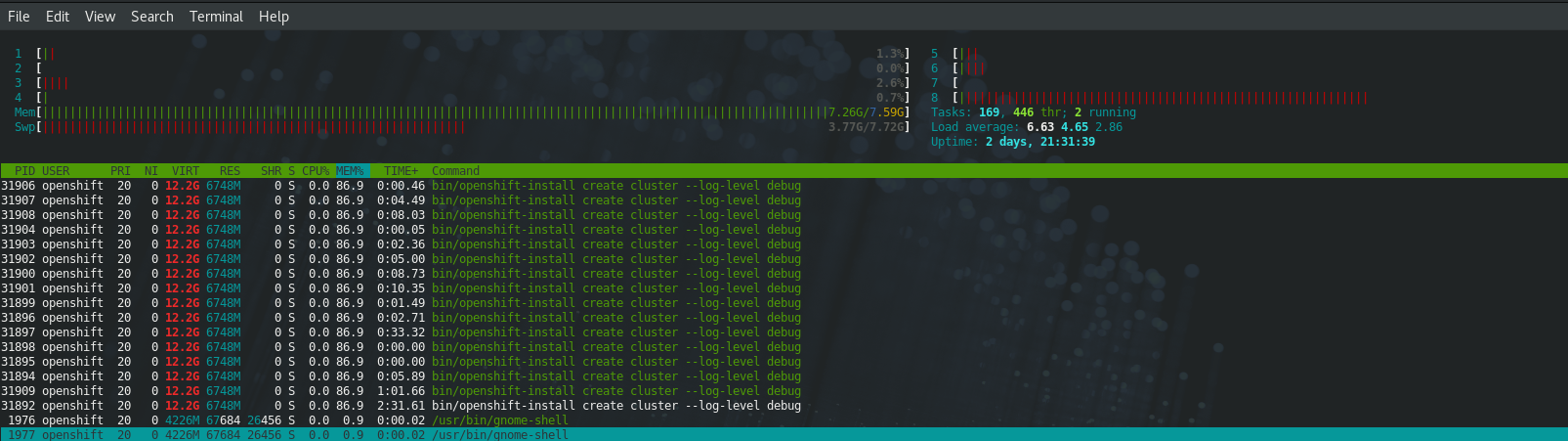
What you expected to happen?
Should not eat up all memory
How to reproduce it (as minimally and precisely as possible)?
1. git clone https://github.com/openshift/installer
2. cd installer
3. dep ensure -update -v
4. TAGS=libvirt_destroy hack/build.sh
5. bin/openshift-install create cluster --log-level debug | tee installer.log
Anything else we need to know?
The memory usage is increasing at
INFO Fetching OS image...
DEBUG Unpacking OS image into "/home/openshift/.cache/openshift-install/libvirt/image/xxxxxx
References
 wjiangjay
All 25 comments
Yeah, I am having this issue too. The openshift-install process is uses about 7.3GB of RAM to run (~47% of my total system RAM). This does not include the additional 5GB of RAM needed by the 2 VMs that are created. 12.3GB of RAM usage to bring everything up seems quite excessive and slows down my computer a ton during the bootstrap.
 AlexNPavel
on 6 Nov 2018
AlexNPavel
on 6 Nov 2018
The memory usage is increasing at
INFO Fetching OS image...
DEBUG Unpacking OS image into "/home/openshift/.cache/openshift-install/libvirt/image/xxxxxx
The installer downloads and unpacks RHCOS OS image. The image is quite large around 1.5 Gigs and so downloading and unpacking is going to be a little intensive.
Try downloading a local copy from https://rhcos-release-browser-coreos.int.open.paas.redhat.com/ and then use the OPENSHIFT_INSTALL_LIBVIRT_IMAGE see here for details so that installer uses the local copy of RHCOS.
 abhinavdahiya
on 6 Nov 2018
abhinavdahiya
on 6 Nov 2018
The installer downloads and unpacks RHCOS OS image. The image is quite large around 1.5 Gigs and so downloading and unpacking is going to be a little intensive.
We should be able to stream this (and if you'd asked me earlier, I'd have said we were). I'll see if I can figure out who's holding this in memory.
 wking
on 7 Nov 2018
wking
on 7 Nov 2018
@wking
I found the we do io.copy for the resp.body in cacheImage, so this is really spent a lot of memory
https://github.com/openshift/installer/blob/master/pkg/tfvars/libvirt/cache.go#L78
And from the openshift-install log, we can see no "Using cached OS image xxx"
two issues here.
- why cached image not take effect, if this is resolved, issue 2 can down the priority
- cacheImage need refactor with stream
wjiangjay
on 7 Nov 2018
I found the we do io.copy...
io.Copy wraps WriteTo. I havent drilled all the way down yet, but I expect that supports streaming copies.
why cached image not take effect...
Doesn't it? You set the same http(s) image URI twice and don't get the cached image on the second round? Which URI did you use?
wking
on 7 Nov 2018
@wking
A idea hit me that I use create cluster each time instead of create install-config and then create cluster, so cached image not work for me, HDYT?
wjiangjay
on 7 Nov 2018
A idea hit me that I use
create clustereach time instead ofcreate install-config...
Shouldn't matter. Cache consumption just depends on:
wking
on 7 Nov 2018
@wking
you mean:
curl -L -I https://releases-rhcos.svc.ci.openshift.org/storage/releases/maipo/47.77/redhat-coreos-maipo-47.77-qemu.qcow2
HTTP/1.1 302 Moved Temporarily
Server: nginx/1.12.1
Date: Wed, 07 Nov 2018 08:11:09 GMT
Content-Type: text/html
Content-Length: 161
Location: https://d26v6vn1y7q7fv.cloudfront.net/releases/maipo/47.77/redhat-coreos-maipo-47.77-qemu.qcow2
Set-Cookie: e30e43ed48b2b5d834c349a0e8ec5ab1=0cf647d7fd1ca3a9fd0e2d7afad3365f; path=/; HttpOnly; Secure
HTTP/2 200
content-type: binary/octet-stream
content-length: 726978099
date: Wed, 07 Nov 2018 08:11:12 GMT
last-modified: Wed, 07 Nov 2018 04:55:46 GMT
etag: "ad672eb5559048062b9e49f7f69cfa17-87"
content-encoding: gzip
accept-ranges: bytes
server: AmazonS3
x-cache: Miss from cloudfront
via: 1.1 c522b74052edf1d6b24778a69d3f566e.cloudfront.net (CloudFront)
x-amz-cf-id: UJ-WiTaIiHRwjrR3dJwW1-RfKOHjMQUExbzCQzVlqXBinv5xKhoQsg==
Currently will be updated per day?
wjiangjay
on 7 Nov 2018
Currently will be updated per day?
Well, redhat-coreos-maipo-47.77-qemu.qcow2 should be stable, but the default for libvirt floats with upstrean RHCOS builds, and there may be several of those per day.
wking
on 7 Nov 2018
@wking then make sense for me why cached image not work
wjiangjay
on 7 Nov 2018
@wking I make a quick fix for this, please take a look
wjiangjay
on 7 Nov 2018
@squeed oh, looks like I misunderstand this issue.
wjiangjay
on 7 Nov 2018
@wjiangjay ignore my (now deleted) comment - it looks like there's more than memory hog here.
 squeed
on 7 Nov 2018
squeed
on 7 Nov 2018
@squeed yeah, it's wired that if I have no cached image, it still eat up my memory in unpacking os image step with your branch, at least the log point to this.
If cached image existed, your branch work really well.
So should be more complex here than I think.
wjiangjay
on 7 Nov 2018
gregjones/httpcache#85.
I'll work up a patch for the caching library.
wking
on 7 Nov 2018
@wking this is what I am looking for, thanks
wjiangjay
on 8 Nov 2018
Fix in gregjones/httpcache#93. We may have to fork while that and its prereqs trickle in upstream.
wking
on 9 Nov 2018
@wking great job!
wjiangjay
on 9 Nov 2018
Just report it here that, with https://github.com/openshift/installer/pull/645
openshift-install process memory usage will not increase any more for the INFO Fetching OS image... step.
And on my testing env, it will take stable 0.6% for 8G memory without cached image.
And with cached image, etag work very well.
wjiangjay
on 9 Nov 2018
This is still an issue - and now that environment variables are deprecated, working around this is a pain.
squeed
on 13 Dec 2018
In the meantime I'm running a cluster by changing this in the config:
    defaultMachinePlatform:
-      image: https://releases-rhcos.svc.ci.openshift.org/storage/releases/maipo/47.198/redhat-coreos-maipo-47.198-qemu.qcow2.gz
+      image: file:///home/user/.openshift/redhat-coreos-maipo-47.198-qemu.qcow2
Don't forget to extract the image from the archive.
The location of the image on disk shouldn't matter.
 metalmatze
on 14 Dec 2018
metalmatze
on 14 Dec 2018
This is still very much an issue even on hosts that I do not actually run out of memory on, at peak I still have 8GB free and I still hit OOM trying to download the image. The installer takes approximately 4GB at that point.
 sjug
on 24 Jan 2019
sjug
on 24 Jan 2019
@wking - Installer (c957fa46636b78189b5dbac076b7371f53fe8831 ) still consumes up to 10GB RAM. I don't think the bug is fixed. I wonder how it affects my installation - as the VMs are going to swap, everything is obviously slow.
 mykaul
on 21 Feb 2019
mykaul
on 21 Feb 2019
Since the switch to rhcos-410.8.20190412.1, I’m seeing openshift-install create cluster grow to over 19GiB RSS (and then the OOM killer steps in). As a result, I can no longer deploy clusters unless I download and extract the image manually.
 skitt
on 25 Apr 2019
skitt
on 25 Apr 2019
645 fixes this, reducing the memory requirements for downloading and unpacking the libvirt image to less than 150 MiB.
skitt
on 25 Apr 2019
Related issues
 alexouzounis
·
12Comments
alexouzounis
·
12Comments
 tvieira
·
11Comments
tvieira
·
11Comments
 jave
·
11Comments
jave
·
11Comments
 raesene
·
12Comments
raesene
·
12Comments
 DanyC97
·
3Comments
DanyC97
·
3Comments
Most helpful comment
In the meantime I'm running a cluster by changing this in the config:
Don't forget to extract the image from the archive.
The location of the image on disk shouldn't matter.