Instagram-private-api: My session function doesn't seem to work, what's the wrong?
General Question
Read the Notes and fill out the form.
Switch to Preview for reading.
Notes
Your issue will be closed if you violate any rule below.
- You need to include a meaningful descriptions and e.g. a screenshot.
- You do not include screenshots of your code.
- Read the Docs.
- Capturing endpoints and similar can be found here
(read it if you are going to ask about it). - You can delete this section after reading it.
Form
Put an [x] if you meet the condition, else leave [ ].
- [x] I've searched the Issues
- [x] I've read the basic concepts
- [x] I'm using the latest version
Question
A specific question, so it's understandable to anyone.
You may add pictures.
YOUR QUESTION HERE
I was working on this function, it's bassed on the given example in docs:
require("dotenv").config();
const fs = require('fs');
const { IgApiClient } = require("instagram-private-api");
const ig = new IgApiClient();
const username = process.env.IG_USERNAME;
const password = process.env.IG_PASSWORD;
ig.state.generateDevice(username);

const dataCheck = function (callback) {
  fs.readFile('login_data.json', function (err, data) {
    console.log(data);
    if (data.length > 0) {
      callback(true);
    } else {
      callback(false);
    }
  });
}

const dataLoad = function (callback) {
  fs.readFile('login_data.json', function (err, data) {
      console.log("Read JSON file: " + data);
      data = JSON.parse(JSON.stringify(data));
      console.log("Object: " + data);
      callback(data);
  });
}

function dataSave(data){
  console.log("saving...");
  fs.writeFile("login_data.json", JSON.stringify(data),    function(err) {
    if(err) {
      console.log(err);
    }
    console.log("The file was saved!");
  });
}

igLogin();

async function igLogin(){

  await ig.simulate.preLoginFlow();

  ig.request.end$.subscribe(async () => {
    const serialized = await ig.state.serialize();
    delete serialized.constants;
    dataSave(serialized);
  });

  dataCheck(async dataExists => {
    console.log(dataExists);
    if (dataExists){
      dataLoad(async data => {
        ig.state.deserialize(data);
      });
    }
  });

  const auth = await ig.account.login(username, password);
  console.log(auth);

  process.nextTick(async () => await ig.simulate.postLoginFlow());

}
It can save the login data as a json file, It can login, but on the Instagram login activity it appears as a new login activity and not an old session.
So, where is the mistake?
 iMrDJAi
All 34 comments
You don't have to log in after loading the state. But you have to be careful in your code because you're mixing up callbacks and async/await. Try to use one concept throughout your project.
 Nerixyz
on 23 Dec 2019
Nerixyz
on 23 Dec 2019
I edited the code a bit:
require("dotenv").config();
const fs = require('fs');
const { IgApiClient } = require("instagram-private-api");
const ig = new IgApiClient();
const username = process.env.IG_USERNAME;
const password = process.env.IG_PASSWORD;
ig.state.generateDevice(username);

const dataCheck = function (callback) {
  fs.readFile('login_data.json', function (err, data) {
    console.log(data);
    if (data.length > 0) {
      callback(true);
    } else {
      callback(false);
    }
  });
}

const dataLoad = function (callback) {
  fs.readFile('login_data.json', function (err, data) {
      console.log("Read JSON file: " + data);
      data = JSON.parse(JSON.stringify(data));
      console.log("Object: " + data);
      callback(data);
  });
}

function dataSave(data){
  console.log("saving...");
  fs.writeFile("login_data.json", JSON.stringify(data),    function(err) {
    if(err) {
      console.log(err);
    }
    console.log("The file was saved!");
  });
}

igLogin();

async function igLogin(){

  await ig.simulate.preLoginFlow();

  dataCheck(async dataExists => {
    console.log(dataExists);
    if (dataExists){
      dataLoad(async data => {
        ig.state.deserialize(data);
        console.log(ig.account);
      });
    } else {
        ig.request.end$.subscribe(async () => {
          const serialized = await ig.state.serialize();
          delete serialized.constants;
          dataSave(serialized);
        });
        const auth = await ig.account.login(username, password);
        console.log(auth);
    }
  });

  process.nextTick(async () => await ig.simulate.postLoginFlow());

}
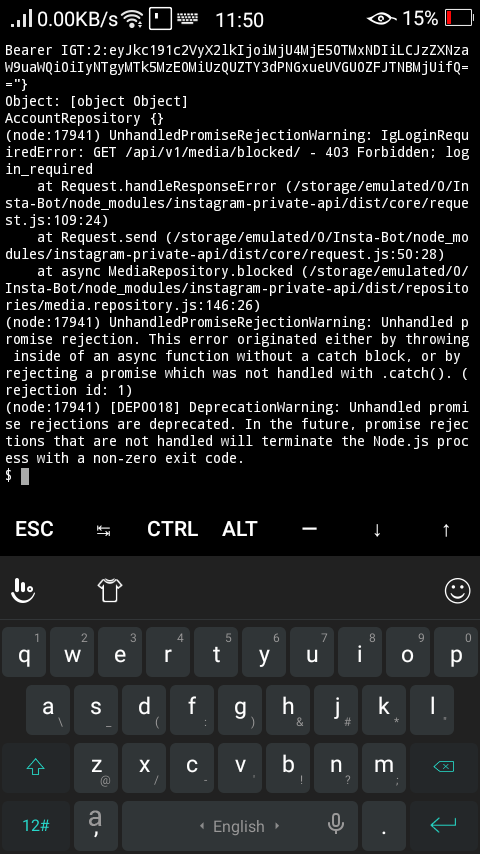
After loading the login data, I got this error:
iMrDJAi
on 23 Dec 2019
You still need to subscribe and save the state.
Also if you get login_required, you need to delete your session and log in again.
Nerixyz
on 23 Dec 2019
Oh, ok i will try again
iMrDJAi
on 23 Dec 2019
This is my code now:
require("dotenv").config();
const fs = require('fs');
const { IgApiClient } = require("instagram-private-api");
const ig = new IgApiClient();
const username = process.env.IG_USERNAME;
const password = process.env.IG_PASSWORD;
ig.state.generateDevice(username);

const dataCheck = function (callback) {
  fs.readFile('login_data.json', function (err, data) {
    console.log(data);
    if (data.length > 0) {
      callback(true);
    } else {
      callback(false);
    }
  });
}

const dataLoad = function (callback) {
  fs.readFile('login_data.json', function (err, data) {
      console.log("Read JSON file: " + data);
      data = JSON.parse(JSON.stringify(data));
      console.log("Object: " + data);
      callback(data);
  });
}

function dataSave(data){
  console.log("saving...");
  fs.writeFile("login_data.json", JSON.stringify(data),    function(err) {
    if(err) {
      console.log(err);
    }
    console.log("The file was saved!");
  });
}

igLogin();

async function igLogin(){

  dataCheck(async dataExists => {
    console.log(dataExists);
    if (dataExists){
      await loadSession();
    } else {
      await newLogin();
    }
  });

}

async function newLogin() {
  await ig.simulate.preLoginFlow();

  ig.request.end$.subscribe(async () => {
    const serialized = await ig.state.serialize();
    delete serialized.constants;
    dataSave(serialized);
  });
  const auth = await ig.account.login(username, password);
  console.log(auth);

  process.nextTick(async () => await ig.simulate.postLoginFlow());
}

async function loadSession() {
  await ig.simulate.preLoginFlow();

  dataLoad(async data => {
    const auth = await ig.state.deserialize(data);
    console.log(auth);
  });
  ig.request.end$.subscribe(async () => {
    const serialized = await ig.state.serialize();
    delete serialized.constants;
    dataSave(serialized);
  });

  process.nextTick(async () => await ig.simulate.postLoginFlow());
}
I still get this error:
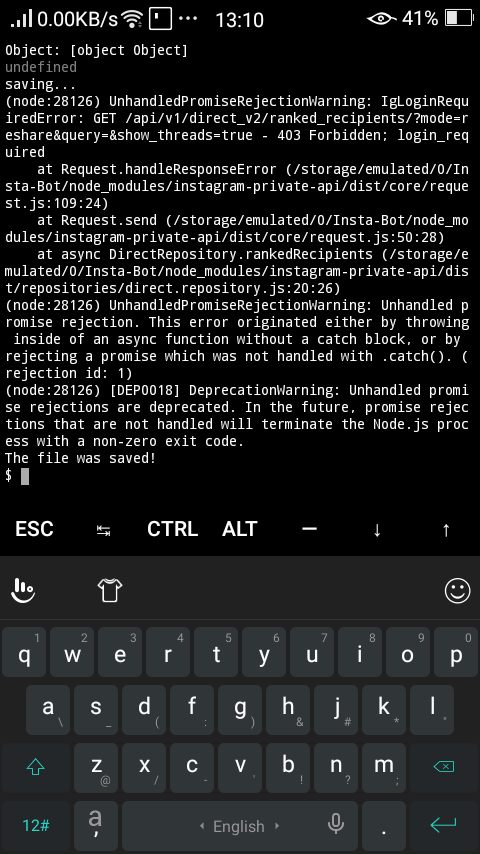
What should I do?
iMrDJAi
on 23 Dec 2019
I gave it another try, and I got this:
(node:24257) UnhandledPromiseRejectionWarning: IgResponseError: POST /api/v1/launcher/sync/ - 400 Bad Request; No valid ID given
    at Request.handleResponseError (/storage/emulated/0/Insta-Bot/node_modules/instagram-private-api/dist/core/request.js:121:16)
    at Request.send (/storage/emulated/0/Insta-Bot/node_modules/instagram-private-api/dist/core/request.js:50:28)
    at async LauncherRepository.sync (/storage/emulated/0/Insta-Bot/node_modules/instagram-private-api/dist/repositories/launcher.repository.js:22:26)
(node:24257) UnhandledPromiseRejectionWarning: Unhandled promise rejection. This error originated either by throwing inside of an async function without a catch block, or by rejecting a promise which was not handled with .catch(). (rejection id: 1)
(node:24257) [DEP0018] DeprecationWarning: Unhandled promise rejections are deprecated. In the future, promise rejections that are not handled will terminate the Node.js process with a non-zero exit code.
I moved ig.state.generateDevice(username); inside the newLogin(); function, that's the only change I did.
iMrDJAi
on 23 Dec 2019
That's not necessary but I suggest you to use async/await and thus Promises instead of callbacks. I think the code will get much cleaner and more understandable but that's up to you.
Nerixyz
on 23 Dec 2019
Ok, i will.
But it stills not working, I can't really understand the reason..
iMrDJAi
on 23 Dec 2019
Actually I changed my mind, using callbacks is the only native and the simple method to use fs with promises, await/async can't deal with that.
iMrDJAi
on 23 Dec 2019
using callbacks is the only native and the simple method to use fs
There should be fs.promises and util.promisify.
Nerixyz
on 23 Dec 2019
This not simple by the way..
iMrDJAi
on 23 Dec 2019
This not simple by the way..
Change
const fs = require('fs');
to
const { promises: fs } = require('fs');
and you're done.
Nerixyz
on 23 Dec 2019
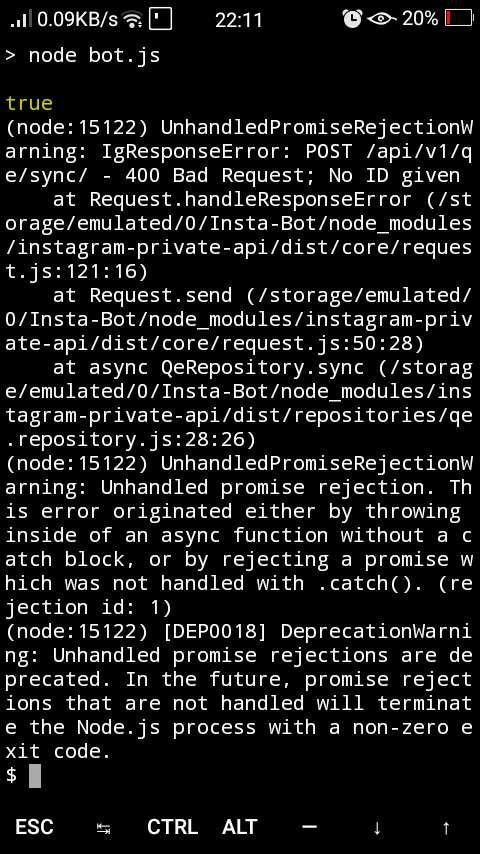
The same No ID given error again and again..
iMrDJAi
on 23 Dec 2019
This isn't perfect but it will work
// create ig, generate device
ig.request.end$.subscribe(async () => {
    const serialized = await ig.state.serialize();
    delete serialized.constants;
    save(serialized);
});

let shouldLogin = true;

try {
    await ig.simulate.preLoginFlow();
    if (exists()) {
        await ig.state.deserialize(...);
        await ig.user.info(ig.state.cookieUserId);
        shouldLogin = false;
    }
} catch (_) { }

if (shouldLogin) {
    await ig.account.login(...);
}
I will give it a try, thx.
iMrDJAi
on 23 Dec 2019
await ig.user.info(ig.state.cookieUserId); didn't fix my error:
(node:15897) UnhandledPromiseRejectionWarning: IgResponseError: POST /api/v1/launcher/sync/ - 400 Bad Request; No valid ID given
    at Request.handleResponseError (/storage/emulated/0/Insta-Bot/node_modules/instagram-private-api/dist/core/request.js:121:16)
    at Request.send (/storage/emulated/0/Insta-Bot/node_modules/instagram-private-api/dist/core/request.js:50:28)
    at async LauncherRepository.sync (/storage/emulated/0/Insta-Bot/node_modules/instagram-private-api/dist/repositories/launcher.repository.js:22:26)
(node:15897) UnhandledPromiseRejectionWarning: Unhandled promise rejection. This error originated either by throwing inside of an async function without a catch block, or by rejecting a promise which was not handled with .catch(). (rejection id: 1)
(node:15897) [DEP0018] DeprecationWarning: Unhandled promise rejections are deprecated. In the future, promise rejections that are not handled will terminate the Node.js process with a non-zero exit code.
:/
iMrDJAi
on 25 Dec 2019
await ig.user.info(ig.state.cookieUserId);didn't fix my error:(node:15897) UnhandledPromiseRejectionWarning: IgResponseError: POST /api/v1/launcher/sync/ - 400 Bad Request; No valid ID given at Request.handleResponseError (/storage/emulated/0/Insta-Bot/node_modules/instagram-private-api/dist/core/request.js:121:16) at Request.send (/storage/emulated/0/Insta-Bot/node_modules/instagram-private-api/dist/core/request.js:50:28) at async LauncherRepository.sync (/storage/emulated/0/Insta-Bot/node_modules/instagram-private-api/dist/repositories/launcher.repository.js:22:26) (node:15897) UnhandledPromiseRejectionWarning: Unhandled promise rejection. This error originated either by throwing inside of an async function without a catch block, or by rejecting a promise which was not handled with .catch(). (rejection id: 1) (node:15897) [DEP0018] DeprecationWarning: Unhandled promise rejections are deprecated. In the future, promise rejections that are not handled will terminate the Node.js process with a non-zero exit code.:/
await ig.user.info(ig.state.cookieUserId); is not there to fix your error.
You did not generate the device.
After creating the ig instance, call ig.state.generateDevice(seed).
Nerixyz
on 25 Dec 2019
So I should generate a device before loading a session too.
iMrDJAi
on 25 Dec 2019
Oh no! :/
(node:23652) UnhandledPromiseRejectionWarning: IgCookieNotFoundError: Cookie "ds_user_id" not found
A new error again
iMrDJAi
on 25 Dec 2019
Oh no! :/
(node:23652) UnhandledPromiseRejectionWarning: IgCookieNotFoundError: Cookie "ds_user_id" not foundA new error again
If this happens in the try-catch block: make sure you're in an async context.
If this is anywhere else: your state is invalid. Delete it.
Nerixyz
on 25 Dec 2019
If this happens in the try-catch block: make sure you're in an async context.
If this is anywhere else: your state is invalid. Delete it.
I have seen that this error occurs after a period of inactivity of the session, but discarding that session and obtaining a new one by logging in repeatedly can cause a temporary account lock.
 acollazo25
on 25 Dec 2019
acollazo25
on 25 Dec 2019
I have seen that this error occurs after a period of inactivity of the session, but discarding that session and obtaining a new one by logging in repeatedly can cause a temporary account lock.
This should not occur if the cookies are saved and sent correctly. And if this only happens after a longer longer period this shouldn't be an issue.
Nerixyz
on 25 Dec 2019
This should not occur if the cookies are saved and sent correctly. And if this only happens after a longer longer period this shouldn't be an issue.
Yes, I think it is because this session value ds_user_id is sometimes not stored, however the other values are.
I use exactly this function to store the session:
ig.request.end$.subscribe(async () => {
    const serialized = await ig.state.serialize();
    delete serialized.constants;
    save(serialized);
});
I am not sure why it happens, but I was able to fix it instead of replacing my session in the json file, I update the session with the new values, preventing missing some session keys like ds_user_id
acollazo25
on 25 Dec 2019
So sometimes it doesn't store some sessions values like ds_user_id inside the .json?
iMrDJAi
on 25 Dec 2019
I just saw how you have to change the try catch block:
    if (exists()) {
        await ig.state.deserialize(...);
        await ig.user.info(ig.state.cookieUserId);
        shouldLogin = false;
    } else {
      await ig.simulate.preLoginFlow();
    }
This way you only do this before logging in.
But I just tested the code and it works fine. Your cookie not found error should not show up because it's ignored by the empty catch block.
Nerixyz
on 26 Dec 2019
Shouldnt you save session after login as well? If you do not have a cookie @Nerixyz
 bvanhou
on 20 Jan 2020
bvanhou
on 20 Jan 2020
Shouldnt you save session after login as well? If you do not have a cookie @Nerixyz
Adding this will ensure the session is always saved:
ig.request.end$.subscribe(async () => save(await ig.state.serialize()));
Thanks, I misunderstood what that was doing. As I am trying to debug the ds_user_id error. Any Ideas?
@Nerixyz
Update: I found out the await ig.simulate.preLoginFlow(); is throwing the error... Hmmm. Trying the approach of updating the session vs deleting it
bvanhou
on 20 Jan 2020
Unfortunately, I am still unable to determine error below. When or why does this occur? Does anyone know.
IgCookieNotFoundError: Cookie "ds_user_id" not found
Got it to work by ignoring the error at first. As you mentioned above.
    try {
        console.log('Checking Session');
        if (sessionExists(data.username)) {
            console.log(`Obtained Session for ${data.username}`);
            var session = fetchSession(data.username);
            await ig.state.deserialize(session);
            await ig.user.info(ig.state.cookieUserId);
            shouldLogin = false;
        } else {
            await ig.simulate.preLoginFlow();
        }
    } catch (_) {}
Can somebody maybe post the full code? I also get:
IgCookieNotFoundError: Cookie "ds_user_id" not found
    at State.extractCookieValue (/srv/node_modules/instagram-private-api/dist/core/state.js:142:19)
    at State.get cookieUserId [as cookieUserId] (/srv/node_modules/instagram-private-api/dist/core/state.js:126:21)
    at LocationSearch.index (/srv/node_modules/instagram-private-api/dist/repositories/location-search.repository.js:10:88)
    at SearchService.location (/srv/node_modules/instagram-private-api/dist/services/search.service.js:26:57)
    at publishAlbum (/srv/lib/cloud-functions/functions/src/helper.js:113:39)
    at <anonymous>
 SaliZumberi
on 30 Jan 2020
SaliZumberi
on 30 Jan 2020
@SaliZumberi Please paste your debug output here inside of code tags.
Nerixyz
on 30 Jan 2020
@Nerixyz
    const ig = new IgApiClient();
    const account = await loadAccount(accountId);
    ig.state.generateDevice(account.username);
    ig.request.end$.pipe(first()).subscribe(async () => {
        const serialized = await ig.state.serialize();
        delete serialized.constants;
        await saveSession(account, serialized);
        await ig.state.deserialize(serialized);
        await ig.user.info(ig.state.cookieUserId);
        nextMethodToCall()
    });

    if (account && account.session) {
        await ig.state.deserialize(account.session);
        nextMethodToCall()
    } else {
        await ig.simulate.preLoginFlow();
        await ig.account.login(account.username, account.password);
        process.nextTick(async () => await ig.simulate.postLoginFlow());
    }
I meant this debug-log.
Nerixyz
on 30 Jan 2020
Hi @Nerixyz, im into the same @SaliZumberi issue:
IgCookieNotFoundError: Cookie "ds_user_id" not found
Im running this code in server mode, vercel environment here my instagram login function:
const instagramLogin = async (file, caption) => {
  const IG_SESSION_KEY = 'instagram-session';
  const IG_USERNAME = process.env.IG_USERNAME;
  const IG_PASSWORD = process.env.IG_PASSWORD;
  const start_time = Date.now();
  const ig = new IgApiClient();
  ig.state.generateDevice(IG_USERNAME);
  let should_login = true;
  const serialized_session = await Shared.getJsonObject(IG_SESSION_KEY).catch(
    (error) => {
      console.warn('No serialized session found', error);
      // ignore when error
    }
  );
  if (serialized_session) {
    try {
      await ig.state.deserialize(serialized_session);
      await ig.user.info(ig.state.cookieUserId);
      const user_info = await ig.user.info(ig.state.cookieUserId);
      console.debug(user_info);
      should_login = false;
    } catch (error) {
      console.warn('Error while trying to restore the session', error);
    }
  }
  if (should_login) {
    ig.request.end$.subscribe(async () => {
      const serialized = await ig.state.serialize();
      delete serialized.constants;
      await Shared.storeJsonObject(IG_SESSION_KEY, serialized);
    });
    const auth = await ig.account.login(IG_USERNAME, IG_PASSWORD);
    console.debug(auth);
  }
  const duration = (Date.now() - start_time) / 1000;
  return {
    duration,
  };
};
i use the session example from repo with some code enhancements from this issue, the ig.account.login should be executed when no session or when session expired (i think) the best way to achieve that is deserialize the session and calling user info to see if the cookie is still valid and perform re-login, but im stuck on Cookie "ds_user_id" not found issue.
Any advice with that? thanks !!!
 outaTiME
on 17 Sep 2020
outaTiME
on 17 Sep 2020
Related issues
 DKertson16
·
10Comments
DKertson16
·
10Comments
 dhillon2325
·
14Comments
dhillon2325
·
14Comments
 endquote
·
12Comments
endquote
·
12Comments
 nikitaulshin
·
17Comments
nikitaulshin
·
17Comments
 sagardalal21
·
39Comments
sagardalal21
·
39Comments