Insomnia: CURL code generation not working
Describe the bug
"Generate Code" and "Copy as CURL" functionality not working
To Reproduce
Steps to reproduce the behavior:
- Create request
- Click on "Generate Code" or "Copy as CURL"
Expected behavior
Generated CURL code or CURL request in clipboard
Screenshots
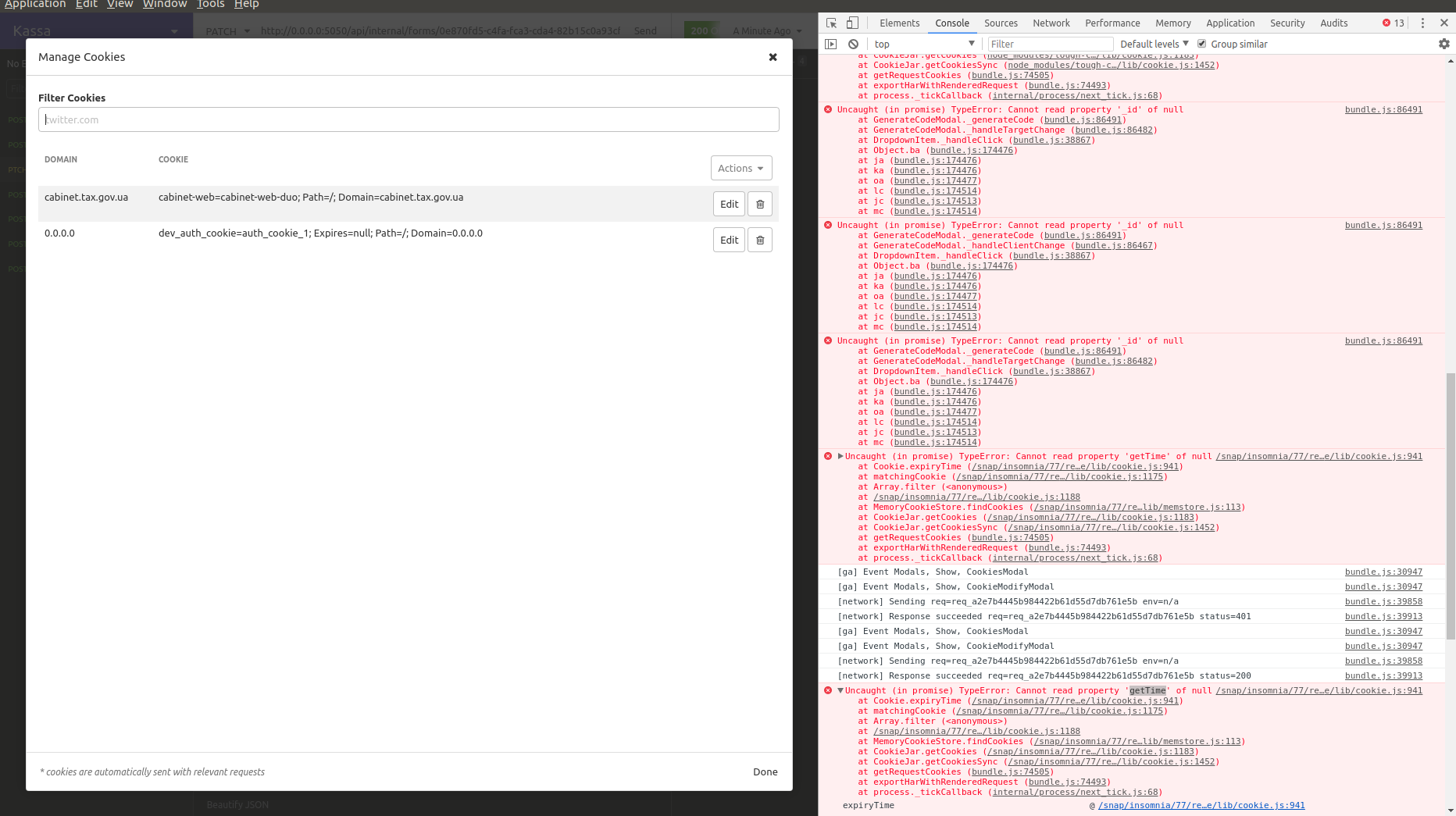
An error in developer tools console:
/opt/Insomnia/resources/app.asar/node_modules/tough-cookie/lib/cookie.js:941 Uncaught (in promise) TypeError: Cannot read property 'getTime' of null
    at Cookie.expiryTime (/opt/Insomnia/resources/app.asar/node_modules/tough-cookie/lib/cookie.js:941)
    at matchingCookie (/opt/Insomnia/resources/app.asar/node_modules/tough-cookie/lib/cookie.js:1175)
    at Array.filter (<anonymous>)
    at /opt/Insomnia/resources/app.asar/node_modules/tough-cookie/lib/cookie.js:1188
    at MemoryCookieStore.findCookies (/opt/Insomnia/resources/app.asar/node_modules/tough-cookie/lib/memstore.js:113)
    at CookieJar.getCookies (/opt/Insomnia/resources/app.asar/node_modules/tough-cookie/lib/cookie.js:1183)
    at CookieJar.getCookiesSync (/opt/Insomnia/resources/app.asar/node_modules/tough-cookie/lib/cookie.js:1452)
    at getRequestCookies (bundle.js:74505)
    at exportHarWithRenderedRequest (bundle.js:74493)
    at process._tickCallback (internal/process/next_tick.js:68)
Desktop (please complete the following information):
- OS: Linux Mint 19.3 Tricia
- Installation Method: deb package
- App Version
2020.3.3(though didn't work on2020.2.2either)
Additional context
 stormherz
All 15 comments
I also have this problem when I changed cookie via interface
 hyzyla
on 13 Aug 2020
hyzyla
on 13 Aug 2020
This could happen if you have a cookie for the same domain without an expire date. As a workaround you can edit the cookie and set expires = 0 (or any other value). That works for me 🙂
Not sure if Insomnia could do something on their side, otherwise looks like an issue in the tough-cookie library: https://github.com/salesforce/tough-cookie/blob/8834cbaae1f523ab9490c991479b2df4870e29d4/lib/cookie.js#L994-L1005
 jrodalo
on 2 Sep 2020
jrodalo
on 2 Sep 2020
@jrodalo works here too! :crab:
 tcelestino
on 14 Oct 2020
tcelestino
on 14 Oct 2020
Hum, I've tried to create a simple node server that returns a cookie without expires but I can't reproduce the error.
@stormherz @jrodalo @tcelestino
Do you reproduce it using the last version of Insomnia?
 jgiovaresco
on 19 Oct 2020
jgiovaresco
on 19 Oct 2020
Yes, I'm using Insomnia Core 2020.4.1
Steps to reproduce it:
- Create a new request for
http://localhost/test - Create a new cookie with the same domain:
localhostand leaveExpiresempty - Try to use the
Generate CodeorCopy as Curloptions on the request - See the error in the console:
Cannot read property 'getTime' of null
Manually setting Expires = 0 fixes it. In my case, the cookie was created automatically from server response, but think it's easier to reproduce it this way.
jrodalo
on 19 Oct 2020
I believe Insomnia is currently two major versions behind with tough-cookie, I wonder if upgrading to latest might help here?
 develohpanda
on 20 Oct 2020
develohpanda
on 20 Oct 2020
@develohpanda I was thinking about updating the library. But first I would like to reproduce the error and I've not succeeded yet 😞
jgiovaresco
on 20 Oct 2020
@jrodalo Thanks! I can reproduce 🎉 🙇
jgiovaresco
on 20 Oct 2020
Okay, I still reproduce the error when I update the tough-cookie dependency.
However, I've noticed something. When I create a cookie on the server-side without the expires attribute, I can see that the cookie is saved in Insomnia with expires: 'Infinity'.
Looking at rfc or Mozilla docs I didn't find an example where the expires is set to null.
In the tough-cookie doc, we can see
expires - Date - if set, the Expires= attribute of the cookie (defaults to the string "Infinity"). See setExpires()
I wonder if we should update the Create new cookie feature in Insomnia to initialize the expires attribute with Infinity?
@develohpanda What do you think about it?
jgiovaresco
on 20 Oct 2020
Sounds reasonable - setting an expiry to null or Infinity seem one and the same to me, and if the RFC points to Infinity then we should do the same.
@DMarby any objections? Not as familiar with cookies.
develohpanda
on 20 Oct 2020
@develohpanda For clarity, the RFC has no concept of Infinity, Expires can only be set to a valid date. What the tough-cookie library does under the hood is set it to the max possible value for a Date in JS, if you pass it Infinity.
If a cookie does not have an Expires or a Max-Age attribute, it becomes what's known as a "session-cookie", meaning it should be deleted once a session is over (in a browser, this is typically when you close the browser).
The solution of setting an expiry to Infinity by default seems reasonable to me, as from a UX perspective, when the user is adding a cookie manually, it makes sense for it to persist until explicitly removed.
 DMarby
on 21 Oct 2020
DMarby
on 21 Oct 2020
The solution of setting an expiry to
Infinityby default seems reasonable to me, as from a UX perspective, when the user is adding a cookie manually, it makes sense for it to persist until explicitly removed.
If a manually created cookie persists beyond the application session this seems reasonable from a product perspective. What do we think about passing the max date value instead of the non-rfc compliant string (Infinity), this way we can avoid needless comments and can worry less about dependency reliance.
 nijikokun
on 21 Oct 2020
nijikokun
on 21 Oct 2020
The solution of setting an expiry to
Infinityby default seems reasonable to me, as from a UX perspective, when the user is adding a cookie manually, it makes sense for it to persist until explicitly removed.If a manually created cookie persists beyond the application session this seems reasonable from a product perspective. What do we think about passing the max date value instead of the non-rfc compliant string (
Infinity), this way we can avoid needless comments and can worry less about dependency reliance.
I think that makes sense.
DMarby
on 21 Oct 2020
I've started to work on this, but there is something weird in the cookies modal logic.
I've taken a record when I've created a cookie and played with the Expires attribute

As you can see, there is something wrong. I've found the cause in those lines:
https://github.com/Kong/insomnia/blob/c73092e2947d3eaf059473086b178fa2fe117df0/packages/insomnia-app/app/ui/components/modals/cookie-modify-modal.js#L112-L117
When we are saving changes, the value in cookie.expires is "0" instead of 0. Therefore we are "generating" a date using
new Date('0') which different than new Date(0) 🤯
We should fix that, but I'd like your thoughts on what format we want to use in the Expires input?
I'm thinking about:
- using a number (epoch time):
1603396449844 - using the UTC string (which is the format described in the RFC if I read it correctly ):
Thu, 22 Oct 2020 19:54:09 GMT - using the ISO string:
2020-10-22T19:54:09.844Z
I would use the 3rd option, the ISO string, which seems to be the simpler. Indeed, I can't convert the epoch time in my head, and we would need to update the day matching the new date using the UTC. 🤔
Of course, this format would be used only in the input field. We would then adapt it when we update the cookie.
jgiovaresco
on 22 Oct 2020
We should fix that, but I'd like your thoughts on what format we want to use in the Expires input?
I'd say we just use a number (option 1) for this fix in particular.
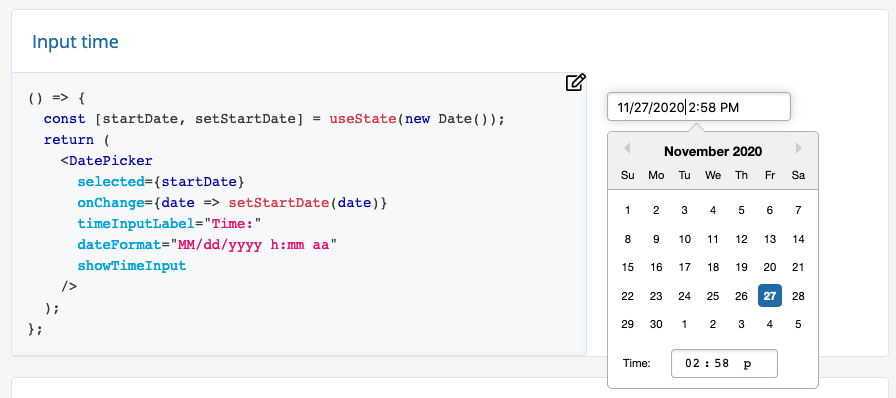
There are some different rules around the expiry field, but in the cases where we require an explicit time input from the user, _in my opinion_ I suggest we use a date picker for that.
It would probably need a checkbox to allow some edge-case inputs so some changes will be needed in that area, which is why I suggest to use option 1 and not expend any extra effort for the input itself.
From the demo site for https://github.com/Hacker0x01/react-datepicker/, it looks like a variant of Input Time demo seems appropriate:
@jgiovaresco
develohpanda
on 27 Nov 2020
Related issues
 isobit
·
4Comments
isobit
·
4Comments
 rootext
·
3Comments
rootext
·
3Comments
 claratorres
·
3Comments
claratorres
·
3Comments
 artoodeeto
·
4Comments
artoodeeto
·
4Comments
 meixger
·
3Comments
meixger
·
3Comments