Insomnia: Add loading state when viewing commit changes in Insomnia designer
Is your feature request related to a problem? Please describe.
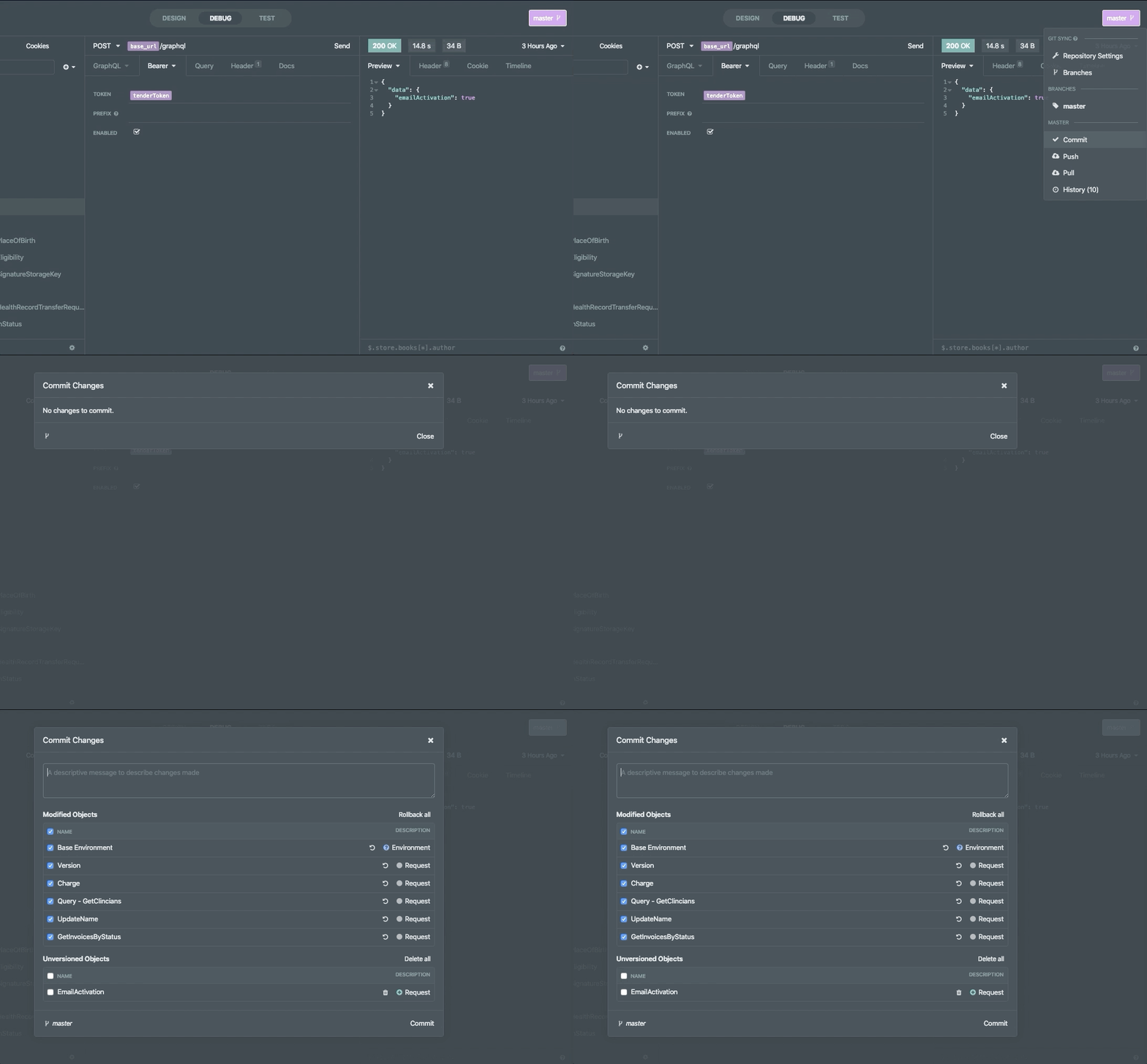
As a user I want to be informed that my changes are still loading so that I know whats going on (and don't close the window before the changes load)
Describe the solution you'd like
Add any old loading spinner while the changes are loading up or some sick elevator music 🎵 :trollface:
Describe alternatives you've considered
Waiting but who does that these days?
Additional context
 jonocairns
All 16 comments
Also worth investigating why it's taking so long. Approx how many requests do you have, and what is the size of your .insomnia directory?
 develohpanda
on 28 Jul 2020
develohpanda
on 28 Jul 2020
@develohpanda
61 requests and 92 files in total in my .insomnia dir
file size in insomnia repo: 190,506 bytes for 2 items
jonocairns
on 28 Jul 2020
@develohpanda BTW an unfortunate side effect of this is that locally people think they have no changes to commit when quickly selecting the commit button - this leads to a significant drift which makes merging a real issue later on (likely leading to one person completely dropping their changes)
jonocairns
on 23 Sep 2020
That doesn't sound great, especially with losing changes. I don't think it should be too tricky to add a loading spinner - we will try to prioritize this, haven't had a chance to look at it 👍
INS-160
develohpanda
on 24 Sep 2020
This was opened quite a few days earlier.
Just making sure if I can go ahead and work on it?
 abhijit-hota
on 12 Oct 2020
abhijit-hota
on 12 Oct 2020
Just making sure if I can go ahead and work on it?
Certainly!
The fix should (most likely) be scoped to this file. Adding isLoading: boolean to state and a corresponding view when changes are loading.
Perhaps the body can just say "Loading..." and show a spinner using font-awesome fa fa-spin fa-refresh.
develohpanda
on 12 Oct 2020
@develohpanda Thanks for the pointers!
Perhaps the body can just say "Loading..." and show a spinner using font-awesome
fa fa-spin fa-refresh.
Seems perfect. Is font awesome already installed as a package?
abhijit-hota
on 12 Oct 2020
Yep, and it's already used as well 😉
develohpanda
on 12 Oct 2020
Yep, and it's already used as well 😉
Thanks! Will update you on the task soon.
abhijit-hota
on 12 Oct 2020
@develohpanda Are there any extra steps for setting up the dev environment in Windows? I've been struggling to set it up.
abhijit-hota
on 14 Oct 2020
@abhijit-hota where is the setup failing for you, and what steps are you taking to set up?
The only unique note for Windows in the README is to install Windows Build Tools. I have it running on a W10 machine at the moment, so it definitely is possible.
develohpanda
on 15 Oct 2020
where is the setup failing for you
It was an ELIFECYCLE error for a module name front-matter if I remember it correctly. I ran npm run clean yesterday and removed node_modules.
Will install Windows build tools and retry. Thanks!
Edit: The module name is font-scanner which runs a node-gyp build while installing which requires Windows Build Tools.
abhijit-hota
on 15 Oct 2020
Sorry for the delay but I'm still facing issues. This one in particular:
lerna ERR! npm install exited 1 in 'insomnia-inso'
lerna ERR! npm install stderr:

┌────────────────────────────────────────────────────────────┐
│                  npm update check failed                   │
│            Try running with sudo or get access             │
│            to the local update config store via            │
│ sudo chown -R $USER:$(id -gn $USER) C:\Users\abhih\.config │
└────────────────────────────────────────────────────────────┘
npm WARN tarball tarball data for [email protected] (the SHA checksum here) seems to be corrupted. Trying one more time.
npm WARN tarball tarball data for [email protected] (the SHA checksum here) seems to be corrupted. Trying one more time.
Then it gives a bunch of npm ENOENT errors and displays this:
npm ERR! code EINTEGRITY
npm ERR! Verification failed while extracting [email protected]
npm ERR! Verification failed while extracting [email protected]
npm ERR! [an SHA checksum] integrity checksum failed when using sha512: wanted [another SHA checksum]
and then again a bunch of ENOENT errors and then finally crashes with this.
lerna ERR! npm install exited 1 in 'insomnia-inso'
lerna WARN complete Waiting for 7 child processes to exit. CTRL-C to exit immediately.
npm ERR! code ELIFECYCLE
npm ERR! errno 1
npm ERR! [email protected] bootstrap: `npm install && lerna bootstrap && lerna run --parallel --stream bootstrap`
npm ERR! Exit status 1
npm ERR!
npm ERR! Failed at the [email protected] bootstrap script.
npm ERR! This is probably not a problem with npm. There is likely additional logging output above.
I've installed Windows build tools. I've tried verifying and cleaning the npm cache.
I think this is a proxy issue on my side as mentioned here. But running npm config get proxy returned null. I'm aware that this is an npm issue but any pointers will be helpful.
Sorry again for the delayed updates. I've already spent a good deal of time understanding these npm errors and yet I face a new one every time. I'm trying to solve the "real" issue here but cannot guarantee any quick updates as I'm facing issues setting up the development environment locally.
P.S. If this is an urgent update and I'm hindering the app's development flow, then anyone else can take it up. =)
abhijit-hota
on 20 Oct 2020
No rush @abhijit-hota, this isn't blocking anything.
Unfortunately I've never come across this before, on both Mac and Windows.
What is your NPM version? Have you tried using Powershell in Admin mode? Have you got flow installed globally and it might be clashing? Are you using NVM? In case you haven't seen this, here are some other solutions you could try.
Let me know how you get on, or you can also ping in the Insomnia Slack to see if anybody else has faced this before.
develohpanda
on 20 Oct 2020
What is your NPM version?
6.14.6
Have you tried using Powershell in Admin mode?
I've been using cmd in Admin mode today. Although I've tried Powershell in Admin mode earlier for this.
Have you got flow installed globally and it might be clashing?
Nope.
Are you using NVM?
Yes. This is what I used to install 12.18.3.
here are some other solutions you could try
I haven't tried all of the solutions from this. One solution is deleting package-lock.json and I don't think I should do that 😅. I'll try out the others!
Thanks a lot!
abhijit-hota
on 20 Oct 2020
I agree, any solution other than deleting package-lock.json. 😄
develohpanda
on 21 Oct 2020
Related issues
 claratorres
·
3Comments
claratorres
·
3Comments
 Fyb3roptik
·
4Comments
Fyb3roptik
·
4Comments
 dextermb
·
3Comments
dextermb
·
3Comments
 kalinchernev
·
4Comments
kalinchernev
·
4Comments
 oliverjanik
·
3Comments
oliverjanik
·
3Comments