Insomnia: [Improvement] AWS Multifactor Auth Support
Thank you @focusaurus and @gschier for your work in #347, I use it every day :)
At the bottom of #347 you mention supporting AWS multifactor auth via the AWS_SESSION_TOKEN.
If this were to be implemented I would use it every other day!
My use case:
I want to get /cat/_indices and run some aws elasticsearch queries. I do this using a read only AWS_ACCESS_KEY / AWS_SECRET_ACCESS_KEY.
When I want to manipulate backups or change some settings I need write access. I generate a temporary AWS_ACCESS_KEY, AWS_SECRET_ACCESS_KEY and AWS_SESSION_TOKEN to do this.
I would love to see a third optional field that lets me put in the AWS_SESSION_TOKEN for times such as these!
 gondalez
All 11 comments
👋 Thanks for opening your first issue! If you're reporting a 🐞 bug, please make sure
you include steps to reproduce it. If you're requesting a feature 🎁, please provide real
use cases that would benefit. 👪
To help make this a smooth process, please be sure you have first read the
contributing guidelines.
![welcome[bot] picture](https://avatars0.githubusercontent.com/in/4141?v=4&s=40) welcome[bot]
on 18 Jan 2018
welcome[bot]
on 18 Jan 2018
I don't really know much about how that would work but maybe @focusaurus has an idea? I'd be happy to help if someone wanted to take this on.
 gschier
on 24 Jan 2018
gschier
on 24 Jan 2018
Yeah I'll take a look tomorrow. Sorry I saw this thread just haven't gotten around it. I believe if the end user can get a valid trio of credentials from the aws command line tool and paste them into Insomnia, they'll work for 24 hours.
 focusaurus
on 24 Jan 2018
focusaurus
on 24 Jan 2018
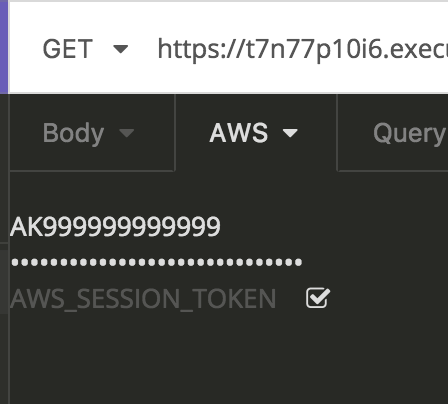
OK so I have the back end changes made in a feature branch on my fork. They are very straightforward just 3 fields instead of 2. I think for the UI trying to use the KeyValueEditor is clunky. What we really have is 3 values and I think the most logical UI would just be a stack of 3 inputs:
- AWS_ACCESS_KEY_ID (text, required)
- AWS_SECRET_ACCESS_KEY (password, required)
- AWS_SESSION_TOKEN (password, optional)
They can have a single enable/disable checkbox.
@gschier What do you think? If you think that UI makes sense it might be faster for you to just wire it up as I'm pretty unfamiliar with the widget library available here. Or if you want me to do it and you can point me to the basic set of components I should look to combine like <InputStack><TextRow/><TextRow/><TextRow/></InputStack> (just making up those names for example)?
focusaurus
on 24 Jan 2018
OK so here's what is done or close to done and what else I think we should do:
- [x] Support the 3 fields in the network/request code
- [x] Test it works against AWS with 2-field SFA
- [x] Test it works against AWS with 3-field MFA
- [x] Ugly/hacky UI with 3 fields and basic
inputtags
HELP WANTED on the following:
- [ ] Fix the UI in terms of layout, styling, using the optimal JSX tags/components
- input width, placement of the checkbox, styling for when disabled (see
key-value-editor__row-wrapper--disabled)
- input width, placement of the checkbox, styling for when disabled (see
- [ ] Get the nunjucks stuff working
Code is in the feature/aws-auth-mfa branch on my fork.
focusaurus
on 28 Jan 2018
On it! I'll try to get this done today.
gschier
on 29 Jan 2018
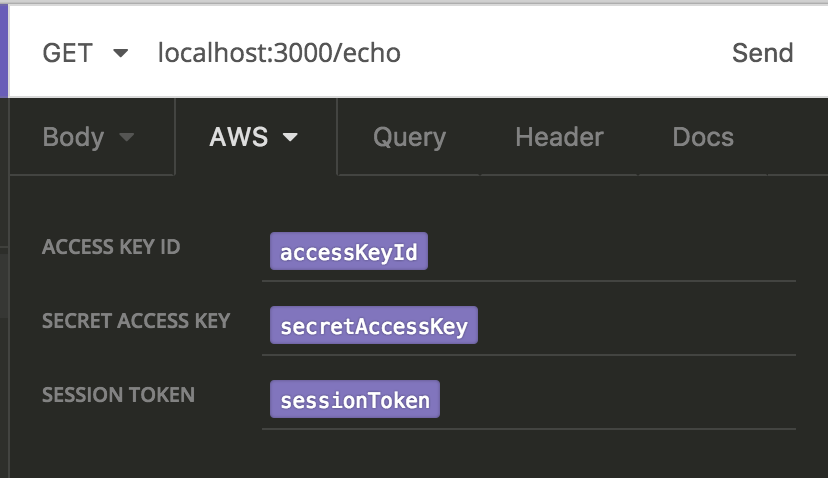
How's this?
gschier
on 29 Jan 2018
That looks good. Nit: I think if most labels are just capitalized you could Access Key ID title case the labels.
focusaurus
on 29 Jan 2018
Also we might want some help text explaining:
- First 2 always required, last one only fill out if you are doing MFA
focusaurus
on 29 Jan 2018
Oh and where did you put the enable/disable checkbox?
focusaurus
on 29 Jan 2018
That looks good. Nit: I think if most labels are just capitalized you could Access Key ID title case the labels.
I just used the same labels that the rest of the app uses. They're all-caps everywhere.
I wasn't sure whether to keep the checkbox or not because only some of the auth types have it. But, I've decided to make it consistent and add it to all the ones that don't as well.

gschier
on 29 Jan 2018
Related issues
 rootext
·
3Comments
rootext
·
3Comments
 isobit
·
4Comments
isobit
·
4Comments
 paulleduc
·
4Comments
paulleduc
·
4Comments
 Natfan
·
3Comments
Natfan
·
3Comments
 dextermb
·
3Comments
dextermb
·
3Comments
Most helpful comment
I wasn't sure whether to keep the checkbox or not because only some of the auth types have it. But, I've decided to make it consistent and add it to all the ones that don't as well.