Insomnia: [Bug] Using a response body in environment settings gives an "Unexpected token % in JSON" error
Overview
Insomnia Version:_5.3.6_Operating System:_Win10 Home (Creators Update)_Summary:_If I use the new response parsing feature directly within a request it all works perfectly, but if I transpose the same response into the environment settings then it doesn't work. At the bottom of the page I get the error "Unexpected error % in JSON at position 13"_
How To Reproduce
- Create new auth request
- Perform request and auth successfully
- Go into environment settings
- Create new variable
- Assign it to a response body, use JSONPath and confirm that the Live Preview finds the correct field
- Select OK
- Observer error at bottom of page and be unable to select "OK" or any other sub-environments
Other Notes
_Thanks for adding this feature, it's going to make my life that little bit more pleasant as I'll no longer have to keep copying my JWT back and forth from auth responses_
 Fritzbraun
All 12 comments
Make sure you have quotes around your tag.
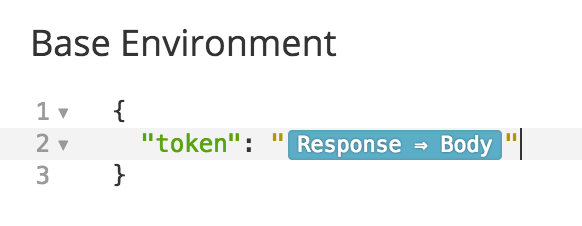
Under the hood, the tag is saved as {% response 'body', 'request_id, '$.json.path.query' %} so, if there are no quotes, the JSON becomes invalid.
 gschier
on 21 Jun 2017
gschier
on 21 Jun 2017
Well, now I feel embarrassed. You're quite right, it was a quoting issue. Thanks for your help.
Fritzbraun
on 21 Jun 2017
Don't be embarrassed @Fritzbraun! The error doesn't make it clear that that's what the issue is.
Glad that helped and you're welcome 😸
gschier
on 21 Jun 2017
Have you guys thought about adding some more documentation around this? Populating headers with login tokens is one of the first things I'm going to do when creating a request library, and I just spent like 90 minutes searching and figuring out how to do it.
 zkghost
on 22 Nov 2017
zkghost
on 22 Nov 2017
Hey @zkghost. Did you end up figuring it out? I'd be happy to answer any questions you have.
There is a brief bit of documentation here but it could definitely use more examples. Did you find that page?
gschier
on 22 Nov 2017
@gschier I did end up finding it out; I think initially I was using the Nunjucks templates wrong.
Think my problem was that I was searching for things around "setting variables" instead of chaining requests.
That page does look pretty good though, I think it was just my bad for not searching for the right thing 👍
zkghost
on 22 Nov 2017
Right. Perhaps I should also make a page for dynamically setting variables that explains that chaining should be used.
Definitely not your fault. The product should always serve the user 🤵
gschier
on 22 Nov 2017
:) Wouldn't hurt.
Thanks also! Used Postman for months and your product is a refreshing alternative :) really like the way variables are integrated. Keep up the good stuff! And the great service :D!
zkghost
on 22 Nov 2017
You're welcome! I always love hearing positive feedback 😄
gschier
on 22 Nov 2017
@gschier Could you write a user-friendly message? And it is not clear what to do.
Unexpected token % in JSON
 4n70w4
on 5 Jan 2019
4n70w4
on 5 Jan 2019
what happens when the thing I want to send is actually an object and not a JSON string?
 danielo515
on 21 Feb 2019
danielo515
on 21 Feb 2019
@danielo515 this problem doesn't exist when using a variable in a JSON request. The syntax checker will complain but the request will still send
gschier
on 13 Mar 2019
Related issues
 wimdecorte
·
3Comments
wimdecorte
·
3Comments
 artoodeeto
·
4Comments
artoodeeto
·
4Comments
 rootext
·
3Comments
rootext
·
3Comments
 kalinchernev
·
4Comments
kalinchernev
·
4Comments
 chrisvis
·
4Comments
chrisvis
·
4Comments
Most helpful comment
Make sure you have quotes around your tag.
Under the hood, the tag is saved as
{% response 'body', 'request_id, '$.json.path.query' %}so, if there are no quotes, the JSON becomes invalid.