Insightface: How about the speed of training ?
Initially, I meet the issue of out of memory issue on TITAN X 12GB, so I change per GPU batch size from 128 to 64, so the batch_size is 64*4=256. However, the training speed is only 26 examples/sec. The version of MXNet is 1.2.0
So, I adopt the suggestions (https://github.com/deepinsight/insightface/compare/master...gaohuazuo:tested) from @gaohuazuo (https://github.com/deepinsight/insightface/issues/32) for out of memory issue. In his comments, he tested on 1080Ti x4, mxnet-cu80, r100, per GPU batch size 128. Memory 8.3G, speed 308 examples/sec.
But I followed the operations he suggested, the training speed is still very low on my server, it is only 28 examples/sec. I test on P100x4 with each 16 GB, mxnet-cu80, r100, loss_type=4, per GPU batch size 128, Memory 8.3G (I also try the setting with per GPU batch size 192, Memory 10.3G, also very low only 32 examples/sec).
Moreover, If I do not use memonger, P100x4 with each 16 GB, mxnet-cu80, r100, loss_type=4, per GPU batch size 128, the training speed is almost the same as 30 examples/sec.
Do you know how to fix the issue of speed ?
 bruinxiong
All 43 comments
Did you set the correct env variables?
export MXNET_CPU_WORKER_NTHREADS=24
export MXNET_ENGINE_TYPE=ThreadedEnginePerDevice
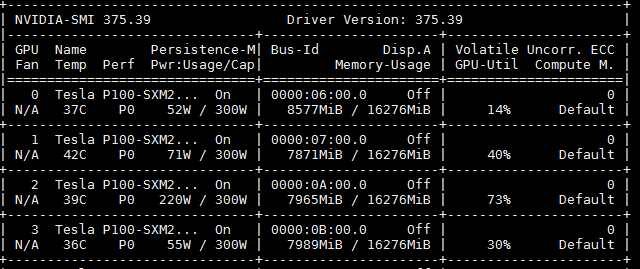
And how about the GPU usage?
 nttstar
on 22 Mar 2018
nttstar
on 22 Mar 2018
@nttstar
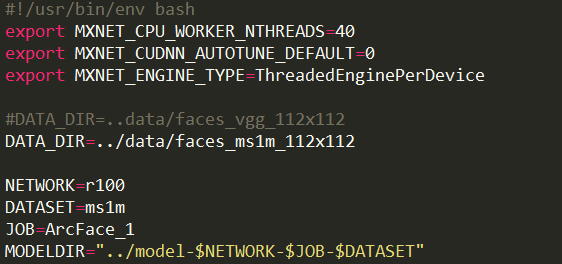
Yes, I set the correct env variables as this:
This is my GPU usage.
bruinxiong
on 23 Mar 2018
Not quite sure, maybe a IO problem?
nttstar
on 23 Mar 2018
@nttstar The speed is ok when I train ourselves models with softmax. Such as ResNext 152, the speed is 250 samples/sec with the same GPU. But train ArcFace with your codes, the speed only 30 samples/sec. I think IO is ok.
bruinxiong
on 23 Mar 2018
@bruinxiong, we have the same issue, have you solved it?
 qiongcao
on 23 Mar 2018
qiongcao
on 23 Mar 2018
@mathqiong No, hope someone can give useful suggestions.
bruinxiong
on 23 Mar 2018
Can you start a training with one single GPU?
nttstar
on 23 Mar 2018
I'm observing the same thing with different losses (0, 2, 4). Have P100.
#!/usr/bin/env bash
export MXNET_CPU_WORKER_NTHREADS=24
export MXNET_CUDNN_AUTOTUNE_DEFAULT=0
export MXNET_ENGINE_TYPE=ThreadedEnginePerDevice

DATA_DIR=../faces_vgg_112x112

NETWORK=r100
JOB=arcface
LOSS=4
BATCH=64
MODELDIR="../model-$NETWORK-$JOB"
mkdir -p "$MODELDIR"
PREFIX="$MODELDIR/model"
LOGFILE="$MODELDIR/log"
CUDA_VISIBLE_DEVICES='0' python -u train_softmax.py --data-dir $DATA_DIR --network "$NETWORK" --loss-type $LOSS --prefix "$PREFIX" --per-batch-size $BATCH 2>&1 | tee "$LOGFILE"
 terencezl
on 24 Mar 2018
terencezl
on 24 Mar 2018
@nttstar I test on single GPU, the issue is still there.


bruinxiong
on 25 Mar 2018
Is CUDNN enabled?
nttstar
on 25 Mar 2018
Checked my cudnn version is 5. mxnet may not like it.
terencezl
on 25 Mar 2018
@nttstar Yes, CUDNN is enabled. My cudnn version is 6.
bruinxiong
on 25 Mar 2018
I think you can try to reinstall the CUDNN7 and NCCL2.1.15. then recomplie the mxnet, actually I solved the speed problem by doing this
 black3391
on 26 Mar 2018
black3391
on 26 Mar 2018
@black3391 Thank you for your suggestion. I will try. do I need to do something when I recompile mxnet ? do you any instruction for this ? Thanks!
bruinxiong
on 27 Mar 2018
@bruinxiong no special instruction, but actually I keep trying to install mxnet for more ten times and It finally work, I suggest you restart the computer before you reinstall the mxent.
black3391
on 27 Mar 2018
@black3391 Did you meet this issue https://github.com/apache/incubator-mxnet/issues/6644 ?
Error message: src/operator/./cudnn_batch_norm-inl.h:62: Check failed: req[cudnnbatchnorm::kOut] == kWriteTo (0 vs. 1)
I have reinstalled the cudnn7 and nccl2.1.15. And I recompile mxnet with nccl2.1.15. But I meet this issue above. I haven't met this issue with cudnn6. The only solution is disable cudnn when do computation of cudnn_batch_norm.
bruinxiong
on 27 Mar 2018
@bruinxiong no, i didn't meet that problem, as I set MXNET_BACKWARD_DO_MIRROR=0, btw, did you use the latest version of mexnet to recompile?
black3391
on 27 Mar 2018
@black3391 Yes, I recompiled the latest version of mxnet (1.2.0). I also set MXNET_BACKWARD_DO_MIRROR=0 with export, btw the default value is 0 ready.
The issue of cudnn_batch_norm may not be case-by-case, someone also met this issue as https://github.com/apache/incubator-mxnet/issues/6644
bruinxiong
on 27 Mar 2018
@bruinxiong I am sorry I didn't meet that problem, but as the answer in
https://github.com/deepinsight/insightface/issues/32, disable the cudnn in batch_norm seems won't has great impact on trainning?
black3391
on 27 Mar 2018
The pip installed mxnet-cu80 or 90 doesn't link with libcucnn. But I compiled mxnet from source with libcudnn.so but still the speed is about 24 pics/s. This is with the env var exports and ~30 CPU cores. GPU usage is low and sporadically high.
I'm starting to think it's indeed an IO problem. Is getting from that binary train.rec file multithreaded?
terencezl
on 28 Mar 2018
@terencezl @black3391 Yes, very similar issue that I met. I use nccl2.1.15, the speed can be boosted from 30 pics/s to 130 pics/s, and I have to disable cudnn in batch norm layer due to I met this issue apache/incubator-mxnet#6644 ? Maybe, this IO problem only be produced here. My previous model have no this speed issue. GPU usage is low and sporadically high, meanwhile, CPU are full utilized and occupied during training.
bruinxiong
on 30 Mar 2018
@bruinxiong Have you found that training for 10w epochs can take more than 10000 days even with 4XP100 gpus?
 PkuRainBow
on 9 Apr 2018
PkuRainBow
on 9 Apr 2018
I meet the same problem, then I set envs like this:
export MXNET_CPU_WORKER_NTHREADS=4
export MXNET_ENGINE_TYPE=ThreadedEnginePerDevice
and the speed is about 220samples/sec,tested on 1080Ti x4, mxnet-cu80, r100
 whhhy
on 10 Apr 2018
whhhy
on 10 Apr 2018
set MXNET_CPU_WORKER_NTHREADS=1 and the speed is 330+samples/sec on 1080Ti x4, mxnet-cu90mkl, r100.
 mittlin
on 20 Apr 2018
mittlin
on 20 Apr 2018
@wangbaoyao @mittlin Thank your suggestions, I will test as soon as possible.
bruinxiong
on 21 Apr 2018
I have a strange discovery:
I have a 2T Mechanical hard disk and a 512G SSD, and ubuntu16.04, mxnet-cu80mkl 1.1.0, cuda8, cudnn7.0, two gtx1070ti
I install ubuntu in 512G SSD and I mount 2T Mechanical hard disk under my home directory named "face_recognition".
Then the strange thing come up.
When I use single gpu to train MobileFaceNet, I got about 400samples/sec, using MXNET_CPU_WORKER_NTHREADS=1, MXNET_ENGINE_TYPE=ThreadedEnginePerDevice
but when I set MXNET_CPU_WORKER_NTHREADS=2, the speed down to 90samples/sec....
Then I set MXNET_CPU_WORKER_NTHREADS=1.
And this is not the strange thing I want to talk, when I use two gpu to train, even I set MXNET_CPU_WORKER_NTHREADS=1, the speed is still 90samples/sec!!!
So I move the entire insightface directory under my home dectory of 512G SSD, I run again the train command, and the speed up to 800samples/sec ⊙0⊙
Then the strange thing comes: I move back the insightface directory to "face_recognition"(my 2T Mechanical hard disk),and I run again the train command, the speed supposed to be down to 90samples/sec, BUT, it's still 800samples/sec !!!!!!!!!!
I don't know why it is.
So you guys have low speed can try to use SSD.
 Wisgon
on 6 May 2018
Wisgon
on 6 May 2018
216
 chinakook
on 17 May 2018
chinakook
on 17 May 2018
I encountered a similar problem. The training speed was 1000 samples/sec at begining, and after several epochs it dropped to 300 samples/sec.
Finally, I solved the problem by reinstalling and upgrading CUDA, CUDNN, and mxnet. Now everything is back to normal.
 YaqiLYU
on 21 May 2018
YaqiLYU
on 21 May 2018
@YaqiLYU aha, Congratulations~
chinakook
on 21 May 2018
THX, finally I still don't know what went wrong
YaqiLYU
on 21 May 2018
I find that when you use the default MXNET_CPU_WORKER_NTHREADS = 1, the speed is much better although my cpu has a total of 32 threads available. Any ideas whats causing this?
 abhinavs95
on 15 Jun 2018
abhinavs95
on 15 Jun 2018
@abhinavs95 I find that when using single GPU, the speed is 120samples / sec, GPU utility is high, but when using multiple GPU, GPU utility is near 0 almost all the time but only high in certain moments, any suggestions?
 Edwardmark
on 16 Jul 2018
Edwardmark
on 16 Jul 2018
@YaqiLYU can you give me your environment setting or a dockerfile?
Edwardmark
on 16 Jul 2018
@bruinxiong how did you solve this issue?
 xmuszq
on 15 Aug 2018
xmuszq
on 15 Aug 2018
@Edwardmark @xmuszq
I met the same issue.
When I did the training months ago, the mxnet-cu80 version may be 1.10, and all things went well, the speed was 480+samples/second.
But yesterday when I tried to train again, the speed got really slow.
Even loading test images (lfw cfp agedb) took a lot of time, and the training speed was poorly 90 samples/second.
I fixed it by changing MXNET_CPU_WORKER_NTHREADS to 1
And also I tried to make it 2 and 4. 2 is the same as 1, as fast as 640 samples/second, while 4 is much slower……
It seems to be some IO problem.
Does anyone know the reason why this configuration affect the speed so much?
btw, my cudnn and nccl version is cudnn v5 and nccl 1.x
 gehaocool
on 16 Aug 2018
gehaocool
on 16 Aug 2018
maybe check whether you added some data augmentation into the data
importing pipeline.
On Thu, Aug 16, 2018 at 2:32 AM, Howard notifications@github.com wrote:
@Edwardmark https://github.com/Edwardmark @xmuszq
https://github.com/xmuszq
I met the same issue.
When I did the training months ago, the mxnet-cu80 version may be 1.10,
and all things went well, the speed was 480+samples/second.
But yesterday when I tried to train again, the speed got really slow.
Even loading test images (lfw cfp agedb) took a lot of time, and the
training speed was poorly 90 samples/second.
I fixed it by changing MXNET_CPU_WORKER_NTHREADS to 1
And also I tried to make it 2 and 4. 2 is the same as 1, as fast as 640
samples/second, while 4 is much slower……
It seems to be some IO problem.
Does anyone know the reason why this configuration affect the speed so
much?
btw, my cudnn and nccl version is cudnn v5 and nccl 1.x—
You are receiving this because you were mentioned.
Reply to this email directly, view it on GitHub
https://github.com/deepinsight/insightface/issues/125#issuecomment-413440372,
or mute the thread
https://github.com/notifications/unsubscribe-auth/APMWvUcXkIXDHPVOz1fkpY_J8cxpKDtJks5uRRHigaJpZM4S2Xox
.
xmuszq
on 16 Aug 2018
@bruinxiong
@nttstar
你好,我是修改default.kvstore = 'local' #device,之后速度从200多变成500多,Gpu 利用率可以达到90%左右跳动,但是仍然没有提高到800的速度
INFO:root:Epoch[0] Batch [260-280] Speed: 594.42 samples/sec acc=0.713281 lossvalue=4.485622
INFO:root:Epoch[0] Batch [280-300] Speed: 585.08 samples/sec acc=0.710059 lossvalue=4.614557
INFO:root:Epoch[0] Batch [300-320] Speed: 587.64 samples/sec acc=0.712695 lossvalue=4.579473
INFO:root:Epoch[0] Batch [320-340] Speed: 592.25 samples/sec acc=0.701758 lossvalue=4.730993
INFO:root:Epoch[0] Batch [340-360] Speed: 580.63 samples/sec acc=0.701172
 shiyuanyin
on 29 Jul 2019
shiyuanyin
on 29 Jul 2019
2080ti x 2, Inter Xeon CPU E5-2678 x 2, HDD
After setting MXNET_CPU_WORKER_NTHREADS = 1,
the speed increased from 40 samples/sec to 130 samples/sec.
Then I use multiprocessing in FaceImageIter(io.DataIter) class,
the speed increased from 130 samples/sec to 330 samples/sec.
Volatile GPU-Util: 95%
Note: Take care about the sharing of the class variable self.cur.
 Walstruzz
on 9 Aug 2019
Walstruzz
on 9 Aug 2019
@Walstruzz which version of mxnet do you use for multiprocessing, I tested the mxnet==1.5.1, but got an error of ConnectionRefusedError
 tranorrepository
on 3 Sep 2019
tranorrepository
on 3 Sep 2019
I was experiencing low training speed (~50 images/second with single GPU). The CPU usage was very high but the GPU was being used only sporadically, up to 30%.
I played with MXNET_CPU_WORKER_NTHREADS but it didn't help.
It turned out that it was an IO issue as mentioned in #216: the disk was not SSD and the shuffling requires random access to the .rec file. My workaround was to create a RAM disk and train on the dataset once copied to the RAM disk.
Performance went up from ~50 images per second to ~500 images per second with a single Tesla T4 GPU. (And I got ~1,000 images per second with two T4 GPU's: I set the "per batch size" to 256 so with two GPU's I got the same batch size of 512 than the default configurations of 128 images per context with 4 GPU's.)
 jolastar
on 6 Oct 2019
jolastar
on 6 Oct 2019
@Walstruzz which version of mxnet do you use for multiprocessing, I tested the mxnet==1.5.1, but got an error of ConnectionRefusedError
@tranorrepository
Finally, I drop my multiprocessing code and
- use
mxnet.gluon.DatasetAPI, rewrite theFaceImageIter(It's easy)
train_dataiter = FaceImageIter(some_params) - use
mxnet.gluon.DataLoaderAPI (so that I can specify num_workers)
train_dataiter = DataLoader(train_dataiter, some_params) - comment
model.fit, copy and paste its source code. - organize data for training
python
for batch_images, batch_labels in train_dataiter:
  databatch = mx.io.DataBatch([batch_iamges], [batch_labels])
It sounds so crazy, isn't it? XDDDDD
Walstruzz
on 15 Nov 2019
I did a test to evaluate the speed w.r.t. #GPU, MXNET_CPU_WORKER_NTHREADS, on an 8-Titan X GPU server, and obtain the following numbers:
| #GPU | MXNET_CPU_WORKER_NTHREADS | Speed (samples/sec)|
|------|------|------|
| 4 | 24 | 170 |
|1 | 24 | 170 |
|1 | 1 | 655 |
| 4 | 1 | 1300|
My data is stored in the an NFS server, and use conda environment. From the table, it seems that set MXNET_CPU_WORKER_NTHREADS to 1 is the most critical reason. I am not sure why, but this shall give some insights.
I am running the MobileNet version with the following command for test:
$ CUDA_VISIBLE_DEVICES='0,1,2,3' python -u train.py --network m1 --loss softmax --dataset emore
 skyuuka
on 20 Nov 2019
skyuuka
on 20 Nov 2019
Have you resolved this? @bruinxiong
There is no difference between using a single or multi gpus. I get the same speed of 22 samples/sec.
 faderani
on 2 Jan 2021
faderani
on 2 Jan 2021
Related issues
 lzg188
·
5Comments
lzg188
·
5Comments
 Alloshee
·
3Comments
Alloshee
·
3Comments
 nmzszxsl01
·
4Comments
nmzszxsl01
·
4Comments
 ahkarami
·
4Comments
ahkarami
·
4Comments
 springtime-cn
·
4Comments
springtime-cn
·
4Comments
Most helpful comment
I meet the same problem, then I set envs like this:
export MXNET_CPU_WORKER_NTHREADS=4
export MXNET_ENGINE_TYPE=ThreadedEnginePerDevice
and the speed is about 220samples/sec,tested on 1080Ti x4, mxnet-cu80, r100