Hi,
I mentioned this on Twitter, but I'd really love to see an example of displaying tabular data with Ink.
I've figured out how to get tabular columns aligned using flexBasis/minWidth, but it's a hack--I have to find the max string length of all table headers and data in table cells (for each column), then share this number among each cell in the column & the associated header.
e.g. (pseudo-jsx):
<!-- colSizes must be manually computed -->
<Box flexDirection="column">
  <Box>
    <Box flexBasis={colSize[0]}>HeaderA</Box>
    <Box flexBasis={colSize[1]}>HeaderB</Box>
    <Box flexBasis={colSize[2]}>HeaderC</Box>
  </Box>
  <Box>
    {rows.map(row => (
      <Box flexBasis={colSize[0]}>{row[0]}</Box>
      <Box flexBasis={colSize[1]}>{row[1]}</Box>
      <Box flexBasis={colSize[2]}>{row[2]}</Box>
    ))}
  </Box>
</Box>
My feeling is that <Box> is perhaps not well-suited to this task, but could be wrong--I'm inexperienced with both React and flexbox.
 boneskull
All 9 comments
Try <Box flex={1} textWrap="wrap">Text</Box> for each of your cells and see if that works.
 vadimdemedes
on 25 Apr 2019
vadimdemedes
on 25 Apr 2019
That doesn't seem to align any columns.
Here's the real code:
<Box flexDirection="column">
<Box>
{HEADERS.map(header => (
<Box key={header} flex={1} marginRight={1}>
<Color underline>{header}</Color>
</Box>
))}
</Box>
<Box flexDirection="column">
{rows.map(row => (
<Box key={row.id}>
<Box marginRight={1} flex={1}>
<Color blue>{row.id}</Color>
</Box>
<Box textWrap="wrap" flex={1}>
{row.meta.docs.description}
<Box marginLeft={1}>
<Link url={row.meta.docs.url}>
(<Color yellow>docs</Color>)
</Link>
</Box>
</Box>
</Box>
))}
</Box>
</Box>
output:

boneskull
on 30 Apr 2019
One thing you could do is split up into columns manually, e.g. left, middle, right arrays, then render them into separate <Box flexDirection="column"> and wrap that whole thing into a <Box flexDirection="row">
import React from "react";
import { render, Box, Text, Color } from "ink";

const left = ["Rule", "cpu usage", "library-mismatch", "long-timeout"];
const middle = ["ID", "id 1", "id 2", "id 3"];
const right = [
  "Description",
  "description 1",
  "description 2",
  "description 3"
];

function App() {
  return (
    <Box flexDirection="row">
      <Box flexDirection="column">
        {left.map((e, i) => {
          if (i === 0) return <Text underline>{e}</Text>;

          return <Color blue>{e}</Color>;
        })}
      </Box>
      <Box flexDirection="column" paddingX={1}>
        {middle.map((e, i) => {
          if (i === 0) return <Text underline>{e}</Text>;

          return <Text>{e}</Text>;
        })}
      </Box>
      <Box flexDirection="column">
        {right.map((e, i) => {
          if (i === 0) return <Text underline>{e}</Text>;

          return (
            <Color yellow underline>
              {e}
            </Color>
          );
        })}
      </Box>
    </Box>
  );
}

render(<App />);
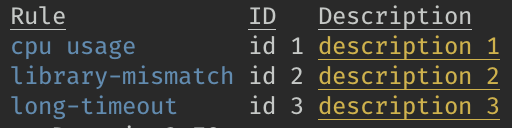
I don't know if that's something that should be encouraged, but it works at least 🙂
 SimenB
on 5 May 2019
SimenB
on 5 May 2019
We can use ink-table for render a table. I have already submitted the migration pull request (https://github.com/maticzav/ink-table/pull/31).
 LitoMore
on 30 May 2019
LitoMore
on 30 May 2019
ink-table 2.0 released.
LitoMore
on 5 Jun 2019
Having learned a little bit about flexbox and CSS grid, it would seem to me that CSS grid would be a more appropriate abstraction for tables. But this seems like it'd be a significant implementation.
boneskull
on 13 Jun 2019
CSS grid is probably far off: https://github.com/facebook/yoga/issues/867. It would be sweet though 😀
SimenB
on 13 Jun 2019
Any news of this, at least an estimated date ?, some year? XD
 Cassers
on 14 Aug 2019
Cassers
on 14 Aug 2019
Try using https://github.com/maticzav/ink-table.
vadimdemedes
on 23 May 2020
Related issues
 maticzav
·
6Comments
maticzav
·
6Comments
 cometkim
·
3Comments
cometkim
·
3Comments
 isaacs
·
4Comments
isaacs
·
4Comments
 zkat
·
7Comments
zkat
·
7Comments
 nmehta6
·
3Comments
nmehta6
·
3Comments
Most helpful comment
One thing you could do is split up into columns manually, e.g.
left,middle,rightarrays, then render them into separate<Box flexDirection="column">and wrap that whole thing into a<Box flexDirection="row">I don't know if that's something that should be encouraged, but it works at least 🙂