Ingress-nginx: External OAUTH Authentication documentation not working with Kubernetes Dashboard v2 setup
NGINX Ingress controller version:
0.32.0
Kubernetes version (use kubectl version):
v1.18.2
Environment:
- Cloud provider or hardware configuration: Azure
- OS (e.g. from /etc/os-release): Linux
What happened:
I'm running an Azure Kubernetes Service cluster (v1.15), and had a setup like this https://kubernetes.github.io/ingress-nginx/examples/auth/oauth-external-auth/#example-oauth2-proxy-kubernetes-dashboard for exposing & securing the K8S dashboard. This worked as expected. After updating the Dashboard to v2.0.1 it seems the setup doesn't work anymore:
first, the new dashboard expects HTTPS traffic on the 443 port instead of 80. Can be fixed by annotating the ingress with
nginx.ingress.kubernetes.io/backend-protocol: "HTTPS". Using the alternative.yml deployment, we can have the dashboard listening on port 80 instead (similar to setup before the update). In either of these cases, the issue still occurs.seems the
oauth2_proxyauthentication part works fine since I get the cookies saved in the browser (because I use AzureAD the cookies are being split in chunks of 4kb, thus ending up with 3 cookies. Haven't tried the Redis storage yet.)after the cookies are being set, NGINX returns a 500 error to the browser, and the following logs on the ingress controller:
10.244.0.1 - - [04/Jun/2020:09:29:43 +0000] "GET /favicon.ico HTTP/2.0" 500 580 "https://kube.domain.com/" "Mozilla/5.0 (Windows NT 10.0; Win64; x64) AppleWebKit/537.36 (KHTML, like Gecko) Chrome/83.0.4103.61 Safari/537.36" 7289 0.004 [kubernetes-dashboard-kubernetes-dashboard-80] [] - - - - 88e42e8f8fde415d47c857a51fd5e1cc
10.244.0.1 - - [04/Jun/2020:09:29:43 +0000] "GET /oauth2/auth HTTP/1.1" 400 636 "https://kube.domain.com/" "Mozilla/5.0 (Windows NT 10.0; Win64; x64) AppleWebKit/537.36 (KHTML, like Gecko) Chrome/83.0.4103.61 Safari/537.36" 764 0.000 [] [] - - - - 88e42e8f8fde415d47c857a51fd5e1cc
2020/06/04 09:29:43 [error] 111#111: *22038 auth request unexpected status: 400 while sending to client, client: 10.244.0.1, server: kube.domain.com, request: "GET /favicon.ico HTTP/2.0", host: "kube.domain.com", referrer: "https://kube.domain.com/"
I've tried both secure and insecure dashboard deployments, also the dashboard that comes with AKS (v1.16+), same issues occur.
What you expected to happen:
The dashboard would be accessible over my domain, instead I get 500 Internal Server Error right after authenticating with Azure AD.
How to reproduce it:
Follow the steps described here: https://kubernetes.github.io/ingress-nginx/examples/auth/oauth-external-auth/#example-oauth2-proxy-kubernetes-dashboard
The issue occurs when trying to secure the v2.0+ of the Kubernetes Dashboard, the previous versions seem to work fine.
/kind documentation
 andreicojocaru
All 21 comments
Ok, I got some time to work more on this issue and I managed to solve it at my end.
The change was mainly to enable RBAC in my Azure Kubernetes Cluster, and integrate it with Azure AD. Then, my users can login into AzureAD using oauth2-proxy and have NGINX forward the Authorization header to the Kubernetes Dashboard.
So, now my users can login into the Dashboard directly using their Azure AD accounts - so I also had to add the correct role bindings into AKS so my users get the correct roles when logged in.
Some reference documentation: https://docs.microsoft.com/en-us/azure/aks/managed-aad
If you'd like you can close the issue - but I think the documentation might need some updates in order to correctly have the integration work (mainly, we have to use the Authorization headers instead of just passing the cookies around).
andreicojocaru
on 16 Jun 2020
Hi @andreicojocaru
Care to share your configuration :) ?
I get 401 from the dashboard when logging in with the access token from azure, with the Authorization Header.
When i try to access the api with the same token via curl/kubectl i also get 401. So it's a issue with the token i believe. Token Config for app registration aslo claims the group scope.
My user is cluster-admin and kubectl with a "normal" token works fine.
 andloh
on 7 Jul 2020
andloh
on 7 Jul 2020
Hi @andloh, I'll put here the configuration I have, maybe it helps.
I've provisioned my AKS cluster using Terraform, so I made sure to enable the Azure AD RBAC like described here: https://www.terraform.io/docs/providers/azurerm/r/kubernetes_cluster.html#role_based_access_control
Also, using the Terraform addon_profile section you can turn off the Kubernetes Dashboard that comes with AKS by default (depending on the version). We'll be installing the Kubernetes Dashboard later on using the official images (https://www.terraform.io/docs/providers/azurerm/r/kubernetes_cluster.html#addon_profile)
Then, I gave my Administrators group in Azure AD the admin role in the cluster:
apiVersion: rbac.authorization.k8s.io/v1
kind: ClusterRoleBinding
metadata:
  name: cluster-admins
roleRef:
  apiGroup: rbac.authorization.k8s.io
  kind: ClusterRole
  name: cluster-admin
subjects:
- apiGroup: rbac.authorization.k8s.io
  kind: Group
  name: $(azure-ad-sso-admin-group-object-id)
Next, I installed the Kubernetes Dashboard using the alternative setup (exposes the service through plain HTTP, not HTTPS). https://raw.githubusercontent.com/kubernetes/dashboard/v2.0.1/aio/deploy/alternative.yaml
Finally, I've created a script by following the NGINX Ingress tutorial (https://kubernetes.github.io/ingress-nginx/examples/auth/oauth-external-auth/#example-oauth2-proxy-kubernetes-dashboard).
---
apiVersion: v1
kind: Secret
metadata:
  name: kube-proxy-oauth-credentials
  namespace: kubernetes-dashboard
type: Opaque
stringData:
  OAUTH2_PROXY_CLIENT_ID: "$(management_service_principal.client_id)"
  OAUTH2_PROXY_CLIENT_SECRET: "$(management_service_principal.client_secret)"
  OAUTH2_PROXY_COOKIE_SECRET: "$(management_service_principal.cookie_secret)"
---
# https://oauth2-proxy.github.io/oauth2-proxy/auth-configuration#azure-auth-provider
# Redis is required as a storage medium for Azure AD cookies. They are >4kb, so nginx has a hard time proxying them.
apiVersion: v1
kind: Pod
metadata:
  name: redis
  labels:
    app: redis
  namespace: kubernetes-dashboard
spec:
  containers:
    - name: redis
      image: redis:latest
      command:
        - redis-server
      env:
        - name: MASTER
          value: "true"
      ports:
        - containerPort: 6379
      resources:
        limits:
          cpu: "0.1"
          memory: "100Mi"
      volumeMounts:
        - mountPath: /redis-master-data
          name: data
  volumes:
    - name: data
      emptyDir: {} # volatile storage, will be cleared at each deployment
---
kind: Service
apiVersion: v1
metadata:
  name: redis
  namespace: kubernetes-dashboard
spec:
  selector:
    app: redis
  type: ClusterIP
  ports:
    - name: http
      port: 6379
      targetPort: 6379
---
apiVersion: apps/v1
kind: Deployment
metadata:
  labels:
    k8s-app: oauth2-proxy
  name: oauth2-proxy
  namespace: kubernetes-dashboard
spec:
  replicas: 1
  selector:
    matchLabels:
      k8s-app: oauth2-proxy
  template:
    metadata:
      labels:
        k8s-app: oauth2-proxy
    spec:
      containers:
        - args:
            - --provider=azure
            - --email-domain=*
            - --upstream=file:///dev/null
            - --http-address=0.0.0.0:4180
            - --set-authorization-header=true
            - --session-store-type=redis
            - --redis-connection-url=redis://redis:6379
          envFrom:
            - secretRef:
                name: kube-proxy-oauth-credentials
          image: quay.io/pusher/oauth2_proxy:latest
          imagePullPolicy: IfNotPresent
          name: oauth2-proxy
          ports:
            - containerPort: 4180
              protocol: TCP
---
apiVersion: v1
kind: Service
metadata:
  labels:
    k8s-app: oauth2-proxy
  name: oauth2-proxy
  namespace: kubernetes-dashboard
spec:
  ports:
    - name: http
      port: 4180
      protocol: TCP
      targetPort: 4180
  selector:
    k8s-app: oauth2-proxy
---
apiVersion: networking.k8s.io/v1beta1
kind: Ingress
metadata:
  name: oauth2-proxy
  namespace: kubernetes-dashboard
  annotations:
    kubernetes.io/ingress.class: "nginx"
spec:
  rules:
    - host: $(environment.dashboard-url)
      http:
        paths:
          - backend:
              serviceName: oauth2-proxy
              servicePort: 4180
            path: /oauth2
---
apiVersion: networking.k8s.io/v1beta1
kind: Ingress
metadata:
  annotations:
    kubernetes.io/ingress.class: "nginx"
    nginx.ingress.kubernetes.io/auth-response-headers: Authorization
    nginx.ingress.kubernetes.io/auth-signin: https://$host/oauth2/start?rd=$escaped_request_uri
    nginx.ingress.kubernetes.io/auth-url: https://$host/oauth2/auth
    # nginx.ingress.kubernetes.io/backend-protocol: "HTTPS"
  name: external-auth-oauth2
  namespace: kubernetes-dashboard
spec:
  rules:
    - host: $(environment.dashboard-url)
      http:
        paths:
          - backend:
              serviceName: kubernetes-dashboard
              servicePort: 80
            path: /
Please make sure to replace the $(secret) values with your values.
One of the issues I had was that the Azure AD cookies were too big to save in the cookies, so I was getting 500s from the NGINX controller. Using a Redis backend for storing those cookies solved the issue.
andreicojocaru
on 7 Jul 2020
Hi @andreicojocaru , Thanks for sharing you configuration. I have compared my config with yours and made som changes...but still no luck :/
We are also using terraform to provision AKS, and we have rbac enabled and are using the AAD integration (Preview) (https://docs.microsoft.com/en-us/azure/aks/managed-aad)
Can you please share some info about your "App Registration" in azure? Do you have something custom configured?
Also, when provisioning the AKS cluster do you add values to the highlighted parameters below?
"Azure ADProfile": {
"adminGroupObjectIds": null,
"clientAppId": null,
"managed": true,
"serverAppId": null,
"serverAppSecret": null,
"tenantId": "72f9*----*d011db47"
}
This is our terraform config for AKS with rbac. All values are set to true. But we don't set a client_app_id, server_app_id and server_app_secret. We default those to null. Do we need to define these you think? And use that app registration to configure SSO?
  role_based_access_control {
    enabled = var.aks-cluster-enable-rbac

    azure_active_directory {
      managed                = var.aks-cluster-enable-rbac ? var.aks-cluster-rbac-managed : null
      admin_group_object_ids = var.aks-cluster-rbac-managed ? var.aks-cluster-ad-admin-group-object-ids : null

      client_app_id     = var.aks-cluster-rbac-managed == false ? var.aks-cluster-ad-client-app-id : null
      server_app_id     = var.aks-cluster-rbac-managed == false ? var.aks-cluster-ad-server-app-id : null
      server_app_secret = var.aks-cluster-rbac-managed == false ? var.aks-cluster-ad-server-app-secret : null
    }
  }
Thanks again for your input :)
andloh
on 7 Jul 2020
When I've created the AKS clusters the managed Azure AD integration was not available so I'm not sure how to configure this properly. From what I read in the documentation, it seems the integration takes care of creating the Client/Server AD apps, so I'm assuming you're right in sending null at the app_* values.
Would be interesting if you could find out what application the managed AD integration created in your AD directory, and check the configuration generated there. We manually created:
- an AD application (we use just one for client and server, I know it's not recommended but yeah)
- generate a secret for that application
- add the required API Permissions (
Sign in and read user profile,Access directory as the signed in user) - in the Cluster, make sure to give
adminpermissions to an User or a Group of users belonging to your AD directory (see the snippet in the previous comment).
Hope it helps.
andreicojocaru
on 7 Jul 2020
Thanks again!
The wierd thing is...i can't find an associated application registration.
I added " Directory.AccessAsUser.All to the API permissions, but no luck.

Could you share your token with me please? When you are signed in go to /oauth2/auth and look for the response header Authorization: Bearer in Chrome Developer tool, network tab and decode it with jwt.io or something. Feel free to remove some sensitive values, but please let the keys/parameters stand :)
Thanks again :D
andloh
on 7 Jul 2020
The JWT headers:
{
  "typ": "JWT",
  "alg": "RS256",
  "x5t": "SsZsBNhZcF3Q9S4trpQBTByNRRI",
  "kid": "SsZsBNhZcF3Q9S4trpQBTByNRRI"
}
The JWT body:
{
  "aud": "<azure application id>",
  "iss": "https://sts.windows.net/<azure ad tenant id>/",
  "iat": 1594119273,
  "nbf": 1594119273,
  "exp": 1594123173,
  "aio": "AUQAu/8QAAAAtEF7mg5FJdkA7sZXYb3ZoBFkaquaWV+IvPz71Rh9vbhP1qGHY9nHEDaYogRTVESrmpz7yCh1MtOgtAlrjs1Q2w==",
  "amr": [
    "pwd",
    "mfa"
  ],
  "family_name": "<my last name>",
  "given_name": "<my first name>",
  "ipaddr": "<my ip>",
  "name": "<my full name>",
  "oid": "41ff1bb4-xxxx-xxxx-xxxx-92d2ee234fa3",
  "rh": "0.ASEAT5kv86glxE-xxxxxxxxxxxys6elLnTQck6uhon8hAP8.",
  "sub": "9vtrDGIlHqlFVxOTAxxxxxxxxxxDmdDL3j9uiSIi5YE",
  "tid": "<azure ad tenant id>",
  "unique_name": "<my email>",
  "upn": "<my email>",
  "uti": "HSy7hllXHkK3SF4XXXE9eAA",
  "ver": "1.0"
}
As you can see I remove the sensitive information also changed the body of some properties with xxxxx.
The cookie sent as part of the request to /oauth2/auth is like this:
cookie: _oauth2_proxy=X29hdXRoMl9wcm94eS02ZTllN2Y4MjJlM2NkNjZkOWY1NjQ2MzJjZWJiMjgyYi5xVnFabGREY3lQM3RVU0Vnd2dfQlVB|1594119573|15umjfRBnSImgK3J4qDc0jVyPBsL8DHWzI0h_l03r6M=
It's basically a session ID that will use the Redis backend to retrieve the full cookie value.
andreicojocaru
on 7 Jul 2020
Hi, Thanks again.
I managed to find the Application Registration that the integration creates. But it's a Enterprise Application, and it was hidden, had to search for the ID.
It seems like its not possible to add a reply url in a Enterprise Application, so I can't reuse it.
I will open a support case against MS to verify.
So I think the problem is that my application registration does not have access to AKS. And the Enterprise Application created by the integration is the oidc endpoint/auth client for the kubernetes API.
Thanks agan for your help!
If I get no way with this I will convert back to the "old" RBAC integration.
Feel free to comment regarding possible solutions:)
andloh
on 7 Jul 2020
Hi @andreicojocaru and @andloh,
Maybe @JoelSpeed could try to help here as well.
I'm trying to get oauth authentication from Azure AD to Kubernetes Dashboard working on an AAD-enabled cluster since a couple of days and I'm currently facing an authorization issue. Maybe you can give me some hints to help me solving this issue...
Let me explain you in details my setup and the issue I'm currently facing:
An App Registration has been created within Azure AD with the proper permissions:
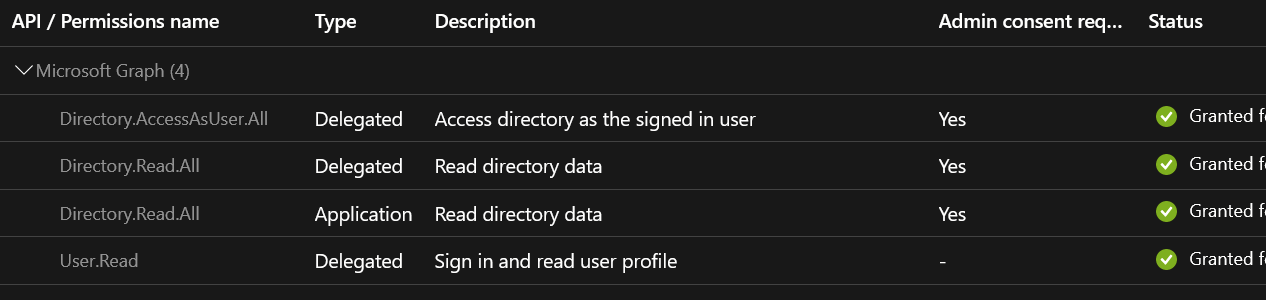
oauth2-proxyhas been deployed to the cluster with the following configuration:
    spec:
      containers:
      - args:
        - --provider=azure
        - --provider-display-name="My Test Account"
        - --upstream=file:///dev/null
        - --http-address=0.0.0.0:4180
        - --email-domain=*
        - --request-logging=false
        - --auth-logging=true
        - --silence-ping-logging=true
        - --standard-logging=true
        - --session-store-type=redis
        - --redis-connection-url=redis://redis-master:6379
        - --set-authorization-header=true
        - --cookie-domain=.my.test.domain
        env:
        - name: OAUTH2_PROXY_COOKIE_SECRET
          ...
        - name: OAUTH2_PROXY_CLIENT_ID
          ...
        - name: OAUTH2_PROXY_CLIENT_SECRET
          ...
        - name: OAUTH2_PROXY_AZURE_TENANT
          ...
- Ingress configurations for the dashboard and the dashboard proxy have been created as follow:
---
apiVersion: extensions/v1beta1
kind: Ingress
metadata:
  annotations:
    cert-manager.io/acme-challenge-type: dns01
    cert-manager.io/cluster-issuer: letsencrypt-prod
    kubernetes.io/ingress.class: nginx
    nginx.ingress.kubernetes.io/auth-response-headers: Authorization
    nginx.ingress.kubernetes.io/auth-signin: https://$host/oauth2/start?rd=$escaped_request_uri
    nginx.ingress.kubernetes.io/auth-url: https://$host/oauth2/auth
    nginx.ingress.kubernetes.io/ssl-redirect: "true"
  name: dashboard
  namespace: kubernetes-dashboard
spec:
  rules:
  - host: dashboard.my.test.domain
    http:
      paths:
      - backend:
          serviceName: kubernetes-dashboard
          servicePort: 80
        path: /
  tls:
  - hosts:
    - my.test.domain
    secretName: dashboard-proxy-tls-secret
---
apiVersion: extensions/v1beta1
kind: Ingress
metadata:
  annotations:
    cert-manager.io/acme-challenge-type: dns01
    cert-manager.io/cluster-issuer: letsencrypt-prod
    kubernetes.io/ingress.class: nginx
    nginx.ingress.kubernetes.io/ssl-redirect: "true"
  name: dashboard-proxy
  namespace: kubernetes-dashboard
spec:
  rules:
  - host: dashboard.my.test.domain
    http:
      paths:
      - backend:
          serviceName: dashboard-proxy
          servicePort: 4180
        path: /oauth2
  tls:
  - hosts:
    - dashboard.my.test.domain
    secretName: dashboard-proxy-tls-secret
- With that configuration in place, I'm able to login to the dashboard with my Azure AD account, but I don't have any permission. It definitely looks like the Authorization header does not get propagated to the backend. Dashboard logs:
2020/08/15 15:32:38 Getting list of namespaces
2020/08/15 15:32:38 Non-critical error occurred during resource retrieval: Unauthorized
If the Authorization header was properly propagated, I would expect to see an error message telling me explicitly that my user account is not authorized to list namespaces, pods, etc.
- Anyway, I created the following ClusterRoleBinding to explicitly allow my user (and an AD group I'm member of), but I still get the same "Unauthorized" error message:
...
roleRef:
  apiGroup: rbac.authorization.k8s.io
  kind: ClusterRole
  name: cluster-admin
subjects:
- apiGroup: rbac.authorization.k8s.io
  kind: Group
  name: <ad-group-uuid>
  namespace: default
- apiGroup: rbac.authorization.k8s.io
  kind: User
  name: <my-email-address>
  namespace: default
- Looking at the requests header while accessing https://dashboard.my.test.domain/oauth2/auth, I don't see any issue:
{
  "typ": "JWT",
  "alg": "RS256",
  "x5t": "huN95IvPfxxxxxxxxxx1GXGirnM",
  "kid": "huN95IvPfxxxxxxxxxx1GXGirnM"
}

{
  "aud": "e79c02fc-xxxx-xxxx-xxxx-081b4e1d75be",
  "iss": "https://sts.windows.net/<my-tenant-id>/",
  "iat": 1591212955,
  "nbf": 1591212955,
  "exp": 1591212855,
  "amr": [
    "pwd",
    "mfa"
  ],
  "family_name": "<my-name>",
  "given_name": "<my-name>",
  "ipaddr": "<my-ip-address>",
  "name": "<my-name>",
  "oid": "c8da3e20-xxxx-xxxx-xxxx-d7b83b7460fe",
  "pwd_exp": "857269",
  "pwd_url": "https://portal.microsoftonline.com/ChangePassword.aspx",
  "sub": "bMWUMUN6lPQG8gxxxxxxxxxxxxPQemNumN0ut_Y",
  "tid": "<my-tenant-id>",
  "unique_name": "<my-email-address>",
  "upn": "<my-email-address>",
  "uti": "6FJtCDLOxxxxxxwEJTAA",
  "ver": "1.0"
}
- In order to test access to the dashboard, I manually added a "fix" token to the dashboard Ingress through annotations by using the default-token of the Kubernetes dashboard:
    nginx.ingress.kubernetes.io/configuration-snippet: |
      proxy_set_header Authorization "Bearer <very-long-dashboard-default-token>";
With that configuration in place, I can successfully access the dashboard with the permissions of the default-token, but my goal would definitely be to be able to restrict permissions to the dashboard to a given AD group, that's why I would like to have the headers propagated.
So, my questions:
- Do you see an issue with my setup? :-)
- How could I confirm that the headers are properly propagated to the backend?
- When accessing the dashboard and analyzing the traffic using the Chrome Developer Tools > Network, I don't see any Authorization header. Is this normal? Is the authentication sent to the backend using a different mechanism?
Thank you very much in advance for your precious help! (because I'm currently running out of ideas)
 tgdfool2
on 15 Aug 2020
tgdfool2
on 15 Aug 2020
Hi, have you provisioned your cluster with this configuration https://docs.microsoft.com/en-us/azure/aks/managed-aad?
Or
This one: https://docs.microsoft.com/en-us/azure/aks/azure-ad-integration-cli?
@tgdfool2
andloh
on 15 Aug 2020
@tgdfool2 Looks like your config is ok as far as I can tell. If you're getting the Authorization header response from /oauth2/auth then the OAuth2 Proxy part is all working.
You could try swapping your backend for something like httpbin to see what headers are actually copied to the request to the backend, might help with your diagnostics.
I would recommend checking the size of the Authoriation header that comes back in the response from /oauth2/auth, if it's over 4kb, I think nginx will silently drop it. If the header is over 4kb then technically it is out of spec and should be dropped so nginx is doing the right thing if that's the case. I don't know if there's a way to reconfigure that.
 JoelSpeed
on 15 Aug 2020
JoelSpeed
on 15 Aug 2020
Hi, have you provisioned your cluster with this configuration https://docs.microsoft.com/en-us/azure/aks/managed-aad?
Or
This one: https://docs.microsoft.com/en-us/azure/aks/azure-ad-integration-cli?
@tgdfool2
Hi @andloh, the cluster has been provisioned with the managed-aad procedure from scratch.
tgdfool2
on 15 Aug 2020
@tgdfool2 Looks like your config is ok as far as I can tell.
Hi @JoelSpeed. Thanks for the hint about httpbin and the header size. I'll try it and let you know the outcome.
tgdfool2
on 15 Aug 2020
This won't work with managed-aad (https://docs.microsoft.com/en-us/azure/aks/managed-aad).
When using managed AAD, azure creates the SP/OIDC client for you, as an "Enterprise Application". Currently there is now way to configure that SP and enable oauth-flow, because it's "managed by azure". You need to be able to reuse that same client because that's the oidc client the kubernetes API uses when authenticating users.
I guess you have now created a new app registration for the dashboard. That won't work because k8s doesn't have that specific oidc client ID configured. It has that one Azure creates for you and it won't accept that token because your token has been issued from another oidc client.
I managed to get it working using this method: https://docs.microsoft.com/en-us/azure/aks/azure-ad-integration-cli. With this method you are able to reuse the oidc client.
I had a case open against microsoft regarding this, but I went on holiday and haven't been able to follow up.
andloh
on 15 Aug 2020
Thank you very much for your detailed explanation @andloh!
That's correct, I created a new App Registration for the dashboard as I was expecting to make it work with it.
I will try to restage the cluster with the ad-integration-cli procedure and let you know if it is working. Just a quick question: which credentials shall I use for the OAUTH2_PROXY_CLIENT_ID and SECRET_ID during the configuration of the oauth2 proxy?
Thanks again for your help!
tgdfool2
on 16 Aug 2020
Client ID, is the oidc client ID. So the ID to the app registration. Secret ID: you need to generate a oidc secret on the app registration.
Hope it helps :)
andloh
on 17 Aug 2020
Hi @andloh and @JoelSpeed,
I finally made it working by using the azure-ad-integration-cli procedure (and not the managed-aad one). Thanks again for your help!
@andloh: do not hesitate to share the outcome of the case you opened at Microsoft when you will have some news. Thanks in advance!
tgdfool2
on 19 Aug 2020
@andloh - Do you get anything useful back from your case with MS for this? I have the same problem....
 markvr
on 13 Oct 2020
markvr
on 13 Oct 2020
@andloh - I have the same question :), Did you get anything useful back from your case with MS for the integration with the managed-aad ?
 mo-saeed
on 22 Oct 2020
mo-saeed
on 22 Oct 2020
Hi, the case got cancelled because I went on holiday. I will re-open the case soon and let you know :)
andloh
on 22 Oct 2020
I opened a case as well and got the following response:
Kubernetes Dashboard has been deprecated since start of AKS Version 1.18 and with version 1.19, AKS will no longer support installation of the managed kube-dashboard addon.
https://docs.microsoft.com/en-us/azure/aks/kubernetes-dashboard
As far as Kubernetes Dashboard is concerned, AKS will be deprecating Kubernetes Dashboard and no actions are in plan for it.
You can raise an issue on Github for this so that you will be guided into right direction.
I've raised https://github.com/Azure/AKS/issues/1925
markvr
on 29 Oct 2020
Related issues
 smeruelo
·
3Comments
smeruelo
·
3Comments
 boazj
·
3Comments
boazj
·
3Comments
 lachlancooper
·
3Comments
lachlancooper
·
3Comments
 bashofmann
·
3Comments
bashofmann
·
3Comments
 c-mccutcheon
·
3Comments
c-mccutcheon
·
3Comments