Ingress-nginx: Nginx module is throwing "io_setup failed (11: Resource temporarily unavailable)" error
NGINX Ingress controller version: 0.32.0, 0.31.1 and 0.30.0
Kubernetes version (use kubectl version): 1.15.10
Environment:
- Cloud provider or hardware configuration: AWS with kubernetes managed using kops
- OS (e.g. from /etc/os-release): Debian GNU/Linux 9 (stretch)
- Kernel (e.g.
uname -a): Linux ip-172-25-18-239 4.9.0-11-amd64 #1 SMP Debian 4.9.189-3+deb9u2 (2019-11-11) x86_64 GNU/Linux - Install tools: kops, terraform, kubectl to deploy this
- Others:
What happened:
When starting the nginx ingress controller container in a cluster, this error message pops up soon after the nginx process starts
2020/05/07 21:11:25 [emerg] 9404#9404: io_setup() failed (11: Resource temporarily unavailable)
What you expected to happen:
Nginx ingress controller start without any error messages in the logs
The error does seem to be coming at emergency log level from nginx and I'm not sure why that error should be thrown.
How to reproduce it:
Logs from the nginx-ingress-controller container: nginx_ingress_0.32.0.log
Kubernetes YAML files that were used to deploy (configmap, deployment and service resources):
bug-report-k8s-yaml.zip
Anything else we need to know:
When I deployed grafana to test if requests were getting routed, those requests do successfully reach the deployment and it responds with 200, but this error message continues to show up in the ingress controller.
Our engineering team's kubernetes experts have vetted the files deployed and were unable to spot anything that should cause this issue.
 audip
audip
All 10 comments
@audip how many CPUs the VM has? The last time I saw this error it was related to a high number.
Please set https://kubernetes.github.io/ingress-nginx/user-guide/nginx-configuration/configmap/#worker-processes to something like 4.
 aledbf
on 8 May 2020
aledbf
on 8 May 2020
Hello @aledbf , thank you for responding promptly, the kubernetes cluster is running on m5.2xlarge, which have 8 vCPUs and 32GB of memory. Let me try seeing the number of worker processes as you suggested and report back on if that fixes the problem or not.
audip
on 8 May 2020
Setting work processes to 4 seems to have solved the problem. So I have a few follow-up questions about this:
- Do you recommend running lower number of worker processes per ingress controller pod?
- And do you recommend running more of these smaller pods? Smaller in terms of CPU and memory that each pod requests.
audip
on 8 May 2020
m5.2xlarge, which have 8 vCPUs and 32GB of memory.
This is fine.
Do you recommend running lower number of worker processes per ingress controller pod?
No.
What's the CPU load in the pod?.
Reading the manifests I see you adjusted the requests cpu to 4. Please remove this definition and the worker-processes definition from the configmap and test again.
aledbf
on 8 May 2020
Alright, I did the test by removing the worker processes from configmap and removing the resource requests for CPU and the error does appear again as soon as I delete the test ingress for grafana running in the kubernetes cluster
nutrition-ingress-external-6bcc5b4888-56p8v nginx-ingress-controller 67.188.194.168 - - [08/May/2020:00:20:08 +0000] "GET /api/search?limit=30&starred=true HTTP/1.1" 200 2 "https://grafana-test-external.uacf.io/?orgId=1" "Mozilla/5.0 (Macintosh; Intel Mac OS X 10_15_4) AppleWebKit/537.36 (KHTML, like Gecko) Chrome/81.0.4044.26 Safari/537.36" 948 0.004 [nutrition-prod-grafana-3000] [] 100.78.51.8:3000 2 0.004 200 33731384bcc6aab076e0ab30e34fe56f
nutrition-ingress-external-6bcc5b4888-56p8v nginx-ingress-controller I0508 00:20:13.735053       8 event.go:278] Event(v1.ObjectReference{Kind:"Ingress", Namespace:"nutrition-prod", Name:"grafana-external", UID:"c6127716-34ff-4128-a000-6b275fed36e4", APIVersion:"networking.k8s.io/v1beta1", ResourceVersion:"12997598", FieldPath:""}): type: 'Normal' reason: 'DELETE' Ingress nutrition-prod/grafana-external
nutrition-ingress-external-6bcc5b4888-56p8v nginx-ingress-controller I0508 00:20:13.900823       8 controller.go:139] Configuration changes detected, backend reload required.
nutrition-ingress-external-6bcc5b4888-56p8v nginx-ingress-controller I0508 00:20:14.008176       8 controller.go:155] Backend successfully reloaded.
nutrition-ingress-external-6bcc5b4888-56p8v nginx-ingress-controller 2020/05/08 00:20:14 [alert] 36#36: [PerimeterX - DEBUG] Nginx C-Core Module 0.8.9, cURL compiled: "7.67.0" loaded: "libcurl/7.67.0 OpenSSL/1.1.1g zlib/1.2.11 nghttp2/1.40.0"; APR compiled: "1.7.0" loaded: "1.7.0"; jansson compiled: "2.12"
nutrition-ingress-external-6bcc5b4888-56p8v nginx-ingress-controller 2020/05/08 00:20:14 [emerg] 5339#5339: io_setup() failed (11: Resource temporarily unavailable)
nutrition-ingress-external-6bcc5b4888-56p8v nginx-ingress-controller 2020/05/08 00:20:14 [emerg] 5622#5622: io_setup() failed (11: Resource temporarily unavailable)
nutrition-ingress-external-6bcc5b4888-56p8v nginx-ingress-controller 2020/05/08 00:20:14 [emerg] 5032#5032: io_setup() failed (11: Resource temporarily unavailable)
This log is from external set of ingress controller and it is external facing and very slightly different from the internal set that I had posted the manifests for. Both of them have the errors.
audip
on 8 May 2020
[alert] 36#36: [PerimeterX - DEBUG] Nginx C-Core Module 0.8.9,
This looks weird. Are you using a custom nginx image?
aledbf
on 8 May 2020
Yes, for the external set of controllers, I'm adding three modules on the base ingress controller image (Lightstep, Signal Sciences and PerimeterX).
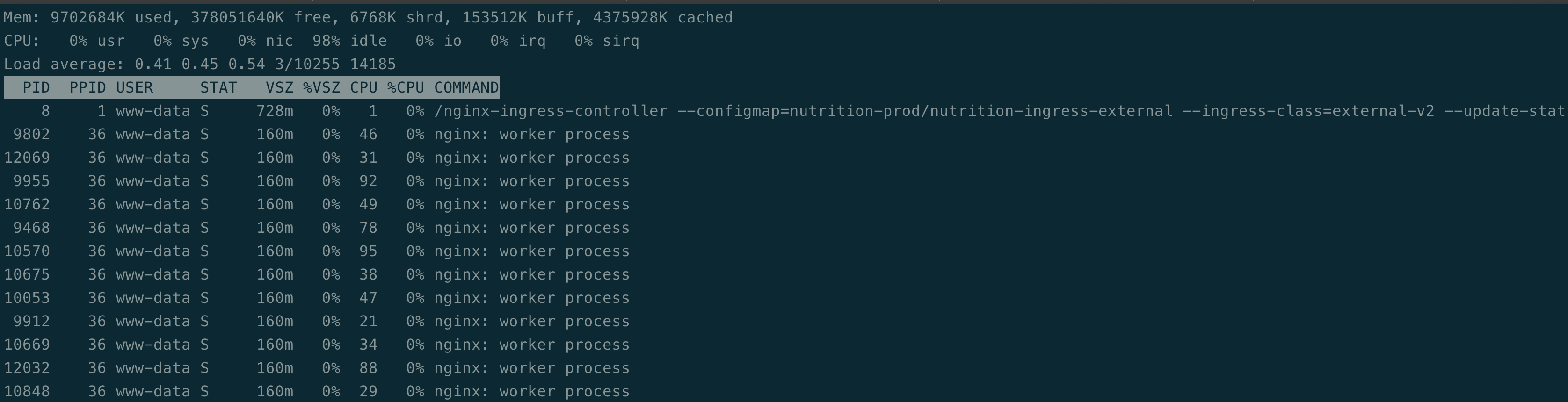
The load isn't that bad on the ingress controller as it is serving just my test grafana workload:
audip
on 8 May 2020
(Lightstep, Signal Sciences and PerimeterX).
Right. Before any change to what you have now, please add the flag --v=5 to the ingress controller deployment. That will set nginx in debug mode so you should see more details.
The second test is to remove the PerimeterX module (just to check if that module is the cause of the error)
aledbf
on 8 May 2020
Don't see anything standing out as an error from the log lines. And I have reproduced this even when I initially ran the ingress controller published by you for version 0.31.1, so it might have less to do PerimeterX and other modules that the other image has.
For some reason, I suspect it has to do with worker processes being set to 96 on a EC2 instance with 8 CPUs. Do you have any other ideas for what I can try out?
Nginx ingress controller setting worker processes with "auto"
nutrition-ingress-external-7949789866-wj95t nginx-ingress-controller I0508 00:39:09.026392       8 nginx.go:521] Adjusting ServerNameHashBucketSize variable to 64
nutrition-ingress-external-7949789866-wj95t nginx-ingress-controller I0508 00:39:09.026403       8 nginx.go:535] Number of worker processes: 96
nutrition-ingress-external-7949789866-wj95t nginx-ingress-controller I0508 00:39:09.026410       8 util.go:71] rlimit.max=1048576
nutrition-ingress-external-7949789866-wj95t nginx-ingress-controller I0508 00:39:09.026415       8 nginx.go:540] Maximum number of open file descriptors: 9898
nutrition-ingress-external-7949789866-wj95t nginx-ingress-controller I0508 00:39:09.026421       8 nginx.go:545] Adjusting MaxWorkerOpenFiles variable to 9898
nutrition-ingress-external-7949789866-wj95t nginx-ingress-controller I0508 00:39:09.026475       8 util.go:56] net.core.somaxconn=128 (using system default)
Logs right before the io_setup() shows up for the first time
```
nutrition-ingress-external-7949789866-wj95t nginx-ingress-controller 2020/05/08 00:39:09 [debug] 259#259: *115 malloc: 000055E46FBBFF00:184
nutrition-ingress-external-7949789866-wj95t nginx-ingress-controller 2020/05/08 00:39:09 [debug] 1026#1026: *117 malloc: 000055E46FBBFE20:184
nutrition-ingress-external-7949789866-wj95t nginx-ingress-controller 2020/05/08 00:39:09 [debug] 1026#1026: *117 malloc: 000055E46FBBFF00:184
nutrition-ingress-external-7949789866-wj95t nginx-ingress-controller 2020/05/08 00:39:09 [emerg] 1445#1445: io_setup() failed (11: Resource temporarily unavailable)
nutrition-ingress-external-7949789866-wj95t nginx-ingress-controller 2020/05/08 00:39:09 [emerg] 1454#1454: io_setup() failed (11: Resource temporarily unavailable)
audip
on 8 May 2020
For some reason, I suspect it has to do with worker processes being set to 96 on a EC2 instance with 8 CPUs. Do you have any other ideas for what I can try out?
So, @aledbf asked me to double check the node that this pod was running on, it was indeed running on a different node m5.24xlarge and was ending up consuming all resources on the node, leading to that error message being thrown.
@aledbf did advise about limiting the number of worker processes and some potential tuning with https://github.com/kubernetes/ingress-nginx/tree/master/docs/examples/customization/sysctl
Thank you for all the help, @aledbf !
audip
on 8 May 2020
Related issues
 kfox1111
·
3Comments
kfox1111
·
3Comments
 bashofmann
·
3Comments
bashofmann
·
3Comments
 natemurthy
·
3Comments
natemurthy
·
3Comments
 cabrinoob
·
3Comments
cabrinoob
·
3Comments
 silasbw
·
3Comments
silasbw
·
3Comments
Most helpful comment
So, @aledbf asked me to double check the node that this pod was running on, it was indeed running on a different node m5.24xlarge and was ending up consuming all resources on the node, leading to that error message being thrown.
@aledbf did advise about limiting the number of worker processes and some potential tuning with https://github.com/kubernetes/ingress-nginx/tree/master/docs/examples/customization/sysctl
Thank you for all the help, @aledbf !